Archive for the ‘MAMP’ Category
MySQL Self-Join
I’m switching to MySQL and leveraging Alan Beaulieu’s Learning SQL as a supporting reference for my Database Design and Development course. While reviewing Alan’s Chapter 5: Querying Multiple Tables, I found his coverage of using self-joins minimal.
In fact, he adds a prequel_film_id column to the film table in the sakila database and then a single row to demonstrate a minimal self-join query. I wanted to show them how to view a series of rows interconnected by a self-join, like the following:
SELECT f.title AS film , fp.title AS prequel FROM film f LEFT JOIN film fp ON f.prequel_id = fp.film_id WHERE f.series_name = 'Harry Potter' ORDER BY f.series_number; |
It returns the following result set:
+----------------------------------------------+----------------------------------------------+ | film | prequel | +----------------------------------------------+----------------------------------------------+ | Harry Potter and the Chamber of Secrets | Harry Potter and the Sorcerer's Stone | | Harry Potter and the Prisoner of Azkaban | Harry Potter and the Chamber of Secrets | | Harry Potter and the Goblet of Fire | Harry Potter and the Prisoner of Azkaban | | Harry Potter and the Order of the Phoenix | Harry Potter and the Goblet of Fire | | Harry Potter and the Half Blood Prince | Harry Potter and the Order of the Phoenix | | Harry Potter and the Deathly Hallows: Part 1 | Harry Potter and the Half Blood Prince | | Harry Potter and the Deathly Hallows: Part 2 | Harry Potter and the Deathly Hallows: Part 1 | +----------------------------------------------+----------------------------------------------+ 7 rows in set (0.00 sec) |
Then, I thought about what questions the students might ask. For example, why doesn’t the query return the first film that doesn’t have a prequel. So, I took the self-join to the next level to display the first film having no prequel, like this:
SELECT f.title AS film , IFNULL( CASE WHEN NOT f.film_id = fp.film_id AND f.prequel_id = fp.film_id THEN fp.title END,'None') AS prequel FROM film f LEFT JOIN film fp ON f.prequel_id = fp.film_id WHERE f.series_name = 'Harry Potter' ORDER BY f.series_number; |
The CASE operator in the SELECT-list filters the result set by eliminating rows erroneously returned. Without the CASE filter, the query would return the original Harry Potter and the Sorcerer’s Stone film matched agains a NULL and all of the other sequels. The CASE operator effectively limits the result set for the LEFT JOIN to only the following data:
+----------------------------------------------+----------------------------------------------+ | film | prequel | +----------------------------------------------+----------------------------------------------+ | Harry Potter and the Sorcerer's Stone | NULL | +----------------------------------------------+----------------------------------------------+ |
The IFNULL() built-in function lets you replace the NULL value returned as the prequel’s title value. The IFNULL() function substitutes a 'None' string literal for a NULL value. The query returns the following result set:
+----------------------------------------------+----------------------------------------------+ | film | prequel | +----------------------------------------------+----------------------------------------------+ | Harry Potter and the Sorcerer's Stone | None | | Harry Potter and the Chamber of Secrets | Harry Potter and the Sorcerer's Stone | | Harry Potter and the Prisoner of Azkaban | Harry Potter and the Chamber of Secrets | | Harry Potter and the Goblet of Fire | Harry Potter and the Prisoner of Azkaban | | Harry Potter and the Order of the Phoenix | Harry Potter and the Goblet of Fire | | Harry Potter and the Half Blood Prince | Harry Potter and the Order of the Phoenix | | Harry Potter and the Deathly Hallows: Part 1 | Harry Potter and the Half Blood Prince | | Harry Potter and the Deathly Hallows: Part 2 | Harry Potter and the Deathly Hallows: Part 1 | +----------------------------------------------+----------------------------------------------+ 8 rows in set (0.01 sec) |
Alan’s modification of the sakila.film table had the following two related design flaws:
- It didn’t provide a way to guarantee the ordering of films with prequels because relational databases don’t guarantee ordered result sets unless you use an
ORDER BYclause, which typically requires a column to order. - It didn’t provide a way to isolate a series of films.
I modified the film table differently by adding the series_name, series_number, and prequel_id columns. The series_name column lets you group results and the series_number column lets you order by a preserved sequence that you store as part of the data The prequel_id column lets you connect to the prequel film, much like the backward portion of a doubly linked list.
The new sakila.film table is:
+----------------------+---------------------------------------------------------------------+------+-----+-------------------+-----------------------------------------------+ | Field | Type | Null | Key | Default | Extra | +----------------------+---------------------------------------------------------------------+------+-----+-------------------+-----------------------------------------------+ | film_id | smallint unsigned | NO | PRI | NULL | auto_increment | | title | varchar(255) | NO | MUL | NULL | | | description | text | YES | | NULL | | | release_year | year | YES | | NULL | | | language_id | tinyint unsigned | NO | MUL | NULL | | | original_language_id | tinyint unsigned | YES | MUL | NULL | | | rental_duration | tinyint unsigned | NO | | 3 | | | rental_rate | decimal(4,2) | NO | | 4.99 | | | length | smallint unsigned | YES | | NULL | | | replacement_cost | decimal(5,2) | NO | | 19.99 | | | rating | enum('G','PG','PG-13','R','NC-17') | YES | | G | | | special_features | set('Trailers','Commentaries','Deleted Scenes','Behind the Scenes') | YES | | NULL | | | last_update | timestamp | NO | | CURRENT_TIMESTAMP | DEFAULT_GENERATED on update CURRENT_TIMESTAMP | | series_name | varchar(20) | YES | | NULL | | | series_number | int unsigned | YES | | NULL | | | prequel | int unsigned | YES | | NULL | | +----------------------+---------------------------------------------------------------------+------+-----+-------------------+-----------------------------------------------+ 16 rows in set (0.21 sec) |
After adding the three new columns, I inserted eight rows for the original Harry Potter films. You can use the following script in the MySQL client (mysql) to add the columns and insert the data to test the preceding queries:
-- Use sakila database. USE sakila; -- Add a prequel_id column to the sakila.film table. ALTER TABLE film ADD (series_name varchar(20)), ADD (series_number int unsigned), ADD (prequel_id int unsigned); -- Set primary to foreign key local variable. SET @sv_film_id = 0; -- Insert Harry Potter films in sakila.film table with classic values clause. INSERT INTO film ( title , description , release_year , language_id , original_language_id , rental_duration , rental_rate , length , replacement_cost , rating , special_features , last_update , series_name , series_number , prequel_id ) VALUES ('Harry Potter and the Sorcerer''s Stone' ,'A film about a young boy who on his eleventh birthday discovers, he is the orphaned boy of two powerful wizards and has unique magical powers.' , 2001 , 1 , NULL , 3 , 0.99 , 152 , 19.99 ,'PG' ,'Trailers' ,'2001-11-04' ,'Harry Potter' , 1 , NULL ); -- Assign the last generated primary key value to the local variable. SET @sv_film_id := last_insert_id(); -- Insert 2nd film in sakila.film table with classic values clause. INSERT INTO film ( title , description , release_year , language_id , original_language_id , rental_duration , rental_rate , length , replacement_cost , rating , special_features , last_update , series_name , series_number , prequel_id ) VALUES ('Harry Potter and the Chamber of Secrets' ,'A film where Harry returning to Hogwarts, still famous and a hero, when strange things start to happen ... people are turning to stone and no-one knows what, or who, is doing it.' , 2002 , 1 , NULL , 3 , 0.99 , 160 , 19.99 ,'PG' ,'Trailers' ,'2002-11-15' ,'Harry Potter' , 2 , @sv_film_id ); -- Assign the last generated primary key value to the local variable. SET @sv_film_id := last_insert_id(); -- Insert 3rd film in sakila.film table with classic values clause. INSERT INTO film ( title , description , release_year , language_id , original_language_id , rental_duration , rental_rate , length , replacement_cost , rating , special_features , last_update , series_name , series_number , prequel_id ) VALUES ('Harry Potter and the Prisoner of Azkaban' ,'A film where Harry, Ron, and Hermione return for their third year at Hogwarts and are forced to face escaped prisoner, Sirius Black.' , 2004 , 1 , NULL , 3 , 0.99 , 141 , 19.99 ,'PG' ,'Trailers' ,'2004-06-04' ,'Harry Potter' , 3 , @sv_film_id ); -- Assign the last generated primary key value to the local variable. SET @sv_film_id := last_insert_id(); -- Insert 4th film in sakila.film table with classic values clause. INSERT INTO film ( title , description , release_year , language_id , original_language_id , rental_duration , rental_rate , length , replacement_cost , rating , special_features , last_update , series_name , series_number , prequel_id ) VALUES ('Harry Potter and the Goblet of Fire' ,'A film where where Harry Potter''s name emerges from the Goblet of Fire, and he becomes a competitor in a grueling battle for glory among three wizarding schools - the Triwizard Tournament.' , 2005 , 1 , NULL , 3 , 0.99 , 157 , 19.99 ,'PG' ,'Trailers' ,'2005-11-18' ,'Harry Potter' , 4 , @sv_film_id ); -- Assign the last generated primary key value to the local variable. SET @sv_film_id := last_insert_id(); -- Insert 5th film in sakila.film table with classic values clause. INSERT INTO film ( title , description , release_year , language_id , original_language_id , rental_duration , rental_rate , length , replacement_cost , rating , special_features , last_update , series_name , series_number , prequel_id ) VALUES ('Harry Potter and the Order of the Phoenix' ,'A film where Lord Voldemort has returned, but the Ministry of Magic is doing everything it can to keep the wizarding world from knowing the truth.' , 2007 , 1 , NULL , 3 , 0.99 , 138 , 19.99 ,'PG-13' ,'Trailers' ,'2007-07-12' ,'Harry Potter' , 5 , @sv_film_id ); -- Assign the last generated primary key value to the local variable. SET @sv_film_id := last_insert_id(); -- Insert 6th film in sakila.film table with classic values clause. INSERT INTO film ( title , description , release_year , language_id , original_language_id , rental_duration , rental_rate , length , replacement_cost , rating , special_features , last_update , series_name , series_number , prequel_id ) VALUES ('Harry Potter and the Half Blood Prince' ,'A film where Voldemort is tightening his grip on Hogwarts and it is no longer the safe haven it once was. Harry and Dumbledore work to find the key to unlock the Dark Lord''s defenses.' , 2009 , 1 , NULL , 3 , 0.99 , 153 , 19.99 ,'PG' ,'Trailers' ,'2009-07-15' ,'Harry Potter' , 6 , @sv_film_id ); -- Assign the last generated primary key value to the local variable. SET @sv_film_id := last_insert_id(); -- Insert 7th film in sakila.film table with classic values clause. INSERT INTO film ( title , description , release_year , language_id , original_language_id , rental_duration , rental_rate , length , replacement_cost , rating , special_features , last_update , series_name , series_number , prequel_id ) VALUES ('Harry Potter and the Deathly Hallows: Part 1' ,'A film where Harry, Ron and Hermione set out on their perilous mission to track down and destroy the Horcruxes - the keys to Voldemort''s immortality.' , 2010 , 1 , NULL , 3 , 0.99 , 146 , 19.99 ,'PG-13' ,'Trailers' ,'2010-11-19' ,'Harry Potter' , 7 , @sv_film_id ); -- Assign the last generated primary key value to the local variable. SET @sv_film_id := last_insert_id(); -- Insert 8th film in sakila.film table with classic values clause. INSERT INTO film ( title , description , release_year , language_id , original_language_id , rental_duration , rental_rate , length , replacement_cost , rating , special_features , last_update , series_name , series_number , prequel_id ) VALUES ('Harry Potter and the Deathly Hallows: Part 2' ,'A film where Harry, Ron and Hermione set out on their perilous mission to track down and destroy the Horcruxes - the keys to Voldemort''s immortality.' , 2011 , 1 , NULL , 3 , 0.99 , 130 , 19.99 ,'PG-13' ,'Trailers' ,'2011-07-15' ,'Harry Potter' , 8 , @sv_film_id ); |
You can put the following commands into a SQL script file to revert the sakila.film table to its base configuration:
DELETE FROM film WHERE film_id > 1000; ALTER TABLE film DROP COLUMN series_name; ALTER TABLE film DROP COLUMN series_number; ALTER TABLE film DROP COLUMN prequel_id; ALTER TABLE film AUTO_INCREMENT = 1000; |
As always, I hope this helps those looking for how to solve a new problem.
Linux User-Group Console
This post shows you how to add the menu option and GUI to set users and groups. It’s quite a bit easier than mastering all the command-line syntax. It makes setting up the required user and group accounts for an Oracle Enterprise or MySQL database solution much easier.
You add the utility by calling the yum (Yellowdog Updater, Modified) utility like this:
yum installed -y system-config_users |
You should see the following:
Loaded plugins: langpacks adobe-linux-x86_64 | 951 B 00:00 ol7_UEKR3 | 1.2 kB 00:00 ol7_latest | 1.4 kB 00:00 Resolving Dependencies --> Running transaction check ---> Package system-config-users.noarch 0:1.3.5-2.el7 will be installed --> Processing Dependency: system-config-users-docs for package: system-config-users-1.3.5-2.el7.noarch --> Running transaction check ---> Package system-config-users-docs.noarch 0:1.0.9-6.el7 will be installed --> Processing Dependency: rarian-compat for package: system-config-users-docs-1.0.9-6.el7.noarch --> Running transaction check ---> Package rarian-compat.x86_64 0:0.8.1-11.el7 will be installed --> Processing Dependency: rarian = 0.8.1-11.el7 for package: rarian-compat-0.8.1-11.el7.x86_64 --> Processing Dependency: rarian for package: rarian-compat-0.8.1-11.el7.x86_64 --> Processing Dependency: librarian.so.0()(64bit) for package: rarian-compat-0.8.1-11.el7.x86_64 --> Running transaction check ---> Package rarian.x86_64 0:0.8.1-11.el7 will be installed --> Finished Dependency Resolution Dependencies Resolved ================================================================================ Package Arch Version Repository Size ================================================================================ Installing: system-config-users noarch 1.3.5-2.el7 ol7_latest 337 k Installing for dependencies: rarian x86_64 0.8.1-11.el7 ol7_latest 97 k rarian-compat x86_64 0.8.1-11.el7 ol7_latest 65 k system-config-users-docs noarch 1.0.9-6.el7 ol7_latest 307 k Transaction Summary ================================================================================ Install 1 Package (+3 Dependent packages) Total download size: 805 k Installed size: 3.9 M Downloading packages: (1/4): rarian-0.8.1-11.el7.x86_64.rpm | 97 kB 00:00 (2/4): rarian-compat-0.8.1-11.el7.x86_64.rpm | 65 kB 00:00 (3/4): system-config-users-1.3.5-2.el7.noarch.rpm | 337 kB 00:00 (4/4): system-config-users-docs-1.0.9-6.el7.noarch.rpm | 307 kB 00:00 -------------------------------------------------------------------------------- Total 830 kB/s | 805 kB 00:00 Running transaction check Running transaction test Transaction test succeeded Running transaction Installing : rarian-0.8.1-11.el7.x86_64 1/4 Installing : rarian-compat-0.8.1-11.el7.x86_64 2/4 Installing : system-config-users-1.3.5-2.el7.noarch 3/4 Installing : system-config-users-docs-1.0.9-6.el7.noarch 4/4 Verifying : rarian-compat-0.8.1-11.el7.x86_64 1/4 Verifying : system-config-users-1.3.5-2.el7.noarch 2/4 Verifying : rarian-0.8.1-11.el7.x86_64 3/4 Verifying : system-config-users-docs-1.0.9-6.el7.noarch 4/4 Installed: system-config-users.noarch 0:1.3.5-2.el7 Dependency Installed: rarian.x86_64 0:0.8.1-11.el7 rarian-compat.x86_64 0:0.8.1-11.el7 system-config-users-docs.noarch 0:1.0.9-6.el7 Complete! |
After successfully installing the radian, rarian-compat, system-config-users, and system-config-users-docs packages, you will find that there’s now a Users and Groups option when you navigate by clicking on Applications and then clicking on Sundry from the menu.
Menu Instructions

- You navigate to the Applications menu, and choose Sundry from the menu list and Users and Groups from the menu item to continue.

- You will be prompted for the sudoer’s password in this dialog.

- At this point, you can use the GUI interface to set users and groups.
As always, I hope this helps those trying to set users and passwords without mastering the command-line syntax.
Mac SQL Developer Install
This how you install SQL Developer on Mac OS Yosemite. The first thing you need to do is download and install Java 8, not Java 7 on your Mac OS Yosemite as suggested on some web sites. You can determine whether or not Java is installed by running the following command:
Mac-Pro-3:~ username$ java -version No Java runtime present, requesting install. |
You must accept the Java license to install Java 8 on the Mac OS X operating system:

You have the option of installing the Java SDK or JDK. I’ve opted to install Netbeans 8 with JDK 8u45, as you can tell from the screen capture after you launched the file:

It is a standard Mac OS installation, which is why I didn’t bother showing any dialog messages. After installing the Java JDK or SDK, you should download SQL Developer 4.1 from Oracle’s web site. Below is a screen shot of the Oracle download web page where I’ve accepted the license agreement:

If you attempt to launch the installation and you’ve set your Mac Security to the “Mac App Store and identified developers” setting, you should raise the following exception:

If you reset the Mac Security to an “Anywhere” setting, you can install Oracle SQL Developer on Yosemite. Just make sure you reset it to the “Mac App Store and identified developers” setting after you install SQL Developer.
If you launch SQL Developer with the Security “Anywhere” setting, it displays the following dialog:

After you launch the program, you will see the following progress dialog:

The last step of the installation launches SQL Developer, as shown below:

Click the Connections icon to create an initial connection, like the following:

After connecting to the database, you can write and execute a query as shown in the next screen capture:

As always, I hope that this helps those who require an example to install SQL Server on a Mac OS.
Mountain Lion Pre-MySQL
While I try to contain everything about installing MySQL in a single post that I update from time-to-time, Mac OS X, Mountain Lion (10.8.x), requires some pre-steps. You must install XCode, and the Command Line Tools. This post provides the screen shots and step-by-step instructions.
Before you can do any of these steps, you must connect to the Apple Store and download XCode. Dependent on your internet speed this may take some time. Generally, it’s an hour or less.
- After installing XCode, click the Rocket Spaceship in the Mac Dock to launch a view of your Applications. Launch XCode by clicking on the hammer overlaying the blue background XCode icon shown below.

- After launching XCode, click the Install button on the lower right of the System Component Installation screen shown below.

- You’re prompted for your default user (actually a sudoer authorized user) password. Enter it in the dialog and click the OK button to continue.

- After entering the valid credentials and a couple minutes, you should see the System Component Installation screen shown below. Click the Start Using XCode button to continue.

- Inside XCode, click on the XCode menu option and select the Preferences menu option, as shown below.

- You should be on the General tab of XCode’s Preferences dialog. Click on the Downloads tab.

- You should see three choices (at the time of writing) in the Downloads tab. As shown, select the Command Line Tools item. It should take only a couple minutes to download. Click the Install button to continue.

- The Install button disappears and is replaced by an Installed label when the Command Line Tools are installed. You should see the following screen shot.

After completing these steps, return to the other post to install and configure MySQL. While it seems this exists already as content on Apple’s site, it seems some folks wanted me to add it with the step-by-step screen shots.
MySQL Workbench Scripts
It’s always interesting when somebody asks why they got an error message, and especially sweet when you’re working on something related that lets you answer the question. They were using MySQL Workbench and wanted to know why they couldn’t open a SQL script file by clicking on the Scripting menu option.
As I explained to the individual who asked, you should always click the Edit SQL Script link in the SQL Development section of the MySQL Workbench home page to work on SQL scripts. The Scripting menu option supports Python and Lua plug-ins development and scripts.
They did the following initially, which led down the rabbit warren and left them stumped because they don’t know anything about Python or Lua. This is provided to those who choose to experiment with this advanced feature of MySQL Workbench.

That presents you with a chooser dialog and it lets you pick any type of file. (You may wonder, as I did, why they didn’t restrict it to .py and .lua file extensions, which would preclude opening a .sql file. I actually logged an enhancement request to see if the development team may agree with me.) You get the following message when you choose something other than a Python or Lua script. You can click on any of the reduced size screen shots to enlarge them and make them readable.

As you may note, the dialog says the activity is unsupported by provides no cancellation button. Click the OK button and the unsupported file is loaded into a tab that is useless. All you can do is click to close the tab and dismiss the window.

After you dismiss (by clicking the x) the non-editable .sql file, you need to click on the Open Script file icon shown below.

This chooser really should open where the default is for the MySQL Workbench application script files but it doesn’t. It opens in the last accessed directory. You need to navigate to where your Python or Lua scripts are stored, which is the following directory on Windows:
C:\Users\<user_name>\AppData\Roaming\MySQL\Workbench\scripts |
Please note that on a Windows system you can’t chose this directory option because it’s protected. You must enter the navigation bar and type it. Then, you should see any scripts that you saved from within MySQL Workbench.

The ReadFile.py below contains a rather simplistic and static program that reads a file and prints it to console (it’s small and fits in the screen). Obviously, it dispenses with a bunch to keep it small but check a Python website or book for the right way to manage a try block and handle exceptions.

Here’s the ReadFile.py file shown in the preceding and next screen shots. For those new to Python, watch out because tabs aren’t equivalent to spaces. I made a change in the script below to display the trailing semicolon because one of my students asked about it.
1 2 3 4 5 6 7 8 9 10 11 12 13 14 15 16 | # -*- coding: utf-8 -*- # MySQL Workbench Python script # ReadFile.py # Written in MySQL Workbench 5.2.41 import os f = open("c:\\Data\\MySQL\\query.sql",'rU') while True: line = f.readline() # Parse string to avoid reading line return. if not line[len(line) - 1:len(line)] == ";": print(line[0:len(line) - 1]) else: print(line) if not line: break |
Life’s funny, and you can never please everyone. The latest question, “Why did I choose to use substrings when suppressing line returns from the print() function is easier?” Simple answer because the approach differs between Python 2.7 and 3.0 and I didn’t want this post to have a lot of Python nuance.
Python 2.7 (compatible with MySQL Workbench 5.2):
1 2 3 4 5 6 7 8 9 | import os f = open("c:\\Data\\MySQL\\query.sql",'rU') while True: line = f.readline() # Suppress line return. print(line), if not line: print break |
Python 3.0 (not-compatible with MySQL Workbench 5.2)
You should take note that both version require a print statement on line #8. Line #6 above shows that Python 2.7 uses a comma to suppress the line return, and below line #6 shows Python 3 requires you set end equal to an empty string. Line #8 below also has a set of empty parentheses, which works in Python 3.x but not in Python 2.7. Python 2.7 would print the parentheses unless you put an empty string inside of them, like a print('') statement.
1 2 3 4 5 6 7 8 9 | import os f = open("c:\\Data\\MySQL\\query.sql",'rU') while True: line = f.readline() # Suppress line return. print(line, end = '') if not line: print() break |
Hopefully, everyone concurs the parsing was simpler than explaining all these Python nuances. Although, it’s nice somebody was so curious.
If your script complies with the Python 2.7 rules (that’s what is deployed in MySQL Workbench), click the lighting bolt and your code will run and display the results. That’s shown in the last screen shot.

If you’re interesting in developing plug-ins, check this summary page or this nice example of executing a query to text. Although, rumor has it that certain features may mature over the next year …
Naturally, I hope this helps those experimenting but personally it’s a cool advanced feature of the MySQL Workbench.
PHP/MySQL Query
Somebody wanted an example of how to handle column values using PHP to query a MySQL database. While I thought there were enough examples out there, they couldn’t find one that was code complete.
Well, here’s one that works using a static query. If you want to use a prepared statement, check this earlier post.
<html>
<header>
<title>Static Query Object Sample</title>
<style type="text/css">
  /* HTML element styles. */
  table {background:white;border-style:solid;border-width:3px;border-color:black;border-collapse:collapse;}
  th {text-align:center;font-style:bold;background:lightgray;border:solid 1px gray;}
  td {border:solid 1px gray;}

  /* Class tag element styles. */
  .ID {min-width:50px;text-align:right;}
  .Label {min-width:200px;text-align:left;}
</style>
</header>
<body>
<?php
  // Assign credentials to connection.
  $mysqli = new mysqli("localhost", "student", "student", "studentdb");

  // Check for connection error and print message.
  if ($mysqli->connect_errno) {
    print $mysqli->connect_error."<br />";
    print "Connection not established ...<br />";
  }
  else {

    // Declare a static query.
    $query = "SELECT au.system_user_id, au.system_user_name FROM system_user au" ;

    // Loop through a result set until completed.
    do {

      // Attempt query and exit with failure before processing.
      if (!$stmt = $mysqli->query($query)) {

        // Print failure to resolve query message.
        print $mysqli->error."<br />";
        print "Failed to resolve query ...<br />";
      }
      else {

        // Print the opening HTML table tag.
        print '<table><tr><th class="ID">ID</th><th class="Label">User Role Name</th></tr>';

        // Fetch a row for processing.
        while( $row = $stmt->fetch_row() ) {

          // Print the opening HTML row tag.
          print "<tr>";

          // Loop through the row's columns.
          for ($i = 0;$i < $mysqli->field_count;$i++) {
            // Handle column one differently.
            if ($i == 0)
              print '<td class="ID">'.$row[$i]."</td>";
            else
              print '<td class="Label">'.$row[$i]."</td>";
          }
          // Print the closing HTML row tag.
          print "</tr>";
        }
      }
    } while( $mysqli->next_result());

  // Print the closing HTML table tag.
  print "</table>";

  // Release connection resource.
  $mysqli->close(); }
?>
</script>
</body>
</html> |
It prints the following image:

While you shouldn’t embed CSS, I’ve done it to keep this as simple as possible. You can also use the procedural approach to the MySQLi library, like this:
<html>
<header>
<title>Static Query Procedural Sample</title>
<style type="text/css">
  /* HTML element styles. */
  table {background:white;border-style:solid;border-width:3px;border-color:black;border-collapse:collapse;}
  th {text-align:center;font-style:bold;background:lightgray;border:solid 1px gray;}
  td {border:solid 1px gray;}

  /* Class tag element styles. */
  .ID {min-width:50px;text-align:right;}
  .Label {min-width:200px;text-align:left;}
</style>
</header>
<body>
<?php
  // Assign credentials to connection.
  $mysqli = mysqli_connect("localhost", "student", "student", "studentdb");

  // Check for connection error and print message.
  if (mysqli_connect_errno()) {
    print mysqli_connect_error()."<br />";
    print "Connection not established ...<br />";
  }
  else {

    // Initialize a statement in the scope of the connection.
    $stmt = mysqli_stmt_init($mysqli);

    // Declare a static query.
    $query = "SELECT au.system_user_id, au.system_user_name FROM system_user au" ;

    // Loop through a result set until completed.
    do {

      // Attempt query and exit with failure before processing.
      if (!$stmt = mysqli_query($mysqli,$query)) {

        // Print failure to resolve query message.
        print mysqli_error($stmt)."<br />";
        print "Failed to resolve query ...<br />";
      }
      else {

        // Print the opening HTML table tag.
        print '<table><tr><th class="ID">ID</th><th class="Label">User Role Name</th></tr>';

        // Fetch a row for processing.
        while( $row = mysqli_fetch_row($stmt) ) {

          // Print the opening HTML row tag.
          print "<tr>";

          // Loop through the row's columns.
          for ($i = 0;$i < mysqli_field_count($mysqli);$i++) {
            // Handle column one differently.
            if ($i == 0)
              print '<td class="ID">'.$row[$i]."</td>";
            else
              print '<td class="Label">'.$row[$i]."</td>";
          }
          // Print the closing HTML row tag.
          print "</tr>";
        }
      }
    } while( mysqli_next_result($mysqli));

    // Print the closing HTML table tag.
    print "</table>";

    // Free system resources.
    mysqli_stmt_free_result($stmt);

    // Release connection resource.
    mysqli_close($mysqli);
  }
?>
</script>
</body>
</html> |
It produces the same output as the object oriented approach with one exception the title of the web page.
Hope this helps some folks.
MySQL and Java Tutorial
This demonstrates how to create an Java infrastructure for reading and writing large text files to a MySQL database. The example provides:
- A
FileIO.jarlibrary that lets you enter MySQL connection parameters through aJOptionPane, and a customizedJFileChooserto filter and read source files from the file system. - A
mysql-connector-java-3.1.14-bin.jarfile, which is MySQL’s library for JDBC communication with the MySQL Databases.
The steps to compiling and testing this code are qualified below:
- Download and install the Java Software Development Kit (JSDK) for Java 6.
- Create a
C:\JavaTestfolder on Windows, or a/JavaTestdirectory from some mount point of your choice. - Download and position the
mysql-connector-java-3.1.14-bin.jarandFileIO.jarfiles in theJavaTestdirectory. - Create a batch file to source your environment path (%PATH% on Windows and $PATH on Linux or Mac OS X) and the two Java Archive (JAR) files. A sample batch file is noted below:
set PATH=C:\Program Files\Java\jdk1.6.0_07\bin;%PATH% set CLASSPATH=C:\JavaDev\Java6\mysql-connector-java-3.1.14-bin.jar;C:\JavaDev\Java6\FileIO.jar;. |
You can run this file by simply typing the files first name. On Linux or Mac OS X, you first need to grant it privileges with the chmod command as 755.
- Copy the
WriteReadCLOBMysql.javacode from the bottom of this posting and also put it into theJavaTestdirectory. - Compile the
WriteReadCLOBMysql.javasource code with thejavacutility, as shown below:
javac WriteReadCLOBMysql.java |
After you compile it, you should run it as follows:
java WriteReadCLOBMysql |
- Before running the code, you’ll need to seed (
INSERT) a row that meets the desired hard coded criteria. It requires anITEM_TITLEvalue of'The Lord of the Rings - Fellowship of the Ring'and anITEM_SUBTITLEof'Widescreen Edition'in theITEMtable. - When it runs, you’ll see the following tabbed
JOptionPane.
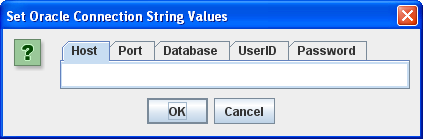
You need to enter the following values before clicking the OK button:
- Host: The
localhostkey word, orhostnameof your physical machine running the database. - Port: The
portthat the MySQL Listener is running on (the default value is3306). - Database: The Oracle TNS Alias, which is
sampledbfor the full database sample database. - UserID: The
username with permissions to the database entered that can access anITEMtable. - Password: The
passwordfor the user’s account.
In the JFileChooser, select a file to upload to the database.
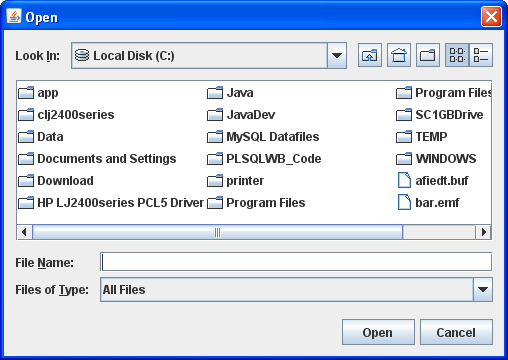
You should see what you uploaded displayed in a JFrame.
Java Source Code Program ↓
The drop down unfolds the WriteReadCLOB.java source code.
The following program has dependencies on the FileIO.jar file. You need to download it and put it in your $CLASSPATH for Linux or Mac OS X or %CLASSPATH% for Windows.
1 2 3 4 5 6 7 8 9 10 11 12 13 14 15 16 17 18 19 20 21 22 23 24 25 26 27 28 29 30 31 32 33 34 35 36 37 38 39 40 41 42 43 44 45 46 47 48 49 50 51 52 53 54 55 56 57 58 59 60 61 62 63 64 65 66 67 68 69 70 71 72 73 74 75 76 77 78 79 80 81 82 83 84 85 86 87 88 89 90 91 92 93 94 95 96 97 98 99 100 101 102 103 104 105 106 107 108 109 110 111 112 113 114 115 116 117 118 119 120 121 122 123 124 125 126 127 128 129 130 131 132 133 134 135 136 137 138 139 140 141 142 143 144 145 146 147 148 149 150 151 152 153 154 155 156 157 158 159 160 161 162 163 164 165 166 167 168 169 170 171 172 173 174 175 176 177 178 179 180 181 182 183 184 185 186 187 188 189 190 191 192 193 194 195 196 197 198 199 200 201 202 203 204 205 206 207 208 209 210 211 212 213 214 215 216 217 218 219 220 221 222 223 224 225 226 227 228 229 230 231 232 233 234 235 236 237 238 239 240 241 242 243 244 245 246 247 248 249 250 251 252 253 254 255 256 257 258 259 260 261 262 263 | // -------------------------------------------------------------------- // WriteReadCLOBMysql.java // by Michael McLaughlin // // This code demonstrates reading an image file and displaying // the image in a JLabel in a JFrame. // // The UPDATE and SELECT statements have dependencies on the // create_store.sql script. // -------------------------------------------------------------------- // Java Application class imports. import java.awt.Dimension; import java.awt.Font; import java.awt.GridLayout; import java.io.Reader; import javax.swing.JFrame; import javax.swing.JLabel; import javax.swing.JOptionPane; import javax.swing.JPanel; import javax.swing.JScrollPane; import javax.swing.JTextArea; // Generic JDBC imports. import java.sql.*; // Mysql JDBC import. import com.mysql.jdbc.Driver.*; import java.io.File; import java.sql.Connection; import java.sql.DriverManager; // Include book libraries (available at publisher website). import plsql.jdbc.DataConnectionPane; import plsql.fileio.FileIO; // -------------------------------------------------------------------/ public class WriteReadCLOBMysql extends JFrame { // Define database connections. private String host; private String port; private String dbname; private String userid; private String passwd; // Define data connection pane. private DataConnectionPane message = new DataConnectionPane(); // Construct the class. public WriteReadCLOBMysql (String s) { super(s); // Get database connection values or exit. if (JOptionPane.showConfirmDialog(this,message ,"Set Oracle Connection String Values" ,JOptionPane.OK_CANCEL_OPTION) == 0) { // Set class connection variables. host = message.getHost(); port = message.getPort(); dbname = message.getDatabase(); userid = message.getUserID(); passwd = message.getPassword(); // Print connection to console (debugging tool). message.getConnection(); // Create a JPanel for data display. ManageCLOB panel = new ManageCLOB(); // Configure the JPanel. panel.setOpaque(true); setContentPane(panel); // Configure the JFrame. setDefaultCloseOperation(JFrame.EXIT_ON_CLOSE); setLocation(100,100); pack(); setVisible(true); } else System.exit(1); } // -------------------------------------------------------------------/ private class ManageCLOB extends JPanel { // Define display variables. private String clobText; private JScrollPane scrollPane; private JTextArea textArea; // -----------------------------------------------------------------/ public ManageCLOB () { // Set layout manager. super(new GridLayout(1,0)); // Assign file read to String. clobText = FileIO.openFile(FileIO.findFile(this)); // Insert record before querying it. if (clobText.length() > 0) { if (insertClob(host,port,dbname,userid,passwd,clobText)) clobText = getQuery(host,port,dbname,userid,passwd); else clobText = null; } else System.exit(2); // Construct text area and format it. textArea = new JTextArea(clobText); textArea.setEditable(false); textArea.setFont(new Font(Font.SANS_SERIF,Font.PLAIN,14)); textArea.setLineWrap(true); textArea.setRows(10); textArea.setSize(400,100); textArea.setWrapStyleWord(true); // Put the image in container, and add label to panel. scrollPane = new JScrollPane(textArea); add(scrollPane); } // ---------------------------------------------------------------/ private Boolean insertClob(String host,String port,String dbname ,String user,String pswd,String fileString) { try { // Define connection. DriverManager.registerDriver(new com.mysql.jdbc.Driver()); Connection conn = DriverManager.getConnection("jdbc:mysql://" + host + ":" + port + "/" + dbname, user, pswd); // Create statement. PreparedStatement prest; String sql = "UPDATE item SET item_desc = ? WHERE item_title = 'The Lord of the Rings - Fellowship of the Ring' AND item_subtitle = 'Widescreen Edition'"; prest = conn.prepareStatement(sql); prest.setString(1,fileString); // Execute query. if (prest.execute()) conn.commit(); // Close resources. prest.close(); conn.close(); // Return CLOB as a String data type. return true; } // End of connection try-block. catch (SQLException e) { if (e.getSQLState() == null) { System.out.println( new SQLException("mysql Client Net8 Connection Error.", "mysql-" + e.getErrorCode() + ": Incorrect Net8 thin client arguments:\n\n" + " database name [" + dbname + "]\n", e.getErrorCode()).getSQLState()); // Return an empty String on error. return false; } else { System.out.println(e.getMessage()); // Return an empty String on error. return false; }}} // -----------------------------------------------------------------/ private String getQuery(String host,String port,String dbname ,String user,String pswd) { // Define method variables. char[] buffer; int count = 0; int length = 0; String data = null; String[] type; StringBuffer sb; try { // Define connection. DriverManager.registerDriver(new com.mysql.jdbc.Driver()); Connection conn = DriverManager.getConnection("jdbc:mysql://" + host + ":" + port + "/" + dbname, user, pswd); // Define metadata object. DatabaseMetaData dmd = conn.getMetaData(); // Create statement. Statement stmt = conn.createStatement(); // Execute query. ResultSet rset = stmt.executeQuery( "SELECT item_desc " + "FROM item " + "WHERE item_title = " + "'The Lord of the Rings - Fellowship of the Ring'"+ "AND item_subtitle = 'Widescreen Edition'"); // Get the query metadata, size array and assign column values. ResultSetMetaData rsmd = rset.getMetaData(); type = new String[rsmd.getColumnCount()]; for (int col = 0;col < rsmd.getColumnCount();col++) type[col] = rsmd.getColumnTypeName(col + 1); // Read rows and only CLOB data type columns. while (rset.next()) { for (int col = 0;col < rsmd.getColumnCount();col++) { if (type[col] == "CLOB") { // Assign result set to CLOB variable. Clob clob = rset.getClob(col + 1); // Check that it is not null and read the character stream. if (clob != null) { Reader is = clob.getCharacterStream(); // Initialize local variables. sb = new StringBuffer(); length = (int) clob.length(); // Check CLOB is not empty. if (length > 0) { // Initialize control structures to read stream. buffer = new char[length]; count = 0; // Read stream and append to StringBuffer. try { while ((count = is.read(buffer)) != -1) sb.append(buffer); // Assign StringBuffer to String. data = new String(sb); } catch (Exception e) {} } else data = (String) null; } else data = (String) null; } else { data = (String) rset.getObject(col + 1); }}} // Close resources. rset.close(); stmt.close(); conn.close(); // Return CLOB as a String data type. return data; } catch (SQLException e) { if (e.getSQLState() == null) { System.out.println( new SQLException("mysql Client Net8 Connection Error.", "mysql-" + e.getErrorCode() + ": Incorrect Net8 thin client arguments:\n\n" + " database name [" + dbname + "]\n", e.getErrorCode()).getSQLState()); // Return an empty String on error. return data; } else { System.out.println(e.getMessage()); return data; }} finally { if (data == null) System.exit(1); }}} // -----------------------------------------------------------------/ public static void main(String[] args) { // Define window. WriteReadCLOBMysql frame = new WriteReadCLOBMysql("Write & Read CLOB Text"); }} |
Excel 2011 Needs ODBC Files
I’d hoped for a better solution with Excel 2011 on Mac OS X but it appears we still need the third party drivers to connect Excel to MySQL. It’s the same as I reported earlier on Excel 2008. Here’s the message and you can click on it to go the web site and links to buy the drivers.

I tried getting away with installing the MySQL Connector/ODBC before downloading one of those recommended by Microsoft. I discovered that it didn’t work.
Therefore, I download and installed the OpenLink Software ODBC Software, instructions with screen shots are in this blog page. I discovered that this software support track isn’t purely native Mac OS X on Intel-based software because it requires Rosetta like Excel 2008. It also only connects with Microsoft Query, which appears to be a Power PC native application too, at least based on the interface and look and feel. I didn’t do much more research because I’ve concluded that connectivity isn’t ready for prime time on the Mac OS X platform. Microsoft still has more work to do.
Mac OS X MySQL Install
Installing MySQL 5.5.9 (updated for MySQL 5.5.16 and 5.5.18) on Mac OS X was on my list but it finally made the top. I needed to write instructions for a class that I teach because asking students who own a Mac to install VMWare and Windows before MySQL seems an unnecessary burden. Especially when you can install it directly on Mac OS X.
Mac OS X Mountain Lion (10.8.*) need to install XCode and Command Line Tools before installing MySQL. You can refer to this XCode installation and configuration post for those steps.
You can download MySQL for the Mac OS X. I downloaded the Mac OS X, Version 10.6 (x86, 64-bit) version for this installation. There were a couple shell syntax tricks beyond the instructions and then you need to configure database. That’s required because the database is installed with an unsecured anonymous and root account. After the step-by-step installation instructions, you’ll find the configuration steps to enable you to access the MySQL Monitor from a terminal session. It also configures your $PATH environment to enable you to start and stop the MySQL Daemon.
- After the download completes, open the file folder in the download directory.

- The open file folder and it will look like the following. Launch the
mysql-5.5.9-osx 10.6-x86_64.pkgfile, which installs the product.

- After launching the executable, you are now on the first page of the Install MySQL 5.5.9 installation application. Click the Continue button.

- This page contains the instructions, you can pause to read them or continue with these instructions. Click the Continue button to proceed.

- This page contains the General Public License (GPL). You agree or stop the installation. Click the Continue button to proceed.

- The following overlay dialog contains your agreement. Click the Agree button to proceed.

- There are fewer options in this installation than the Windows installation. While you can change the installation location, the software installs by default in the
/usr/local/mysqldirectory. The installation requires that you have amysqluser account on the operating system, and you don’t need to do anything because one exists as part of the default Mac OS X installation. Click the Install button to proceed.

- This dialog requires the system administrator’s password. Enter the valid password and click the OK button to proceed.

- Depending on the system, this could take more than a minute. All you can do it wait.

- This page tells you that you’ve completed the installation. Click the Close button to proceed.

- This step requires that you return to the download folder, shown in Step #2 above. Launch the
MySQLStartupItem.pkgand you’ll see the following MySQL Startup Item Installer dialog. Click the Continue button to proceed.

- This page contains the instructions for the MySQL Startup software, you can pause to read them or continue with these instructions. Click the Continue button to proceed.

- This page asks if you want to change the directory. I’d recommend you leave it as the default because it requires the System Administrator’s password to start and stop the database. It should also start for you every time you boot the machine. Click the Continue button to proceed.

- Like Step #8, this dialog requires the system administrator’s password. Enter the valid password and click the OK button to proceed.

- You could see a progress dialog box but generally it happens so fast you should land at the Installation was Successful dialog. Click the Close button to proceed.

- This step requires that you return to the download folder, shown in Step #2 above. Launch the
MySQL.prefPaneand you’ll see the following MySQL Preferences dialog. Click the Install button to proceed.

- Like Step #8 and #14, this dialog requires the system administrator’s password. Enter the valid password and click the OK button to proceed.

- Don’t click in the automatic start button unless you’re sure. Otherwise, there’s a lot of cleanup to be able to return to this point and start or stop the server as required. This is the last screen, you should click the Start MySQL Server button to start MySQL. While installing MySQL 5.5.18 I discovered that the service menu is no longer installed in the Preferences, and you must start it manually.

You can start and stop the service by opening your System Preferences, where you’ll find them in the bottom Other row. If the intent was to have it start automatically, sometimes the permissions are incorrect. You’ll get the following error in MySQL 5.5.9 but not in MySQL 5.5.16 because the MySQL DMG file is fixed. You can skip the instructions until you get to Configure User’s Shell Environment below:

"/Library/StartupItems/MySQLCOM" has not been started because it does not have the proper security settings. |
You can fix this by changing the permissions manually in a Terminal Session. Launch a Terminal Session from your Utilities folder inside your Applications folder.
Change directory to the /Library/StartupItems/MySQLCOM directory. Then, list the files. These commands should do the trick for you:
cd /Library/StartupItems/MySQLCOM ls -al |
If you see these permissions, you have problem because the group for startup files should be wheel not staff:
drwxr-xr-x 4 root staff 136 Jan 20 13:46 . drwxr-xr-x 4 root wheel 136 Feb 9 21:11 .. -rwxr-xr-x 1 root staff 1300 Jan 20 13:46 MySQLCOM -rw-r--r-- 1 root staff 469 Jan 20 13:46 StartupParameters.plist |
You can change the files with this command:
sudo chown root:wheel * |
However, now you need to step up the directory tree one level to /Library/StartupItems, and change the ownership of:
drwxr-xr-x 4 root staff 136 Jan 20 13:46 MySQLCOM |
There are two commands to do this. The first changes directory by moving to the parent directory in the hierarchy (the parent directory is represented by two dots). The second changes the group ownership of the MySQLCOM directory.
cd .. sudo chown root:wheel MySQLCOM |
Now you need to configure your shell environment and harden the database. Hardening means securing accounts with passwords. They’re covered in the next two sections.
Configure User’s Shell Environment
Assuming you accepted the defaults, you should be able to copy the required instructions directly into a .bash_login file if one exists. Unless you’ve created one before there won’t be a file. Mac OS X doesn’t automatically create the file. If you don’t have the file, you can create one with the following syntax:
touch .bash_login |
You can open the file with the vi editor or a text editor of your choice. MySQL 5.5.9 installed in /usr/local/mysql, which has changed to /usr/local/mysql-version as noted below. You can copy the following contents into the file for MySQL 5.5.16 but will need to change the file for earlier or later releases (added sudo per Don McArthur’s comment):
# Set the MySQL Home environment variable to point to the root directory of the MySQL installation. export set MYSQL_HOME=/usr/local/mysql-5.5.16-osx10.6-x86_64 # Add the /bin directory from the MYSQL_HOME location into your $PATH environment variable. export set PATH=$PATH:$MYSQL_HOME/bin # Create aliases that make it easier for you to manually start and stop the MySQL Daemon. alias mysqlstart="sudo /Library/StartupItems/MySQLCOM start" alias mysqlstop="sudo /Library/StartupItems/MySQLCOM stop" |
Changes between MySQL 5.5.16 and 5.5.18 introduce a new directory structure, you need to use the following in the .bash_login file (added sudo and status per Don McArthur’s comments):
# Set the MySQL Home environment variable to point to the root directory of the MySQL installation. export set MYSQL_HOME=/usr/local/mysql-5.5.18-osx10.6-x86_64 # Add the /bin directory from the MYSQL_HOME location into your $PATH environment variable. export set PATH=$PATH:$MYSQL_HOME/bin # Create aliases that make it easier for you to manually start and stop the MySQL Daemon. alias mysqlstart="sudo /Library/StartupItems/MySQLCOM/MySQLCOM start" alias mysqlstop="sudo /Library/StartupItems/MySQLCOM/MySQLCOM stop" alias mysqlstatus="ps aux | grep mysql | grep -v grep" |
As pointed out by Shashank’s comment, you should now use the following aliases:
alias mysqlstart='sudo /usr/local/mysql/support-files/mysql.server start' alias mysqlstop='sudo /usr/local/mysql/support-files/mysql.server stop' |
You need to save the file and close and restart a new Terminal session to place these environment variables in scope. You could also run the following to put them in scope without closing and opening the terminal:
. ./.bash_login |
The preceding command sources the environment file into active memory. This should configure your environment. After restarting the shell, you should be able to run this command to confirm the new environment:
which -a mysql |
It should return:
/usr/local/mysql-5.5.16-osx10.6-x86_64/bin/mysql |
Secure the Database
This is presently necessary because of the different file structure in a Mac OS X MySQL install, which disables the mysql_secure_installation file from running successfully. You can manually edit the file or follow these steps.
You need to connect to the database as the privileged super user, root user. This is simple because the installation doesn’t set any passwords. You open another Terminal session to make these changes or you could install MyPHPAdmin or MySQL Workbench. The tools work as well in fixing the majority of issues.
mysql -uroot |
Once connected to the database as the root user, you can confirm that passwords aren’t set and an insecure anonymous user account has been previously configured. You do that by connecting to the mysql database, which is the database catalog for MySQL. You do that by running the following command:
USE mysql; |
You can query the result set with the following query:
SELECT USER, password, host FROM USER\G |
You should see the following output plus the user’s name preceding the MacPro (or iMac.local) host name value:
*************************** 1. row ***************************
    user: root
password:
    host: localhost
*************************** 2. row ***************************
    user: root
password:
    host: MacPro.local
*************************** 3. row ***************************
    user: root
password:
    host: 127.0.0.1
*************************** 4. row ***************************
    user: root
password:
    host: ::1
*************************** 5. row ***************************
    user:
password:
    host: localhost
*************************** 6. row ***************************
    user:
password:
host: MacPro.local |
You now need to change the password for the root user. I would suggest that you do this with the SQL command rather than a direct update against the data dictionary tables. The syntax to fix the root user account require you enter the user name, an @ symbol, and complete host values, like:
SET PASSWORD FOR 'root'@'localhost' = password('cangetin'); SET PASSWORD FOR 'root'@'MacPro.local' = password('cangetin'); SET PASSWORD FOR 'root'@'127.0.0.1' = password('cangetin'); SET PASSWORD FOR 'root'@'::1' = password('cangetin'); |
You should be able to drop both anonymous user rows with the following syntax, but I did encounter a problem. Assuming you may likewise encounter the problem, the fix follows the first commands you should try:
DROP USER ''@'localhost'; DROP USER ''@'MacPro.local'; |
If either of the anonymous accounts remain in the USER table, you can manually drop them from the database catalog. This syntax will get rid of them:
DELETE FROM USER WHERE LENGTH(USER) = 0; |
You’ve completed the configuration and can now type quit; to exit the MySQL Monitor. To reconnect, you’ll now need a password, like this:
mysql -uroot -pcangetin |
Also, don’t forget to use a real password. The one shown here is trivial, which means easy to hack. Use something that others might not guess.
Configure my.cnf file
You can copy one of the sample configuration files as a starting point (as provided by Don McArthur’s comment):
sudo cp /usr/local/mysql/support-files/my-huge.cnf /etc/my.cnf |
Starting and Stopping the Database
You can manually start the database server with the following command, which you defined as aliases in your .bash_login shell script:
mysqlstart |
Stopping it is also straightforward, you do this:
mysqlstop |
You can check it’s status with this command:
mysqlstatus |
Create a synonym in MySQL
A friend wanted to know how to create a synonym to a library of stored functions and procedures in MySQL. I had to deliver the sad news that you can’t create a synonym in MySQL 5.0, 5.1, or 5.5. You need to write a wrapper function or procedure.
A synonym (available in Oracle) would eliminate the need to call a function from another database through the component selector (or period). That’s because it maps a name to the reference and name instead of requiring you to include it with each call. The following shows a call from outside of the lib database:
SELECT lib.demo('Hello World!') AS "Statement"; |
He asked how to do it, so here’s how you do it below. Assume the following for this example:
- You have a
libdatabase where you define all your functions, procedures, and tables. - You have a
appdatabase that supports web connections. - You don’t want to allow web users to connect directly to the
libdatabase because access to the tables should only be available through the functions and procedures.
This base function is simplified to avoid interaction with table data but illustrate the technique of definer rights functions. The function takes a string of up to 20 characters and returns it enclosed in double quotes. To mimic these behaviors, as the root user, you should create the app and lib databases, the dev and web users, and grant privileges to the dev user to act in the lib database and the web user to act in the app database. The example below does this as the root user, but in real life don’t use a trivial password like the example:
/* Create the two databases. */ CREATE DATABASE app; CREATE DATABASE lib; /* Create the two users, the developer can only connect locally. */ CREATE USER 'dev'@'localhost' IDENTIFIED BY 'dev'; CREATE USER 'web'@'%' IDENTIFIED BY 'web'; /* Grant privileges to be a definer in both databases. */ GRANT ALL ON app.* TO 'dev'@'localhost'; GRANT ALL ON lib.* TO 'dev'@'localhost'; /* Grant privileges to any function or privilege in the APP database to the WEB user. */ GRANT EXECUTE ON app.* TO 'web'@'%'; |
After creating and granting all the appropriate privileges, here are the steps to create the test case.
- You create and test the function as the
devuser in thelibdatabase.
/* Set the delimiter to something other than a semi-colon so they can be typed in statements. */ DELIMITER $$ /* Create a function that echoes back the string with double quotes. */ CREATE FUNCTION demo(str VARCHAR(20)) RETURNS VARCHAR(20) BEGIN RETURN CONCAT('"',str,'"'); END; $$ /* Reset the DELIMITER value. */ DELIMITER ; /* Query the function. */ SELECT demo('Ciao amico!') AS "Statement"; |
- You create and test the wrapper function as the
devuser in theappdatabase.
/* Set the delimiter to something other than a semi-colon so they can be typed in statements. */ DELIMITER $$ /* Create a function that echoes back the string with double quotes. */ CREATE FUNCTION demo(str VARCHAR(20)) RETURNS VARCHAR(20) BEGIN RETURN lib.demo(str); END; $$ /* Reset the DELIMITER value. */ DELIMITER ; /* Query the function. */ SELECT demo('Ciao amico!') AS "Statement"; |
If you’re wondering why a GRANT wasn’t required from the lib database to the app database, it’s because the dev user has access to both databases and defined both objects.
- You can test the wrapper function as the
webuser in theappdatabase.
SELECT demo('Yes, it works!') AS "Statement"; |
This is the closest to a synonym for a function or procedure that is possible. I know this solves his problem and hope it solves a couple others too.
 Subscribe via RSS