Archive for the ‘NUMTODSINTERVAL’ tag
Inline views, fabrication, & the WITH clause
Sometimes working with a product like Oracle brings a surprise, like a new feature you failed to catch when it was released. I’ve seen a lot of entries using inline views through the WITH clause in the Oracle forums. It caught my eye because it is such a radical departure from portable SQL syntax of an inline view. I finally went searching to find the rationale for this approach.
The answer doesn’t lie with the Charlotte like National Treasure, but with simplifying the join syntax, as qualified in the Oracle Database 2 Day + Data Warehousing Guide 11g, Release 1. The following looks at this approach, and compares using the WITH clause instead of the inline view to perform table fabrication.
Oracle tells us to use the WITH clause when a query has multiple references to the same query block and there are joins and aggregations. The official name of the WITH clause is a subquery factoring clause. Basically, the WITH clause lets you name inline views and then reuse them inside other inline views. This behavior avoids having to call different copies of the same inline view in different parts of a query or DML statement, which reduces overhead and increases view response time for resolution.
Like local named PL/SQL blocks, subquery factoring clauses must be defined before they can be referenced. Unlike PL/SQL, they have no equivalent function and procedure stubs used for forward referencing in a PL/SQL program unit. They simply become available in sequence, the top most universally available and the next only available below to those statements below it.
The WITH clause (or subquery factoring clause) feature comes to us from the ANSI SQL:1999 specification. It is implemented in Oracle databases with the same syntax as it is in Microsoft SQL Server 2005. The only difference is Microsoft brands it as a Common Table Expression (CTE). It also happens to be the only way to implement a recursive query in Microsoft SQL Server.
The basic syntax is:
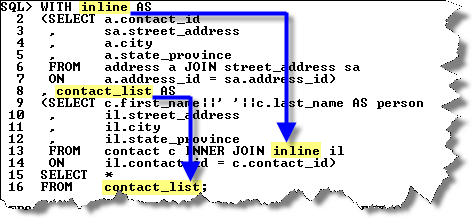
The first code block is assigned the subquery factoring clause’s name. You can then reuse the name in subsequent code blocks or the master query. The idea is that this syntax is simpler than the traditional inline view approach and more efficient.
The WITH clause is also capable of letting you create tables from literal values, which is known as table fabrication. The following syntax uses the with clause to fabricate a table of two columns (x and y) and two rows.
SQL> WITH fabricated AS 2 (SELECT 1 AS x, 2 AS y FROM dual 3 UNION ALL 4 SELECT 3 AS x, 4 AS y FROM dual) 5 SELECT x, y FROM fabricated; |
This produces the following results:
         X          Y
---------- ----------
         1          2
3 4 |
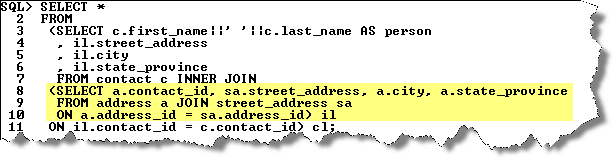
The next shows the traditional way of fabricating a table using an inline view:
SQL> SELECT x, y 2 FROM (SELECT 1 AS x, 2 AS y FROM dual 3 UNION ALL 4 SELECT 3 AS x, 4 AS y FROM dual) fabricated; |
This also produces the same results as before, two rows of X and Y variables.
You can also use this type of syntax in MySQL to fabricate a table. You can’t use the WITH clause in MySQL because it’s not supported. You’ll notice in the example that the FROM dual portion is omitted in MySQL. Wouldn’t it be nice if Oracle let that happen too?
SQL> SELECT x, y 2 FROM (SELECT 1 AS x, 2 AS y 3 UNION ALL 4 SELECT 3 AS x, 4 AS y) fabricated; |
A neat function that I picked up on the Oracle Technical Network is the NUMTODSINTERVAL (number to date-stamp interval) function, which can create intervals for qualifying sales by hour or quarter hour. More or less it is a way to fabricate timing intervals. Here’s a quick example:
SQL> SELECT TO_CHAR(SYSDATE - NUMTODSINTERVAL(dist,'HOUR') 2 ,'DD-MON-YYYY HH24:MI:SS') bracket 3 FROM (SELECT 1 AS dist FROM dual 4 UNION ALL 5 SELECT 2 AS dist FROM dual 6 UNION ALL 7 SELECT 3 AS dist FROM dual) fabricated; |
The output is:
BRACKET ------------------- 22-OCT-2008 23:07:15 22-OCT-2008 22:07:15 22-OCT-2008 21:07:15 |
This has been the syntax, now I’ll have to check whether there are any performance differences. I suspect that since the execution plan is the same that there aren’t any performance differences but you never know until you test it.
More or less they were but I tripped into a performance shortfall of the WITH clause. It was a complete accident when I was trying to convert a MySQL SQL syntax model into Oracle SQL. The smaller change to the code was to use a WITH clause but I found it didn’t work.
You can’t use the WITH clause inside a subquery for a multiple row insert. It raises an ORA-32034 error if you attempt it, which struck me as bizare. A normal inline view works fine but the WITH clause doesn’t.
Here’s a simple example of embedding an inline view into an INSERT statement. It works seamlessly in Oracle 11g:
INSERT INTO contact_copy ( SELECT contact_s1.nextval , 1001 , cl.contact_type , 'Doe' , 'John' , NULL , 3 , SYSDATE , 3 , SYSDATE FROM dual CROSS JOIN (SELECT common_lookup_id AS contact_type FROM common_lookup WHERE common_lookup_type LIKE '%DAY RENTAL') cl ); |
When I switched to what appeared as the equivalent syntax using a WITH clause, it failed and raised the ORA-32034: unsupported use of with clause error. The following shows you how the WITH would be used, if it could be used:
INSERT INTO contact_copy ( WITH cl AS (SELECT common_lookup_id AS contact_type FROM common_lookup WHERE common_lookup_type LIKE '%DAY RENTAL') SELECT contact_s1.nextval , 1001 , cl.contact_type , 'Doe' , 'John' , NULL , 3 , SYSDATE , 3 , SYSDATE FROM dual ); |
I thought that might be the reason why Oracle didn’t bother putting it in the SQL reference manual for Oracle Database 10g or 11g. However, Dominic Brooks provided the correct syntax. Very interesting that you simply start with the WITH clause and exclude the enclosing parentheses. Quite a departure from the normal syntax for a multiple row insert.
The correct syntax when the subquery cl returns only one row is like Dominic’s suggestion:
INSERT INTO contact_copy WITH cl AS (SELECT common_lookup_id AS contact_type FROM common_lookup WHERE common_lookup_type LIKE '%DAY RENTAL') SELECT contact_s1.nextval , 1001 , (SELECT cl.contact_type FROM cl) , 'Doe' , 'John' , NULL , 3 , SYSDATE , 3 , SYSDATE FROM dual; |
The correct syntax when the subquery cl subquery returns more than one row differs from Dominic’s. You need a CROSS JOIN to multiply the other static values by the number of rows returned by the subquery so that you have a multiple row insert statement.
INSERT INTO contact_copy WITH cl AS (SELECT common_lookup_id AS contact_type FROM common_lookup WHERE common_lookup_type LIKE '%DAY RENTAL') SELECT contact_s1.nextval , 1001 , cl.contact_type , 'Doe' , 'John' , NULL , 3 , SYSDATE , 3 , SYSDATE FROM dual CROSS JOIN cl; |
It turned into a longer discussion than I anticipated. Hope it helps solve problems and tune Oracle queries.
 Subscribe via RSS