SQL Query in Excel 2007
Over a year ago, I put out a blog page on how to query the contents of a table from an Oracle database through Excel. I meant to get back to provide much more about this. Specifically, I want to cover the XML mechanism used to accomplish the task. However, a blog reader augmented my page with a solution comment. I’m thrilled he did because it tells me to get a basic thing out rather than hang folks up halfway. My thanks go to Vernon.
Here’s a quick addendum to the original post with screen shots because folks tell me they’re very useful. It demonstrates how you write queries in Microsoft Excel against the Oracle database. While I plan a full tutorial on a different URL, this should help everybody in the meantime. This content is dependent on the generic mechanism, which I covered in this older post.
It starts with an alternative to Step #9 in the older blog page, and therefore, I’ve started the numbering as 9 there.
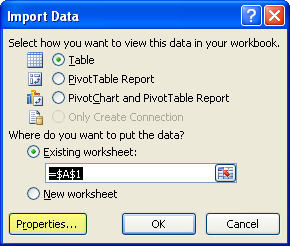
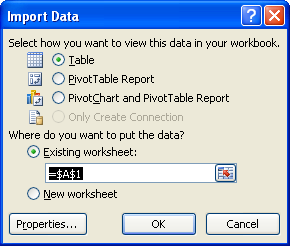
- The Import Data dialog asks you how and where you want to import it. When you don’t want the contents of a simple table, click the Properties button.
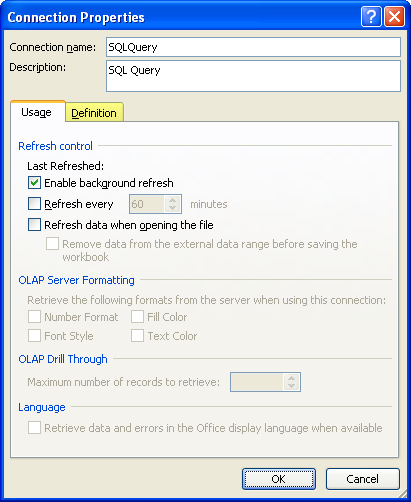
- Clicking the prior dialog’s Property button brings you to the Connection Properties dialog. The Usage tab is first for a reason but the Definition tab is where you need to go to enter a free form query. Click the Definition tab highlighted in yellow below.
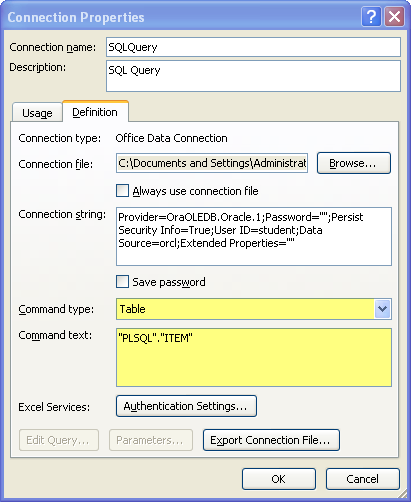
- In this dialog, the most important boxes are the Command type (as you may guess, Table is the default value) and Command text boxes. The first thing to do, is click on the Command type multiple select widget and choose SQL.
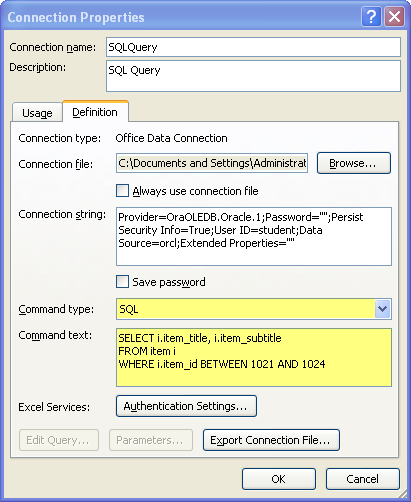
Now, you can write any query that you’d like against the selected Oracle schema. You may reference any tables or views for which your user (schema) has SELECT permissions. You don’t need to limit yourself to a single table because ANSI SQL:89 (comma delimited tables), and ANSI SQL:92 (INNER JOIN, et cetera) are both supported. Don’t forget that Oracle uses a different concatenation method than Microsoft Access or SQL Server, you can find that here. After you’ve entered your query, click the OK button to proceed.
- When you clicked OK, you’ve instructed Microsoft Excel 2007 to change the connection, it raises this dialog box (click on it if you want to read it). You click Yes to continue and save your query.

- You’re back to where you began, more or less, this it the Import Data dialog. This is Step #9 but this time it’ll run your query not return a simple table content. Click OK to run the query. Don’t be surprised if you get a message saying no password was provided. It just means you’ll be prompted to enter one. You should never store that password because it’s stored in plain text inside an XML file.
You can find those data source files in this directory:
C:\Document and Settings\<some_user>\My Documents\My Data Sources |


Great post! Thanks for this useful tutorial. Have you checked out the Excel conversation on Facebook yet? If not, head to http://www.facebook.com/office
Cheers,
Andy
MSFT Office Outreach Team
Andy
1 Dec 09 at 4:51 pm
Hi,
Your tips really helped me in my job. However, what if I want to have the
WHEREclause parameterized?For example, instead of your
item_id:I want it to be just like when we use PLSQL in TOAD or PLSQL Developer.
Any idea? Thank you so much for the answer.
Michael
19 Mar 10 at 2:53 am
Great share man Thanks
Sueann Kut
28 Jul 10 at 6:12 am
Great post. Thanks a million
Harshad
20 Aug 10 at 4:17 pm
the answer is
SELECT ….
FROM ….
WHERE item_id BETWEEN ? AND ?
then click on Parameters..
Rodrigo
14 Jan 11 at 9:28 am
Excellent doco! This was exactly what I needed. You rock!
Unca Lar
14 Apr 11 at 12:08 pm
>4000 characters can’t be entered into command text, right? I’ve hit that wall. any way around it? thanks.
steve
14 Oct 11 at 6:46 am
Rodrigo, If you hold the key to making the Parameters button active with an Oracle driver, please share it. It appears that the ODBC driver must support specified criteria to enable parameters, which aren’t qualified in the Microsoft Support page.
My understanding is that you must first use Microsoft Query, which works with MySQL’s driver but not Oracle’s 11gR1 driver. It does work with Oracle’s 11gR2 driver. Once you define the parameters in Microsoft Query it enables the Parameters button and you save the query as a
*.dqyfile. Unless you want to unhide theAppDataandMicrosoftsubdirectories, you’ll have to find these queries by opening acmd.exe(Command-Line shell). They’re in theC:\Users\UserName\AppData\Roaming\Microsoft\Queriesdirectory. If I get a chance, I’ll put together screen shots on that.However, this is only possible if you load the
SQORA32.dllandSQRESUS.dllfrom the Oracle Data Access Components for Oracle Client 11.2.0.2.1. You need to put them in the%ORACLE_HOME%\bindirectory. After you sort through getting Parameters button working, you may encounter Microsoft Bug 692357, which they say isn’t reproducible. This appears to occur when the edited copy of the query isn’t supported with the syntax of Microsoft Query and it has been edited on the fly. You can manually save the query file to avoid the error (work around). I suspect that I’ll need to build a test case to see any action on the bug. Unfortunately, with my schedule it’ll have to wait.The preceding query supports the way bind variables work for Microsoft Excel but isn’t supported in the scope of Microsoft Query’s syntax (not supported by the parser). It’s tough force fitting things in Excel because query syntax follows more or less the limited set provided by Microsoft Access.
maclochlainn
15 Oct 11 at 5:42 pm
Steve, It’s a guess on my part but that’s probably the case because a
VARCHAR2has a maximum size in SQL of 4,000 characters. However, there may be a newer driver that uses aCLOB. I’m looking for it too. If I find it, I’ll update the post.maclochlainn
15 Oct 11 at 5:46 pm
I can’t believe this is so easy to do, without VBA even. Just hard to find. I bet this would be utilized a lot more if people knew about it. Thanks for the info.
Anonymous
24 Apr 12 at 5:57 am
Excellent post great !!
I have another question concerning security.
In the Excel connection string are the sql-user and sql-password specified.
Now I want that a end user can’t see these items and therefore can’t abuse it.
How can I tackle this the best?
Thanks
Jos
Jos
8 May 12 at 4:56 am
Create a view only schema, and only put the views in it that you want to allow the user to see.
maclochlainn
9 May 12 at 10:57 pm
SELECT *
FROM TABLE
WHERE (FECHA BETWEEN ? AND ? OR FECHA IS NULL)
Q: THE “IS NULL”, GIVE ME A MESSAGE ERROR, SO HOW I USE THE “IS NULL” WITH EXCEL???
jes636
13 May 12 at 7:39 pm
The problem is that a
NULLvalue in the column you’re comparing results against raises an error. You should be able to rewrite theWHEREclause to include anNULLIFfunction call like this:maclochlainn
14 May 12 at 12:29 am
This was indeed helpful. Good work. Thanks for sharing.
Ishan
29 Aug 12 at 9:13 am
Thanks for sharing! Saved me some fumbling with my old cutting and pasting technique that is too horrible to describe!
Bill Jackson
16 Sep 12 at 8:31 am
I am trying to pass list of text value into Oracle query. For example, select subset of postal codes with selection list managed in Excel file.
Between or Like would not work in this case.. I tried concatenating postal codes to create the string to pass as a parameter: ‘L6M3X5′,’L8W8K6′ but MS query ignores it. Anyone has any other ideas how to do it?
TM
23 Nov 12 at 4:58 pm
Thanks for the nice post.
I have the following use case. I built a query to connect to one Oracle DB on my laptop and then I built a pivot table and chart upon it. Now I need to use this workbook exactly when going to different clients without the need to create a new connections and build new sheets.I just want to refresh my sheets & charts at the client, that simple. So, Is there a simple way to achieve this?.
Thanks
Ahmed
Ahmed Abdel Fattah
13 Apr 13 at 4:09 am
Ahmed, You would like to have a publish and subscribe model? Unfortunately, the connection to the database is not portable like other links.
While it is not ideal, you can use one worksheet to import the data and have another worksheet that references the data by simple direct links, like
=Import!A1.maclochlainn
13 Apr 13 at 9:04 am
Is it possible to use values from cells as variables in “Where” section of sql-query?
I should create report for different people, who use different filters. Actually all comes to two dates and string.
Daniel
17 Apr 13 at 5:15 am
Daniel, Yes, but I’ve not written an example.
maclochlainn
17 Apr 13 at 8:40 am
Awesome site! thanks..
I have managed to create a query with fixed values however
I tried using the MS query for a simple query into excel however for multiple values with a comma but doesn’t seem to work?
any suggestions here??
Lisa Pereira
12 May 13 at 11:20 am