Query Oracle database
I caught a post on the OTN forum asking how to do this, and it happened to be something I’m working on for a new course that I’ll be teaching on data analytics. Ultimately, Microsoft Excel is the de facto tool of many accounts and financial analysts, protests notwithstanding.
This shows you how to query an Oracle 11g database from Excel 2007 (only available when you do a FULL install of Excel 2007). Actually, it should work on any current version of the Oracle database. The key to making this work is having the Oracle 10g Client software or an Oracle 11g database on the same machine. The Oracle client software allows you to resolve an Oracle Network Alias (found in the %ORACLE_HOME%\network\admin\tnsnames.ora file).
Here are the instructions with screen shots:
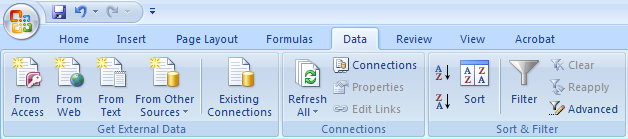
1. Click on the Data ribbon, and then click on the From Other Sources icon in the Get External Data section, as shown:
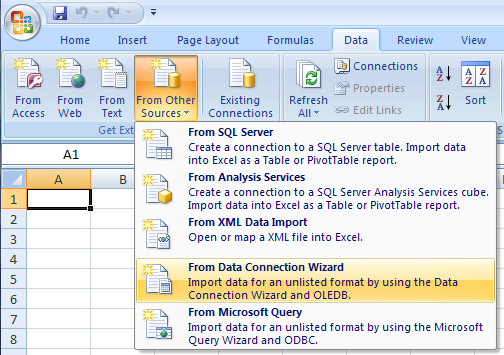
2. When you click on the From Other Sources icon, you’ll get the following drop down list. Click on the From Data Connection Wizard item.
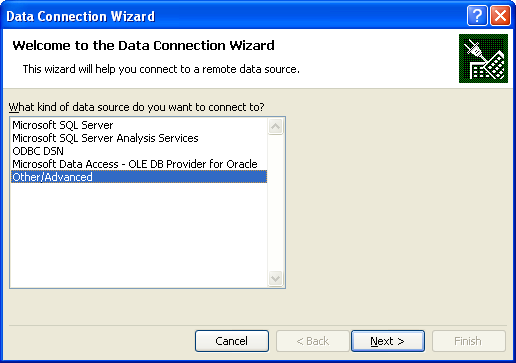
3.The Data Connection Wizard provides a number of Microsoft data sources, but you click the Other/Advanced option to connect to an Oracle database.
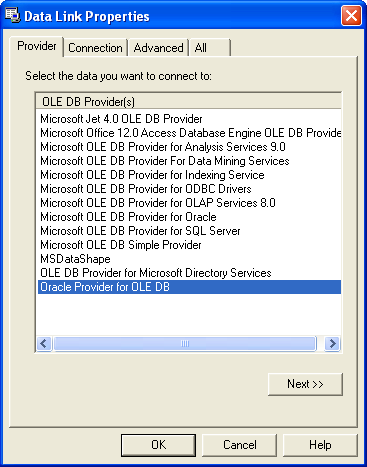
4. The Other/Advanced selection launches the Data Link Properties dialog with the Provider tab open and active. Click the Oracle Provider for OLE DB choice. If you don’t have the Oracle Provider for OLE DB option, download the Oracle Data Access Components for Windows from Oracle site. The installation should also load it as a new data source, if not you can follow the same instructions provided for MySQL’s ODBC here. After clicking the Oracle Provider for OLE DB choice, you click the Next button.
5. The Next button brings you to the Connection tab. You should fill it out as noted below, and if you wish check the Allow saving password checkbox.
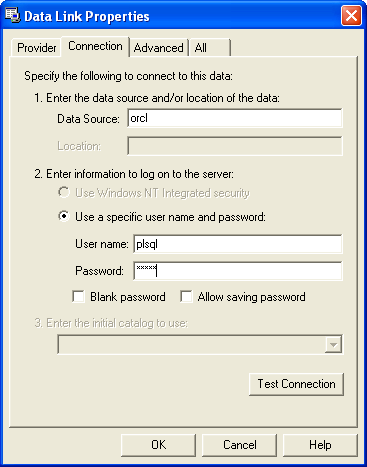
6. Before preceding, you should verify that the connection works. Click the Test Connection button to do that, and if successful you’ll see the following. Click the OK button in the Microsoft Data Link dialog to complete the test and the OK button in the Data Link Properties dialog.

7. After setting up the data connection in the Data Link Properties dialog, you’ll be taken to the Data Connection Wizard dialog. Here you can pick any table that you have access to within the PL/SQL schema (remember a schema in Oracle is a database in Microsoft SQL Server or MySQL). Click the Next button to continue.
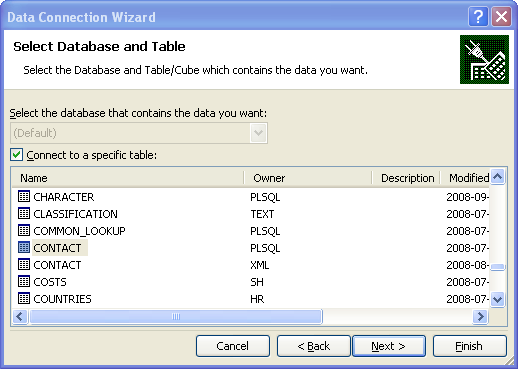
8. After clicking the Next button, you’ll see the second Data Connection Wizard dialog. Click the Finish button to begin importing the data.
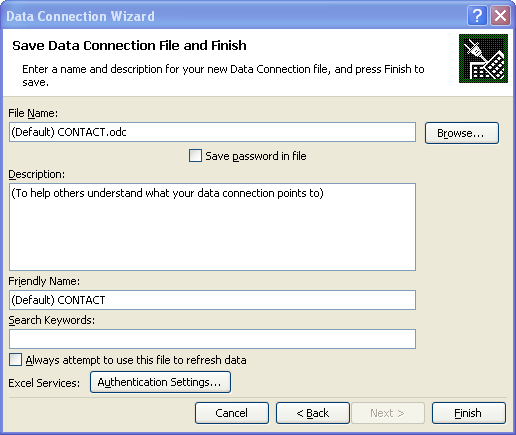
9. The Import Data dialog asks you how and where you want to import it. The following chooses to import it as an ordinary table. Click the OK button to import the data from a table. If you want to write a query against one or more tables, click here for the additional instructions.
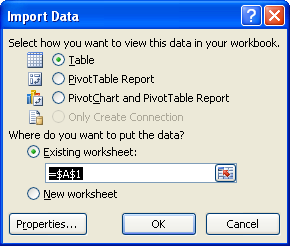
10. Imports into Excel 2007 as a table are automatically created as a table. The following screen shot formats the display columns.
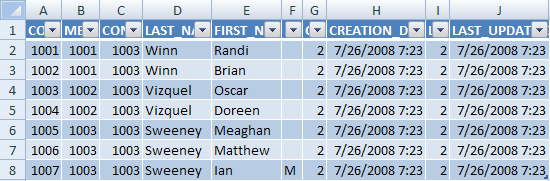
You have a number of very advantageous features in Excel 2007. They allow a number of options that resemble working within a database but honestly they’re much more difficult than working in SQL. I’d advise you create preformatted data by using views. Then, query the views through these steps.
 Subscribe via RSS
Hammad, You can write a SQL Query and assign the results to the Excel page, instead of a table. I’ve written the following post to highlight how to use a query instead of a table reference.
maclochlainn
20 Nov 15 at 11:46 pm
Hi,
i want to connect oracle DB using excel 2013(32 bit) in windows8.1 (64 bit)
always throws an error message
“Net working components were not found..
Please help me on this
Vinay
26 Nov 15 at 3:23 am
Viney, You need 32-bit drivers for Oracle client installed on your server. Otherwise you’re trying to connect a 32-bit client software with 64-bit server software and it won’t work.
maclochlainn
21 Dec 15 at 8:25 pm
Hi Guys,
We are trying to build a small report, which needs to pull the data from DB into excel file, we are hitting a deadlock, tried most of the options suggested in google but couldn’t figure out a solution…so reaching out to you guys if anyone has tried to integrate excel and Oracle.
1. the specified dsn contains architecture mismatch..
2. oracle client and networking components are not found.
revanth
10 May 16 at 3:50 am
Revanth, I’ll try to get to it but probably not for a couple weeks.
maclochlainn
10 May 16 at 11:16 pm
We have a need to weekly move data from an assortment of (>20) Oracle 12c tables into MS Access tables of the same names. We have a database tool that allows us to manually move this data from Oracle Into Access, but would like to be able to automate the process.
Could you help with this?
Rose
28 Jun 16 at 9:58 am
We’ve migrated to a 64 bit version of Excel (Office 2010). We are finding the connections are VERY SLOW. What could cause this? Do we need a 64 bit driver for the Oracle OLE DB?
Thanks for your help.
Don
Don Wilson
21 Jul 16 at 2:00 pm
Don, You should match the 64-bit version of Excel with the 64-bit driver generally.
maclochlainn
16 Oct 16 at 9:01 pm
Hi There,
I am trying to connect to a DB in Oracle from Excel, but I am not able to see the tables that I upload on my database. Do you know way?
I a using Oracle 11g and excel 365.
*Just as a comment, with sql server you specify not just the connection also the database and table, thing that I do not see so easy in this query.
Pablo
3 Feb 17 at 4:57 am
This post was published almost 10 years ago, but as I see the comments are still alive. So I’d like to recommend to use some add-in for this task. There’s a lot of them now and I believe it’s much more easier way to connect to any DB from Excel. For example Power Query (free) or Devart (it’s commercial, but it has great visual query builder)
Jason
26 Jul 17 at 4:36 am
How to connect SQL DEVELOPER through Excel 2016..kINDLY HEL ME FOR THE STEPS
MANOHARAN
7 Aug 17 at 5:05 am
Manoharan, You want to return results from SQL Developer to Excel?
maclochlainn
10 Dec 17 at 11:44 am
i can not find oracle provider option in data link properties. there is no option for that?
Guru
4 Sep 18 at 12:36 am
Which version of Excel are you using?
maclochlainn
27 Oct 18 at 10:12 am
I imagine that you’ve already done this but I would script it in PowerShell.
maclochlainn
27 Oct 18 at 12:27 pm
I have been able to complete up to #6, including getting the connection in Excel to test positively. After I click ok in the Data Link Properties the wizard doesn’t come up, instead my Excel 2016 application crashes and gives me a (Not Responding) error. Is there a known fix for this?
qhqman
30 Oct 18 at 9:59 am
When I try to fetch data from using option Table I am able to do that , but while getting the same thin using SQL and command as “Select * from SCHEMA.TABLENAME” is giving me unexpected Error.
Sujit
8 Nov 18 at 2:44 pm
Qhqman, Did the Data Connection Wizard render itself or did it die before the Data Connection Wizard rendered?
maclochlainn
12 Nov 18 at 7:20 pm
Suit, You can’t refer to a schema in the query. All objects must be in the connection schema.
maclochlainn
12 Nov 18 at 7:23 pm
[…] 1 enlace más que me ayudó hace varios meses: blog.mclaughlinsoftware.com/microsoft-excel/… […]
excel - El proveedor de Datos OleDB no puede ser encontrado VBA/Excel
25 Aug 19 at 5:34 am