Oracle 12c & PHP
This answers “How you connect PHP programs to an Oracle 12c multitenant database. This shows you how to connect your PHP programs to a user-defined Container Database (CDB) and Pluggable Database (PDB). It presupposes you know how to provision a PDB, and configure your Oracle listener.ora and tnsnames.ora files.
CDB Connection:
This assumes you already created a user-defined c##plsql CDB user, and granted an appropriate role or set of privileges to the user. Assuming the demonstration database Oracle TNS Service Name of orcl, you would test your connection with this script:
PDB Connection:
This assumes you already created a user-defined videodb PDB, and video user in the PDB, and granted an appropriate role or set of privileges to the video user. Assuming the user-defined videodb PDB uses an Oracle TNS Service Name of videodb, you would test your connection with this script:
Line 3 above uses the TNS Service Name from the tnsnames.ora file, which is also the SID Name from the listener.ora file after the slash that follows the localhost. That’s the only trick you should need.
You should note that because the tnsnames.ora file uses a video service name, the connection from the command line differs:
sqlplus video@video/video |
Hope this helps those trying to sort it out.
DBMS_COMPARISON Missing?
The dbms_comparison package isn’t deployed when you provision a pluggable databases (PDBs) in Oracle 12c. It appears to be a simple omission. At least, it let me manually compiled the dbms_comparison package with this syntax:
@?/rdbms/admin/dbmscmp.sql @?/rdbms/admin/prvtcmp.plb |
However, when I ran the code against the PDB it failed. The same code worked against a container database (CDB). It struck me as odd. The error stack wasn’t too useful, as you can see below:
1 2 3 4 5 6 7 8 9 10 | BEGIN * ERROR at line 1: ORA-06564: object "SYS"."COMPARE_NAME" does NOT exist ORA-06512: at "SYS.DBMS_LOGREP_UTIL", line 569 ORA-06512: at "SYS.DBMS_LOGREP_UTIL", line 602 ORA-06512: at "SYS.DBMS_CMP_INT", line 394 ORA-01403: no DATA found ORA-06512: at "SYS.DBMS_COMPARISON", line 764 ORA-06512: at line 2 |
My test was using two copies of a table with differences between column values. Both were deployed in the same CDB or PDB. That meant it was either a missing table or a problem with my database link. Here’s the statement that caused the failure:
7 8 9 10 11 12 | dbms_comparison.create_comparison(comparison_name => 'COMPARE_NAME' , schema_name => 'video' , object_name => 'MEMBER#1' , dblink_name => 'loopbackpdb' , remote_schema_name => 'video' , remote_object_name => 'MEMBER#2'); |
Unfortunately, there wasn’t any notable difference between the two database links. Playing around with it, I discovered the problem. While you don’t have to enclose your case sensitive password in double quotes for a CDB database link, you do need to enclose the password with double quotes in a PDB database link.
This database link fixed the problem:
1 2 3 | CREATE DATABASE LINK loopbackpdb CONNECT TO video IDENTIFIED BY "Video1" USING 'video'; |
The delimiting double quotes on line 2 fixed the problem. Hopefully, this helps somebody who runs into it too. Any way, according to this June 2013 Oracle White Paper it would appear as a bug because it’s an inconsistent behavior between a CDB and PDB.
Convert LONG to CLOB
A friend asked me how to get an Oracle view definition out of a LONG column and into a web application. I thought it was an interesting question because I ran into a similar problem when writing the Oracle Database 12c PL/SQL Programming book.
One of the new Oracle 12c features is the DBMS_UTILITY‘s new EXPAND_SQL_TEXT procedure. It lets you expand a view’s definition to include any views that the master view uses. It produces a single queries with all the base tables that support the view. Clearly, it’s an effective tool when it comes to understanding how those large ERP views work in the E-Business Suite.
LONG to CLOB Data Type
Here’s a version of the function that converts the LONG data type into a CLOB data type:
1 2 3 4 5 6 7 8 9 10 11 12 13 14 15 16 17 18 19 20 21 22 23 24 25 26 27 28 29 30 31 32 33 34 35 36 37 38 39 40 41 42 43 44 45 46 47 48 49 50 51 52 | CREATE OR REPLACE FUNCTION long_to_clob ( pv_view_name VARCHAR2 , pv_column_length INTEGER ) RETURN CLOB AS /* Declare local variables. */ lv_cursor INTEGER := dbms_sql.open_cursor; lv_feedback INTEGER; -- Acknowledgement of dynamic execution lv_length INTEGER; -- Length of string lv_return CLOB; -- Function output lv_stmt VARCHAR2(2000); -- Dynamic SQL statement lv_string VARCHAR2(32760); -- Maximum length of LONG data type BEGIN /* Create dynamic statement. */ lv_stmt := 'SELECT text'||CHR(10) || 'FROM user_views'||CHR(10) || 'WHERE view_name = '''||pv_view_name||''''; /* Parse and define a long column. */ dbms_sql.parse(lv_cursor, lv_stmt, dbms_sql.native); dbms_sql.define_column_long(lv_cursor,1); /* Only attempt to process the return value when fetched. */ IF dbms_sql.execute_and_fetch(lv_cursor) = 1 THEN dbms_sql.column_value_long( lv_cursor , 1 , pv_column_length , 0 , lv_string , lv_length); END IF; /* Check for an open cursor. */ IF dbms_sql.is_open(lv_cursor) THEN dbms_sql.close_cursor(lv_cursor); END IF; /* Create a local temporary CLOB in memory: - It returns a constructed lv_return_result. - It disables a cached version. - It set the duration to 12 (the value of the dbms_lob.call package-level variable) when the default is 10. */ dbms_lob.createtemporary(lv_return, FALSE, dbms_lob.call); /* Append the Long to the empty temporary CLOB. */ dbms_lob.write(lv_return, pv_column_length, 1, lv_string); RETURN lv_return; END long_to_clob; / |
This wraps the conversion of a LONG to CLOB, which is necessary to pre-size the LONG data type. Pre-sizing avoids reading the LONG column’s value character-by-character.
1 2 3 4 5 6 7 8 9 10 11 12 13 14 15 16 17 18 19 20 21 22 23 24 25 26 27 28 29 30 31 32 | CREATE OR REPLACE FUNCTION expand_view ( pv_view_name VARCHAR2 ) RETURN CLOB IS /* Declare containers for views. */ lv_input_view CLOB; lv_output_view CLOB; /* Declare a target variable, because of the limit of SELECT-INTO. */ lv_long_view LONG; /* Declare a dynamic cursor. */ CURSOR c (cv_view_name VARCHAR2) IS SELECT text FROM user_views WHERE view_name = cv_view_name; BEGIN /* Open, fetch, and close cursor to capture view text. */ OPEN c(pv_view_name); FETCH c INTO lv_long_view; CLOSE c; /* Convert a LONG return type to a CLOB. */ lv_input_view := long_to_clob(pv_view_name, LENGTH(lv_long_view)); /* Send in the view text and receive the complete text. */ dbms_utility.expand_sql_text(lv_input_view, lv_output_view); /* Return the output CLOB value. */ RETURN lv_output_view; END; / |
LONG to VARCHAR2 Data Type
Here’s a version of the function that converts the LONG data type into a VARCHAR2 data type:
1 2 3 4 5 6 7 8 9 10 11 12 13 14 15 16 17 18 19 20 21 22 23 24 25 26 27 28 29 30 31 32 33 34 35 36 37 38 39 40 41 42 43 44 45 | CREATE OR REPLACE FUNCTION long_to_varchar2 ( pv_view_name VARCHAR2 , pv_column_length INTEGER ) RETURN VARCHAR2 AS /* Declare local variables. */ lv_cursor INTEGER := dbms_sql.open_cursor; lv_feedback INTEGER; -- Acknowledgement of dynamic execution lv_length INTEGER; -- Length of string lv_return VARCHAR2(32767); -- Function output lv_stmt VARCHAR2(2000); -- Dynamic SQL statement lv_string VARCHAR2(32760); -- Maximum length of LONG data type BEGIN /* Create dynamic statement. */ lv_stmt := 'SELECT text'||CHR(10) || 'FROM user_views'||CHR(10) || 'WHERE view_name = '''||pv_view_name||''''; /* Parse and define a long column. */ dbms_sql.parse(lv_cursor, lv_stmt, dbms_sql.native); dbms_sql.define_column_long(lv_cursor,1); /* Only attempt to process the return value when fetched. */ IF dbms_sql.execute_and_fetch(lv_cursor) = 1 THEN dbms_sql.column_value_long( lv_cursor , 1 , pv_column_length , 0 , lv_string , lv_length); END IF; /* Check for an open cursor. */ IF dbms_sql.is_open(lv_cursor) THEN dbms_sql.close_cursor(lv_cursor); END IF; /* Convert the long length string to a maximum size length. */ lv_return := lv_string; RETURN lv_return; END long_to_varchar2; / |
This wraps the conversion of a LONG to VARCHAR2, which is necessary to pre-size the LONG data type. Pre-sizing avoids reading the LONG column’s value character-by-character.
1 2 3 4 5 6 7 8 9 10 11 12 13 14 15 16 17 18 19 20 21 22 | CREATE OR REPLACE FUNCTION return_view_text ( pv_view_name VARCHAR2 ) RETURN VARCHAR2 IS /* Declare a target variable, because of the limit of SELECT-INTO. */ lv_long_view LONG; /* Declare a dynamic cursor. */ CURSOR c (cv_view_name VARCHAR2) IS SELECT text FROM user_views WHERE view_name = cv_view_name; BEGIN /* Open, fetch, and close cursor to capture view text. */ OPEN c(pv_view_name); FETCH c INTO lv_long_view; CLOSE c; /* Return the output CLOB value. */ RETURN long_to_varchar2(pv_view_name, LENGTH(lv_long_view)); END; / |
Wrapper to DBMS_UTILITY‘s EXPAND_SQL_TEXT Procedure
As a response to somebody who simply wants a wrapper to the new dbms_utility‘s expand_sql_text procedure, I wrote the wrapper. Although, my reflection on this is why does a new procedure require a new wrapper to be useful? Did the use case get stated incorrectly. Anyway, here’s the wrapper:
1 2 3 4 5 6 7 8 9 10 11 12 13 14 15 16 17 18 19 20 21 22 23 24 25 26 27 28 29 30 31 32 33 34 35 36 37 38 39 40 41 42 43 44 45 46 47 48 49 50 51 52 53 54 55 56 57 58 59 60 61 62 63 64 65 66 67 68 69 70 71 72 73 74 75 76 77 78 79 80 81 82 83 84 85 86 87 88 89 90 91 92 93 94 95 96 97 98 99 100 101 102 103 104 105 106 | -- Converts a long column to a CLOB data type. CREATE OR REPLACE FUNCTION expand_sql_text ( pv_view_name VARCHAR2 ) RETURN CLOB AS /* Declare containers for views. */ lv_input_view CLOB; lv_output_view CLOB; /* Declare a target variable, because of the limit of SELECT-INTO. */ lv_long_view LONG; /* Declare local variables for dynamic SQL. */ lv_cursor INTEGER := dbms_sql.open_cursor; lv_feedback INTEGER; -- Acknowledgement of dynamic execution lv_length INTEGER; -- Length of string lv_return CLOB; -- Function output lv_stmt VARCHAR2(2000); -- Dynamic SQL statement lv_string VARCHAR2(32760); -- Maximum length of LONG data type /* Declare user-defined exception. */ invalid_view_name EXCEPTION; PRAGMA EXCEPTION_INIT(invalid_view_name, -20001); /* Declare a dynamic cursor. */ CURSOR c (cv_view_name VARCHAR2) IS SELECT text FROM user_views WHERE view_name = cv_view_name; FUNCTION verify_view_name ( pv_view_name VARCHAR2 ) RETURN BOOLEAN AS /* Default return value. */ lv_return_result BOOLEAN := FALSE; /* Declare cursor to check view name. */ CURSOR c (cv_view_name VARCHAR2) IS SELECT NULL FROM user_views WHERE view_name = cv_view_name; BEGIN FOR i IN c (pv_view_name) LOOP lv_return_result := TRUE; END LOOP; RETURN lv_return_result; END verify_view_name; BEGIN /* Throw exception when invalid view name. */ IF NOT verify_view_name(pv_view_name) THEN RAISE invalid_view_name; END IF; /* Open, fetch, and close cursor to capture view text. */ OPEN c(pv_view_name); FETCH c INTO lv_long_view; CLOSE c; /* Create dynamic statement. */ lv_stmt := 'SELECT text'||CHR(10) || 'FROM user_views'||CHR(10) || 'WHERE view_name = '''||pv_view_name||''''; /* Parse and define a long column. */ dbms_sql.parse(lv_cursor, lv_stmt, dbms_sql.native); dbms_sql.define_column_long(lv_cursor,1); /* Only attempt to process the return value when fetched. */ IF dbms_sql.execute_and_fetch(lv_cursor) = 1 THEN dbms_sql.column_value_long( lv_cursor , 1 , LENGTH(lv_long_view) , 0 , lv_string , lv_length); END IF; /* Check for an open cursor. */ IF dbms_sql.is_open(lv_cursor) THEN dbms_sql.close_cursor(lv_cursor); END IF; /* Create a local temporary CLOB in memory: - It returns a constructed lv_return_result. - It disables a cached version. - It set the duration to 12 (the value of the dbms_lob.call package-level variable) when the default is 10. */ dbms_lob.createtemporary(lv_input_view, FALSE, dbms_lob.call); /* Append the Long to the empty temporary CLOB. */ dbms_lob.write(lv_input_view, LENGTH(lv_long_view), 1, lv_string); /* Send in the view text and receive the complete text. */ dbms_utility.expand_sql_text(lv_input_view, lv_output_view); /* Return the output CLOB value. */ RETURN lv_output_view; EXCEPTION WHEN invalid_view_name THEN RAISE_APPLICATION_ERROR(-20001,'Invalid View Name.'); WHEN OTHERS THEN RETURN NULL; END expand_sql_text; / |
As always, I hope this provides folks with a leg up on tricky syntax.
Oracle 12c on Windows 7
Here are step-by-step instructions for installing Oracle Database 12c Release 1 on Windows 7. This is more or less to install a Desktop version of Oracle 12c. I posted other versions for Oracle Database 11gR1 and 11gR2. While some report that they installation doesn’t work for them, its typically because they didn’t configured their Windows 7 environment.
Here are some Windows 7 configuration caveats before you perform this installation, and they are:
Windows 7 Configuration Steps
- Make sure you have at least 3 GB of memory on your Windows PC, or that you can allocate 4 GB of memory to your virtual machine for Windows.
- Install Oracle’s JDK 7 for 64-bit OS with NetBeans and 32-bit OS when running on a 64-bit machine. The installer is smart enough to only install NetBeans once. The JDK 7 32-bit installation supports SQL Developer.
- Disable Microsoft’s User Access Controls (UAC). I blogged about a set of Windows 7 gripes, and the second point shows you the screen shots that let you disable UAC on Windows 7.
- Configure your C:\Windows\System32\drivers\etc\hosts file. Use lines 1 through 3 when you’re using a DHCP IP address, and lines 1 through 4 when you’re using a static IP address. If you want to set a static IP address, check this old post on how to set a static IP address. Please note that the
hostnameneeds to be lowercase.
1 2 3 | 127.0.0.1 localhost
::1 localhost
127.0.0.1 oracle12c oracle12c.techtinker.com |
Line 4, only use for a static IP address, would look like this on the 192.168.* subdomain:
4 | 192.168.0.5 oracle12c oracle12c.techtinker.com |
- Create a user account name that doesn’t have a white space, like McLaughlinM in the screen shots, and assign it Administrator privileges. During the install, you’ll be prompted to create a non-administrator account to start Oracle.
Oracle Database 12c Release 1 Installation Steps
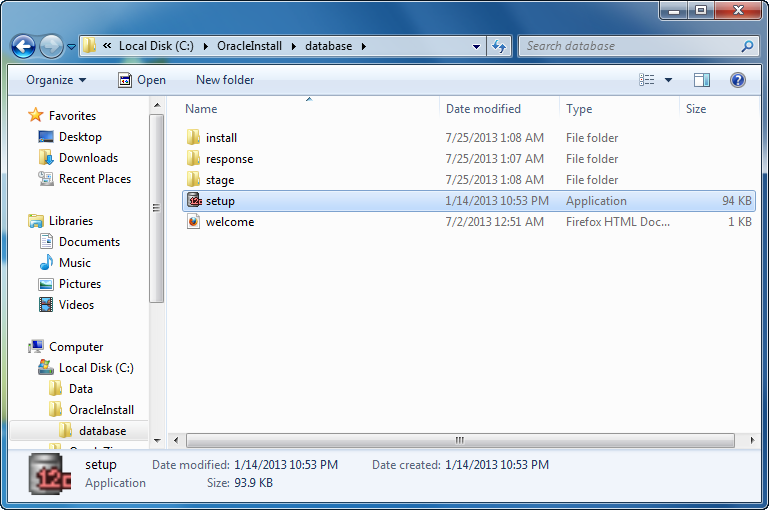
- The first thing you need to do is unzip the two zip files into a common directory. I’ve chosen to create an OracleInstall folder. Oracle creates a database folder inside it. Within the database folder, click the Setup file to launch the Oracle Installer.
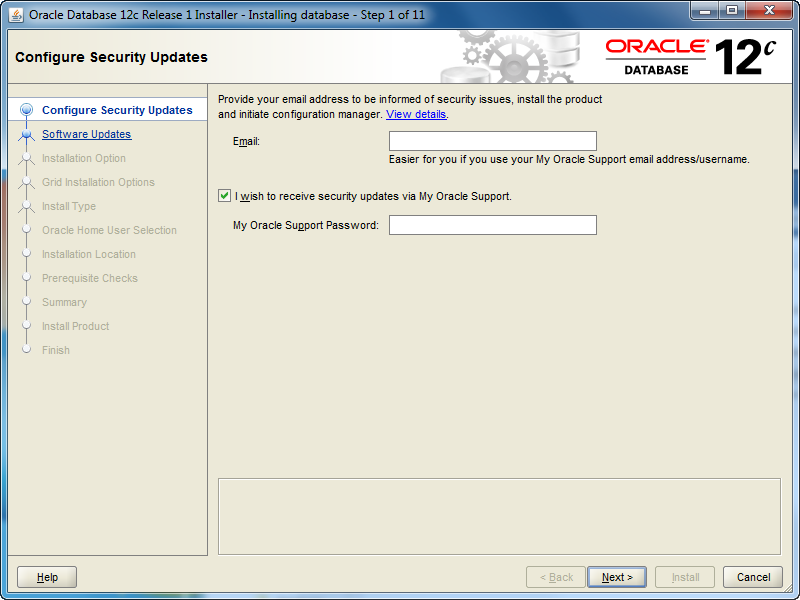
- After launching the Oracle Installer, the Configure Security Updates screen is your first stop. You may provide your email (attached to your Oracle Support Contract) and Oracle Support password, or uncheck the box and you can simply install a Desktop test environment. Click the Next button to proceed.
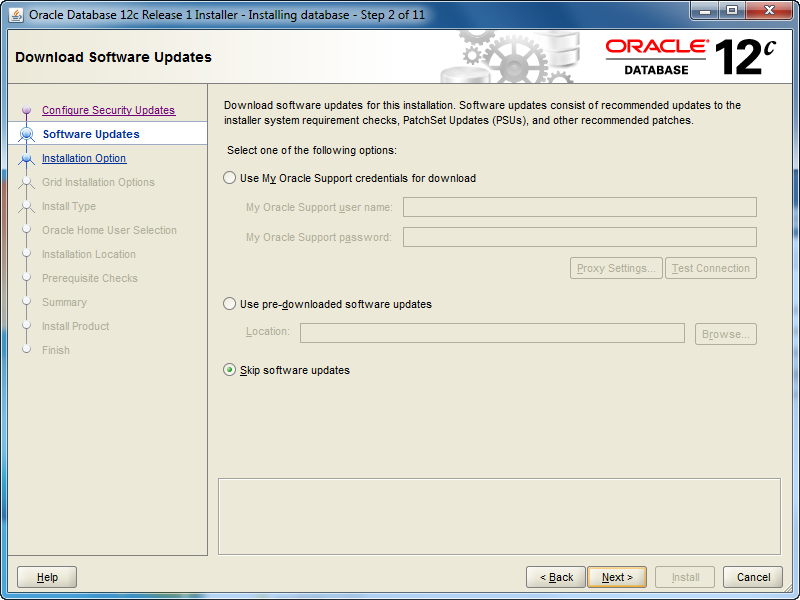
- The Software Updates is the next screen. If you want to check for updates, click and enter your Oracle Support credentials. If you want to install the base release, click the Skip software updates radio button. After making a choice about what you want to do with updates, click the Next button to proceed with the install.
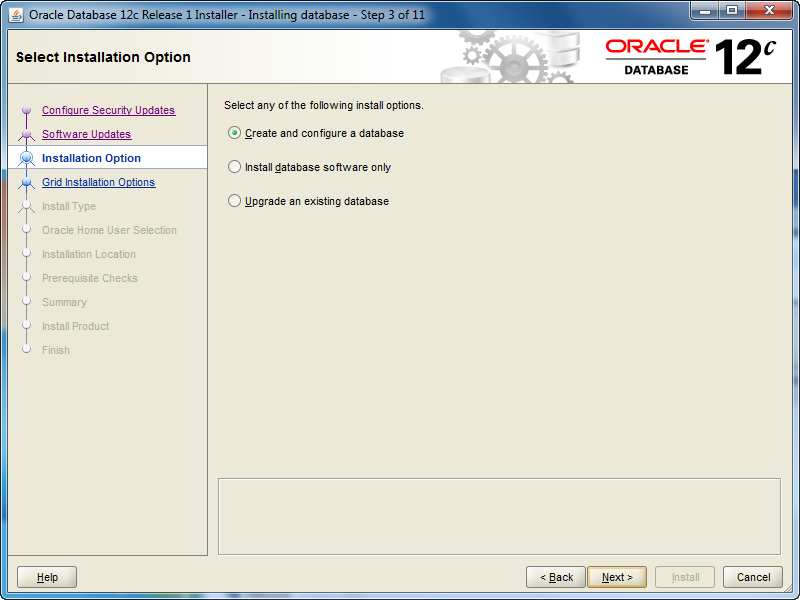
- The Installation Option screen lets you chose whether you want to Create and configure a database (sample database), Intall database software only, or Upgrade an existing database. Check the appropriate radio button and then click the Next button to proceed with the install.
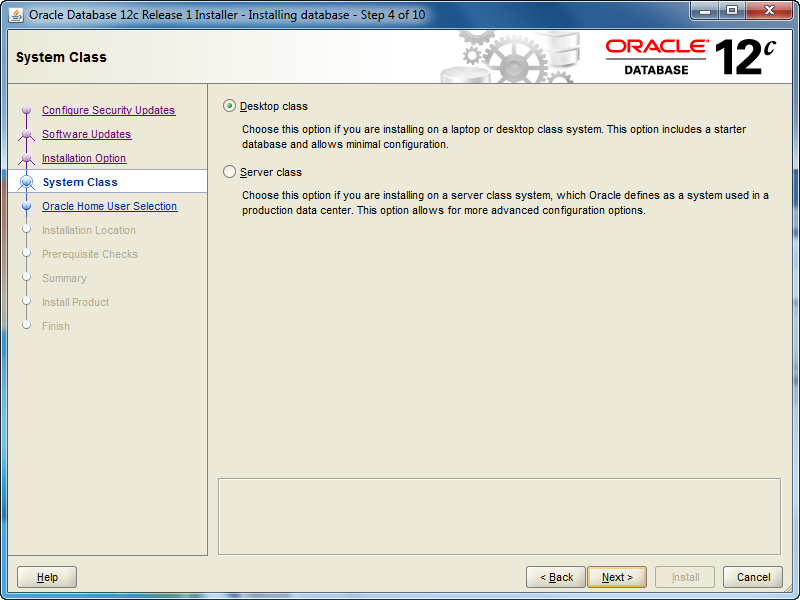
- The System Class screen lets you chose whether you want to install a Desktop class (ideal for develoers to play around in) or a Server class. Check the appropriate radio button and then click the Next button to proceed with the install.
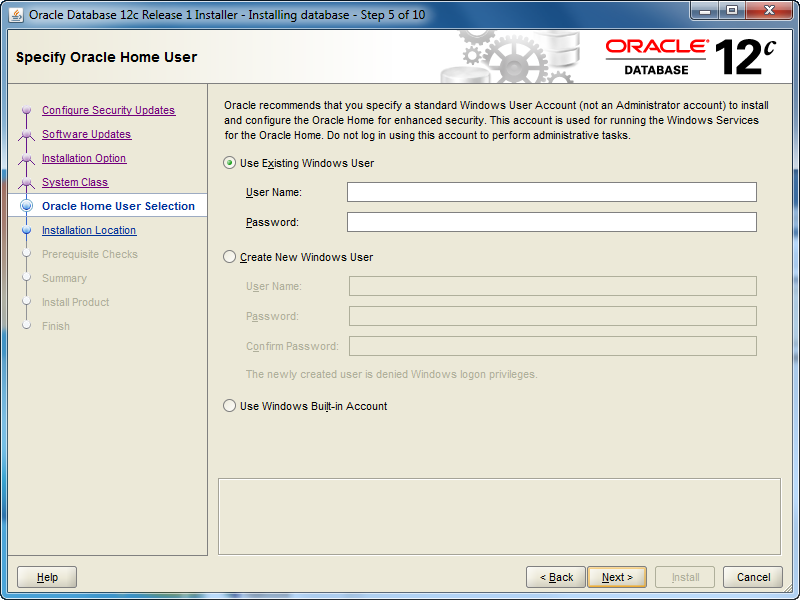
- The Oracle Home User Selection screen lets you chose whether you want to Use Existing Windows User (that’s fine if you created one previously), Create New Windows User (what I’ll do next), or Use Windows Built-in Account. Check the appropriate radio button and then click the Next button to proceed with the install.
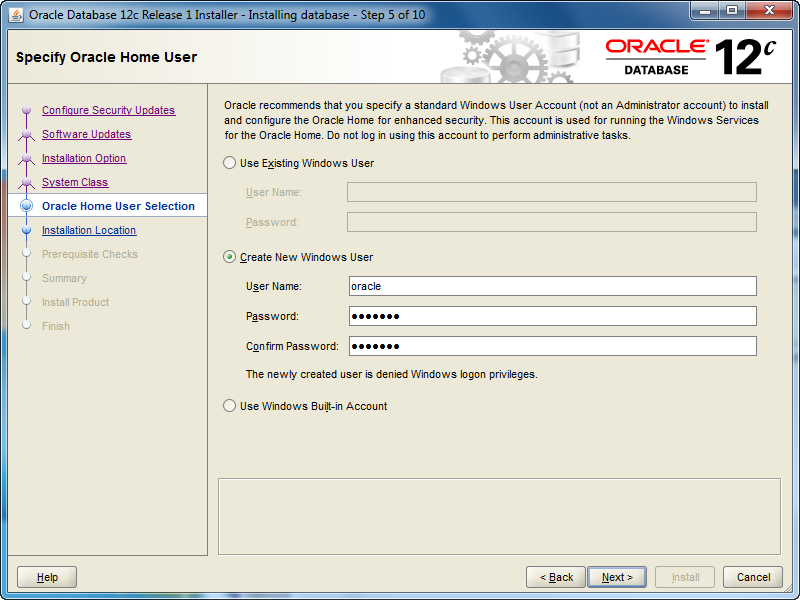
- The Oracle Home User Selection screen lets you Create New Windows User, and that’s what I’ve done with the oracle user (it could be whatever you like). Click the Next button to proceed with the install.
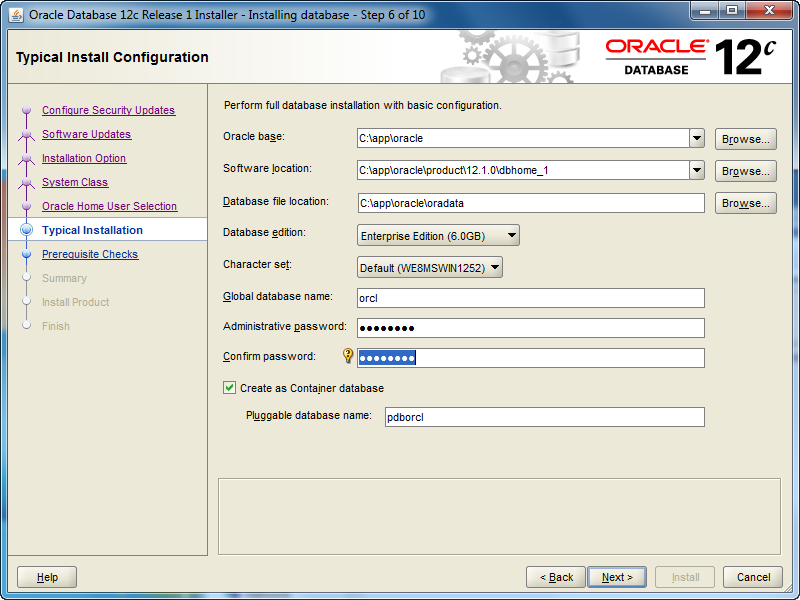
- The Typical Install Configuration screen lets you customize your installation. I’ve only opted to provide an Oracle compliant password while accepting the defaults. Click the Next button to proceed with the install.
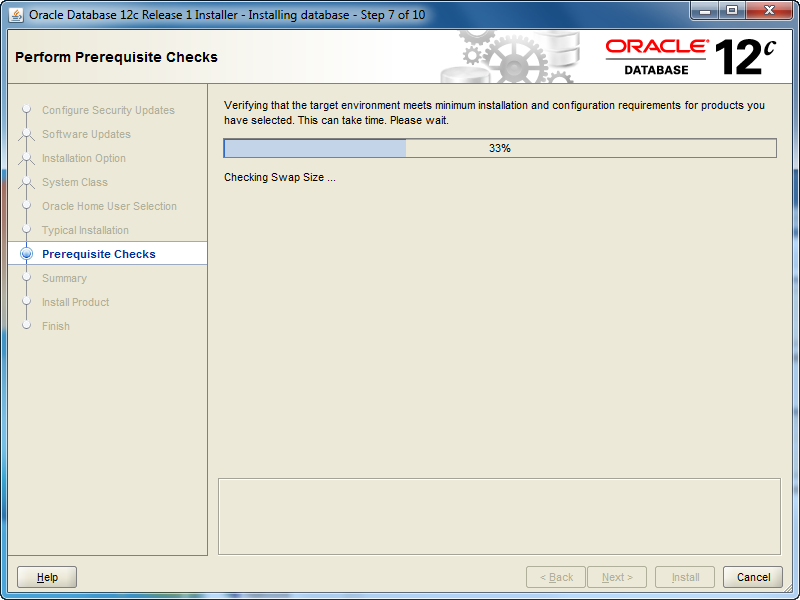
- The Perform Prerequisite Checks screen initially displays a task bar. You need some patience, it’ll show you the next screen if everything is fine.
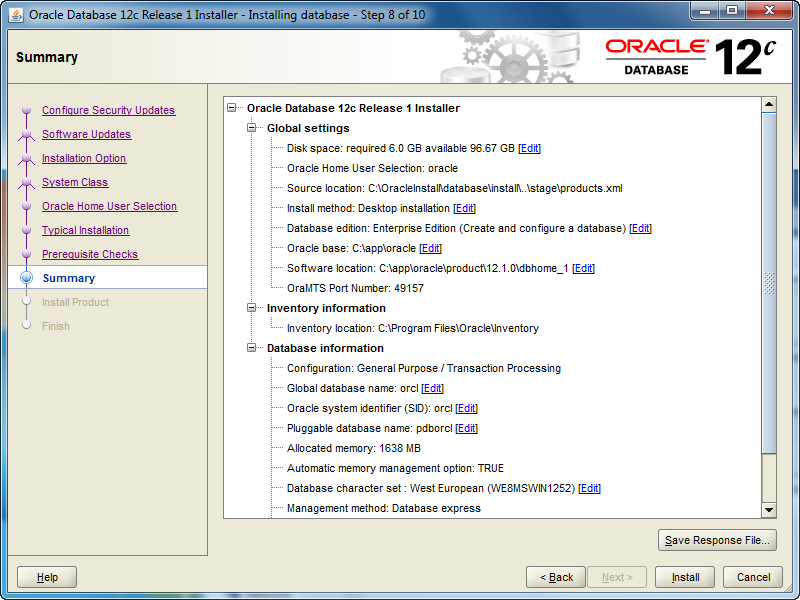
- The Summary screen tells you what you’re going to install. Read it over, save a copy for later, and when everything is right then click the Next button to install.
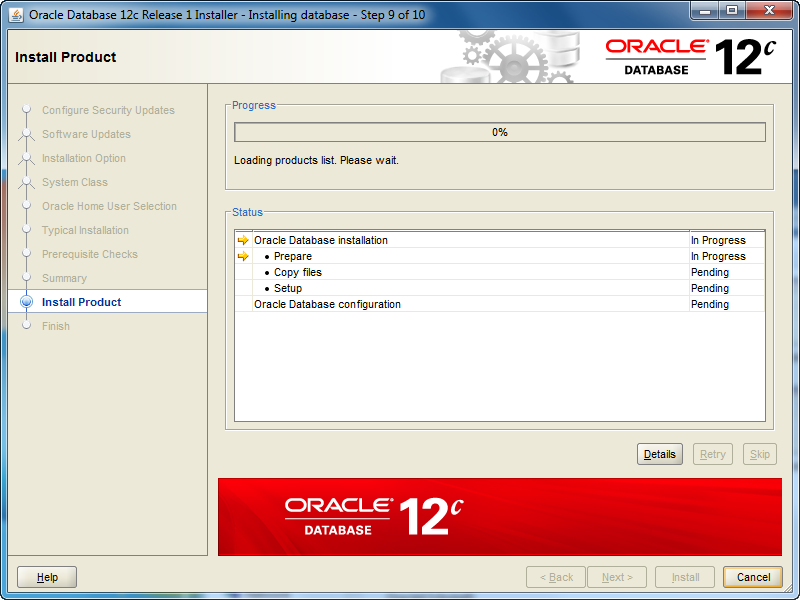
- The Install Product screen tells you what you’re installing and it can take some time. Don’t walk away too quickly because you’re most likely going to have to allow access for the installation to complete successfully.
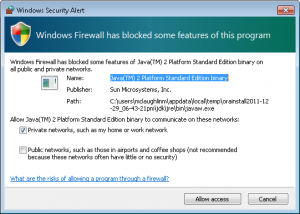
- You should see two Windows Security Alerts with the installation. Click the Allow access button to continue successfully.
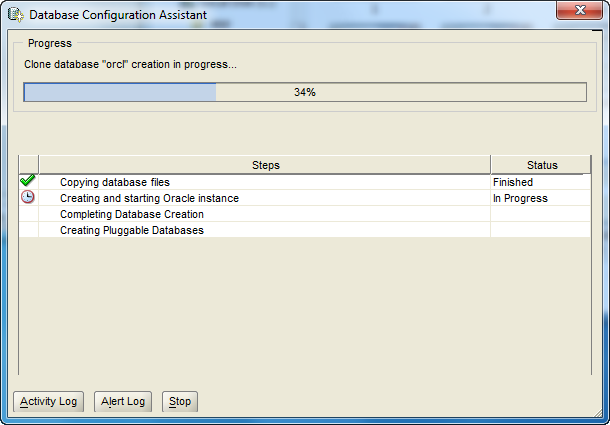
- The Database Configuration Assistant screen tells you that you’ve been successful to this point. Although, this is where several errors can occur when you failed to correctly configure Windows 7 before installation. This takes some time to run, here’s where you can take a break.
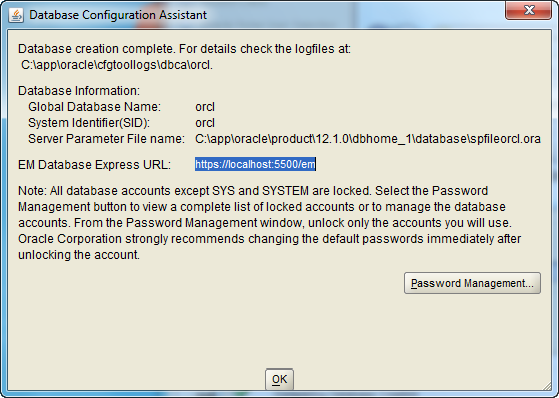
- The second Database Configuration Assistant screen lets you configure passwords for the database accounts. I’m skipping that by accepting the defaults and clicking the OK button to proceed.
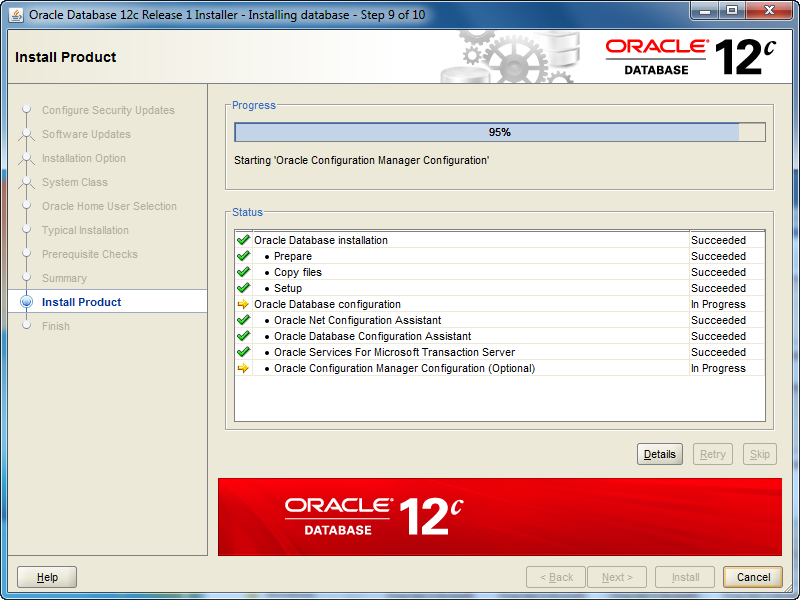
- The Install Product screen reappears while most of the database cloning operation has finished. At this point, it starts configuring the Oracle Enterprise Manager (OEM). It can take a couple minutes to complete. Simply monitor it.

- The Finish screen appears after everything has worked. Click the Close button to finish the install.
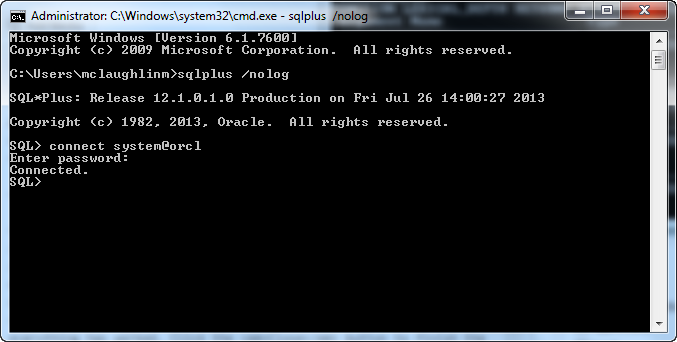
- Now, you can open a Windows command shell and call the
sqlplusexecutable with a/nologoption (denies login credentials form OS history files). Then, you can connect using the TNS orcl alias, which verifies your networking listener.ora and tnsnames.ora files are setup correctly. You should see the following in the command shell when the installation was successful.
C:\Users\mclaughlinm>sqlplus /nolog SQL*Plus: Release 12.1.0.1.0 Production on Fri Jul 26 02:00:19 2013 Copyright (c) 1982, 2013, Oracle. All rights reserved. Connected to: Oracle Database 12c Enterprise Edition Release 12.1.0.1.0 - 64bit Production With the Partitioning, OLAP, Advanced Analytics and Real Application Testing options SQL> connect system@orcl Enter password: Connected. |
Oracle 12c changes the dynamics on users. You now have two types of databases. One is a Container Database (CDB) and the other is a Pluggable Database (PDB). While Oracle’s default container users, like SYS, SYSTEM, and so forth, remain unchanged, you create new CDB users with a C##<user_name> preface. PDB users are a different matter, and they can retain the same format used previously for user-defined users. You set PDB users as the ADMIN user for a pluggable database when you provision it.
Subsequent to this post, I’ve posted how you can provision an Oracle 12c Pluggable Database (PDB), and you can find it in this post. AS always, I hope that this helps those trying to find a quick shortcut on reading the instructions. 😉
Site Blocked in Russia?
This is either too funny 🙂 or too sad. 🙁
An acquaintance sent me this image from a cyber cafe or hotel in Russia. It says that my blog site is prohibited and violates Russian law, and that they’re blocking my site in accordance with the Russian Federal Law of 27.07.2006 No. 149-FZ.
All I can say is, “Wow!” I didn’t know that stuff about writing programs, web pages, and solving generic database and operating system problems was so sensitive. For that matter, I didn’t know what I post would interest any government. I half wonder whether my friend’s pulling my leg.
As I reflect on it, could it be that Oracle post on how to write an encrypted object type? or, how with proper OS credentials how you reset MySQL’s root password? or, how to verify a socket in Perl? Nah, it’s probably the one on how to set a static IP in Windows – that’s truly sensitive stuff. 😉
Does anybody who reads the blog have any clue about what would drive the Russian government to block a technology blog site like mine? My serious guess is that there is somebody who hosts with the same provider who’s done something tacky.
SQL Like Comparisons
SQL tidbits are always valuable and highly searched for by newbies (as opposed to reading the SQL documentation). Sometimes we seasoned SQL developers take for granted little things like when a single- or multiple-character wildcard comparison works. It seems we know what newbies don’t. That you need a wildcard comparison operator not simply and equality comparison operator.
The question posed to me was, “Why doesn’t my wildcard comparison work?” Here’s a simplified example of their question.
SELECT 'Valid' AS "Test" FROM dual WHERE 'Treat' = 'Tre_t' OR 'Treet' = 'Tre_t'; |
Naturally, the answer is that the equality operator compares the strings based on their exact match (character sensitively in Oracle and character insensitively in MySQL). It needs to be rewritten by replacing the equals (=) comparison operator with the LIKE comparison operator. The following query does that:
SELECT 'Valid' AS "Test" FROM dual WHERE 'Treat' LIKE 'Tre_t' OR 'Treet' LIKE 'Tre_t' |
The same behavior exists for the multiple-character wildcard (%). I hope this helps those looking for this answer.
Oracle OpenWorld 2013
I registered yesterday for Oracle OpenWorld 2013, and I’ll look forward to seeing friends there. Having worked in the Oracle 12c beta for a year, I’ll be interested in the presentations. Also, hearing more about Java 7 at JavaOne. On the downside, I’m missing MySQL Connect this year.

Cloud computing offers many possibilities, and container and pluggable databases are a great solution. We’ve two new acronyms with the Oracle 12c release. A containerized database is a CDB, and a pluggable database is a PDB. I’m looking forward to seeing more about the provisioning of PDBs during the conference. If you’re new to the changes, check out CDBs and PDBs in Chapter 17 in the Oracle 12c Concepts manual.
A couple of my favorite new features are Identity and Invisible Columns. If you’re unfamiliar with the new features for application development, let me recommend this Oracle White Paper. Also, for reference I’ve covered identity and invisible columns thoroughly in the Oracle Database 12c PL/SQL Programming book, which will be available in December.
Missing the MySQL Connect 2013 Bus

Unfortunately, travel budgets preclude me attending MySQL Connect 2013 this year (alas, I’ll miss the bus). 🙁 It was hard because I’d like to see what’s up with MySQL (since I was a closet MySQL user at Oracle before they acquired it). Anyway, if you’re there, make sure you check out MySQL Workbench 6 for me. Also, I’d like to thank Dave Stokes for the AWESOME review he wrote on Amazon.com for my MySQL Workbench: Data Modeling & Development book. Maybe, I’ll get to go to MySQL Connect 2014 next year.
PHP PL/SQL Function Return
Somebody wanted an example of how to capture the return value of a PL/SQL function in a PHP script running against the Oracle Database. The trick is embedding the call inside an anonymous block program unit, like a prior example that I posted on handling an OUT mode variable in a PL/SQL Procedure.
Here’s the sample PHP code:
1 2 3 4 5 6 7 8 9 10 11 12 13 14 15 16 17 18 19 20 21 22 23 24 25 26 27 28 29 30 31 32 33 34 | <?php // Attempt to connect to your database. $c = @oci_connect("student", "student", "localhost/orcl"); if (!$c) { print "Sorry! The connection to the database failed. Please try again later."; die(); } else { // Initialize incoming message whether or not parameter sent. $msg_in = (isset($_GET['msg'])) ? $_GET['msg'] : "Cat got your keyboard?"; // Set the call statement, like a SQL statement. $sql = "BEGIN :b := echo(:a); END;"; // Prepare the statement and bind the two strings. $stmt = oci_parse($c,$sql); // Bind local variables into PHP statement, you MUST size OUT only variables. oci_bind_by_name($stmt, ":a", $msg_in); oci_bind_by_name($stmt, ":b", $msg_out, 80, SQLT_CHR); // Execute it and print success or failure message. if (oci_execute($stmt)) { print $msg_out; } else { print "Sorry, I can't do that Dave..."; } // Free resources. oci_free_statement($stmt); oci_close($c); } ?> |
As noted by Chris, you should size input parameters too. It could be qualified as a best practice when code re-executes with different values without rebinding.
It depends on this echo function:
1 2 3 4 5 6 | CREATE OR REPLACE FUNCTION echo ( message IN VARCHAR2 ) RETURN VARCHAR2 IS BEGIN RETURN 'Message ['||message||'] received.'; END; / |
Hope that this is what they needed, or you’re looking for as an answer to a search.
PHP DB Connection Class
PHP namespaces are new to PHP 5.3 (2012), but PHP class files have been around since PHP 5 was introduced. However, a couple students had problems creating working code from the many fragments published else where. Here’s my attempt to qualify it in a single post, running Zend Server Community Edition 6 and Oracle Database 11g.
The first thing you need to understand is a namespace. Namespaces exist to disambiguate (tell the difference between) class files that share the same name. After all, there are only so many obvious things to call class files. 😉 You can put classes, interfaces, functions, and constants in namespaces.
Let’s say you qualify your namespace as:
namespace Oracle\Db; |
You would make that the first thing in a PHP file, and shouldn’t include any HTML. You would then use a require(), require_once(), include(), or include_once() to add the class to a PHP file that uses the namespace qualified file. Then, you would construct a new instance of your PHP class. Together, these two steps would look like this:
require_once('Db.php'); $db = new \Oracle\Db\Db("Test Example","Author"); |
Notice the back slash in front of the Oracle namespace, and then you provide the namespace qualified file name (minus the file extension) and the class name. Since the namespace qualified file name and class name are the same, you see the double Db.
Here is a basic (starter) Oracle database connection class file, which you should store as Db.php in the Apache’s htdocs\Oracle directory:
<?php /* Declare a namespace, available from PHP 5.3 forward. */ namespace Oracle\Db; /* Create a Database Connection class. */ class Db { /* Declare class variables. */ protected $conn = null; protected $stmt = null; protected $prefetch = 100; /* Declare the default construction function. */ function __construct($module, $cid) { // Construct a connection and suppress errors and warnings. $this->conn = @oci_connect(SCHEMA, PASSWD, TNS_ID, CHARSET); // Check for a connection, and process the work. if (!$this->conn) { // Assign Oracle error message. $msg = oci_error(); /* The \ preceding Exception is necessary because of the introduction of namespaces in PHP 5.3. Without it, the program would attempt to call \Oracle\Exception rather than our little runtime example. */ throw new \Exception('Cannot connect to database: '.$msg['message']); } /* Set Oracle Call Interface parameters. * ========================================================= * - The oci_set_client_info() function replaces a call * to the DBMS_APPLICATION_INFO package, and much more * efficient. * - The oci_set_module_name() function allows you to * register the function name that calls the Db class. * - The oci_set_client_identifier() function and you * use it with DBMS_MONITOR.CLIENT_ID_TRACE_ENABLE, * which can be enabled with a call to the * DBMS_MONITOR.SERV_MOD_ACT_STAT_ENABLE. * ========================================================= */ oci_set_client_info($this->conn, "Administrator"); oci_set_module_name($this->conn, $module); oci_set_client_identifier($this->conn, $cid); } /* Declare execute function. */ public function execute($sql, $action, $bindvars = array()) { // Parse statement. $this->stmt = oci_parse($this->conn, $sql); // Check for a prefetch value greater than zero. if ($this->prefetch >= 0) { oci_set_prefetch($this->stmt, $this->prefetch); } // Read the list of bind variables and bind them. foreach ($bindvars as $bv) { oci_bind_by_name($this->stmt, $bv[0], $bv[1], $bv[2]); } // Set the action name for Oracle tracing and execute statement. oci_set_action($this->conn, $action); // Set to auto commit. oci_execute($this->stmt); } /* Declare function that fetches all. */ public function execFetchAll($sql, $action, $bindvars = array()) { $this->execute($sql, $action, $bindvars); oci_fetch_all($this->stmt, $res, 0, -1, OCI_FETCHSTATEMENT_BY_ROW); // Free statement resources. $this->stmt = null; return($res); } /* Declare the default destructor function. */ function __destruct() { if ($this->stmt) oci_free_statement($this->stmt); if ($this->conn) oci_close($this->conn); } } ?> |
Here is a credential file for Oracle, where the network SID is orcl (change orcl to xe when using the Oracle Express Edition):
1 2 3 4 5 6 7 | <?php // Connection variables. define('SCHEMA',"student"); define('PASSWD',"student"); define('TNS_ID',"localhost/orcl"); define('CHARSET',"AL32UTF8"); ?> |
If you do not know your the character set of your database, you can find it by logging in as the SYSTEM user, and running this query:
SELECT VALUE$ FROM sys.props$ WHERE name = 'NLS_CHARACTERSET'; |
Here’s the test program for the database connection class, save it as TestDb.php in your Apache’s htdocs\Oracle directory:
1 2 3 4 5 6 7 8 9 10 11 12 13 14 15 16 17 18 19 20 21 22 23 24 25 26 27 28 29 30 31 32 33 34 35 36 37 38 39 40 41 | <?php // Require once the namespace identified class and credentials files. require_once('Db.php'); require_once('credentials.php'); // Process the input parameter, which REALLY should be through a $_POST argument. (isset($_GET['last_name'])) ? $input = $_GET['last_name'] : $input = ''; /* Establish new connection. * ====================================================== * The namespace (PHP 5.3) is set in Db.php as follows: * namespace Oracle\Db; * * The namespace syntax needs to qualify the following * when you call it: * - A \ (back slash) before the namespace. * - The file name but not the file extension. * - The class name from the Db.php file. */ $db = new \Oracle\Db\Db("Test Example","Author"); // Assign query. $sql = "SELECT * FROM contact c WHERE c.last_name = :bv"; // Assign fetch to a result array. $result = $db->execFetchAll($sql, "Query Example", array(array(":bv", $input, -1))); // Open table and provide headers. print "<table border='1'>\n"; print "<tr><th>First Name</th><th>Last Name</th></tr>\n"; // Iterate through the rows. foreach ($result as $row) { $fname = htmlspecialchars($row['FIRST_NAME'], ENT_NOQUOTES, 'UTF-8'); $lname = htmlspecialchars($row['LAST_NAME'], ENT_NOQUOTES, 'UTF-8'); print "<tr><td>$fname</td><td>$lname</td></tr>\n"; } // Close the table. print "</table>"; ?> |
If you get the call to the namespace wrong, you’ll get a strange set of errors. Just make sure you understand the differences between declaring a namespace and calling a namespace.
You test the database connection class with the following URL on your localhost (substitute a server name if it’s not a development environment), provided you’ve created a table contact with a row where the last_name equals 'Sweeney':
http://localhost/Oracle/TestDb.php?last_name=Sweeney |
The following creates and seeds the contact table:
CREATE TABLE contact ( contact_id NUMBER , first_name VARCHAR2(10) , last_name VARCHAR2(10)); INSERT INTO contact VALUES (1,'Meghan','Sweeney'); INSERT INTO contact VALUES (2,'Matthew','Sweeney'); INSERT INTO contact VALUES (3,'Ian','Sweeney'); |
MySQL Book in Chinese
 One of my old students and lab assistants stopped by to show his fiancée the BYU-Idaho campus. It was a long trip since he lives in Macao, China.
He kindly brought me a copy of my Oracle Database 11g and MySQL 5.6 Developer Handbook in simplified Chinese. He’s holding it in the photo.
That makes three books translated into Chinese, which made my day. It’ll be interesting to see if the new MySQL Workbench: Data Modeling & Development book gets translated into Chinese too. Oddly, I never hear about this from the publisher first.
The cover emphasized only the Dolphin, not the Oracle logo material. It made me wonder, how many MySQL users there might be in China. If anybody from China catches the post, it would be great to hear about the MySQL Community in China.
Likewise, if anybody in China catches the post and reads the book, please let me know if you liked it. 😉 Naturally, let me know if you found any problems with it too. By the way, I keep an errata for the book here.
 Subscribe via RSS