SELECT-INTO variables
Somebody said, I shouldn’t have buried so much information in an answer to a question posed in a comment on a summary blog page. They suggested I put it in a regular blog post, and here it is with as little editing as possible.
The Ron Quizon user provided this sample code and a “What’s wrong with this PL/SQL program?”
1 2 3 4 5 6 7 8 9 10 11 12 13 | DECLARE v_name friends.fname%TYPE; v_grade friends.id%TYPE; BEGIN SELECT fname, grade INTO &ssv_name, v_grade FROM friends WHERE v_name = fname; DBMS_OUTPUT.PUT_LINE(NVL(v_name,'No Name ')||' has an id of '||NVL(v_grade, 0)); EXCEPTION WHEN NO_DATA_FOUND THEN DBMS_OUTPUT.PUT_LINE ('There is no record with '||'id 123'); END; |
While this certainly looks like a question from a class on PL/SQL or something from Steven Feuerstein’s PL/SQL question quizzes, I paused before answering it. The give away is the style is what Steven’s advocated for two decades. My guess is that it’s for Steven’s Q&A stuff, which means there’s no harm in answering it because I’m likely not defeating a teacher’s learning objective.
There are two core errors. The first error is an inappropriate assignment target on line #6 and the second is failing to assign a value to the local v_name variable. If you’d taken the time to create the tables and try it, you should generate an error like this:
SQL> / Enter VALUE FOR ssv_name: Harry OLD 6: INTO &ssv_name, v_grade NEW 6: INTO Harry, v_grade INTO Harry, v_grade * ERROR at line 6: ORA-06550: line 6, COLUMN 12: PLS-00201: identifier 'HARRY' must be declared ORA-06550: line 7, COLUMN 4: PL/SQL: ORA-00904: : invalid identifier ORA-06550: line 5, COLUMN 4: PL/SQL: SQL Statement ignored |
Also, at this point if you couldn’t see the error by quick inspection, it should be transparent to you. However, I don’t believe in playing games. Here’s the answer you need:
- The SELECT-INTO statement is an left-to-right assignment operator in SQL (available in all dialects), and the right operand (variable) or list of operands (variables) must be identifier(s). “Identifiers are words. They can be reserved words, predefined identifiers, quoted identifiers, user-defined variables, subroutines, or user-defined types. (Oracle Database 11g PL/SQL Programming on page #51).” In this case, as the right operand(s), they are user-defined variables.
- The & (ampersand) preceding
ssv_namemakes that a substitution placeholder or target, which is a SQL*Plus prompt for a value. The value provided at run-time is assigned to the SQL*Plus placeholder as a string literal during the preparing phase. That phase precedes the anonymous block parse, fetch, and execute cycle. Therefore, you raise a parsing error while running the anonymous block unless the&ssv_nameinput value is a valid locally declared variable or defined session bind variable name. - Assuming you input a valid identifier, the next problem is that the
WHEREclause uses an equality comparison operator against thev_namelocal variable, which holds a null value. That means theSELECT-INTOalways fails on a no data found error unless you add an assignment statement for thev_namevariable.
Anyway, I hope spelling it out in a formal blog post was helpful to someone in the future. If so, leave a comment and let me know.
MySQL Database Triggers
One of the students wanted an equivalent example to an Oracle DML trigger sample that replaces a white space in a last name with a dash for an INSERT statement. Apparently, the MySQL trigger example in the Oracle Database 11g and MySQL 5.6 Developer Handbook was a bit long. I have to agree with that because the MySQL DML trigger demonstrated cursors and loops in the trigger code.
Triggers can be statement- or row-level actions. Although some databases let you define statement-level triggers, MySQL doesn’t support them. MySQL only supports row-level triggers. Row-level triggers support critical or non-critical behaviors. Critical behavior means the trigger observes an insert, update, or delete that must be stopped, which means it raises an error. Non-critical behavior means the trigger observes a DML statement and logs it or implements a change during the context of the DML activity.
The first example shows you non-critical behavior. It observes an attempt to enter a two-part last name, and replaces the white space with a dash (you can find help on MySQL Regular Expressions in this other post). This means the trigger ensures compliance on how names are entered in the database, which should be protected in the web form (through JQuery or JavaScript) and the database.
DELIMITER $$ DROP TRIGGER IF EXISTS contact_insert$$ CREATE TRIGGER contact_insert BEFORE INSERT ON contact FOR EACH ROW BEGIN IF new.last_name REGEXP '^.* .*$' THEN SET new.last_name := REPLACE(new.last_name,' ','-'); END IF; END; $$ DELIMITER ; |
The problem with implementing a non-critical trigger is that the database performs the work but clerks entering the data don’t learn the business rule. A critical trigger simply disallows non-conforming data entry. The next program shows a critical behavior with an UPDATE statement row-level trigger. After all, won’t a data entry clerk update the entry with a white space after the INSERT statement didn’t?
Yes, that was a rhetorical question. Spelling out the business rule in the UPDATE statement row-level trigger should educate the persistent errant behavior. While letting the INSERT statement row-level trigger manage the behavior probably saves time for most end-users who make a casual mistake.
DELIMITER $$ DROP TRIGGER IF EXISTS contact_update$$ CREATE TRIGGER contact_update BEFORE UPDATE ON contact FOR EACH ROW BEGIN IF new.last_name REGEXP '^.* .*$' THEN SIGNAL SQLSTATE '42000'; END IF; END; $$ DELIMITER ; |
Somebody wanted to know why I choose SQLSTATE 42000. That’s because it signals an error in the SQL statement, and that’s the closest existing SQLSTATE to the actual behavior that exists. Moreover, the error identified by the critical trigger signals non-compliance with the application’s SQL standards that protects the data.
Hopefully, this helps somebody looking for a MySQL database trigger example that raises an exception. The example works with MySQL 5.5 forward because the critical trigger uses the SIGNAL feature, which was introduced in MySQL 5.5. Another article shows you how to leverage MyISAM tables to create a logging mechanism for critical event triggers, and you click this link to the MySQL Triggers with Logging blog entry.
Reset sequence START WITH
Two things contributed to this post. One was a student question about the difference between the MAX_VALUE of a sequence and the actual sequence value. The other was a comment on an earlier post addressing an NDS approach to resetting sequences.
The student wanted to understand why there were gaps in the sequence, since they created it with the default values, like this:
CREATE SEQUENCE sequence_name; |
A default sequence in an Oracle database sets the cache value to 20, which means you get gaps every time a new set is allocated. This Ask Tom question and answer holds that information.
The blog comment was on an NDS statement post. I wasn’t quite sure what the comment wanted because there really wasn’t a question or a complete code example. Having demonstrated how to dynamically drop and recreate a new sequence without a gap in a comment reply, I thought that was adequate.
Having pointed the student to the Ask Tom column and my answer, he wanted to know how to create a stored procedure to reset sequences dynamically. It took me a couple weeks to get back to this but here’s the procedure. The tricky element of the procedure is the “no binding values allowed” restriction placed on NDS statements that process DDL statements.
The procedure uses two local procedures and two local functinons. The local find_sequence finds a sequence name in the schema, and find_next_sequence function returns the next value. The local create_sequence and drop_sequence procedures respectively isolate the logic for dynamic drops and creates of the sequence.
Warning: The restriction with this design assumes that the table name and sequence name are linked by using the table name and an _ID suffix.
-- Declare an autonomous procedure to drop sequences. CREATE OR REPLACE PROCEDURE reset_sequence ( pv_table_name VARCHAR2 , pv_sequence_name VARCHAR2 , pv_cache_value NUMBER DEFAULT 0 ) IS -- Declares stubs to remove forward reference limits. PROCEDURE create_sequence ( pv_sequence_name VARCHAR2, pv_cache_value NUMBER ); PROCEDURE drop_sequence ( pv_sequence_name VARCHAR2 ); FUNCTION find_sequence ( pv_sequence_name VARCHAR2 ) RETURN VARCHAR2; FUNCTION find_next_sequence ( pv_table_name VARCHAR2 ) RETURN VARCHAR2; -- Drops sequence. PROCEDURE drop_sequence ( pv_sequence_name VARCHAR2 ) IS -- Declare local variable(s). lv_statement VARCHAR2(200); lv_sequence_name VARCHAR2(30); BEGIN /* Conditionally drop any sequence using a local function to find a valid sequence name before attempting to drop it. */ IF find_sequence(DBMS_ASSERT.SIMPLE_SQL_NAME(pv_sequence_name)) > 0 THEN /* Dynamically drop sequence, which requires concatenating the sanitized sequence name because you can't bind values on a DDL statement. */ lv_statement := 'DROP sequence '||DBMS_ASSERT.SIMPLE_SQL_NAME(pv_sequence_name); -- Execute statement immediately. EXECUTE IMMEDIATE lv_statement; END IF; END drop_sequence; -- Drops sequence. PROCEDURE create_sequence ( pv_sequence_name VARCHAR2 , pv_cache_value NUMBER ) IS -- Declare local variable(s). lv_statement VARCHAR2(200); lv_next_sequence NUMBER; BEGIN -- Assign the next sequence value if one exists. lv_next_sequence := find_next_sequence(pv_table_name); -- Check whether a cache value has been provided. IF pv_cache_value > 0 THEN /* Dynamically create a sequence statement with a new start value that is one greater than the highest value in the table that uses the sequence. */ lv_statement := 'CREATE SEQUENCE '||DBMS_ASSERT.SIMPLE_SQL_NAME(pv_sequence_name)||CHR(10) || 'MINVALUE 1 NOMAXVALUE INCREMENT BY 1'||CHR(10) || 'START WITH '||lv_next_sequence||' CACHE '||pv_cache_value||' NOORDER NOCYCLE'; ELSE /* Dynamically create a sequence statement with a new start value that is one greater than the highest value in the table that uses the sequence. */ lv_statement := 'CREATE SEQUENCE '||DBMS_ASSERT.SIMPLE_SQL_NAME(pv_sequence_name)||CHR(10) || ' MINVALUE 1 NOMAXVALUE'||CHR(10) || 'INCREMENT BY 1 START WITH '||lv_next_sequence||' NOCACHE NOORDER NOCYCLE'; END IF; -- Execute create sequence statement. EXECUTE IMMEDIATE lv_statement; END create_sequence; -- Finds whether a sequence exists. FUNCTION find_sequence ( pv_sequence_name VARCHAR2 ) RETURN VARCHAR2 IS -- Declare local return variable(s). lv_statement VARCHAR2(200); lv_sequence_name VARCHAR2(30); lv_return_value NUMBER := 0; -- Declare local system reference cursor. lv_cursor SYS_REFCURSOR; BEGIN -- Dynamically find sequence. lv_statement := 'SELECT sequence_name'||CHR(10) || 'FROM user_sequences'||CHR(10) || 'WHERE sequence_name = :seq_name'; OPEN lv_cursor FOR lv_statement USING DBMS_ASSERT.SIMPLE_SQL_NAME(pv_sequence_name); FETCH lv_cursor INTO lv_sequence_name; CLOSE lv_cursor; -- Convert valid sequence name to positive integer, which represents truth. lv_return_value := LENGTH(lv_sequence_name); -- Return value. RETURN lv_return_value; EXCEPTION -- Reached when DBMS_ASSERT check fails. WHEN OTHERS THEN RETURN lv_return_value; END find_sequence; -- Finds the next sequence value. FUNCTION find_next_sequence ( pv_table_name VARCHAR2 ) RETURN VARCHAR2 IS -- Declare local return variable(s). lv_statement VARCHAR2(200); lv_sequence_value NUMBER; lv_return_value NUMBER := 1; -- Declare local system reference cursor. lv_cursor SYS_REFCURSOR; BEGIN -- Dynamically find sequence. lv_statement := 'SELECT MAX('||DBMS_ASSERT.SIMPLE_SQL_NAME(pv_table_name)||'_ID) + 1'||CHR(10) || 'FROM '||DBMS_ASSERT.SIMPLE_SQL_NAME(pv_table_name); OPEN lv_cursor FOR lv_statement; FETCH lv_cursor INTO lv_sequence_value; CLOSE lv_cursor; -- Assign the return value from the NDS statement to a local return variable. lv_return_value := lv_sequence_value; -- Return value. RETURN lv_return_value; EXCEPTION -- Reached when DBMS_ASSERT check fails. WHEN OTHERS THEN RETURN lv_return_value; END find_next_sequence; -- Set precompiler instruction to run in a discrete process. PRAGMA AUTONOMOUS_TRANSACTION; BEGIN -- Conditionally drop sequence. drop_sequence(DBMS_ASSERT.SIMPLE_SQL_NAME(pv_sequence_name)); -- Create sequence. create_sequence(DBMS_ASSERT.SIMPLE_SQL_NAME(pv_sequence_name), pv_cache_value); END; / |
You can test this procedure with the following script, which includes COMMIT statements. Those are requires because the stand alone procedure runs independently of the current session as an autonomous procedure.
-- Conditionally drop existing tables and sequences. BEGIN FOR i IN (SELECT object_name, object_type FROM user_objects WHERE object_name IN ('SAMPLE','SAMPLE_S')) LOOP IF i.object_type = 'TABLE' THEN EXECUTE IMMEDIATE 'DROP TABLE '||i.object_name||' CASCADE CONSTRAINTS'; dbms_output.put_line(i.object_name); ELSIF i.object_type = 'SEQUENCE' THEN EXECUTE IMMEDIATE 'DROP SEQUENCE '||i.object_name; dbms_output.put_line(i.object_name); END IF; END LOOP; END; / -- Create test table. CREATE TABLE sample (sample_id NUMBER); -- Create test table. CREATE SEQUENCE sample_s; -- Insert a seeding row. INSERT INTO sample VALUES (10); -- Commit the values because the procedure is autonomous. COMMIT; -- Reset the sequence value. EXECUTE reset_sequence('SAMPLE','SAMPLE_S'); -- Insert the next sequence value. INSERT INTO sample VALUES (sample_s.nextval); -- Commit the values because the procedure is autonomous. COMMIT; -- Query the result to ensure the numbers are sequential. SELECT * FROM sample; EXECUTE reset_sequence('SAMPLE','SAMPLE_S',500); -- Insert the next sequence value. INSERT INTO sample VALUES (sample_s.nextval); -- Query the result to ensure the numbers are sequential. SELECT * FROM sample; |
Hope this helps anybody interested in automating the process of resetting a START WITH value of an Oracle sequence.
Common Lookup Tables 1
My students wanted an example of how to use a lookup table in the database. I thought it would be a great idea to create a simple example like this one. You can read further on my second post about common lookup tables.
A lookup table is a generalization that holds lists of values that support end-user selections. The following example uses a combination of the common_lookup_table and common_lookup_column columns to identify sets of value for drop down lists. The end-user selects a value from the list to identify a unique row, and returns a common_lookup_id surrogate key value.
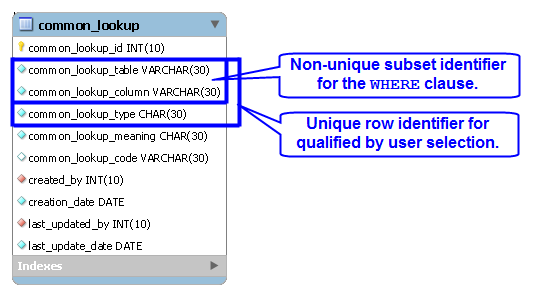
The sample code uses the table defined in the previous illustration. It uses a simple HTML drop down list, a PHP library.inc file, and an HTML display form. Below is the drop down selection set for a table and column value.
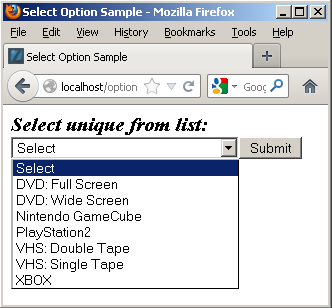
The drop down list code uses an insecure and trivial GET method to keep the example simple, as shown below:
<html>
<header>
<title>Select Option Sample</title>
<style type="text/css">
  /* Class tag element styles. */
  .label {min-width:200px;text-align:left;}
  .title {font-weight:bold;font-style:italic;font-size:125%;}
</style>
</header>
<body>
<?php

  // Include libraries.
  include_once("library.inc");

  // Declare input variables.
  $table_name = (isset($_GET['table_name'])) ? $_GET['table_name'] : $table_name = "item";
  $column_name = (isset($_GET['column_name'])) ? $_GET['column_name'] : $column_name = "item_type";

  // Call function.
  get_lookup($table_name, $column_name);

?>
</body>
</html> |
The library.inc file contains the logic to use a PHP prepared statement to read and render a SELECT HTML tag. It uses OPTION tags for all values in the drop down list. The values for the OPTION tag are the surrogate key values from the common_lookup_id column of the common_lookup table, and text elements are the descriptive values from the common_lookup_meaning column.
1 2 3 4 5 6 7 8 9 10 11 12 13 14 15 16 17 18 19 20 21 22 23 24 25 26 27 28 29 30 31 32 33 34 35 36 37 38 39 40 41 42 43 44 45 46 47 48 49 50 51 52 53 54 55 56 57 58 59 60 61 62 63 64 65 66 67 | <?php /* || Program Name: library.inc */ function get_lookup($table_name, $column_name) { // Assign credentials to connection. $mysqli = new mysqli("localhost", "student", "student", "studentdb"); // Check for connection error and print message. if ($mysqli->connect_errno) { print $mysqli->connect_error."<br />"; print "Connection not established ...<br />"; } else { // Initial statement. $stmt = $mysqli->stmt_init(); // Declare a static query. $sql = "SELECT cl.common_lookup_id\n" . ", cl.common_lookup_meaning\n" . "FROM common_lookup cl\n" . "WHERE common_lookup_table = ?\n" . "AND common_lookup_column = ?\n" . "ORDER BY 2"; // Prepare statement. if ($stmt->prepare($sql)) { $stmt->bind_param("ss",$table_name,$column_name); } // Loop through a result set until completed. do { // Attempt query and exit with failure before processing. if (!$stmt->execute()) { // Print failure to resolve query message. print $mysqli->error."<br />"; print "Failed to resolve query ...<br />"; } else { // Fetch a row for processing. $result = $stmt->get_result(); // Print the opening select tag. print '<form method="post" name="myForm" action="submitItemType.php">'; print '<div class="title">Select unique from list:</div>'; print '<select name="item_type" size="1" onChange="change(this.form.item_type)">'; print "<option class=label value='' selected>Select </option>"; // Read through the rows of the array. while( $row = $result->fetch_array(MYSQLI_NUM) ) { print "<option class=label value='".$row[0]."'>".$row[1]."</option>"; } } } while($stmt->next_result()); // Print the closing HTML table tag. print '</select>'; print '<input name="submit" type="submit" value="Submit">'; print '</form>'; // Release connection resource. $mysqli->close(); } } ?> |
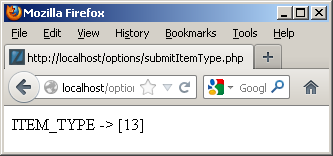
The display form action calls the submitItemType.php program, which displays the value from the OPTION tag selected in the prior form. The code for the display is:
<html> <head> </head> <body> <?php print "ITEM_TYPE -> [".$_POST['item_type']."]"; ?> </body> </html> |
It generates:
Hope this helps illustrate the value of and mechanics of lookup tables. As mentioned above, there’s a newer post on how to leverage common_lookup tables with more working code.
Why Stored Programs?
Why should you use stored programs? Great question, here’s my little insight into a situation that I heard about in a large organization.
A very large organization is having a technology argument. In someway, like politics, half-truth drives this type of discussion. This company has hundreds of databases and they’re about half SQL Server and Oracle. The argument (half-truth) states that using T-SQL or PL/SQL yields “spaghetti” code!
It seems like an old argument from my perspective. After all, I’ve been working with T-SQL and PL/SQL for a long time. Spaghetti code exists in every language when unskilled programmers solve problems but the point here is one of software architecture, and an attempt to malign stored programming in general. Let’s examine the merit of the argument against stored programs.
First of all, the argument against stored programs is simply not true. SQL DML statements, like the INSERT, UPDATE, and DELETE statements should maintain ACID compliant interactions with a single table in a database. Unfortunately, the same statements create anomalies (errors) in a poorly designed database.
Stored programs provide the ability to perform ACID compliant interactions across a series of tables in a database. They may also hide database design errors and protect the data from corruption. The same can’t be said for Java or C# developers. Java and C# developers frequently fail to see database design errors or they overlook them as inconsequential. This type of behavior results in corrupt data.
It typically raises cost, errors, and overall application complexity when key logic migrates outside the database. If you’re asking why, that’s great. Here are my thoughts on why:
- Making a Java or C# programmer responsible for managing the transaction scope across multiple tables in a database is not trivial. It requires a Java programmer that truly has mastered SQL. As a rule, it means a programmer writes many more lines of logic in their code because they don’t understand how to use SQL. It often eliminates joins from being performed in the database where they would considerably outperform external language operations.
- Identifying bottlenecks and poor usage of data becomes much more complex for DBAs because small queries that avoid joins don’t appear problematic inside the database. DBAs don’t look at the execution or scope of transactions running outside of the database and you generally are left with anecdotal customer complaints about the inefficiency of the application. Therefore, you have diminished accountability.
- Developing a library of stored procedures (and functions) ensures the integrity of transaction management. It also provides a series of published interfaces to developers writing the application logic. The published interface provides a modular interface, and lets developers focus on delivering quality applications without worrying about the database design. It lowers costs and increases quality by focusing developers on their strengths rather than trying to make them generalists. That having been said, it should never mask a poorly designed database!
- Service level agreements are critical metrics in any organization because they compel efficiency. If you mix the logic of the database and the application layer together, you can’t hold the development team responsible for the interface or batch processing metrics because they’ll always “blame” the database. Likewise, you can’t hold the database team responsible for performance when their metrics will only show trivial DML statement processing. Moreover, the DBA team will always show you that it’s not their fault because they’ve got metrics!
- Removing transaction controls from the database server generally means you increase the analysis and design costs. That’s because few developers have deep understanding of a non-database programming language and the database. Likewise, input from DBAs is marginalized because the solution that makes sense is disallowed by design fiat. Systems designed in this type of disparate way often evolve into extremely awkward application models.
Interestingly, the effective use of T-SQL or PL/SQL often identifies, isolates, and manages issues in poorly designed database models. That’s because they focus on the integrity of transactions across tables and leverage native database features. They also act like CSS files, effectively avoiding the use of inline style or embedded SQL and transaction control statements.
Let’s face this fact; any person who writes something like “spaghetti” code in the original context is poorly informed. They’re typically trying to sidestep blame for an existing bad application design or drive a change of platform without cost justification.
My take on this argument is two fold. Technologists in the organization may want to dump what they have and play with something else; or business and IT management may want to sidestep the wrath of angry users by blaming their failure on technology instead of how they didn’t design, manage, or deliver it.
Oh, wait … isn’t that last paragraph the reason for the existence of pre-package software? 😉 Don’t hesitate to chime in, after all it’s just my off-the-cuff opinion.
Open World 2012
In prior years a daily update from Open World was possible, but this year my schedule was too full to support it. This is my compendium of thoughts about MySQL Connect, JavaOne, and Open World 2012.
MySQL Connect was great – good sessions re-enforcing the positive investments Oracle is making in the product. I’ll leave to others to qualify changes in what elements of technology are opened or closed along the road to a better MySQL. The announcement of Connector/Python 1.0 GA on Saturday was great news and as a community we owe a lot to Greet Vanderkelen.
NoSQL is a hot topic along with using JSON objects and it was interesting hearing of some unequal testing paradigms to position non-Oracle solutions to be “better” than Oracle solutions. Naturally, the MongoDB was the elephant in the room during those conversations. Some of the discussions seemed more like political rants than technical dialog. A great spot to start with NoSQL and JSON would be downloading Oracle’s MySQL 5.6 Release Candidate.
 There were also more PostgreSQL conversations this year and fairly accurate comparisons between it and Oracle or MySQL from folks. It certainly looks like it may gain more ground.
Java 7 is awesome, and my favorite feature is clearly NIO2, reinforced at JavaOne. NIO2 brings static methods to interactions with external directory and file sources. It removes directories from the files class, which is long overdue. The nature of those static methods also happen to fit within the definition of Java code that lives inside the Oracle database and gives me a whole host of thoughts about potential in Oracle Database 12c.
Larry Ellison’s keynote was impressive because it gives us a clear vision of Oracle’s direction and Duncan Davies captured the keynote well in his blog. The continued presence of Red Hat and VMWare offers interesting reality checks to their key contributions to world wide implementation of the Oracle technical stack.
Issues that seem most critical to those I’ve chatted with are storage, security, tools, and development languages. A nice update on security can be found in the new edition of Hacking Exposed 7: Network Security Secrets & Solutions
On the forthcoming Oracle 12c release, Information Week just released a good summary view. The introduction of the R programming language on the Exadata Server leads me to wonder about what uses may magically appears in Oracle Enterprise Manager down the road. The TIOBE Index for September 2012 doesn’t list the R language in the top 20 programming languages but there’s always the future. No mention of Erlang programming language at any of the conferences that I caught but it’s inevitably on the horizon as application servers evolve.
Now we wait for the Oracle Database 12c release, which looks like something in the very short term. Perhaps right after the holidays …
MySQL Workbench Book
 Finally, I finished writing the MySQL Workbench book. It’ll be available next spring. Now it’s time to leave for the plane, fly to San Francisco, and see everyone at MySQL Connect.
I look forward to meeting folks, I’ll be presenting after MySQL Connect for those staying for Oracle Open World. My presentation is at Oracle Develop on Monday, 10/1/12 from 16:45 – 17:45, in the Marriott Marquis – Foothill F. As I mentioned in an earlier post, you can probably catch me in Moscone West at the bookstore. The publisher requests we attend book signings. 😉
Unfortunately as a speaker I need to convert my Keynote to Powerpoint, and had to purchase, install, and update Microsoft Office 2011 on my Mac. Open Office and Keynote weren’t on the approved list, alas …
Update: The book published 4/9/2013 (a bit of a delay from completing the write, eh?). It’s available on Safari as of yesterday.
MySQL 5.0 migration bug
At present, you can’t use the MySQL Workbench migration tool to migrate MySQL 5.0 to MySQL 5.5, as documented in Bug 66861. The only documentation reference that I could find that references the mysql.proc table. Since the physical definition of the mysql.proc table changes across the MySQL 5.0, 5.1, and 5.6 releases, I modified my documentation Bug 66886 to suggest providing online documentation (as a feature request) for the mysql, information_schema, and performance_schema tables across all releases.
The actual definition of the mysql.proc table for MySQL 5.0.91 holds 16 columns not 20 columns as presently expected by the MySQL Workbench migration tool, and is summarized below:
| Field | Type | Null | Key |
|---|---|---|---|
| db | char(64) | NO | PRI |
| name | char(64) | NO | PRI |
| type | enum(‘FUNCTION’,’PROCEDURE’) | NO | PRI |
| specific_name | char(64) | NO | |
| language | enum(‘SQL’) | NO | SQL |
| sql_data_access | enum(‘CONTAINS_SQL’,…) | NO | CONTAINS_SQL |
| is_deterministic | enum(‘YES’,’NO’) | NO | NO |
| security_type | enum(‘INVOKER’,’DEFINER’) | NO | DEFINER |
| param_list | blob | NO | |
| returns | char(64) | NO | |
| body | longblob | NO | |
| definer | char(77) | NO | |
| created | timestamp | NO | CURRENT_TIMESTAMP |
| modified | timestamp | NO | 0000-00-00 00:00:00 |
| sql_mode | set(‘REAL_AS_FLOAT’,…) | NO | |
| comment | char(64) | NO |
I found out about the issue through a comment on my blog from Marc, who was trying to migrate his production instance. I hope this provides a heads-up to anybody else attempting to migrate a MySQL 5.0 database to a MySQL 5.5. The good news is that the MySQL Workbench team appears to be actively working the issue.
Bulk Transfer Works
As many already know, I’ve been trying to get the MySQL Workbench migration feature working between Microsoft SQL Server 2012 and MySQL 5.5. There are a number of features added to the 5.2.43 point release, and one led me to believe that the Migration tool expects to find the data in a schema of its own, as opposed to the dbo schema. Having made that change in Microsoft SQL Server, it did appear to have a positive impact on the migration and when I corrected a character set mismatch it worked perfectly!
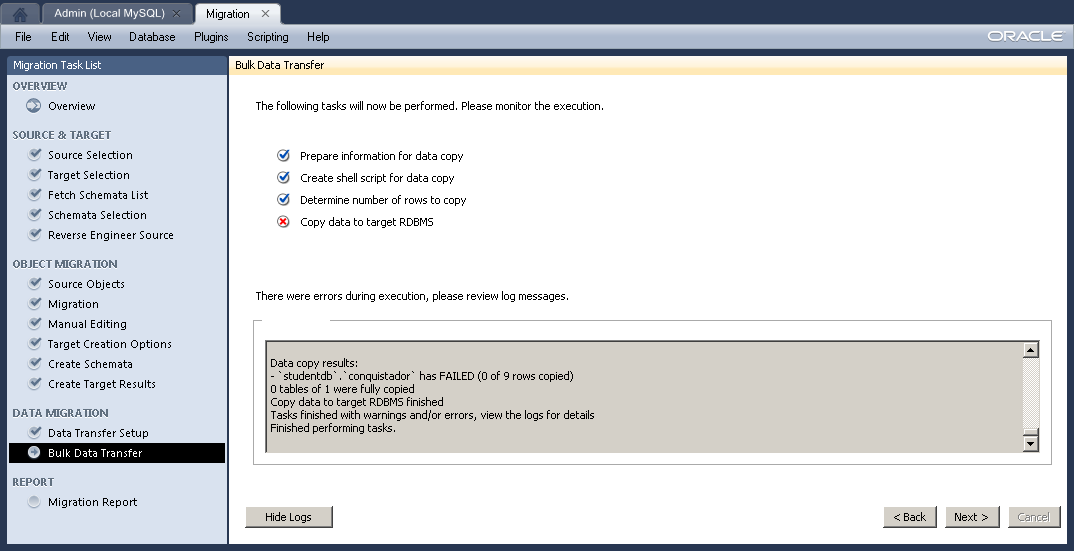 MySQL Workbench successfully migrated the schema and table but failed to migrate the data because of a character set mismatch. I updated Bug 66516 the log file from the character set mismatch before I retyped all 9 test rows to make sure they were in a
 latin1 character set.
I shortened the original log file because the actual log had over 2,000 blanks line :-(. That’s probably something that should be fixed in the code too.
Starting... Prepare information for data copy... Prepare information for data copy done Create shell script for data copy... Table copy script written to C:\Users\McLaughlinM\Desktop\copy_migrated_tables.cmd Create shell script for data copy done Determine number of rows to copy.... Counting number of rows in tables... wbcopytables.exe --count-only --passwords-from-stdin --odbc-source=DSN=SQL Server ODBC;DATABASE=;UID=sa --table [studentdb] [studentdb].[conquistador] 18:29:13 [INF][ copytable]: Opening ODBC connection to 'DSN=SQL Server ODBC;DATABASE=;UID=sa;PWD=XXX' 18:29:14 [INF][ copytable]: ODBC connection to 'DSN=SQL Server ODBC;DATABASE=;UID=sa;PWD=' opened 9 total rows in 1 tables need to be copied: - [studentdb].[studentdb].[conquistador]: 9 Determine number of rows to copy finished Copy data to target RDBMS.... Migrating data... wbcopytables.exe --odbc-source=DSN=SQL Server ODBC;DATABASE=;UID=sa --target=student@mclaughlinsql:3306 --progress --passwords-from-stdin --thread-count=1 --table [studentdb] [studentdb].[conquistador] `studentdb` `conquistador` [conquistador_id], [conquistador], [actual_name], [nationality] `studentdb`.`conquistador`:Copying 4 columns of 9 rows from table [studentdb].[studentdb].[conquistador] ERROR: `studentdb`.`conquistador`:Inserting Batch: Incorrect string value: '\x9Acak' for column 'actual_name' at row 7 `studentdb`.`conquistador`:Finished copying 0 rows in 0m00s 29:15 [INF][ copytable]: Opening ODBC connection to 'DSN=SQL Server ODBC;DATABASE=;UID=sa;PWD=XXX' 29:16 [INF][ copytable]: ODBC connection to 'DSN=SQL Server ODBC;DATABASE=;UID=sa;PWD=' opened 29:16 [INF][ copytable]: Connecting to MySQL server at mclaughlinsql:3306 with user student 29:16 [INF][ copytable]: Connection to MySQL opened Copy helper has finished Data copy results: - `studentdb`.`conquistador` has FAILED (0 of 9 rows copied) 0 tables of 1 were fully copied Copy data to target RDBMS finished Tasks finished with warnings and/or errors, view the logs for details Finished performing tasks. |
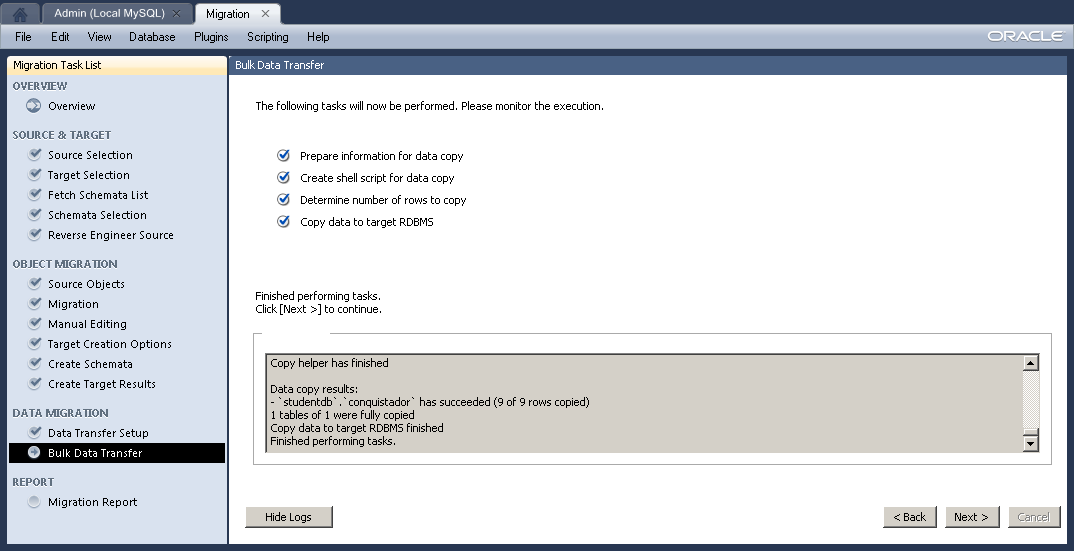 Originally, I thought the failure was due to the extended ASCII characters in the Microsoft SQL Server table. It still failed when I took all of the extended characters out. However, Alfredo suggested it was a character set issue, which is obvious when I looked more closely at the log –
 '\x9Acak' is clearly an incorrect string. I retyped the INSERT statement for the nine rows and it worked perfectly. Naturally, I’ve updated open Bug 66516 with the log file.
If you’re curious about the Microsoft SQL Server configuration check this post.
Setup SQL Server Schema
After you’ve installed Microsoft SQL Server 2012 and created a database schema, you still need to setup or configure the database schema. This is the recommended Microsoft SQL Server Best Practice.That means you must grant permissions to a user to work in the database schema, otherwise you get the following type of error message.
Msg 2760, Level 16, State 1, Line 1 The specified schema name "studentdb" either does not exist or you do not have permission to use it. |
You receive the foregoing error message when trying to create a table in a database schema that hasn’t been assigned a user or role. This typically occurs after you create a new database schema, which has a <default> owner.
For those new to the idea of schemas (or scheme), they were introduced by Microsoft in SQL Server 2005. Here are some rules of thumb on schemas:
- Database schema names are distinct from user names.
- Multiple users may share a schema, which means it can hold objects owned by multiple users.
- Permissions to act inside the schema may be granted to individual users, and you have a varied set of privileges that you can assign to users.
- Ownership of objects in a schema can be transferred using the
ALTER SCHEMAcommand. - Ownership of a schema can be changed by using the
ALTER AUTHORIZATIONcommand. - Database users can be dropped without changing objects in schemas, which is a big difference between Oracle and SQL Server.
The following example occurs when you try to create a table in a studentdb database schema. It doesn’t expose you to the SQL syntax but demonstrates how to manage the changes within the SQL Server Management Studio (SSMS).
By the way, you start the new schema creation process by right clicking on the Databases folder in the SQL Server Management Studio. Then, you give the new database schema a name in the New Database dialog; and click the OK button to complete the process.
The balance of the instructions show you how to create a user account that will map to your new database schema. It assumes you’ve installed it on your local machine and have privileges through local Windows Authentication to the System Administrator (sa) account. You create a student user account, assign the studentdb database schema, log off as the System Administrator, log in as the new user, conditionally drop a table from the studentdb schema, create a table in the studentdb schema, and query the results. It’s also possible to create the user first, database second, and assign the database as the default database for the user account.
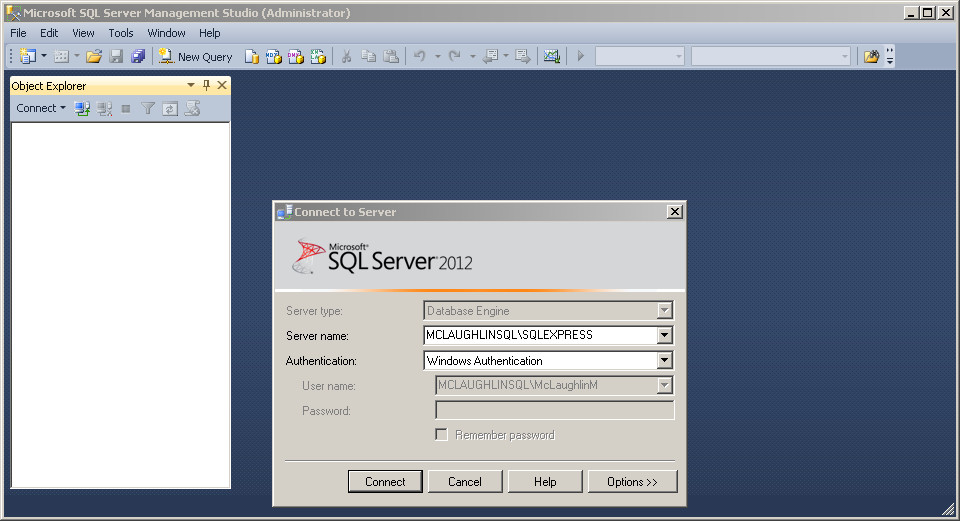
- The first screen asks you to authenticate as the System Administrator using Windows Authentication. Click the Connect button to connect to the SQL Server Management System (SMSS).
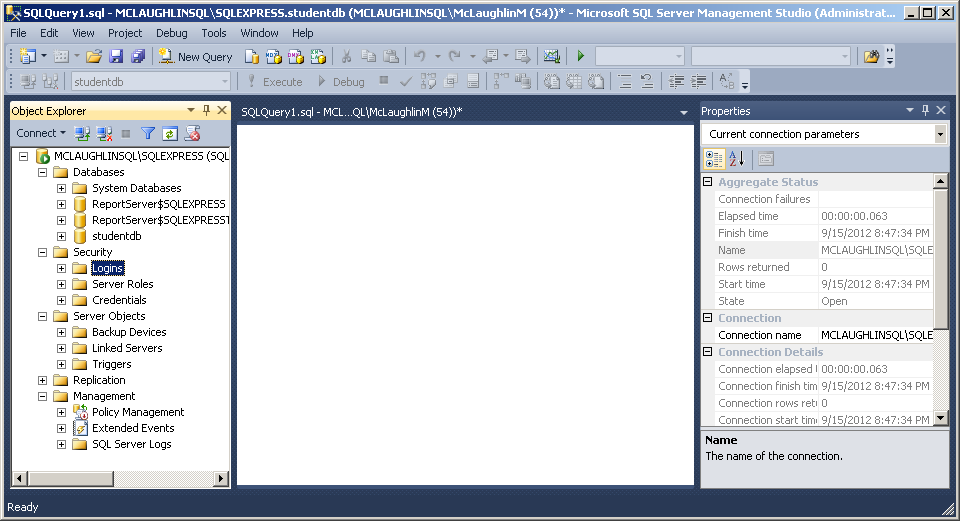
- Click the Security folder and expand the subordinate list of folders. Right click on the Logins folder and click on the New Login option in the context menu. It launches a new dialog where you enter a user account.
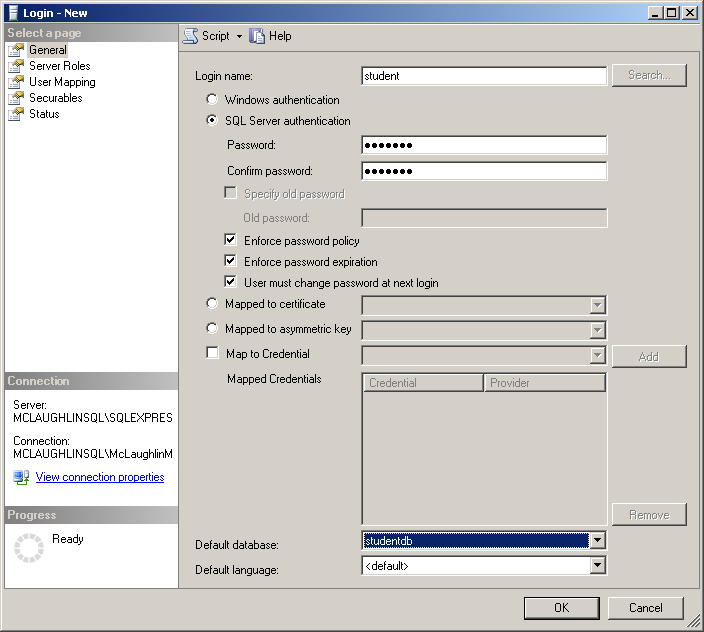
- On the General page of the Login – New dialog, enter a Login name and click the SQL Server authentication radio button. Clicking the radio button enables the Password and Confirm password fields where you enter the same password twice. Click the Default database drop down and choose the studentdb created earlier. Click the Server Roles page to continue.
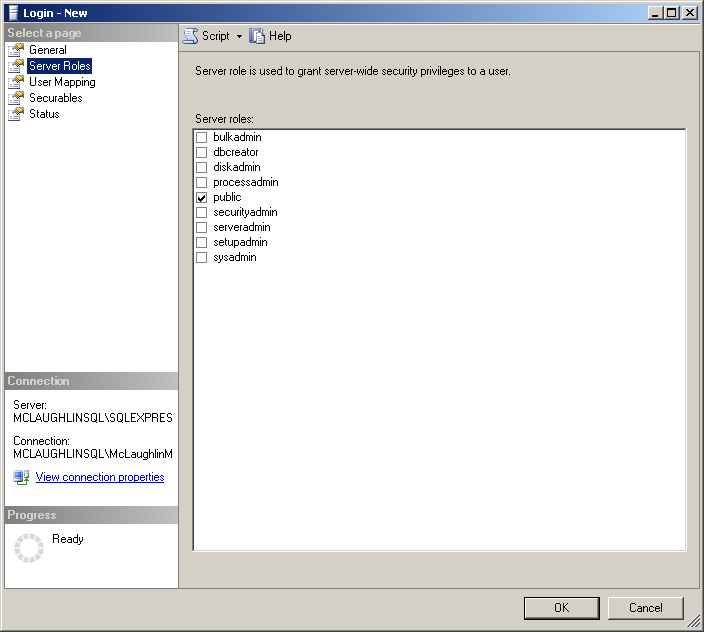
- On the Server Roles page, ensure that only the public server role is checked. Click on the User Mapping page to continue.
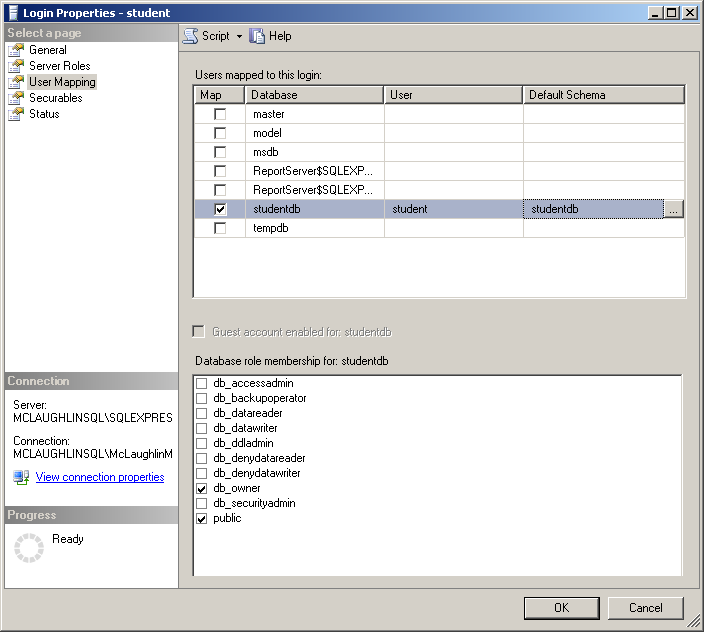
- On the User Mapping page, click the Map check box for the
studentdbdatabase, enterstudentin the User field, and enterstudentdbin the Default Schema field. Click the db_owner and public database role membership forstudentdb. Click on the Securables page to continue.
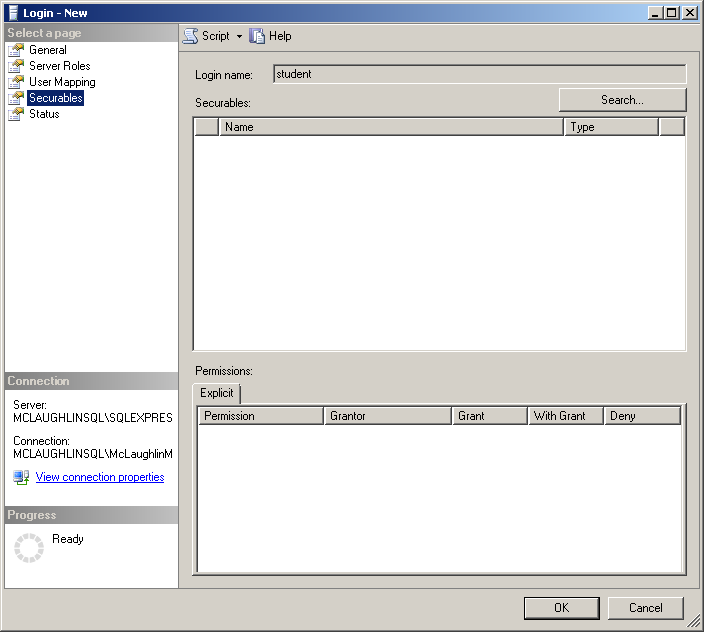
- There are no required changes on the Securables page. Check that screen matches the illustration at the left, and click on the Status page to continue.

- There are no required changes on the Status page. Check that screen matches the illustration at the left, and click on the OK button to complete creating the user. Then, exit the SQL Server Management Studio as the System Administrator.
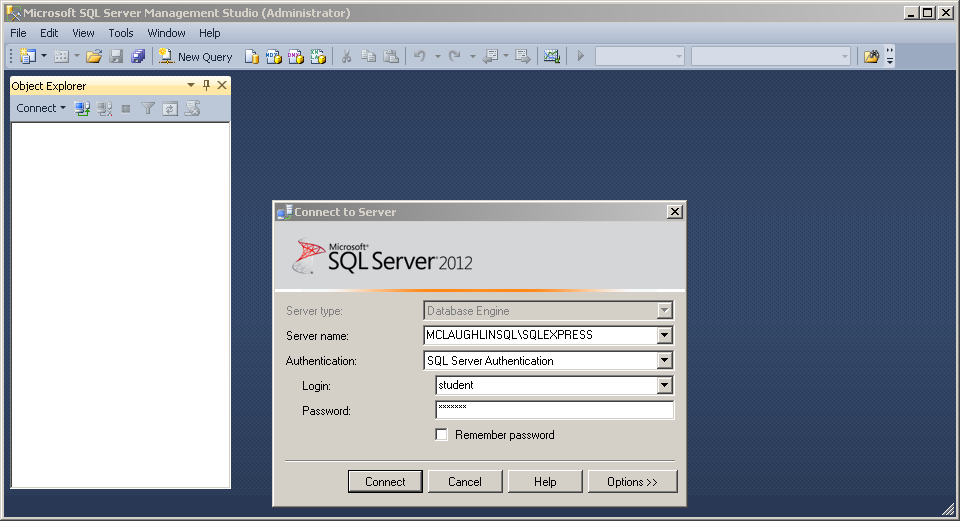
- Launch the SQL Server Management Studio, choose SQL Server Authentication as the authentication method, and enter the
studentLogin (user name) and Password before clicking the Connect button to continue.
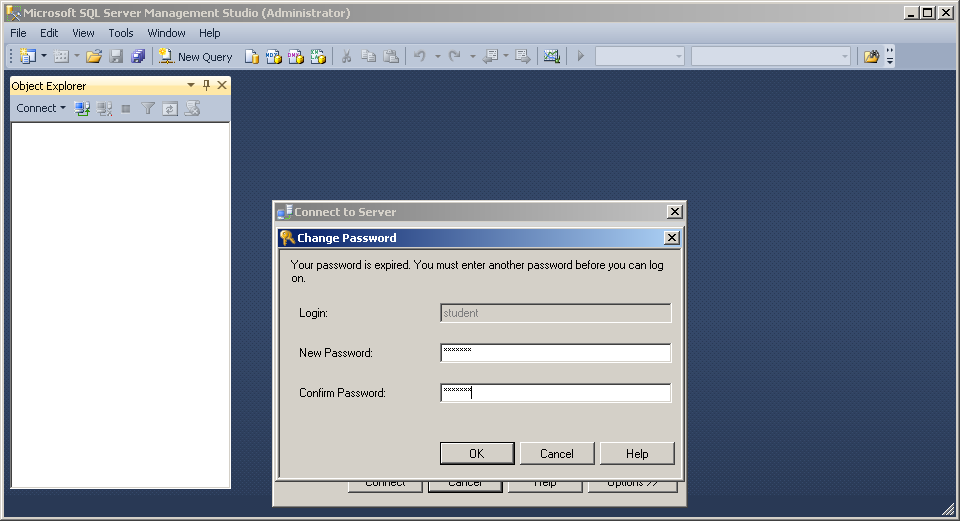
- The first time a user logs in, they must re-enter a valid password. After entering the password twice, click the OK button to continue.
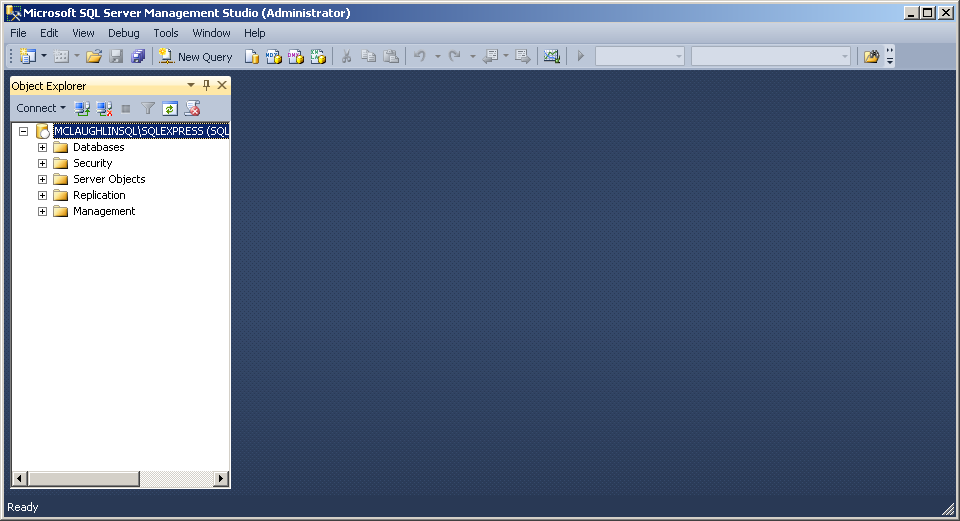
- The initial display shows only the Object Explorer. Click the New Query option in the menu toolbar.
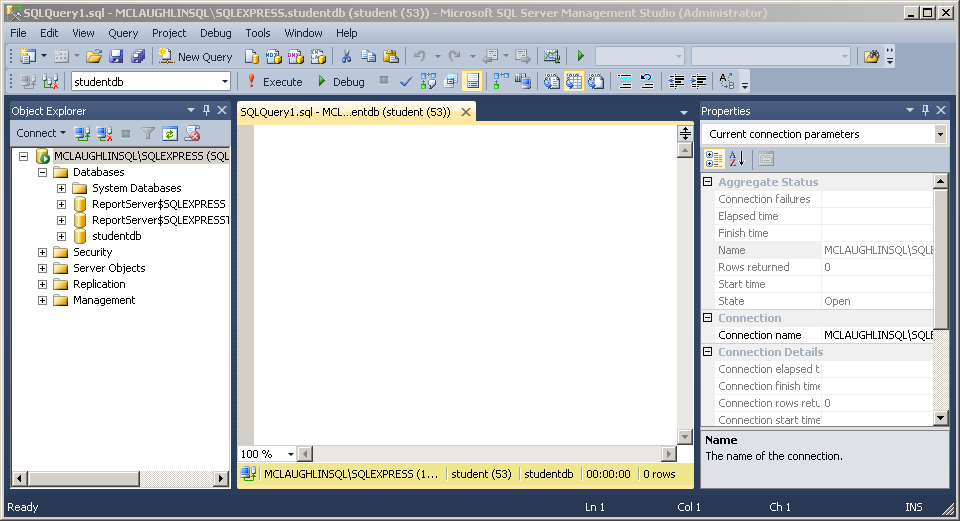
- Click on the Databases folder to expand the list and you will see the
studentdbdatabase schema displayed, as shown in the illustration on the left.
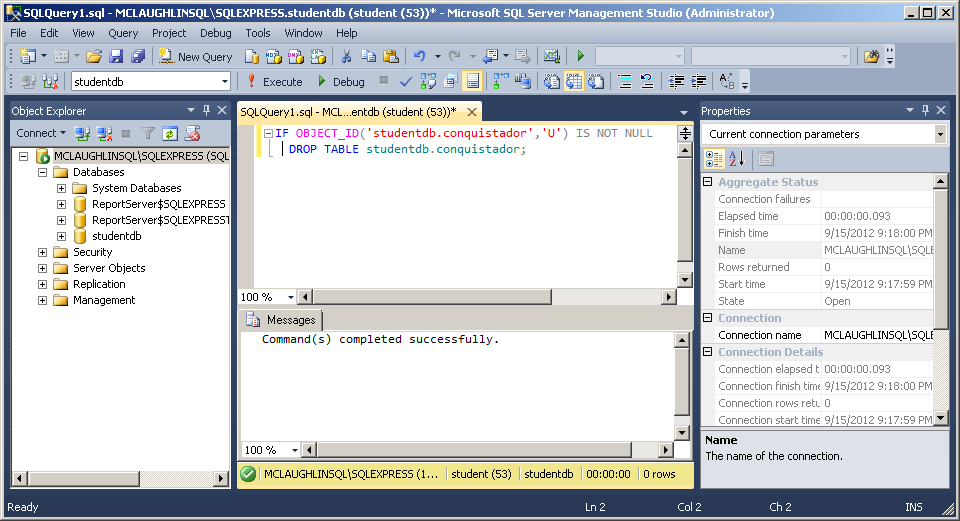
- Enter a conditional drop of a
conquistadortable from thestudentdbdatabase schema. Click the Execute button from the toolbar menu to run the statement.
IF OBJECT_ID('studentdb.conquistador','U') IS NOT NULL DROP TABLE studentdb.conquistador; |
- Enter a
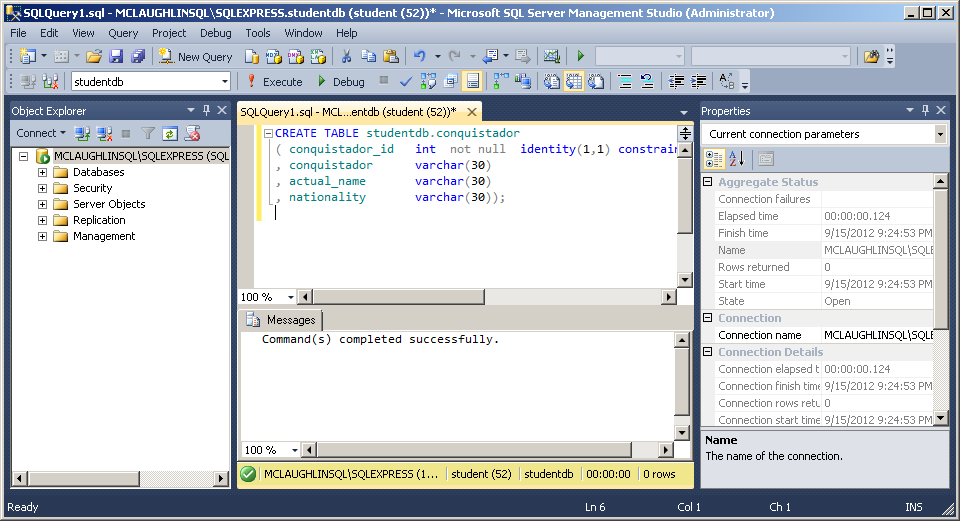
CREATEstatement for aconquistadortable in thestudentdbdatabase schema. Click the Execute button from the toolbar menu to run the statement.
CREATE TABLE studentdb.conquistador ( conquistador_id INT NOT NULL IDENTITY(1,1) CONSTRAINT pk_conquistador PRIMARY KEY , conquistador VARCHAR(30) , actual_name VARCHAR(30) , nationality VARCHAR(30)); |
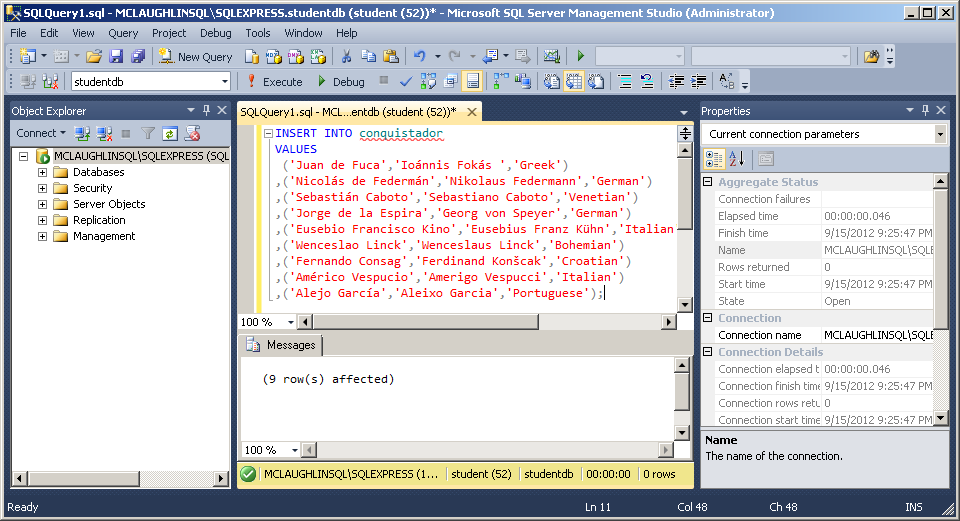
- Enter an
INSERTstatement to theconquistadortable in thestudentdbdatabase schema. Click the Execute button from the toolbar menu to run the statement and see that it inserted 9 rows.
INSERT INTO conquistador VALUES ('Juan de Fuca','Ioánnis Fokás','Greek') ,('Nicolás de Federmán','Nikolaus Federmann','German') ,('Sebastián Caboto','Sebastiano Caboto','Venetian') ,('Jorge de la Espira','Georg von Speyer','German') ,('Eusebio Francisco Kino','Eusebius Franz Kühn','Italian') ,('Wenceslao Linck','Wenceslaus Linck','Bohemian') ,('Fernando Consag','Ferdinand Konšcak','Croatian') ,('Américo Vespucio','Amerigo Vespucci','Italian') ,('Alejo García','Aleixo Garcia','Portuguese'); |
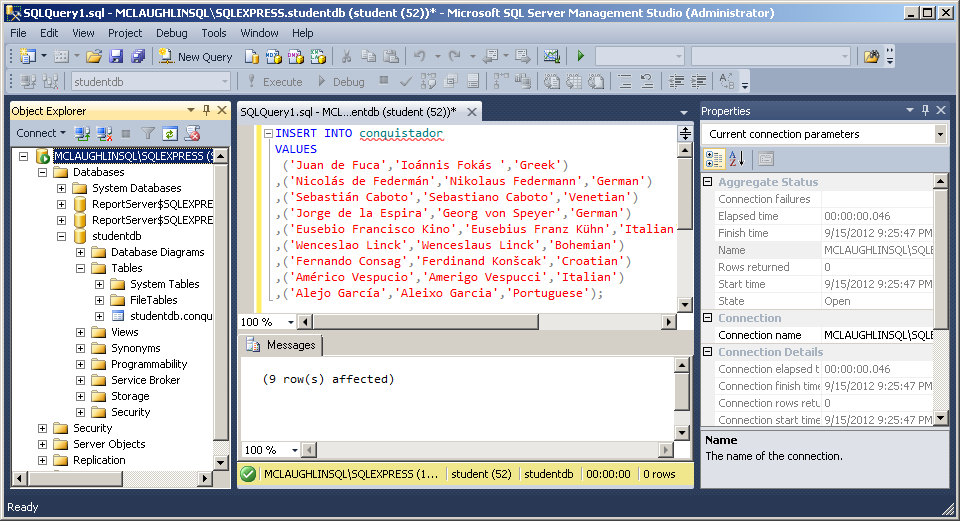
- Click the
studentdbfolder to expand content, and you should see theconquistadortable.
SELECT * FROM conquistador; |
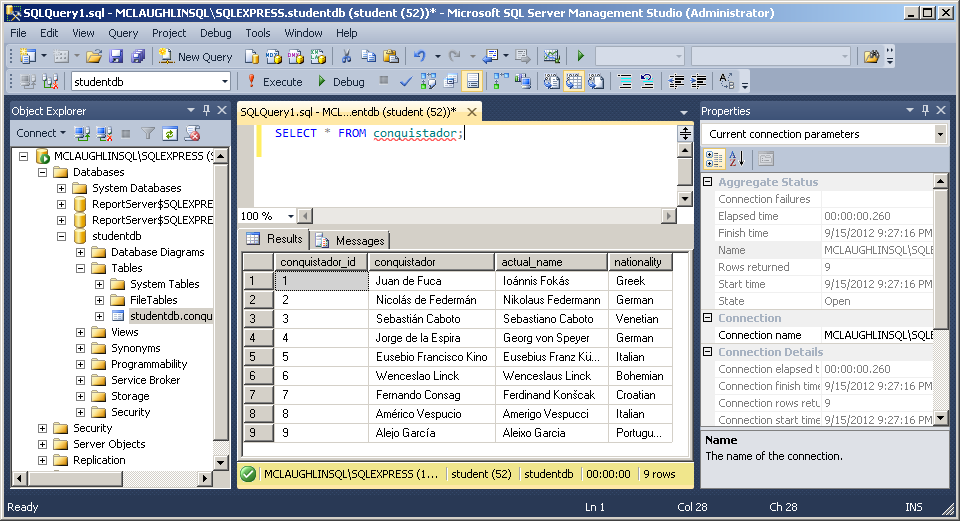
- Click in the SQL Query frame and enter a query against the
conquistadortable. Click the Execute button to run the query and you should see the following output from theconquistadortable.
As always, I hope this helps those trying to sort out how to solve a similar problem.
 Subscribe via RSS