Fedora URL Changes
Somebody posted on a Gnome patching blog post for Fedora to let me know that the download URL was invalid. I poked around and it appears that the old Fedora URL at Red Hat’s site doesn’t work:
http://download.fedora.redhat.com/pub/fedora/linux
You now have to go the Fedora Project web site for the code archive, and it’s here:
http://archive.fedoraproject.org/pub/fedora/linux/
If somebody knows why they made the change without any fanfare, please post a note.
My iPhone is back …
Life’s interesting, and thankfully AT&T is no longer the sole provider of the iPhone. On December 21st, 2010, I replaced my iPhone 3G with a LG Optimus S using Sprint. It was adequate, and far cheaper than what AT&T was charging me. It also had 3G service because AT&T didn’t provide coverage in Rexburg, Idaho.

The iPhone is now on Sprint, and I switched to the iPhone 4S. When I went and got it, I thought it strange that there wasn’t an order option for AppleCare+. No one mentioned that AppleCare+ was now the ticket, and that it’s the responsibility of the vendors to advise you at the time of purchase. They didn’t advise me! Is it possible that they don’t want to advise you because AppleCare+ provides for two repairs for accidental damage at $49 per service opportunity and covers any part that might fail earlier through normal use. Who wouldn’t opt to protect the iPhone from both a faulty part or grip for $99 over 2 years?
A rumor or rumbling that may have its origin in Apple Support is that AT&T, Sprint, and Verizon aren’t telling customers at the time of sale. Customers must then take their iPhone to an Apple Store, not an authorized reseller, have their phone inspected before they can get AppleCare+ after sale. That is if you do it within 30 days of the purchase with proof of purchase and a Genius Bar appointment.
Alert to potential buyers, demand AppleCare+ before you get your iPhone! Let your friends know because this may be more than a baseless rumor. That is, unless you like inordinate risks. Those in that category should watch this unfortunate Assuie bungee jumper go swimming with the crocodiles. At least the crocodiles didn’t get her below Victoria Falls in Zimbabwe, which is a miracle in itself.
The downside was that I’d have to go to Salt Lake City for the coverage, the upside is I have an iPhone again. The upside outweighs the downside, but like Shylock in the Merchant of Venice I’d like to get my metaphoric pound of corporate flesh. When I posed the question to the Sprint kiosk, “Is it possible that the vendors have some financial interest in folks not purchasing AppleCare+?” 😉 That question asked; and, miraculously, Sprint said it was their error and they’d fix it – add AppleCare+. Apple support emailed me to confirm that AppleCare+ is now enforce on my new iPhone. That proves the squeaky wheel does get oiled.
I strongly recommend you don’t waste your money on anything less than an Otterbox Defender Series Hybrid Case & Holster for iPhone 4 & 4S.
The only problem I’ve found is the hip case because it’s hard plastic and breaks. Fortunately, you can buy just the OtterBox iPhone 4S Defender Case Replacement Belt Clip Holster
How to use object types?
A tale of Oracle SQL object types, their constructors, and how you use them. This demonstrates what you can and can’t do and gives brief explanations about why.
The following creates a base SAMPLE_OBJECT data type and a sample_table
collection of the base SAMPLE_OBJECT data type.
CREATE OR REPLACE TYPE sample_object IS OBJECT (id NUMBER ,name VARCHAR2(30)); / CREATE OR REPLACE TYPE sample_table IS TABLE OF sample_object; / |
If the base SAMPLE_OBJECT data type were a Java object, the default constructor of an empty call parameter list would allow you to construct an instance variable. This doesn’t work for an Oracle object type because the default constructor is a formal parameter list of the object attributes in the positional order of their appearance in the declaration statement.
The test case on this concept is:
1 2 3 4 5 6 | DECLARE lv_object_struct SAMPLE_OBJECT := sample_object(); BEGIN NULL; END; / |
Running the program raises the following exception, which points to the object instance constructor from line 2 above:
  lv_object_struct SAMPLE_OBJECT := sample_object();
                                    *
ERROR at line 2:
ORA-06550: line 2, column 37:
PLS-00306: wrong number or types of arguments in call to 'SAMPLE_OBJECT'
ORA-06550: line 2, column 20:
PL/SQL: Item ignored |
Changing the instantiation call to the Oracle design default, two null values let you create
an instance of the SAMPLE_OBJECT type. The following shows that concept, which works when the base object type allows null values.
1 2 3 4 5 6 | DECLARE lv_object_struct SAMPLE_OBJECT := sample_object(NULL, NULL); BEGIN NULL; END; / |
If you want to have a null parameter constructor for an object type, you must implement a type and type body with an overloaded no argument constructor, like this:
1 2 3 4 5 | CREATE OR REPLACE TYPE sample_object IS OBJECT ( id NUMBER , name VARCHAR2(30) , CONSTRUCTOR FUNCTION sample_object RETURN SELF AS RESULT); / |
1 2 3 4 5 6 7 8 9 | CREATE OR REPLACE TYPE BODY sample_object IS CONSTRUCTOR FUNCTION sample_object RETURN SELF AS RESULT IS sample_obj SAMPLE_OBJECT := sample_object(NULL,NULL); BEGIN SELF := sample_obj; RETURN; END sample_object; END; / |
Unlike Java, the addition of an overloaded constructor doesn’t drop the default constructor. You can also create a single parameter constructor that leverages the sequence like this:
1 2 3 4 5 6 | CREATE OR REPLACE TYPE sample_object IS OBJECT ( id NUMBER , name VARCHAR2(30) , CONSTRUCTOR FUNCTION sample_object RETURN SELF AS RESULT , CONSTRUCTOR FUNCTION sample_object (pv_name VARCHAR2) RETURN SELF AS RESULT); / |
1 2 3 4 5 6 7 8 9 10 11 12 13 14 | CREATE OR REPLACE TYPE BODY sample_object IS CONSTRUCTOR FUNCTION sample_object RETURN SELF AS RESULT IS sample_obj SAMPLE_OBJECT := sample_object(sample_object_id.NEXTVAL,NULL); BEGIN SELF := sample_obj; END sample_object; CONSTRUCTOR FUNCTION sample_object (pv_name VARCHAR2) RETURN SELF AS RESULT IS sample_obj SAMPLE_OBJECT := sample_object(sample_object_id.NEXTVAL,pv_name); BEGIN SELF := sample_obj; RETURN; END sample_object; END; / |
You can test the final object type and body with this anonymous block of code:
1 2 3 4 5 6 7 8 9 10 11 12 13 14 15 16 17 18 | SET SERVEROUTPUT ON SIZE UNLIMITED DECLARE lv_object_struct1 SAMPLE_OBJECT := sample_object(); lv_object_struct2 SAMPLE_OBJECT := sample_object('User Name'); lv_object_struct3 SAMPLE_OBJECT := sample_object(1001,'User Name'); BEGIN dbms_output.put_line('lv_object_struct1.id ['||lv_object_struct1.id||']'); dbms_output.put_line('lv_object_struct1.name ['||lv_object_struct1.name||']'); dbms_output.put_line('lv_object_struct2.id ['||lv_object_struct2.id||']'); dbms_output.put_line('lv_object_struct2.name ['||lv_object_struct2.name||']'); lv_object_struct2.name := 'Changed Name'; dbms_output.put_line('lv_object_struct2.id ['||lv_object_struct2.id||']'); dbms_output.put_line('lv_object_struct2.name ['||lv_object_struct2.name||']'); dbms_output.put_line('lv_object_struct3.id ['||lv_object_struct3.id||']'); dbms_output.put_line('lv_object_struct3.name ['||lv_object_struct3.name||']'); END; / |
It prints to console:
lv_object_struct1.id [1] lv_object_struct1.name [] lv_object_struct2.id [2] lv_object_struct2.name [User Name] lv_object_struct2.id [2] lv_object_struct2.name [Changed Name] lv_object_struct3.id [1001] lv_object_struct3.name [User Name] |
Hope this helps those looking for a quick syntax example and explanation.
Function or Procedure?
Somebody asked for a simple comparison between a PL/SQL pass-by-value function and pass-by-reference procedure, where the procedure uses only an OUT mode parameter to return the result. This provides examples of both, but please note that a pass-by-value function can be used in SQL or PL/SQL context while a pass-by-reference procedure can only be used in another anonymous of named block PL/SQL program.
The function and procedure let you calculate the value of a number raised to a power of an exponent. The third parameter lets you convert the exponent value to an inverse value, like 2 to 1/2.
1 2 3 4 5 6 7 8 9 10 11 12 13 14 15 16 17 18 19 20 | CREATE OR REPLACE FUNCTION find_root_function ( pv_number BINARY_DOUBLE , pv_power BINARY_DOUBLE , pv_inverse BINARY_INTEGER DEFAULT 0 ) RETURN BINARY_DOUBLE IS -- Declare local variable for return value. lv_result BINARY_DOUBLE; BEGIN -- If the inverse value is anything but zero calculate the inverse of the power. IF pv_inverse = 0 THEN lv_result := POWER(pv_number,pv_power); ELSE lv_result := POWER(pv_number,(1 / pv_power)); END IF; RETURN lv_result; END find_root_function; / |
You can test it with these to queries against the dual table:
SELECT TO_CHAR(find_root_function(4,3),'99,999.90') FROM dual; SELECT TO_CHAR(find_root_function(125,3,1),'99,999.90') FROM dual; |
The procedure does the same thing as the function. The difference is that the fourth parameter to the procedure returns the value rather than a formal return type like a function.
1 2 3 4 5 6 7 8 9 10 11 12 13 14 15 16 17 18 | CREATE OR REPLACE PROCEDURE find_root_procedure ( pv_number IN BINARY_DOUBLE , pv_power IN BINARY_DOUBLE , pv_inverse IN BINARY_INTEGER DEFAULT 0 , pv_return OUT BINARY_DOUBLE ) IS BEGIN -- If the inverse value is anything but zero calculate the inverse of the power. IF pv_inverse = 0 THEN pv_return := POWER(pv_number,pv_power); ELSE dbms_output.put_line('here'); pv_return := POWER(pv_number,(1 / pv_power)); END IF; END find_root_procedure; / |
You can test it inside an anonymous block PL/SQL program, like this:
1 2 3 4 5 6 7 8 9 10 11 12 13 14 15 16 17 18 19 20 21 22 23 24 25 | DECLARE -- Declare input variables. lv_input BINARY_DOUBLE; lv_power BINARY_DOUBLE; lv_inverse BINARY_INTEGER; lv_output BINARY_DOUBLE; BEGIN -- Assign input values to variables. lv_input := '&1'; lv_power := '&2'; lv_inverse := '&3'; -- Test raising to a power. find_root_procedure(lv_input, lv_power, lv_inverse, lv_output); dbms_output.put_line(TO_CHAR(lv_output,'99,999.90')); -- Test raising to an inverse power. find_root_procedure(lv_input, lv_power, lv_inverse, lv_output); dbms_output.put_line(TO_CHAR(lv_output,'99,999.90')); END; / |
You can test it inside an anonymous block PL/SQL program, like the following example. For reference, the difference between PL/SQL and the SQL*Plus environment is large. The EXECUTE call is correct in SQL*Plus but would be incorrect inside a PL/SQL block for a Native Dynamic SQL (NDS) call. Inside a PL/SQL block you would use EXECUTE IMMEDIATE because it dispatches a call from the current running scope to a nested scope operation (see comment below).
1 2 3 4 5 6 7 8 9 10 11 12 13 14 15 16 17 18 19 20 21 22 23 24 25 | -- SQL*Plus Test. VARIABLE sv_input BINARY_DOUBLE VARIABLE sv_power BINARY_DOUBLE VARIABLE sv_inverse BINARY_DOUBLE VARIABLE sv_output BINARY_DOUBLE -- Verify the null value of the session variable. SELECT :sv_output AS ":sv_output" FROM dual; BEGIN -- Prompt for local assignments and initialize output variable. :sv_input := '&1'; :sv_power := '&2'; :sv_inverse := '&3'; :sv_output := 0; END; / -- Run the procedure in the SQL*Plus scope. EXECUTE find_root_procedure(:sv_input, :sv_power, :sv_inverse, :sv_output); -- Query the new value of the session variable. SELECT TO_CHAR(:sv_output,'99,999.90') AS ":output" FROM dual; |
As usual, I hope this helps folks beyond the one who asked. Comments are always welcome.
Java Generics in Oracle
Somebody posed the question about using a Comparator in the sorting examples provided in this earlier post on Updating Table View Columns (columns using a Varray or Nested Table of a single scalar data type). It seems the individual thought that you can’t use Java Generics inside an Oracle Database 11g’s Java libraries. It’s seems odd since they’ve been around since Java 5.
You can use Generics like those shown in the following example. It builds on explanation from the prior post. If you want to get the whole set of facts click the link above but you should have all the code you need in this post.
An example like this requires you first define a collection of strings in the database. This one uses the following definition:
1 2 | CREATE OR REPLACE TYPE stringlist IS TABLE OF VARCHAR2(4000); / |
This creates the Java library source, and line 21 shows the use of Generics in the instantiation of a anonymous Comparator class:
1 2 3 4 5 6 7 8 9 10 11 12 13 14 15 16 17 18 19 20 21 22 23 24 25 26 27 28 29 30 31 32 33 34 35 36 37 38 39 40 41 42 43 44 45 46 47 48 | CREATE OR REPLACE AND COMPILE JAVA SOURCE NAMED "SortList" AS // Import required classes. import java.io.*; import java.security.AccessControlException; import java.sql.*; import java.util.Arrays; import java.util.Comparator; import oracle.sql.driver.*; import oracle.sql.ArrayDescriptor; import oracle.sql.ARRAY; // Define class. public class Sorting { public static ARRAY sortTitleCaseList(oracle.sql.ARRAY list) throws SQLException, AccessControlException { // Convert Oracle data type to Java data type. String[] unsorted = (String[])list.getArray(); // Sort elements. Arrays.sort(unsorted, new Comparator<String>() { public int compare(String s1, String s2) { // Declare a sorting key integer for the return value. int sortKey; // Check if lowercase words match and sort on first letter only. if (s1.toLowerCase().compareTo(s2.toLowerCase()) == 0) sortKey = s1.substring(0,1).compareTo(s2.substring(0,1)); else sortKey = s1.toLowerCase().compareTo(s2.toLowerCase()); // Return the sorting index. return sortKey; }}); // Define a connection (this is for Oracle 11g). Connection conn = DriverManager.getConnection("jdbc:default:connection:"); // Declare a mapping to the schema-level SQL collection type. ArrayDescriptor arrayDescriptor = new ArrayDescriptor("STRINGLIST",conn); // Translate the Java String{} to the Oracle SQL collection type. ARRAY sorted = new ARRAY(arrayDescriptor,conn,((Object[])unsorted)); // Return the sorted list. return sorted; } } / |
The PL/SQL wrapper for this class would be:
1 2 3 4 | CREATE OR REPLACE FUNCTION sortTitleCaseList(list STRINGLIST) RETURN STRINGLIST IS LANGUAGE JAVA NAME 'Sorting.sortNaturalCaseList(oracle.sql.ARRAY) return oracle.sql.ARRAY'; / |
You can test the code with the following query:
1 2 | SELECT column_value FROM TABLE(sortTitleCaseList(stringlist('Oranges','apples','Apples','Bananas','Apricots','apricots'))); |
It sorts the strings based on a title case sort, like:
COLUMN_VALUE ------------------------ Apples apples Apricots apricots Bananas Oranges 6 rows selected. |
If you want a quick example of a Generic Collection sort operation outside of the database, here a sample file.
1 2 3 4 5 6 7 8 9 10 11 12 13 14 15 16 17 18 19 20 21 22 23 24 25 26 27 28 29 30 31 32 33 34 35 36 37 38 39 40 41 42 43 44 45 46 47 | // Import required classes. import java.util.Arrays; import java.util.Comparator; /** * An example of using a Comparator sort. */ public class SortStaticString { /* * Sort the instance array. */ public static String[] sortTitleCaseList(String[] list) { // Sort elements by title case. Arrays.sort(list, new Comparator<String>() { public int compare(String s1, String s2) { // Declare a sorting key integer for the return value. int sortKey; // Check if lowercase words match and sort on first letter only. if (s1.toLowerCase().compareTo(s2.toLowerCase()) == 0) sortKey = s1.substring(0,1).compareTo(s2.substring(0,1)); else sortKey = s1.toLowerCase().compareTo(s2.toLowerCase()); // Return the sorting index. return sortKey; }}); // Return the sorted Index. return list; } /* * Test case. */ public static void main(String[] args) { // Construct and instance and apply sort method. args = SortStaticString.sortTitleCaseList(args); // Print the title case sorted list. for (int i = 0; i < args.length; i++) { System.out.println(args[i]); } } } |
You would call the SortStaticString class as follows:
java SortStaticString apples Oranges Pears Apples orange Grapefruit |
I hope this helps the interested party and any others looking for a sample file. 😉
Understanding Java Enum
Somebody wanted an example of how to write an Enum class in Java 7 (a bit late since its introduced in Java 5) because they found the Enum tutorial unhelpful (not as helpful to their purpose at hand). They wanted to understand how to use an Enum type in another class. Here’s an example set of files to do that and here’s the link to the jazzed up Java 7 API online docs).
First, you need to understand that while the equals(), toString(), and hashCode() override methods should always be provided in your classes. The exception is when they’re designated final, like the toString() and hashCode() methods of the Enum class. Second, you can write an Enum class with or without private variables. The inclusion of private instance variables makes the Enum a complex Enum (that’s just the vocabulary for the Java certification tests.
Sample Enum Class
The AppleComputer class is a complex Enum, and you should note that the constructor is private, and must always define the values of instance variables. The instance variables are defined within the parentheses after the name in the enumeration list.
1 2 3 4 5 6 7 8 9 10 11 12 13 14 15 16 17 18 19 20 21 22 23 24 25 26 27 28 29 30 31 32 33 34 35 36 37 38 39 40 41 42 43 44 45 46 47 48 49 50 51 52 53 54 55 56 57 58 59 60 61 62 63 64 65 66 67 68 69 70 71 72 73 74 75 76 77 78 79 80 81 | /** * Enumeration class AppleComputer - write a description of the enum class here * * @author Michael McLaughlin * @version 1.0 */ public enum AppleComputer { /** * This is an entry-level desktop computer. */ IMAC("Entry-level Desktop",1199), /** * This is an manager-level laptop computer. */ MACBOOKAIR("Manager-level Laptop",999), /** * This is an manager-level laptop computer. */ MACBOOKPRO("Developer-level Laptop",1199), /** * This is an developer-level laptop computer. */ MACMINI("Mini-Desktop",599), /** * This is a mini-desktop computer. */ MACPRO("Desktop",2499); /** * Private variable definitions. */ private double cost; private String description; /** * Constructs an instance with a cost and description. */ private AppleComputer(String description, double cost) { this.description = description; this.cost = cost; } /** * Returns the cost field of an Apple Computer. */ public double getCost() { return this.cost; } /** * Returns the description field of an Apple Computer. */ public String getDescription() { return description; } /** * Returns the description field of an Apple Computer. */ public String getDescription(String name) { return this.description; } /** * Returns the equality of between two AppleComputer Enum types. */ public boolean equals(AppleComputer ac) { // First comparision on primitives and second on String instances. if ((this.cost == ac.getCost()) && (this.description.equals(ac.getDescription()))) return true; else return false; } /** * Method to test class integrity. */ public static void main(String[] args) { if (args.length == 1) { System.out.printf("Apple Computer : %s is %s\n", AppleComputer.valueOf(args[0]).toString(), AppleComputer.IMAC.getDescription(args[0])); System.exit(0); } else { for (AppleComputer ac : AppleComputer.values()) System.out.printf("Apple Computer : %s is %s\n", ac, ac.description); }} } |
Sample Class that uses the Enum Class
The EnumTextUse class demonstrates how to use and identify the instance of a complex Enum class in another class. The setState() method has two approaches, one where you pass the name and discover viable enumeration possibilities, and two when you pass an Enum instance.
1 2 3 4 5 6 7 8 9 10 11 12 13 14 15 16 17 18 19 20 21 22 23 24 25 26 27 28 29 30 31 32 33 34 35 36 37 38 39 40 41 42 43 44 45 46 47 48 49 50 51 52 53 54 55 56 57 58 59 60 61 62 63 64 65 66 67 68 69 70 71 72 73 74 75 76 77 78 79 80 81 82 83 84 85 86 87 88 89 90 91 92 93 94 95 96 97 98 99 100 101 102 103 104 105 106 107 108 109 110 111 112 113 114 115 116 117 118 119 120 121 122 123 124 125 126 127 128 129 130 131 132 133 134 135 136 137 138 139 140 141 | /** * The EnumTextUse class demonstrates how to identify and use an Enum * class that contains a text value. * * @author Michael McLaughlin * @version 1.0 */ /** * Import classes. */ import java.text.NumberFormat; import java.text.DecimalFormat; public class EnumTextUse { /** * Declare class level variables. */ private AppleComputer ac; private String desc; /** * Constructor for objects of class TestEnum */ public EnumTextUse() {} /** * An example of a method that takes a text string to find the ENUM * element value. */ public int setState(String name) { // Declare local variable for false. int returnValue = 0; // put your code here try { // Verify that it's a valid instance of AppleComputer. if (AppleComputer.valueOf(name) instanceof AppleComputer) { if (AppleComputer.IMAC == AppleComputer.valueOf(name)) { this.ac = AppleComputer.IMAC; } else if (AppleComputer.MACBOOKAIR == AppleComputer.valueOf(name)) { this.ac = AppleComputer.MACBOOKAIR; } else if (AppleComputer.MACBOOKPRO == AppleComputer.valueOf(name)) { this.ac = AppleComputer.MACBOOKPRO; } else if (AppleComputer.MACPRO == AppleComputer.valueOf(name)) { this.ac = AppleComputer.MACPRO; } else if (AppleComputer.MACMINI == AppleComputer.valueOf(name)) { this.ac = AppleComputer.MACMINI; }} // Return -1 as the truth indicator state was set or unnecessary. returnValue = -1; } catch (Exception e) { System.out.println(name + " is no longer sold."); } // Return the int value for true or false. return returnValue; } /** * An example of a method that takes a text string to find the ENUM * element value. */ public int setState(AppleComputer ac) { // Assign the AppleComputer fields to a local variable. double costSavings; double localCost = this.ac.getCost(); String localDesc = this.ac.toString() + " : " + this.ac.getDescription(); // Define format mask for output. NumberFormat f = new DecimalFormat("##,###,##0.00"); // Declare local variable for false. int returnValue = 0; // put your code here try { // Check for an instance of the Enum. if (this.ac instanceof AppleComputer) { // Find different (unequal) instances and update with the new one. if (this.ac.equals(ac)) { // Print message on match between prior and set value of AppleComputer. this.desc = this.ac + " is the authorized platform and no cost difference."; } else { // Assign the new Enum value, calculate and display cost savings message. this.ac = ac; costSavings = this.ac.getCost() - localCost; // Determine the message based on a reduced or increased cost of replacement. if (costSavings > 0) { this.desc = this.ac + " is substituted for " + localDesc + " at $" + f.format(costSavings) + " more than planned."; } else { this.desc = this.ac + " is substituted for " + localDesc + " at $" + f.format(Math.abs(costSavings)) + " less than planned."; }}} // Return -1 as the truth indicator state was set or unnecessary. returnValue = -1; } catch (Exception e) { System.out.println(e.getMessage()); } // Return the int value for true or false. return returnValue; } /** * Return the current description value. */ public String getState() { return this.desc; } /** * Allows testing the program. */ public static void main(String [] args) { // Declare a string of possible enumeration types. String [] list = {"IMAC","MACBOOK","MACBOOKAIR","MACBOOKPRO","MACMINI","MACPRO"}; // Construct a test instance. EnumTextUse etu = new EnumTextUse(); /** * Read through the list of enumeration types, printing output from * the inherited or overridden toString() method. */ for (int i = 0; i < list.length; i++) { if (etu.setState(list[i]) != 0) { // The company standard must apply in all cases. if (etu.setState(AppleComputer.IMAC) != 0) System.out.println(etu.getState()); } } } } |
You can run the EnumTextUse class from the command-line or tool of your choice, like:
$ java EnumTextUse |
It’ll print the following text:
IMAC is the authorized platform and no cost difference. MACBOOK is no longer sold. IMAC is substituted for MACBOOKAIR : Manager-level Laptop at $200.00 more than planned. IMAC is substituted for MACBOOKPRO : Developer-level Laptop at $0.00 less than planned. IMAC is substituted for MACMINI : Mini-Desktop at $600.00 more than planned. IMAC is substituted for MACPRO : Desktop at $1,300.00 less than planned. |
You can check this Java Community Process page for the nuts and bolts of the Enum class. As always, I hoped this helped. Let me know if anything requires more clarity or any correction.
Oracle 11gR2 on Windows 7
Here are step-by-step instructions for installing Oracle Database 11g Release 2 on Windows 7 (Oracle 12c is here). It’s provided in response to questions posted on my step-by-step instructions for installing Oracle 11gR1 on Windows 7. For reference, I posted the former because it didn’t work without intervention. I hadn’t updated step-by-step instructions because Oracle Database 11g Release 2 has always worked for me when installing on Windows 7.
A number of students and blog readers have mentioned that it didn’t work for them. My guess is that they had configuration issues within the Windows 7 environment. There are some Windows 7 configuration caveats before you perform this installation, and they are:
Windows 7 Configuration Steps
- Make sure you have at least 3 GB of memory on your Windows PC, or that you can allocate 4 GB of memory to your virtual machine (the latter typically requires 8 GB of real memory to avoid extensive disk caching of memory).
- Install Oracle’s SJDK and run time for Java 6 or 7 on Windows 7 (I installed Java 7). Although either work with the database, you need the Java 6 SDK 32-bit version (at least SJDK 1.6.0_4) for Oracle SQL Developer. This means you need to download the 32-bit version even when you’re installing the 64-bit Oracle Database 11g version. The SQL Developer fix is found in this blog post.
- Disable Microsoft’s User Access Controls (UAC). I blogged about a set of Windows 7 gripes, and the second point shows you the screen shots that let you disable UAC on Windows 7.
- Configure your
C:\Windows\System32\drivers\etc\hostsfile. Use lines 1 through 3 when you’re using a DHCP IP address, and lines 1 through 4 when you’re using a static IP address. If you want to set a static IP address, check this old post on how to set a static IP address. Please note that thehostnameneeds to be lowercase.
1 2 3 4 | 127.0.0.1 localhost
::1 localhost
127.0.0.1 mclaughlinmysql mclaughlinmysql.techtinker.com
172.26.126.131 mclaughlinmysql mclaughlinmysql.techtinker.com |
- Create a user account name that doesn’t have a white space, like
McLaughlinMin the screen shots, and assign it Administrator privileges. - The Oracle Enterprise Manager (OEM) uses port ranges above 5,000, which according to Microsoft requires that you set
MaxUserPortkey in the Windows Registry. You can find more details at this Microsoft Support page. Personally, I haven’t found this necessary and after adding it to please somebody without setting it everything ran fine in Windows 7.
Registry key: HKEY_LOCAL_MACHINE\SYSTEM\CurrentControlSet\Services\Tcpip\Parameters
| Value Name | MaxUserPort |
| Value Type | DWORD |
| Value Data | 65534 |
| Value Range | 5000-65534 (decimal) |
| Value Default | 0x1388 (5000 decimal) |
| Description | This parameter controls the maximum port number that is used when a program requests any available user port from the system. Typically, ephemeral (short-lived) ports are allocated between the values of 1024 and 5000 inclusive. After the release of security bulletin MS08-037, the behavior of Windows Server 2003 was changed to more closely match that of Windows Server 2008 and Windows Vista. For more information about Microsoft security bulletin MS08-037 |
Oracle 11g Release 2 Installation Steps
- The Oracle Database 11g Release 2 files are broken down into two zip files on the Oracle site. That means you need to download both files, and then expand them into an installation directory. I called my installation directory
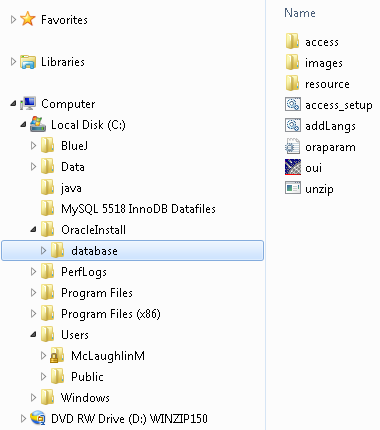
C:\OracleInstall, but you can call it whatever works for you. Here’s a screen shot of the directory after expanding both compressed files (done with WinZip 15).
database directory (or folder). Within the installation folder (C:\OracleInstall\database), you double click on the oui icon to launch (start) the Oracle Universal Installer. It’ll open a command prompt that may dwell on the screen for a few seconds up to maybe fifteen seconds.
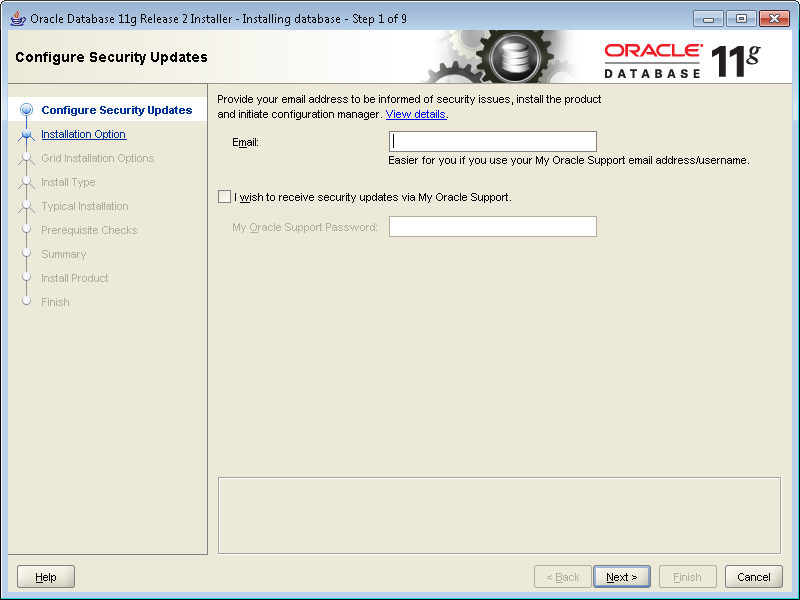
- It’s a good idea to provide an email address for security updates no matter what. You can uncheck the box if you don’t want updates via Oracle Support Services. Click the Next button to continue.
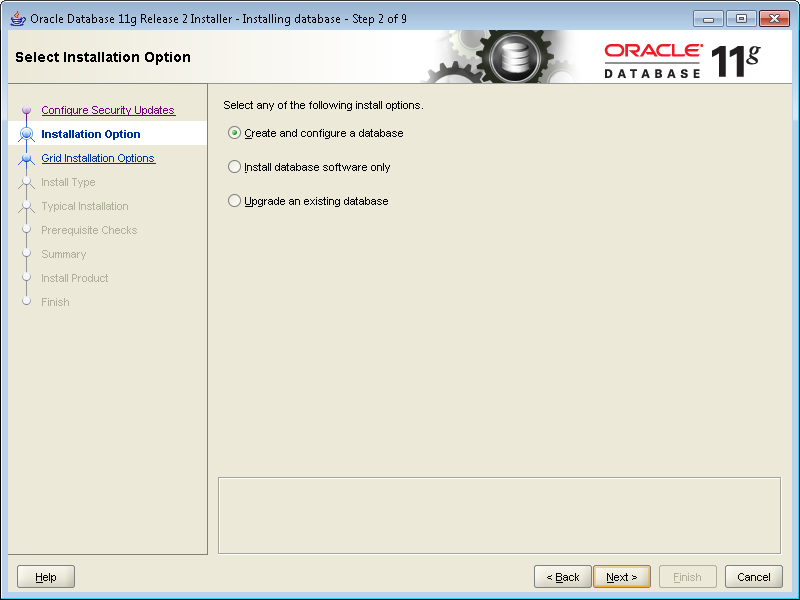
- Most developers want to Create and configure a database. If that’s your desire, leave the default radio button checked. Click the Next button to continue.
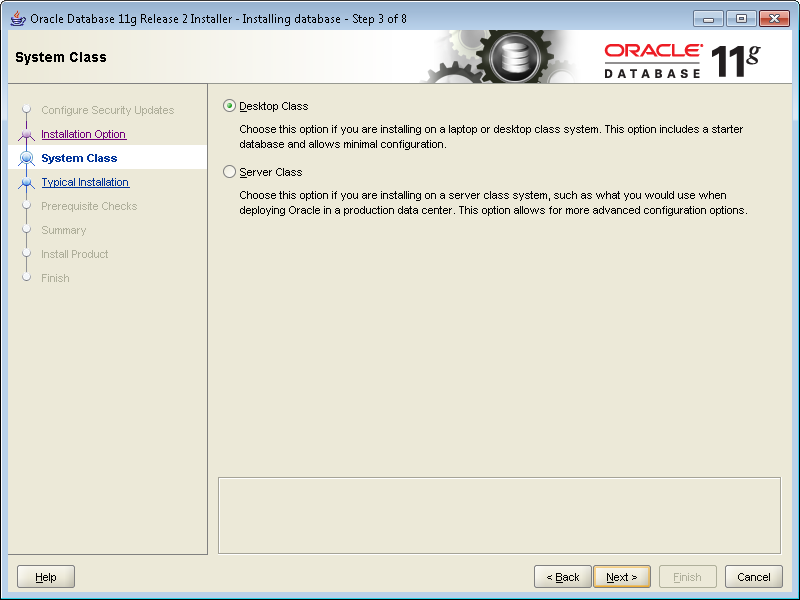
- Most developers install their test instance on a desktop or laptop. If that’s your desire, leave the default Desktop Class radio button checked. Click the Next button to continue.
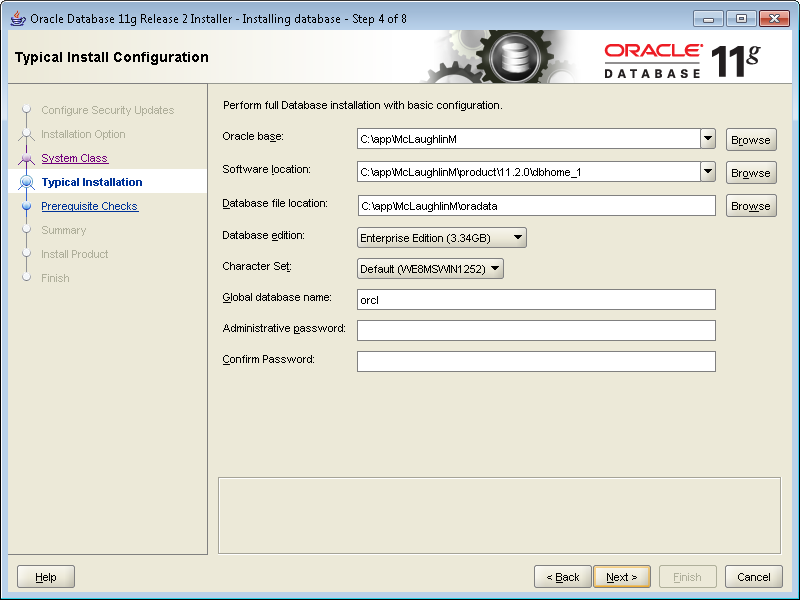
- These are default settings and generally the easiest to use. I’d suggest you change the Character Set drop down to Unicode. Then, enter a password twice. Oracle requires that you use at least one capital letter and one number in a 6 character or more long password. Click the Next button to continue.
- The next screen is a progress bar that checks for prerequisites. You shouldn’t have to do anything here because it automatically advances you to the next dialog screen. This generally takes less than a minute to run but can take two or so. If you’re much beyond 3 minutes there may be a resource problem with your Windows PC or virtual machine.

- This shows you all the selected values for the installation. Unless you want to abort the installation, click the Finish button to proceed.

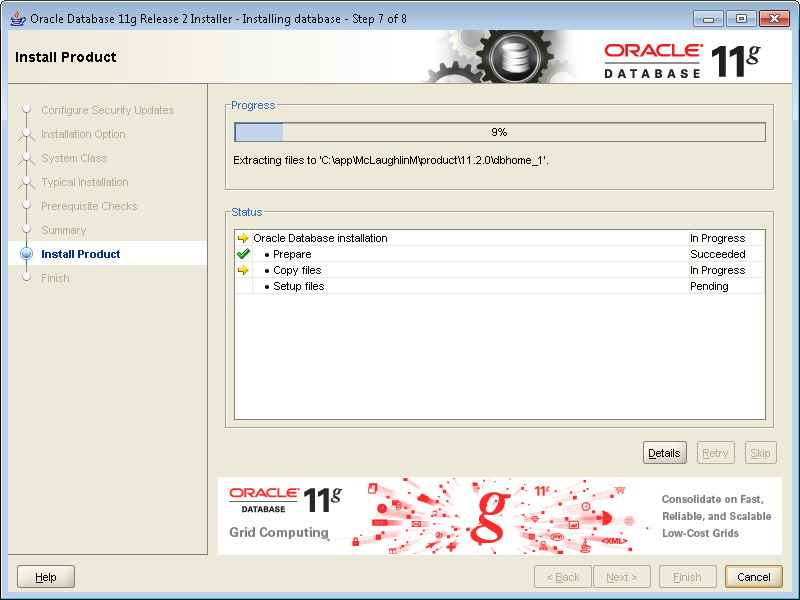
- This screen is the main progress bar, and you’ll be here somewhere between 5 and 10 minutes. The downside is that there are some dialogs that will popup during this phase and you need to authorize them, so it’s a bad time to take a break.
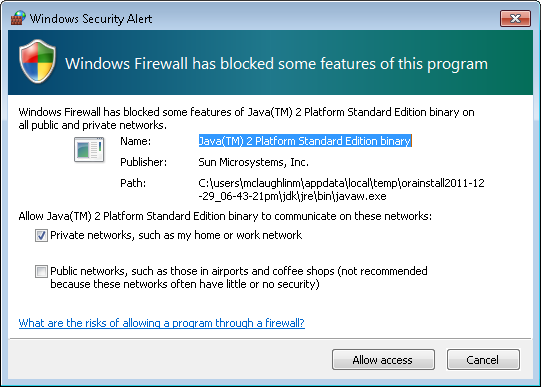
- The first popup screen requires you to authorize the Java runtime to call home. You should click the Allow Access button to proceed.
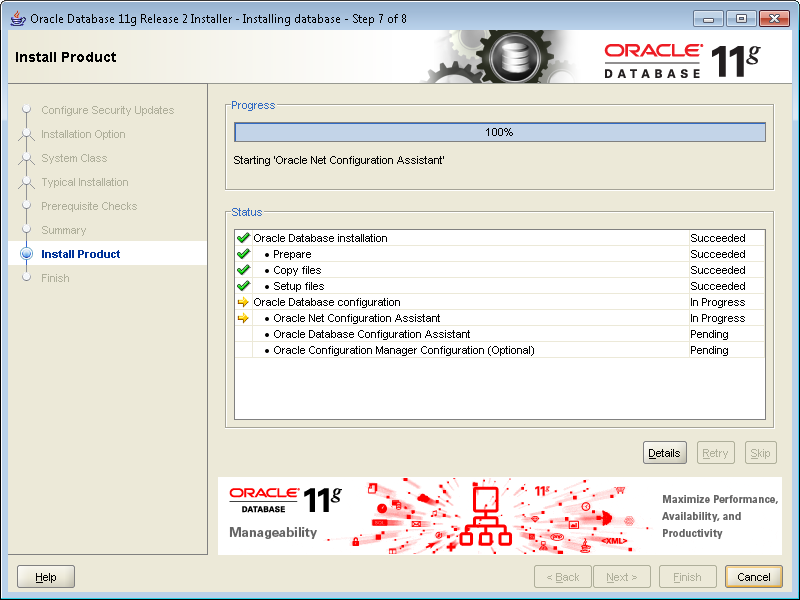
- When the progress bar starts configuring the instance, failures can occur. The first may occur during the network configuration, which typically happens if you didn’t preconfigure the
hostsfile. You don’t need to do anything but watch here unless the installer triggers an error.
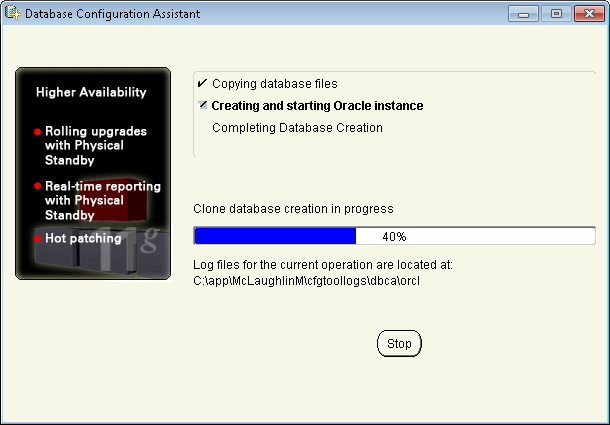
- The following progress bar is launched by the Oracle Database Configuration Assistant. It typically runs without a problem. You don’t need to do anything but watch here unless the installer triggers an error. This takes a few minutes, and unfortunately requires you to stick aroung to again authorize Java.
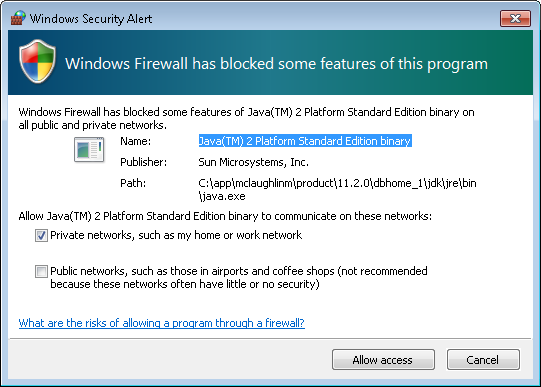
- The second popup screen requires you to authorize the Java runtime to call home. You should click the Allow Access button to proceed.
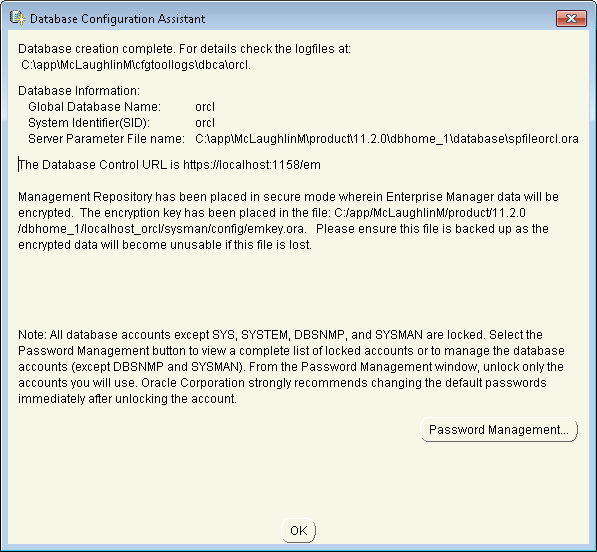
- The third and last popup screen asks you to whether you want to open other scheme. Generally, you should click the OK button to proceed.
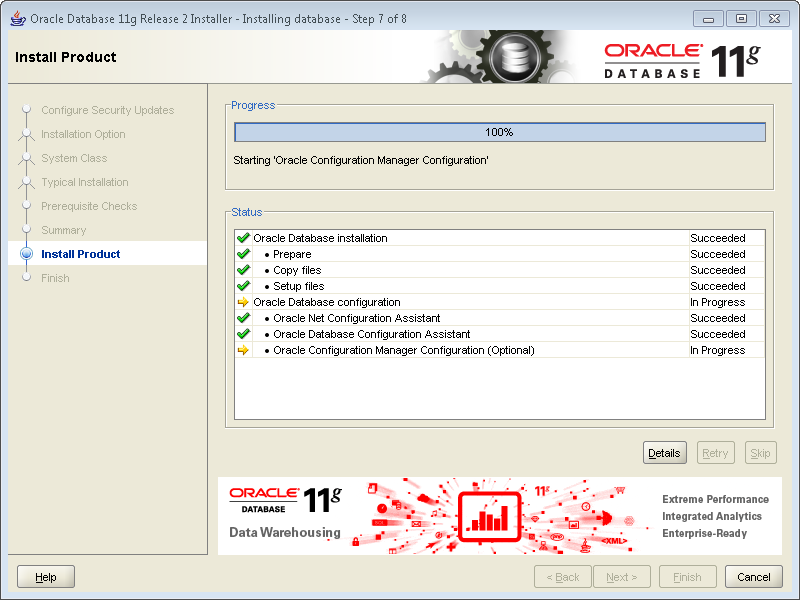
- The next dialog shows you that the network and database instances are configured. It’s also running the OEM (Oracle Enterprise Manager) installation. You can wait here but it won’t be a long wait.
- This is the last dialog and says you’ve installed Oracle Database 11g Release 2 successfully. You can the Close button to complete the installation.
The next step is probably running Oracle Enterprise Manager (OEM). I’ve recently added this post, which arose from a question. It shows you how to run the DB Console.
Also, it’s possible that you could have a problem launching SQL Developer. If so, check how to set the proper JVM for SQL Developer post.
As always, I hope this helps folks.
Updating Table View Columns
Answering a reader’s question: How can you sort data inside an Oracle table view column? This blog post shows you how to perform the trick, but for the record I’m not a fan of nested tables. A table view column is an Oracle specific user-defined type (UDT), and is nested table or varray of a scalar data type.
Oracle’s assigned a formal name to this type of UDT. It’s now labeled an Attribute Data Type (ADT). The ADT doesn’t allow you to update nested elements outside of PL/SQL program units.
This blog post reviews table view columns, and extends concepts from Oracle Database 11g & MySQL 5.6 Developer Handbook
Before you implement table view columns, you should answer two design questions and one relational modeling principal. You should also understand that this direction isn’t portable across database implementations. It currently supported fully by the Oracle database and mostly by PostgreSQL database. You can find how to join nested tables helpful in understanding the UPDATE statements used in this posting, and this earlier post on UPDATE and DELETE statements.
Design Questions:
- Should you implement full object types with access methods in PL/SQL? The object type solution says there is no value in the nested data outside of the complete object. While choosing the table view column solution says that there is value to just implementing a nested list without element handling methods.
- Should you embed the elements in an XML_TYPE? An XML solution supports hierarchical node structures more naturally, like when you only access child nodes through the parent node. While choosing the table view column solution says that you want to avoid the XML Software Development Kit and that the data set is small and more manageable in a table view column.
Design Principle:
- Should you implement an ID-dependent relational modeling concept? An ID-dependent model replaces the primary and foreign keys with the relative position of parent and child elements. This is the design adopted when you choose a table view column, and it is more complex than single subject relational tables.
You should note that table view columns are inherently static at creation. You must also update the entire nested table view column when using Oracle SQL. Oracle SQL does let you modified attributes of object types in nested tables, as qualified in my new book (page 252).
Any attempt to modify a table view column element in SQL raises an ORA-25015 error. The error message states that (you) cannot perform DML on this nested TABLE VIEW COLUMN.
You can update the table view column value by replacing it with a new collection, and that’s done with a PL/SQL function. This type of function preserves the ordered list in the table view column by finding and replacing an element in the collection.
Unfortunately, developers who use nested tables typically design table view columns with an internal ordering scheme. That means the collection is ordered during insert or update. This type of design relies on the fact that you can’t change the order without re-writing the stored structure.
While common for those you use these, it is a bad practice to rely on the ordering of elements in a collection. At least, it’s a bad practice when we’re trying to work within the relational model. All that aside, here’s how you ensure element updates while preserving element position:
1 2 3 4 5 6 7 8 9 10 11 12 13 14 15 16 17 18 19 20 21 22 23 24 25 26 | CREATE OR REPLACE FUNCTION update_collection ( old_element_collection STREET_LIST , old_element_value VARCHAR2 , new_element_value VARCHAR2 ) RETURN STREET_LIST IS -- Declare and initial a new counter. lv_counter NUMBER := 1; -- Declare local return collection variable. lv_element_collection STREET_LIST := street_list(); BEGIN FOR i IN 1..old_element_collection.COUNT LOOP IF NOT old_element_collection(i) = old_element_value THEN lv_element_collection.EXTEND; lv_element_collection(lv_counter) := old_element_collection(i); ELSE lv_element_collection.EXTEND; lv_element_collection(lv_counter) := new_element_value; END IF; lv_counter := lv_counter + 1; END LOOP; RETURN lv_element_collection; END update_collection; / |
Then, you can use the user-defined function (UDF) inside a SQL UPDATE statement, like this:
1 2 3 4 5 6 | UPDATE TABLE (SELECT e.home_address FROM employee e WHERE e.employee_id = 1) e SET e.street_address = update_collection(e.street_address, 'Suite 525','Suite 522') , e.city = 'Oakland' WHERE e.address_id = 1; |
The UPDATE_COLLECTION function replaces Suite 525 with Suite 522, and preserves the sequence of elements in a new nested table. The UPDATE statement assigns the modified nested table to the table view column. You can find the code to create the employee table in Chapter 6 (pages 148-149), and the code to insert the default data in Chapter 8 (page 229) of Oracle Database 11g & MySQL 5.6.
The lv_counter variable could be replaced with a reference to the for loop’s iterator (i) because the counts of both collections are the same. I opted for the local variable to make the code easier to read.
While common for those you use these, it is a bad practice to rely on the ordering of elements in a collection. At least, it’s a bad practice when we’re trying to work within the relational model. Along the same line of thought, you also have the ability of removing elements from a table view column with a similar PL/SQL function. You could write the function like this:
1 2 3 4 5 6 7 8 9 10 11 12 13 14 15 16 17 18 19 20 21 22 23 | CREATE OR REPLACE FUNCTION delete_from_collection ( old_element_collection STREET_LIST , old_element_value VARCHAR2 ) RETURN STREET_LIST IS -- Declare and initial a new counter. lv_counter NUMBER := 1; -- Declare local return collection variable. lv_element_collection STREET_LIST := street_list(); BEGIN FOR i IN 1..old_element_collection.COUNT LOOP IF NOT old_element_collection(i) = old_element_value THEN lv_element_collection.EXTEND; lv_element_collection(lv_counter) := old_element_collection(i); lv_counter := lv_counter + 1; END IF; END LOOP; RETURN lv_element_collection; END delete_from_collection; / |
Then, you can use the user-defined function (UDF) to delete an element from the collection inside a SQL UPDATE statement, like this:
1 2 3 4 5 6 | UPDATE TABLE (SELECT e.home_address FROM employee1 e WHERE e.employee_id = 1) e SET e.street_address = delete_from_collection(e.street_address,'Suite 522') , e.city = 'Oakland' WHERE e.address_id = 1; |
After understanding all that, let’s examine how you sort data in a nested table or varray of a scalar data type (the basis of a table view column). The easiest way is a BULK COLLECT INTO statement nested inside a function, like this:
1 2 3 4 5 6 7 8 9 10 11 12 13 14 15 16 17 18 19 | CREATE OR REPLACE FUNCTION sort_collection ( old_element_collection STREET_LIST) RETURN STREET_LIST IS -- Declare and initial a new counter. lv_counter NUMBER := 1; -- Declare local return collection variable. lv_element_collection STREET_LIST := street_list(); BEGIN -- Sort a collection alphabetically based on case sensitivity. SELECT column_value BULK COLLECT INTO lv_element_collection FROM TABLE(old_element_collection) ORDER BY column_value; RETURN lv_element_collection; END sort_collection; / |
You could test it with this:
1 2 | SELECT column_value FROM TABLE(sort_collection(street_list('Adams', 'Lewis', 'Clark', 'Fallon'))); |
Then, you can use the user-defined function (UDF) to update a table view column like this:
1 2 3 4 5 6 | UPDATE TABLE (SELECT e.home_address FROM employee1 e WHERE e.employee_id = 1) e SET e.street_address = sort_collection(e.street_address) , e.city = 'Oakland' WHERE e.address_id = 1; |
The funny thing about database solutions these days is that some Java developers don’t appreciate the simplicity of SQL and PL/SQL and would solve the problem with Java. Especially, if it was an case insensitive sort operation. That’s the hard way (easy way at the bottom), but I figured it should be thrown in because some folks think everything is generic if written in Java. Though, I thought making it proprietary would increase the irony and wrote it as a Java library for Oracle.
Here’s the Java library, which you can run from the SQL*Plus command line, SQL Developer, or that pricey Toad:
1 2 3 4 5 6 7 8 9 10 11 12 13 14 15 16 17 18 19 20 21 22 23 24 25 26 27 28 29 30 31 | CREATE OR REPLACE AND COMPILE JAVA SOURCE NAMED "SortOracleList" AS // Import required classes. import java.io.*; import java.security.AccessControlException; import java.sql.*; import java.util.Arrays; import oracle.sql.driver.*; import oracle.sql.ArrayDescriptor; import oracle.sql.ARRAY; // Define class. public class DemoSort { public static ARRAY getList(oracle.sql.ARRAY list) throws SQLException, AccessControlException { // Convert Oracle data type to Java data type. String[] unsorted = (String[])list.getArray(); // Sort elements. Arrays.sort(unsorted, String.CASE_INSENSITIVE_ORDER); // Define a connection (this is for Oracle 11g). Connection conn = DriverManager.getConnection("jdbc:default:connection:"); // Declare a mapping to the schema-level SQL collection type. ArrayDescriptor arrayDescriptor = new ArrayDescriptor("STRINGLIST",conn); // Translate the Java String{} to the Oracle SQL collection type. ARRAY sorted = new ARRAY(arrayDescriptor,conn,((Object[])unsorted)); return sorted; }} / |
Then, you write the PL/SQL wrapper like this:
1 2 3 4 | CREATE OR REPLACE FUNCTION sortTable(list STRINGLIST) RETURN STRINGLIST IS LANGUAGE JAVA NAME 'DemoSort.getList(oracle.sql.ARRAY) return oracle.sql.ARRAY'; / |
You could test the case insensitive sort with this:
1 2 | SELECT column_value FROM TABLE(sort_collection(street_list('Adams', 'adams', 'Lewis', 'Clark', 'Fallon'))); |
Naturally, it ignores the fact you could do it like this without Java by using the UPPER function in the purely PL/SQL SORT_COLLECTION function shown earlier in this post:
12 13 14 15 | -- Sort a collection alphabetically based on case insensitive comparison. SELECT column_value BULK COLLECT INTO lv_element_collection FROM TABLE(old_element_collection) ORDER BY UPPER(column_value); |
Anyway, it’s a bunch of thoughts about writing solutions for table view columns. Hope it helps those interested in nested tables.
Fixing my.cnf on Fedora
Working with a Fedora 16 VM for my students (next term) and found that the MySQL Server’s my.cnf file worked with a Linux socket as opposed to a listener port, and that several configuration options where missing from the file. Here’s the default /etc/my.cnf file after the package installation from the Red Hat site:
[mysqld] # Settings user and group are ignored when systemd is used. # If you need to run mysqld under different user or group, # customize your systemd unit file for mysqld according to the # instructions in http://fedoraproject.org/wiki/Systemd datadir=/var/lib/mysql socket=/var/lib/mysql/mysql.sock # Disabling symbolic-links is recommended to prevent assorted security risks symbolic-links=0 [mysqld_safe] log-error=/var/log/mysqld.log pid-file=/var/run/mysqld/mysqld.pid |
Without rebuilding the log files, this seemed like the cleanest replacement for the MySQL Server my.cnf for a development instance running on Fedora 16. If you’ve other suggestions, please let me know.
[mysqld] # Settings user and group are ignored when systemd is used. # If you need to run mysqld under different user or group, # customize your systemd unit file for mysqld according to the # instructions in http://fedoraproject.org/wiki/Systemd # Default directory. datadir=/var/lib/mysql # The TCP/IP Port the MySQL Server listens on. # ------------------------------------------------------------ # Find the machine's IP address with this command run as # the root user and use the port number specified in the # my.cnf file: # [root@localhost ~]# netstat -an | grep 3306 # ------------------------------------------------------------ bind-address=nnn.nnn.nnn.nnn port=3306 # The Linux Socket the MySQL Server uses when not using a listener. # socket=/var/lib/mysql/mysql.sock # Disabling symbolic-links is recommended to prevent assorted security risks symbolic-links=0 # The default storage engine that will be used when creating new tables. default-storage-engine=INNODB # Set the SQL mode to strict. sql-mode="STRICT_TRANS_TABLES,NO_AUTO_CREATE_USER,NO_ENGINE_SUBSTITUTION" # Set the maximum number of connections. max_connections=100 # Set the number of open tables for all threads. table_cache=256 # Set the maximum size for internal (in-memory) temporary tables. tmp_table_size=26M # Set how many threads should be kept in a cache for reuse. thread_cache_size=8 # MyISAM configuration. myisam_max_sort_file_size=100G myisam_sort_buffer_size=52M key_buffer_size=36M read_rnd_buffer_size=256K sort_buffer_size=256K # InnoDB configuration. innodb_data_home_dir=/var/lib/mysql innodb_additional_mem_pool_size=2M innodb_flush_log_at_trx_commit=1 innodb_log_buffer_size=1M innodb_buffer_pool_size=25M innodb_log_file_size=5M innodb_thread_concurrency=8 [mysqld_safe] log-error=/var/log/mysqld.log pid-file=/var/run/mysqld/mysqld.pid |
As always, I hope this helps somebody.
Set up Gnome for Oracle
Back in September, I showed how to setup Oracle Database 11g XE on Fedora. It was straightforward more or less, but tonight I ran into a problem while working with the Oracle Stop Database menu option. When I selected it form the menu, I got the user must be in the DBA OS group to stop the database.
Since the database started automatically on boot and shutdown when closing the operating system, I missed this nuance in the setup. The screen shot for the error is:

Oracle Database 11g XE automatically creates an oracle user with a dba group. While the mclaughlinm user was in the wheel group and an authorized sudoer, the mclaughlinm user needed to also be in the dba group. That’s more tricky in Fedora 15 and 16 because they’ve removed the System menu and the options that let you install and modify users.
Here are the steps to add your user to the dba group. Open a terminal session, and launch the User Manager application with the following command:
system-config-users |
You have to enter the root password to get this to work. Then, it launches the User Manager application. Click on the target user, and click the Properties button.

The User Manager application launches the User Properties dialog. Click on the Groups tab.

Scroll in the groups list to the dba group. Click the checkbox for the dba group and the OK button.

Now, you’ll be able to navigate to through the menu to Stop Database to shutdown and Start Database to restart the Oracle database.
Hope this helps a few folks.
 Subscribe via RSS