Show indexes in Oracle
One of my students asked how you could show index from table_name; in Oracle. They were chagrined when I told them there wasn’t an equivalent command. Outside of using Quest’s Toad or Oracle SQL*Developer, you can query the data catalog, like so:
-- SQL*Plus formatting commands. COLUMN index_name FORMAT A32 COLUMN column_position FORMAT 999 HEADING "COLUMN|POSITION" COLUMN column_name FORMAT A32 -- Ordinary query with a substitution variable. SELECT i.index_name , ic.column_position , ic.column_name FROM user_indexes i JOIN user_ind_columns ic ON i.index_name = ic.index_name WHERE i.table_name = UPPER('&input') |
Naturally, this is a subset of what’s returned by the show index from table_name; syntax. There is much more information in these tables but I only wanted to show an example.
The UPPER function command ensures that the table name is found in the database. Unless you’ve created a case sensitive object, they’re stored in uppercase strings.
While a single SQL statement works well, a little organization in PL/SQL makes it more readable. A display_indexes function provides that organization. It only displays normal indexes, not LOB indexes, and it depends on a schema-level collection of strings. This is the user-defined type (UDT) that I used for the collection.
CREATE OR REPLACE TYPE index_table AS TABLE OF VARCHAR2(200); / |
The following is the definition of the function:
1 2 3 4 5 6 7 8 9 10 11 12 13 14 15 16 17 18 19 20 21 22 23 24 25 26 27 28 29 30 31 32 33 34 35 36 37 38 39 40 41 42 43 44 45 46 47 48 49 50 51 52 53 54 55 56 57 58 59 60 61 62 63 64 65 66 67 68 69 70 | CREATE OR REPLACE FUNCTION display_indexes ( pv_table_name VARCHAR2 ) RETURN INDEX_TABLE IS -- Declare an iterator for the collection return variable. index_counter NUMBER := 1; column_counter NUMBER; -- Declare and initialize local collection variable as return type. index_desc INDEX_TABLE := index_table(); -- Get indexes. CURSOR index_name (cv_table_name VARCHAR2) IS SELECT i.index_name FROM user_indexes i WHERE i.table_name = cv_table_name AND i.index_type = 'NORMAL' ORDER BY 1; -- Get index columns. CURSOR index_columns (cv_index_name VARCHAR2) IS SELECT ic.column_position , ic.column_name FROM user_ind_columns ic WHERE ic.index_name = cv_index_name ORDER BY 1; BEGIN -- Assign the table name to the collection. index_desc.EXTEND; index_desc(index_counter) := UPPER(pv_table_name); index_counter := index_counter + 1; FOR i IN index_name(UPPER(pv_table_name)) LOOP -- Assign the index name to the collection. index_desc.EXTEND; index_desc(index_counter) := LPAD(i.index_name,2 + LENGTH(i.index_name),' '); -- Set column counter on entry to nested loop. column_counter := 1; FOR j IN index_columns(i.index_name) LOOP IF column_counter = 1 THEN -- Increment the column counter, extend space, and concatenate to string. column_counter := column_counter + 1; index_desc.EXTEND; index_desc(index_counter) := index_desc(index_counter) || '(' || LOWER(j.column_name); ELSE -- Add a subsequent column to the list. index_desc(index_counter) := index_desc(index_counter) || ',' || LOWER(j.column_name); END IF; END LOOP; -- Append a close parenthesis and incredment index counter. index_desc(index_counter) := index_desc(index_counter) || ')'; index_counter := index_counter + 1; END LOOP; -- Return the array. RETURN index_desc; END; / |
You can call the function with this syntax:
SELECT column_value AS "TRANSACTION INDEXES" FROM TABLE(display_indexes('TRANSACTION')); |
It returns the following formatted output for the TRANSACTION table, which is much nicer than the SQL output. Unfortunately, it will take more effort to place it on par with the show index from table_name; in MySQL.
TRANSACTION INDEXES ------------------------------------------------------------------------------------------------------------------------------ TRANSACTION PK_TRANSACTION(transaction_id) UQ_TRANSACTION(rental_id,transaction_type,transaction_date,payment_method_type,payment_account_number,transaction_account) |
As always, I hope it helps folks.
MySQL Timestamp to Date?
One of my ex-students asked for an example of converting a DATETIME column into a DATE data type in MySQL. He’d tried a few approaches and hadn’t been successful. It’s best to use the DATE function to convert a DATETIME to a DATE in MySQL.
- Create a sample
TIMECLOCKtable.
DROP TABLE IF EXISTS timeclock; CREATE TABLE TIMECLOCK ( timeclock_id INT UNSIGNED AUTO_INCREMENT PRIMARY KEY , timein datetime , timeout datetime); |
- Insert two rows with values in the
TIMEINcolumn.
-- Insert two rows with automatic numbering and only a "time in" value. INSERT INTO timeclock ( timein ) VALUES (NOW()),(NOW()); |
- Update the previously inserted rows with values in the
TIMEOUTcolumn. The firstUPDATEstatement inserts a UTC date into theDATETIMEcolumn. That date is a time stamp of of the next day at 12:00 A.M. in the morning. The secondUPDATEstatement updates theTIMEOUTcolumn with a current time stamp plus 4 hours, thirty-two minutes, and thirty-three seconds. Then, the code segment queries the results.
-- Update with tomorrow's future date at 12:00 A.M.. UPDATE timeclock SET timeout = ADDDATE(DATE(NOW()), INTERVAL 1 DAY) WHERE timeclock_id = 1; -- Update with a timestamp 4 hours, thirty-two minutes, and thirty-three seconds in the future. UPDATE timeclock SET timeout = ADDTIME(NOW(), '4:32:33') WHERE timeclock_id = 2; -- Query the value sets. SELECT timein, timeout FROM timeclock; |
This returns:
+---------------------+---------------------+ | timein | timeout | +---------------------+---------------------+ | 2010-06-18 16:16:08 | 2010-06-19 00:00:00 | | 2010-06-18 16:16:08 | 2010-06-18 20:48:42 | +---------------------+---------------------+ 2 rows in set (0.00 sec) |
- Query the differences of the timestamps as dates and times. The
DATEfunction lets you convert aDATETIMEinto aDATEdata type. Then, theDATEDIFFcalculates the difference and returns an integer result (the interval of days). You calculate the time difference by using theTIMEDIFFfunction.
-- Query the difference in intervals of days. SELECT DATE(timeout) AS dateout , DATE(timein) AS datein , DATEDIFF(DATE(timeout),DATE(timein)) FROM timeclock; -- Query the difference in intervals of time. SELECT timeout , timein , TIMEDIFF(timeout,timein) FROM timeclock; |
These return:
+------------+------------+--------------------------------------+ | dateout | datein | DATEDIFF(DATE(timeout),DATE(timein)) | +------------+------------+--------------------------------------+ | 2010-06-19 | 2010-06-18 | 1 | | 2010-06-18 | 2010-06-18 | 0 | +------------+------------+--------------------------------------+ 2 rows in set (0.00 sec) +---------------------+---------------------+--------------------------+ | timeout | timein | TIMEDIFF(timeout,timein) | +---------------------+---------------------+--------------------------+ | 2010-06-19 00:00:00 | 2010-06-18 16:16:08 | 07:43:52 | | 2010-06-18 20:48:42 | 2010-06-18 16:16:08 | 04:32:34 | +---------------------+---------------------+--------------------------+ 2 rows in set (0.00 sec) |
You can also use:
SELECT CAST(timein AS DATE) , CAST(timeout AS DATE) FROM timeclock; |
Hope this helps the one who asked how and anybody else who runs across it.
A \G Option for Oracle?
The \G option in MySQL lets you display rows of data as sets with the columns on the left and the data on the write. I figured it would be fun to write those for Oracle when somebody pointed out that they weren’t out there in cyberspace (first page of a Google search ;-)).
I started the program with a student’s code. I thought it a bit advanced for the student but didn’t check if he’d snagged it somewhere. Thanks to Niall Litchfield, I now know that the base code came from an earlier post of Tom Kyte. Tom’s example code failed when returning a Blob, BFile, or CFile column.
Naturally, there are two ways to write this. One is a procedure and the other is the function. This post contains both. The procedure is limited because of potential buffer overflows associated with the DBMS_OUTPUT package’s display. A function isn’t limited because you can return a collection from the function.
Required setup to use the DBMS_SQL package ↓
The DBMS_SQL package requires permissions. There are two ways to provide those permissions. One is more secure and sensible in a production system and the other is great in a development test system.
Production or Test System
If this is a production system, you probably want to grant permissions only to the SYSTEM schema. This follows the practice of narrowing access to powerful features and control systems.
The first step requires the SYS user to grant permissions and authority to re-grant to individual users. You connect as the privileged user, like:
sqlplus / AS sysdba |
When connected as the SYS, you run the following two commands:
GRANT EXECUTE ON dbms_sys_sql TO system; GRANT EXECUTE ON dbms_sql TO system; |
You should then define the procedure or function as a CURRENT_USER module. This type of module is known as an invoker’s right program. The code is owned by the SYSTEM schema but you run it on your own objects in your less privileged schema.
You can do that by replacing the function and procedure headers with these:
CREATE OR REPLACE PROCEDURE display_vertical ( TABLE_NAME VARCHAR2, where_clause VARCHAR2 ) AUTHID CURRENT_USER IS |
CREATE OR REPLACE FUNCTION vertical_query ( TABLE_NAME VARCHAR2, where_clause VARCHAR2 ) RETURN query_result AUTHID CURRENT_USER IS |
After you compile the procedure and function in the SYSTEM schema, you should grant access to a schema (more restricted) or public (as generic tools). You should also create synonyms. The following commands assume you want to deploy these as generic tools. As the SYSTEM user, it grants privileges and then creates public synonyms.
-- Grant privileges. GRANT EXECUTE ON display_vertical TO PUBLIC; GRANT EXECUTE ON vertical_query TO PUBLIC; -- Create public synonyms. CREATE PUBLIC SYNONYM display_vertical FOR system.display_vertical; CREATE PUBLIC SYNONYM vertical_query FOR system.vertical_query; |
You should now be able to call these from any schema to work with their own tables and views.
Student Development System
If this is a test system and you’re new to Oracle, the following should help you. This shows you how to implement these in a Definer’s right model, inside a STUDENT schema.
This isn’t a secure design, but it allows you to keep your testing limited to a STUDENT schema. When these permissions aren’t granted the examples won’t work at all.
The first step requires the SYS user to grant permissions and authority to re-grant to individual users. You connect as the privileged user, like:
sqlplus / AS sysdba |
When connected as the SYS, you run the following two commands:
GRANT EXECUTE ON dbms_sys_sql TO system WITH GRANT OPTION; GRANT EXECUTE ON dbms_sql TO system WITH GRANT OPTION; |
You don’t have to exit to reconnect as the SYSTEM user. Just type the following at the SQL command prompt (substitute your password ;-)).
CONNECT system/password |
When connected as the SYSTEM user, you run the following two commands:
GRANT EXECUTE ON dbms_sys_sql TO student; GRANT EXECUTE ON dbms_sql TO student; |
You should now be able to compile the function and procedure.
Procedure for \G output ↓
The procedure nice because there’s only a dependency on the buffer size for the DBMS_OUTPUT package. The procedure only returns column values that are printable at the console, and it only returns the first 40 characters of long text strings.
Here’s the procedure definition:
1 2 3 4 5 6 7 8 9 10 11 12 13 14 15 16 17 18 19 20 21 22 23 24 25 26 27 28 29 30 31 32 33 34 35 36 37 38 39 40 41 42 43 44 45 46 47 48 49 50 51 52 53 54 55 56 57 58 59 60 61 62 63 64 65 66 67 68 69 70 71 72 73 74 75 76 77 78 79 80 81 82 83 84 85 86 87 88 89 90 91 92 93 94 95 96 97 98 99 100 101 102 103 104 105 106 107 108 109 110 111 112 113 114 115 116 117 118 119 120 121 122 123 124 125 126 127 128 129 130 131 132 133 134 135 136 137 138 139 140 141 142 143 144 145 146 147 148 149 150 151 152 153 154 155 156 157 158 159 160 161 162 163 164 165 166 167 168 169 170 171 172 173 174 175 176 177 178 179 180 181 182 | -- Create procedure. CREATE OR REPLACE PROCEDURE display_vertical ( TABLE_NAME VARCHAR2, where_clause VARCHAR2 ) IS -- Open a cursor for a query against all columns in a table. base_stmt INTEGER := dbms_sql.open_cursor; -- Open a cursor for a dynamically constructed query, which excludes -- any non-displayable columns with text. stmt INTEGER := dbms_sql.open_cursor; -- Declare local variables. colValue VARCHAR2(4000); -- Declare a maximum string length for column values. STATUS INTEGER; -- Declare a variable to hold acknowledgement of DBMS_SQL.EXECUTE tableDesc dbms_sql.desc_tab2; -- Declare a table to hold metadata for the queries. colCount NUMBER; -- Declare a variable for the column count. rowIndex NUMBER := 0; -- for displaying the row number retrieved from the cursor colLength NUMBER := 0; -- for keeping track of the length of the longest column name -- Declare local variable for the dynamically constructed query. dynamic_stmt VARCHAR2(4000) := 'SELECT '; -- Declare an exception for a bad table name, raised by a call to -- the dbms_assert.qualified_sql_name function. table_name_error EXCEPTION; PRAGMA EXCEPTION_INIT(table_name_error, -942); -- Declare exception handlers for bad WHERE clause statements. -- Declare an exception for a missing WHERE keyword. missing_keyword EXCEPTION; PRAGMA EXCEPTION_INIT(missing_keyword, -933); -- Declare an exception for a bad relational operator. invalid_relational_operator EXCEPTION; PRAGMA EXCEPTION_INIT(invalid_relational_operator, -920); -- Declare an exception for a bad column name. invalid_identifier EXCEPTION; PRAGMA EXCEPTION_INIT(invalid_identifier, -904); -- Declare an exception for a missing backquoted apostrophe. misquoted_string EXCEPTION; PRAGMA EXCEPTION_INIT(misquoted_string, -1756); -- Declare a function that replaces non-displayable values with text messages. FUNCTION check_column( p_name VARCHAR2 , p_type NUMBER ) RETURN VARCHAR2 IS -- Return column name or literal value. retval VARCHAR2(30); BEGIN -- Find strings, numbers, dates, timestamps, rowids and replace non-display values. IF p_type IN (1,2,8,9,12,69,96,100,101,112,178,179,180,181,231) THEN -- Assign the column name for a displayable column value. retval := p_name; ELSE -- Re-assign string literals for column names where values aren't displayable. SELECT DECODE(p_type, 23,'''RAW not displayable.''' ,105,'''MLSLABEL not displayable.''' ,106,'''MLSLABEL not displayable.''' ,113,'''BLOB not displayable.''' ,114,'''BFILE not displayable.''' ,115,'''CFILE not displayable.''' ,'''UNDEFINED not displayable.''') INTO retval FROM dual; END IF; -- Return the column name or a apostrophe delimited string literal. RETURN retval; END check_column; BEGIN -- Prepare unfiltered display cursor. dbms_sql.parse(base_stmt, 'SELECT * FROM ' || dbms_assert.simple_sql_name(TABLE_NAME) || ' ' || where_clause, dbms_sql.native); -- Describe the table structure: -- -------------------------------------------------------- -- 1. Store metadata in tableDesc -- 2. Store the number of columns in colCount -- -------------------------------------------------------- dbms_sql.describe_columns2(base_stmt, colCount, tableDesc); -- Define individual columns and assign value to colValue variable. FOR i IN 1..colCount LOOP -- Define columns for each column returned into tableDesc. dbms_sql.define_column(base_stmt, i, colValue, 4000); -- Find the length of the longest column name. IF LENGTH(tableDesc(i).col_name) > colLength THEN colLength := LENGTH(tableDesc(i).col_name); END IF; -- Replace non-displayable column values with displayable values. IF i < colCount THEN dynamic_stmt := dynamic_stmt || check_column(tableDesc(i).col_name,tableDesc(i).col_type) || ' AS ' || tableDesc(i).col_name || ', '; ELSE dynamic_stmt := dynamic_stmt || check_column(tableDesc(i).col_name,tableDesc(i).col_type) || ' AS ' || tableDesc(i).col_name || ' ' || 'FROM ' || dbms_assert.simple_sql_name(TABLE_NAME) || ' ' || where_clause; END IF; END LOOP; -- Provide conditional debugging instruction that displays dynamically created query. $IF $$DEBUG = 1 $THEN dbms_output.put_line(dynamic_stmt); $END -- Prepare unfiltered display cursor. dbms_sql.parse(stmt, dynamic_stmt, dbms_sql.native); -- Describe the table structure: -- -------------------------------------------------------- -- 1. Store metadata in tableDesc (reuse of existing variable) -- 2. Store the number of columns in colCount -- -------------------------------------------------------- dbms_sql.describe_columns2(stmt, colCount, tableDesc); -- Define individual columns and assign value to colValue variable. FOR i IN 1..colCount LOOP dbms_sql.define_column(stmt, i, colValue, 4000); END LOOP; -- Execute the dynamic cursor. STATUS := dbms_sql.execute(stmt); -- Fetch the results, row-by-row. WHILE dbms_sql.fetch_rows(stmt) > 0 LOOP -- Reset row counter for display purposes. rowIndex := rowIndex + 1; dbms_output.put_line('********************************** ' || rowIndex || '. row **********************************'); -- For each column, print left-aligned column names and values. FOR i IN 1..colCount LOOP -- Limit display of long text. IF tableDesc(i).col_type IN (1,9,96,112) THEN -- Display 40 character substrings of long text. dbms_sql.column_value(stmt, i, colValue); dbms_output.put_line(RPAD(tableDesc(i).col_name, colLength,' ') || ' : ' || SUBSTR(colValue, 1,40)); ELSE -- Display full value as character string. dbms_sql.column_value(stmt, i, colValue); dbms_output.put_line(RPAD(tableDesc(i).col_name, colLength,' ') || ' : ' || colValue); END IF; END LOOP; END LOOP; EXCEPTION -- Customer error handlers. WHEN table_name_error THEN dbms_output.put_line(SQLERRM); WHEN invalid_relational_operator THEN dbms_output.put_line(SQLERRM); WHEN invalid_identifier THEN dbms_output.put_line(SQLERRM); WHEN missing_keyword THEN dbms_output.put_line(SQLERRM); WHEN misquoted_string THEN dbms_output.put_line(SQLERRM); WHEN OTHERS THEN dbms_output.put_line(SQLERRM); END; / |
You can run the procedure with the following syntax:
EXECUTE display_vertical('ITEM','WHERE item_title LIKE ''Star%'''); |
It’ll return the following display of data:
********************************** 1. ROW ********************************** ITEM_ID : 1002 ITEM_BARCODE : 24543-02392 ITEM_TYPE : 1011 ITEM_TITLE : Star Wars I ITEM_SUBTITLE : Phantom Menace ITEM_RATING : PG ITEM_RELEASE_DATE : 04-MAY-99 CREATED_BY : 3 CREATION_DATE : 09-JUN-10 LAST_UPDATED_BY : 3 LAST_UPDATE_DATE : 09-JUN-10 ITEM_DESC : DISPLAY_PHOTO : BLOB NOT displayable. ********************************** 2. ROW ********************************** ITEM_ID : 1003 ITEM_BARCODE : 24543-5615 ITEM_TYPE : 1010 ITEM_TITLE : Star Wars II ITEM_SUBTITLE : Attack OF the Clones ITEM_RATING : PG ITEM_RELEASE_DATE : 16-MAY-02 CREATED_BY : 3 CREATION_DATE : 09-JUN-10 LAST_UPDATED_BY : 3 LAST_UPDATE_DATE : 09-JUN-10 ITEM_DESC : DISPLAY_PHOTO : BLOB NOT displayable. ********************************** 3. ROW ********************************** ITEM_ID : 1004 ITEM_BARCODE : 24543-05539 ITEM_TYPE : 1011 ITEM_TITLE : Star Wars II ITEM_SUBTITLE : Attack OF the Clones ITEM_RATING : PG ITEM_RELEASE_DATE : 16-MAY-02 CREATED_BY : 3 CREATION_DATE : 09-JUN-10 LAST_UPDATED_BY : 3 LAST_UPDATE_DATE : 09-JUN-10 ITEM_DESC : This IS designed TO be a long enough str DISPLAY_PHOTO : BLOB NOT displayable. ********************************** 4. ROW ********************************** ITEM_ID : 1005 ITEM_BARCODE : 24543-20309 ITEM_TYPE : 1011 ITEM_TITLE : Star Wars III ITEM_SUBTITLE : Revenge OF the Sith ITEM_RATING : PG13 ITEM_RELEASE_DATE : 19-MAY-05 CREATED_BY : 3 CREATION_DATE : 09-JUN-10 LAST_UPDATED_BY : 3 LAST_UPDATE_DATE : 09-JUN-10 ITEM_DESC : DISPLAY_PHOTO : BLOB NOT displayable. |
Function for \G output ↓
The function is the best solution. It does have a dependency on a user-defined type (UDT). The function, like the procedure, only returns column values that are printable at the console. It also parses the first 40 characters from long text strings.
Before you create the function, you must create a UDT collection variable. The following syntax creates a schema-level UDT.
CREATE OR REPLACE TYPE query_result AS TABLE OF VARCHAR2(77); / |
Here’s the function definition:
1 2 3 4 5 6 7 8 9 10 11 12 13 14 15 16 17 18 19 20 21 22 23 24 25 26 27 28 29 30 31 32 33 34 35 36 37 38 39 40 41 42 43 44 45 46 47 48 49 50 51 52 53 54 55 56 57 58 59 60 61 62 63 64 65 66 67 68 69 70 71 72 73 74 75 76 77 78 79 80 81 82 83 84 85 86 87 88 89 90 91 92 93 94 95 96 97 98 99 100 101 102 103 104 105 106 107 108 109 110 111 112 113 114 115 116 117 118 119 120 121 122 123 124 125 126 127 128 129 130 131 132 133 134 135 136 137 138 139 140 141 142 143 144 145 146 147 148 149 150 151 152 153 154 155 156 157 158 159 160 161 162 163 164 165 166 167 168 169 170 171 172 173 174 175 176 177 178 179 180 181 182 183 184 185 186 187 188 189 190 191 192 193 194 195 196 197 198 199 200 201 202 203 204 205 206 207 208 209 210 211 212 213 214 215 216 | CREATE OR REPLACE FUNCTION vertical_query ( TABLE_NAME VARCHAR2, where_clause VARCHAR2 ) RETURN query_result IS -- Open a cursor for a query against all columns in a table. base_stmt INTEGER := dbms_sql.open_cursor; -- Open a cursor for a dynamically constructed query, which excludes -- any non-displayable columns with text. stmt INTEGER := dbms_sql.open_cursor; -- Declare local variables. colValue VARCHAR2(4000); -- Declare a maximum string length for column values. STATUS INTEGER; -- Declare a variable to hold acknowledgement of DBMS_SQL.EXECUTE tableDesc dbms_sql.desc_tab2; -- Declare a table to hold metadata for the queries. colCount NUMBER; -- Declare a variable for the column count. rowIndex NUMBER := 0; -- for displaying the row number retrieved from the cursor colLength NUMBER := 0; -- for keeping track of the length of the longest column name -- Declare local variable for the dynamically constructed query. dynamic_stmt VARCHAR2(4000) := 'SELECT '; -- Declare a index for the return collection. rsIndex NUMBER := 0; -- Declare a collection variable and instantiate the collection. result_set QUERY_RESULT := query_result(); -- Declare an exception for a bad table name, raised by a call to -- the dbms_assert.qualified_sql_name function. table_name_error EXCEPTION; PRAGMA EXCEPTION_INIT(table_name_error, -942); -- Declare exception handlers for bad WHERE clause statements. -- Declare an exception for a missing WHERE keyword. missing_keyword EXCEPTION; PRAGMA EXCEPTION_INIT(missing_keyword, -933); -- Declare an exception for a bad relational operator. invalid_relational_operator EXCEPTION; PRAGMA EXCEPTION_INIT(invalid_relational_operator, -920); -- Declare an exception for a bad column name. invalid_identifier EXCEPTION; PRAGMA EXCEPTION_INIT(invalid_identifier, -904); -- Declare an exception for a missing backquoted apostrophe. misquoted_string EXCEPTION; PRAGMA EXCEPTION_INIT(misquoted_string, -1756); -- ------------------------------------------------------------------ -- Declare a function that replaces non-displayable values with text messages. FUNCTION check_column( p_name VARCHAR2 , p_type NUMBER ) RETURN VARCHAR2 IS -- Return column name or literal value. retval VARCHAR2(30); BEGIN -- Find strings, numbers, dates, timestamps, rowids and replace non-display values. IF p_type IN (1,2,8,9,12,69,96,100,101,112,178,179,180,181,231) THEN -- Assign the column name for a displayable column value. retval := p_name; ELSE -- Re-assign string literals for column names where values aren't displayable. SELECT DECODE(p_type, 23,'''RAW not displayable.''' ,105,'''MLSLABEL not displayable.''' ,106,'''MLSLABEL not displayable.''' ,113,'''BLOB not displayable.''' ,114,'''BFILE not displayable.''' ,115,'''CFILE not displayable.''' ,'''UNDEFINED not displayable.''') INTO retval FROM dual; END IF; -- Return the column name or a apostrophe delimited string literal. RETURN retval; END check_column; -- ------------------------------------------------------------------ BEGIN -- Prepare unfiltered display cursor. dbms_sql.parse(base_stmt, 'SELECT * FROM ' || dbms_assert.simple_sql_name(TABLE_NAME) || ' ' || where_clause, dbms_sql.native); -- Describe the table structure: -- -------------------------------------------------------- -- 1. Store metadata in tableDesc -- 2. Store the number of columns in colCount -- -------------------------------------------------------- dbms_sql.describe_columns2(base_stmt, colCount, tableDesc); -- Define individual columns and assign value to colValue variable. FOR i IN 1..colCount LOOP -- Define columns for each column returned into tableDesc. dbms_sql.define_column(base_stmt, i, colValue, 4000); -- Find the length of the longest column name. IF LENGTH(tableDesc(i).col_name) > colLength THEN colLength := LENGTH(tableDesc(i).col_name); END IF; -- Replace non-displayable column values with displayable values. IF i < colCount THEN dynamic_stmt := dynamic_stmt || check_column(tableDesc(i).col_name,tableDesc(i).col_type) || ' AS ' || tableDesc(i).col_name || ', '; ELSE dynamic_stmt := dynamic_stmt || check_column(tableDesc(i).col_name,tableDesc(i).col_type) || ' AS ' || tableDesc(i).col_name || ' ' || 'FROM ' || dbms_assert.simple_sql_name(TABLE_NAME) || ' ' || where_clause; END IF; END LOOP; -- Provide conditional debugging instruction that displays dynamically created query. $IF $$DEBUG = 1 $THEN dbms_output.put_line(dynamic_stmt); $END -- Prepare unfiltered display cursor. dbms_sql.parse(stmt, dynamic_stmt, dbms_sql.native); -- Describe the table structure: -- -------------------------------------------------------- -- 1. Store metadata in tableDesc (reuse of existing variable) -- 2. Store the number of columns in colCount -- -------------------------------------------------------- dbms_sql.describe_columns2(stmt, colCount, tableDesc); -- Define individual columns and assign value to colValue variable. FOR i IN 1..colCount LOOP dbms_sql.define_column(stmt, i, colValue, 4000); END LOOP; -- Execute the dynamic cursor. STATUS := dbms_sql.execute(stmt); -- Fetch the results, row-by-row. WHILE dbms_sql.fetch_rows(stmt) > 0 LOOP -- Reset row counter for output display purposes. rowIndex := rowIndex + 1; -- Increment the counter for the collection and extend space before assignment. rsIndex := rsIndex + 1; result_set.EXTEND; result_set(rsIndex) := '********************************** ' || rowIndex || '. row **********************************'; -- For each column, print left-aligned column names and values. FOR i IN 1..colCount LOOP -- Increment the counter for the collection and extend space before assignment. rsIndex := rsIndex + 1; result_set.EXTEND; -- Limit display of long text. IF tableDesc(i).col_type IN (1,9,96,112) THEN -- Display 40 character substrings of long text. dbms_sql.column_value(stmt, i, colValue); result_set(rsIndex) := RPAD(tableDesc(i).col_name, colLength,' ') || ' : ' || SUBSTR(colValue, 1,40); ELSE -- Display full value as character string. dbms_sql.column_value(stmt, i, colValue); result_set(rsIndex) := RPAD(tableDesc(i).col_name, colLength,' ') || ' : ' || colValue; END IF; END LOOP; END LOOP; -- Increment the counter for the collection and extend space before assignment. FOR i IN 1..3 LOOP rsIndex := rsIndex + 1; result_set.EXTEND; CASE i WHEN 1 THEN result_set(rsIndex) := '****************************************************************************'; WHEN 2 THEN result_set(rsIndex) := CHR(10); WHEN 3 THEN result_set(rsIndex) := rowIndex || ' rows in set'; END CASE; END LOOP; -- Return collection. RETURN result_set; EXCEPTION -- Customer error handlers, add specialized text or collapse into one with the OTHERS catchall. WHEN table_name_error THEN dbms_output.put_line(SQLERRM); WHEN invalid_relational_operator THEN dbms_output.put_line(SQLERRM); WHEN invalid_identifier THEN dbms_output.put_line(SQLERRM); WHEN missing_keyword THEN dbms_output.put_line(SQLERRM); WHEN misquoted_string THEN dbms_output.put_line(SQLERRM); WHEN OTHERS THEN dbms_output.put_line(SQLERRM); END; / |
Before you attempt to run the function, you should set two Oracle SQL*Plus environment commands. One suppresses a message saying what just ran, and the other removes column headers. Clearly, the output is sufficient and the headers are clutter. You set these, as noted below:
SET FEEDBACK OFF SET PAGESIZE 0 |
You can run the function with the following syntax (the COLUMN_VALUE is the standard name returned from a scalar schema-level collection.
SELECT column_value FROM TABLE(vertical_query('ITEM','WHERE item_title LIKE ''Star%''')); |
It’ll return the following display of data:
********************************** 1. ROW ********************************** ITEM_ID : 1002 ITEM_BARCODE : 24543-02392 ITEM_TYPE : 1011 ITEM_TITLE : Star Wars I ITEM_SUBTITLE : Phantom Menace ITEM_RATING : PG ITEM_RELEASE_DATE : 04-MAY-99 CREATED_BY : 3 CREATION_DATE : 09-JUN-10 LAST_UPDATED_BY : 3 LAST_UPDATE_DATE : 09-JUN-10 ITEM_DESC : DISPLAY_PHOTO : BLOB NOT displayable. ********************************** 2. ROW ********************************** ITEM_ID : 1003 ITEM_BARCODE : 24543-5615 ITEM_TYPE : 1010 ITEM_TITLE : Star Wars II ITEM_SUBTITLE : Attack OF the Clones ITEM_RATING : PG ITEM_RELEASE_DATE : 16-MAY-02 CREATED_BY : 3 CREATION_DATE : 09-JUN-10 LAST_UPDATED_BY : 3 LAST_UPDATE_DATE : 09-JUN-10 ITEM_DESC : DISPLAY_PHOTO : BLOB NOT displayable. ********************************** 3. ROW ********************************** ITEM_ID : 1004 ITEM_BARCODE : 24543-05539 ITEM_TYPE : 1011 ITEM_TITLE : Star Wars II ITEM_SUBTITLE : Attack OF the Clones ITEM_RATING : PG ITEM_RELEASE_DATE : 16-MAY-02 CREATED_BY : 3 CREATION_DATE : 09-JUN-10 LAST_UPDATED_BY : 3 LAST_UPDATE_DATE : 09-JUN-10 ITEM_DESC : This IS designed TO be a long enough str DISPLAY_PHOTO : BLOB NOT displayable. ********************************** 4. ROW ********************************** ITEM_ID : 1005 ITEM_BARCODE : 24543-20309 ITEM_TYPE : 1011 ITEM_TITLE : Star Wars III ITEM_SUBTITLE : Revenge OF the Sith ITEM_RATING : PG13 ITEM_RELEASE_DATE : 19-MAY-05 CREATED_BY : 3 CREATION_DATE : 09-JUN-10 LAST_UPDATED_BY : 3 LAST_UPDATE_DATE : 09-JUN-10 ITEM_DESC : DISPLAY_PHOTO : BLOB NOT displayable. **************************************************************************** |
As usual, I hope this helps folks.
Goodbye to my iPhone
For almost two years, I’ve loved my iPhone. That’s amazing, since I live where AT&T has never provided 3G coverage. The contract expires this summer.
Admittedly, business trips were refreshing because I generally always had a 3G connection. That is, until the last six months or so. During that period of time, I’ve been experiencing some random dropped calls. For example, AT&T dropped my 3G connections about 8 times in less than 30 minutes in April. All three calls went over 5 minutes before they were dropped, and they were made from a hotel in Anaheim, California (near Angels Stadium). Those drops certainly made it appear that their system couldn’t handle the volume of concurrent calls, but it could have been something else. 😉
The final straw was AT&T’s unlimited data plan change announcement. Wow! It caught me by surprise. Their back peddling with a subsequent announcement of qualified renewed contracts doesn’t work for me. They’ve lost what little trust I had for them.
Fortunately, I’d deferred buying an iPad. I’d planned to order an iPad 3G model this last week, but now it will definitely be a Wi-Fi only device! I’m also deferring the purchase now to see if there’s another surprise in the wings.
When I compare the cost of my iPhone against the HTC EVO, the iPhone loses. I found Daniel Lyon’s article Phone Fight! interesting for many reasons. While his comparison of Microsoft versus Apple of yesteryear to Google versus Apple of today is interesting, this quote strikes me:
The mobile Wi-Fi hotspot means my iPad Wi-Fi works virtually anywhere. That alone is probably the single most important reason why I considered dropping my iPhone. Alas, I was disabused of the notion today by David Pogue (6/17/2010). The battery life is pathetic.
Let’s face it: the iPhone interface is AWESOME! Therefore, my idea of replacing my iPhone with an EVO will be a nearly forgotten memory, like my HP-25C of college days and Star Wars IV premiere gone by …
A couple DBMS_SQL limits
While developing a dynamic SQL example in Oracle 11g that builds a query based on available display columns, I found two interesting error messages. Now instead of noting it for the umpteenth time, I’m documenting it for everybody. The error messages are generated when this DBMS_SQL package’s statement is a SELECT statement, and is executed with either a BLOB, BFILE or CFILE column in the list of returned columns.
26 | STATUS := dbms_sql.execute(stmt); |
BLOB data type
You get the following error when a column in the query has a BLOB data type. If you alter the query to exclude the column, no error occurs.
BEGIN test('DEMO'); END; * ERROR at line 1: ORA-00932: inconsistent datatypes: expected NUMBER got BLOB ORA-06512: at "SYS.DBMS_SQL", line 1575 ORA-06512: at "STUDENT.TEST", line 26 ORA-06512: at line 1 |
BFILE or CFILE data type
You get the following error when a column in the query has a BFILE or CFILE data type. If you alter the query to exclude the column, no error occurs.
BEGIN test('DEMO'); END; * ERROR at line 1: ORA-00932: inconsistent datatypes: expected NUMBER got FILE ORA-06512: at "SYS.DBMS_SQL", line 1575 ORA-06512: at "STUDENT.TEST", line 26 ORA-06512: at line 1 |
It’s never a joy to debug the DBMS_SQL package, at least it’s never a joy for me. I hope this helps somebody sort out an issue more quickly.
VMWare Fusion Permissions
It’s always interesting when I have to sort out problems with VMWare Fusion on my Mac OS X. Right, as you guessed, interesting means frustrating. 😉 What started the whole thing was my investigating why VMWare networking would sometimes not start. I noticed the problem began after my upgrade to VMWare Fusion 3.1.0 (261058).
Rather than reboot the Mac OS X, which has fixed the problem, I tried to restart the service after closing my VMs. You can find how to do that in this older post of mine.
When I tried to restart it with the following command:
# sudo /Library/Application\ Support/VMware\ Fusion/boot.sh --restart |
I got the following error on VMWare file permissions:
VMware Fusion 261058: Shutting down VMware Fusion: Stopped DHCP service on vmnet1 Disabled hostonly virtual adapter on vmnet1 Stopped DHCP service on vmnet8 Stopped NAT service on vmnet8 Disabled hostonly virtual adapter on vmnet8 Stopped all configured services on all networks No matching processes were found No matching processes were found No matching processes were found No matching processes were found No matching processes were found No matching processes were found (kernel) Kext com.vmware.kext.vmcrosstalk not found for unload request. Failed to unload com.vmware.kext.vmcrosstalk - (libkern/kext) not found. (kernel) Kext com.vmware.kext.vmmon not found for unload request. Failed to unload com.vmware.kext.vmmon - (libkern/kext) not found. VMware Fusion 261058: Starting VMware Fusion: 2010-06-10 22:22:30.588 repair_packages[455:607] PackageKit: *** Missing bundle identifier: /Library/Receipts/vpn.pkg Verifying files from package 'com.vmware.fusion.application' on '/'. Permissions differ on "Library/Application Support/VMware Fusion/VMDKMounter.app/Contents/MacOS/vmware-vmdkMounter", should be -rwxr-xr-x , they are -rwsr-xr-x . Warning: SUID file 'Library/Application Support/VMware Fusion/VMDKMounter.app/Contents/MacOS/vmware-vmdkMounter' has been modified and will not be repaired. Finished verifying files from package 'com.vmware.fusion.application' on '/'. Started network services Verifying and re-installing files from /Library/Application Support/VMware Fusion/thnuclnt |
Navigating to the directory, an ls -al found the two files below and their respective permissions.
drwxr-xr-x 4 root wheel 136 Jun 10 22:51 . drwxr-xr-x 5 root wheel 170 May 27 21:22 .. -rwsr-xr-x 1 root wheel 1593620 May 21 03:51 vmware-vmdkMounter -rwsr-xr-x 1 root wheel 1475396 May 21 03:51 vmware-vmdkMounterTool |
I thought perhaps both files required the same permissions but I was wrong. If you change the permissions on the vmware-vmdkMounterTool file, you’ll raise an error telling you that it should be -rwsr-xr-x. If you make that same mistake too, I’ve got the reset syntax at the bottom of the post.
You should only change the file permissions of vmware-vmdkMounter file. The following syntax lets you remove the sticky bit from the user permissions but you’ll need the root password (the administrator password).
sudo chmod u=rwx,go=rx vmware-vmdkMounter |
That should leave you with the following permissions:
drwxr-xr-x 4 root wheel 136 Jun 10 22:51 . drwxr-xr-x 5 root wheel 170 May 27 21:22 .. -rwxr-xr-x 1 root wheel 1593620 May 21 03:51 vmware-vmdkMounter -rwsr-xr-x 1 root wheel 1475396 May 21 03:51 vmware-vmdkMounterTool |
When you restart you should get the following pseudo clean output. Pseudo because apparently the two errors are not meaningful. At least, I couldn’t find anything on them and VMWare Fusion now works. I’ll probably investigate this a bit more later, and I’ll update anything in this post. If you know something, post it as a comment to help everybody.
VMware Fusion 261058: Shutting down VMware Fusion: Stopped DHCP service on vmnet1 Disabled hostonly virtual adapter on vmnet1 Stopped DHCP service on vmnet8 Stopped NAT service on vmnet8 Disabled hostonly virtual adapter on vmnet8 Stopped all configured services on all networks No matching processes were found No matching processes were found No matching processes were found No matching processes were found No matching processes were found No matching processes were found (kernel) Kext com.vmware.kext.vmcrosstalk not found for unload request. Failed to unload com.vmware.kext.vmcrosstalk - (libkern/kext) not found. (kernel) Kext com.vmware.kext.vmmon not found for unload request. Failed to unload com.vmware.kext.vmmon - (libkern/kext) not found. VMware Fusion 261058: Starting VMware Fusion: 2010-06-10 22:58:45.276 repair_packages[861:607] PackageKit: *** Missing bundle identifier: /Library/Receipts/vpn.pkg Verifying files from package 'com.vmware.fusion.application' on '/'. Finished verifying files from package 'com.vmware.fusion.application' on '/'. Started network services Verifying and re-installing files from /Library/Application Support/VMware Fusion/thnuclnt |
If you fat fingered the resetting command and also changed the vmware-vmdkMounterTool file permissions, you can reset them to shared user by using the following syntax:
sudo chmod u=rwxs,go=rx vmware-vmdkMounterTool |
As always, I hope this helps others.
LIKE operator in Excel
While discussing the limitations of wild card comparisons in the Microsoft Excel’s IF function, I resolved to share my ISLIKE function. It acts like the LIKE operator in SQL. You can’t use the word like as the function name because it’s a reserved word in Visual Basic for Applications (VBA).
The function lets you compare any string to see if it is contained in another string. The default mode is case-insensitive, and the override mode case-sensitive. The optional third element lets you override the default comparison method.
You should remember or note that a number 0 is always evaluated as false, and any other number (negative or positive) is always true. You can put the ISLIKE function in a macro sheet or an Add-in library. I recently posted instructions on how to create your own Add-in library.
Here is the VBA code for the user defined ISLIKE function:
1 2 3 4 5 6 7 8 9 10 11 12 13 14 15 16 17 18 19 20 21 22 23 24 25 26 27 | Function ISLIKE( inValue As Variant _ , hasValue As Variant _ , Optional caseSensitive As Integer = 0) ' Define a logical return variable and assign a default value. Dim logicReturn As Boolean logicReturn = False If caseSensitive Then ' Finds a case-insensitive value as a component in a larger value. If inValue Like "*" + hasValue + "*" Then logicReturn = True End If Else ' Finds a case-sensitive value as a component in a larger value. If UCase(inValue) Like "*" + UCase(hasValue) + "*" Then logicReturn = True End If End If ' Return the logical value. ISLIKE = logicReturn End Function |
Line numbers 12 and 19 use the "*", which is equivalent to the regular expression of "\.*". I’ve no idea why they made this choice, and it’s not well explained on Microsoft’s web site covering SmartTags.
You can shorten the program and make it slightly less efficient by performing the case sensitive match twice. The following doesn’t rely on nested block IF statements. You also must change the third parameter to a Boolean or the Not operator won’t work correctly.
1 2 3 4 5 6 7 8 9 10 11 12 13 14 15 16 17 18 19 20 21 22 23 24 | Function ISLIKE( lookupValue As Variant _ , containsValue As Variant _ , Optional caseSensitive As Boolean = 0) ' Define a logical return variable and assign a default value. Dim logicReturn As Boolean logicReturn = False ' Finds a case-insensitive value as a component in a larger value. If caseSensitive And _ lookupValue Like "*" + containsValue + "*" Then logicReturn = True ' Finds a case-sensitive value as a component in a larger value. ElseIf Not caseSensitive And _ UCase(lookupValue) Like "*" + UCase(containsValue) + "*" Then logicReturn = True End If ' Return the logical value. ISLIKE = logicReturn End Function |
Somebody asked me, “How this can be useful?” That meant from their perspective, how is it useful beyond a comparison of cell values. A quick example of that additional utility can be demonstrated from an early post. In that post on replacing a VLOOKUP function with a UDF, there’s compound logic used to find the occurrence of a substring in a string. The ISLIKE function can simplify that logic.
Here’s that snippet of the code from that referenced post. The snippet evaluates whether the base string is greater than one character and checks the second character of the string to see if it is a - (minus sign).
58 | ElseIf Len(LetterGrades(i)) > 1 And Mid(LetterGrades(i), 2, 1) = "-" Then |
You can replace the compound logic with a call to the LIKE function. It would replace line 58 as follows:
58 | ElseIf ISLIKE(LetterGrades(i),"-") Then |
The logic of the function examines to see if the first parameter contains the second parameter. This is what is meant by like. In the following illustration, you examine if a string contains a substring (or is like a substring). The cell A2 is also assigned a Range name. Range names can increase the readability of your models and functions. All but the last one perform case insensitive comparisons that find whether the substring in cell A2 is found with cell range of the B5:B10. The B10 formula performs a case sensitive match.

Another logic comparison uses grades to see if a minus sign is found in them. The example compares the cell values in A1 against the and A2B1 and B2 values. Returning true for one and false for the other cases in column C of the respective rows.

Here are the calls to the ISLIKE user defined function. The first one is case-insensitive and the second case-sensitive, but there’s no case sensitivity with a minus sign, -.
| Spreadsheet Functions | |
|---|---|
| Cell | Formula |
| C1 | =ISLIKE(A1,B1) |
| C2 | =ISLIKE(A2,B2,TRUE) |
As always, I hope this helps. If you’ve comments or alternative approaches, please let me know.
Excel dynamic ranges
Microsoft Excel has many Visual Basic for Application (VBA) features that are seemingly not well understood. One of these features is passing a range value into a VBA procedure (a Sub) or function. The following example demonstrates how to pass a dynamic range to a local multiple dimensional array, and process the uploaded data in a VBA function.
My sample spreadsheet looks like the screen shot below. The formula call is in cell A11 and the text of the formula is in cell B11.
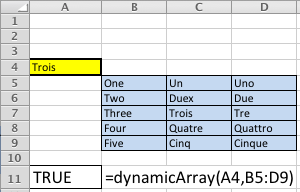
I left a debug MsgBox() call that demonstrates how you size a range. This shows the range above based on zero-based numbering, which means 5 rows are reported as 4 rows because 0 contains a row, and 3 columns are reported as 2 columns for the same reason. If the dialog looks strange to a Windows user, that’s because it’s one generated on a Mac OS X running Excel 2011. 🙂

I kept this as simple as possible to demonstrate the how to do this. Unfortunately, feedback required adding more extensive comments and making it a bit more bulletproof on concepts. The variable names were chosen to help read the syntax. Two loops are used to demonstrate (a) how you assign the range values to a multidimensional array, and (b) how you read the array values in your VBA code.
1 2 3 4 5 6 7 8 9 10 11 12 13 14 15 16 17 18 19 20 21 22 23 24 25 26 27 28 29 30 31 32 33 34 35 36 37 38 39 40 41 42 43 44 45 46 47 48 49 50 51 52 53 54 55 56 57 58 59 60 61 62 | Function dynamicArray(lookupValue As String, table As Range) ' Define the row starting cell, Row n maps to the first row where the range is found in the spreadsheet. ' Row 1 is the first row and 1,048,576 is the last possible row. Dim rowStart As Integer Dim rowSize As Integer ' Define the column starting cell, Column A maps to 1, Column B maps to 2, et cetera. ' Column A is the first column and XFD is the last possible column. Dim columnStart As Integer Dim columnSize As Integer ' Create a dynamic multiple dimension array without any physical size. Dim multidimensionArray As Variant ' Define and declare a local returnValue variable. Dim returnValue As Boolean returnValue = False ' Assign the starting row and column values, and the length of values. ' Since you need to add the row and column to the starting grid coordinates, you need to use 0-based numbering, ' which means you subtract one from the length. rowStart = table.Row rowSize = table.Rows.Count - 1 columnStart = table.Column columnSize = table.Columns.Count - 1 ' This demonstrates that the range starts in the row and column, and ' the length and width of the multiple dimension array. ' ---------------------------------------------------------------------- ' Insert single quotes for the next two lines to suppress testing the program with variables. MsgBox ("(RowStart [" + CStr(rowStart) + "], (ColStart [" + CStr(columnStart) + "]) " + _ "(RowSize [" + CStr(rowSize) + "] ColSize [" + CStr(columnSize) + "])") ' ---------------------------------------------------------------------- ' Redimension the arrays maximum size, rows first, columns second. ReDim multidimensionArray(rowSize, columnSize) ' Read through the range and assign it to a local and dynamically sized array variable. ' An important note to those unfamilar with the Cells function, it works on the active worksheet and uses two ' parameters, the absolute row and column number or relative row and column numbers. In this sample, the ' easiest solution is to use absolute row an dolumn numbers. For i = 0 To rowSize For j = 0 To columnSize multidimensionArray(i, j) = CStr(Cells(rowStart + i, columnStart + j)) Next j Next i ' Read through the local variable range and view the content set. For i = 0 To rowSize For j = 0 To columnSize ' Check if the lookupValue has been found and return true. If lookupValue = CStr(multidimensionArray(i, j)) Then returnValue = True Exit For End If Next j Next i ' Return a Boolean value: true when found and false when not found. dynamicArray = returnValue End Function |
You would call it with syntax like that below. The range can be any valid range value in Excel, which is any two cell references separated by a colon.
=dynamicArray("LookupString",A1:G5) |
As always, I hope this helps others looking for a way to perform this task natively in Microsoft Excel. As an addendum, I thought the absence of a code example for VB on the MSDN web page was quite interesting.
UDF replaces VLOOKUP
A colleague asked how a User Defined Function (UDF) could simplify their grading. They were using a VLOOKUP() function and range component that they’d copy into spreadsheets generated from Blackboard.
You typically want a letter grade before you transcribe it into the student record system. What you usually start with is a percentage and a defined range of percentages that map to letter grades. While you can solve that probelm with a VLOOKUP() function, is it the best way. I’d suggest this type of activity is ideally suited to a UDF solution.

The VLOOKUP() function call in cell C2 is:
=VLOOKUP(B2,$E$2:$G$13,MATCH("Letter Grade",$E$1:$G$1,FALSE),TRUE) |
A User Defined Function (UDF) can replace the VLOOKUP() function, the nested MATCH() function, and lookup range. You create a record type, like VirtualLookup, which must be defined outside of a subroutine or function.
The letterGrade() UDF call in cell C2 is much simpler:
=letterGrade(B2) |
You can refer to the following blog post for clarification on how to create a UDF. UDFs can simplify our lives for routine operations. If you’re not interested in the programming, just copy it into your Visual Basic for Application library and it should work.
These letterGrade examples require a custom data type. It must be defined before any function or subroutine in a module. It’s generally a good idea to make these available in other modules by making them Public.
' Define a record type (must happen outside of a function or sub block. Type VirtualLookupRecord lowerLimit As Double upperLimit As Double letterGrade As String * 2 ' A variable length string up to 2 characters. End Type |
For those interested in understanding how to program this UDF. You leverage that User Defined Type (UDT) when you define the function. In this example, you create a fifteen element array of the record structure. The example defines an array with 1-based numbering index. The default for Microsoft Excel is 0-based numbering. You would define a 0-based numbered array of fifteen elements like the one in the example.
Here’s the complete function that you can copy into your spreadsheet.
Dim VirtualLookup(15) As VirtualLookup |
Since the formal parameter of the function is optional, you need an if-block to replace a null value with a zero. Then, you need a loop to read through the array and find where the call parameter value is within the lower and upper grade range values. When it finds a match, it assigns the letter grade to a variable and then breaks out (exits) the loop. If you implement this, don’t forget to comment out the debugging MsgBox() function call.
1 2 3 4 5 6 7 8 9 10 11 12 13 14 15 16 17 18 19 20 21 22 23 24 25 26 27 28 29 30 31 32 33 34 35 36 37 38 39 40 41 42 43 44 45 46 47 48 49 50 51 52 53 54 55 56 57 58 59 60 61 62 63 64 65 66 67 68 69 70 71 72 73 | ' Define a function to convert a percentage into a letter grade. Function letterGrade(Optional percentage As Double = 0) ' Define a return variable Dim grade As String * 2 ' Define a single dimension array of a UDT (record) Dim VirtualLookup(1 To 12) As VirtualLookupRecord ' Record initialization VirtualLookup(1).lowerLimit = 0.93 VirtualLookup(1).upperLimit = 1# VirtualLookup(1).letterGrade = "A" VirtualLookup(2).lowerLimit = 0.9 VirtualLookup(2).upperLimit = 0.93 VirtualLookup(2).letterGrade = "A-" VirtualLookup(3).lowerLimit = 0.87 VirtualLookup(3).upperLimit = 0.9 VirtualLookup(3).letterGrade = "B+" VirtualLookup(4).lowerLimit = 0.83 VirtualLookup(4).upperLimit = 0.87 VirtualLookup(4).letterGrade = "B" VirtualLookup(5).lowerLimit = 0.8 VirtualLookup(5).upperLimit = 0.83 VirtualLookup(5).letterGrade = "B-" VirtualLookup(6).lowerLimit = 0.77 VirtualLookup(6).upperLimit = 0.8 VirtualLookup(6).letterGrade = "C+" VirtualLookup(7).lowerLimit = 0.73 VirtualLookup(7).upperLimit = 0.77 VirtualLookup(7).letterGrade = "C" VirtualLookup(8).lowerLimit = 0.7 VirtualLookup(8).upperLimit = 0.73 VirtualLookup(8).letterGrade = "C-" VirtualLookup(9).lowerLimit = 0.67 VirtualLookup(9).upperLimit = 0.7 VirtualLookup(9).letterGrade = "D+" VirtualLookup(10).lowerLimit = 0.63 VirtualLookup(10).upperLimit = 0.67 VirtualLookup(10).letterGrade = "D" VirtualLookup(11).lowerLimit = 0.6 VirtualLookup(11).upperLimit = 0.63 VirtualLookup(11).letterGrade = "D-" VirtualLookup(12).lowerLimit = 0# VirtualLookup(12).upperLimit = 0.6 VirtualLookup(12).letterGrade = "F" ' Read through the possible lookup array values. For i = 1 To (UBound(VirtualLookup) + 1) ' Assign a grade if the percentage criterion or criteria match. If percentage > VirtualLookup(1).lowerLimit Then grade = VirtualLookup(1).letterGrade ' Exit the loop. Exit For ElseIf percentage > 0 And _ percentage >= VirtualLookup(i).lowerLimit And _ percentage < VirtualLookup(i).upperLimit Then grade = VirtualLookup(i).letterGrade Exit For Else grade = "UW" End If Next i ' A debug message (remark out for deployment). MsgBox ("Completed [" + grade + "]") ' Return the letter grade. letterGrade = grade End Function |
Somebody asked for a variable array set by the input parameters. That’s a bit more programming and requires understanding the two types of array initialization and the difference between 0-based and 1-based numbering systems. Since this program assigns a constructed Array type to a Variant data type variable, 0-based arrays are consistently used in the example. That’s a change from the foregoing example.
Here is a function that lets you set the hundredth limits to something other than the traditional .x3 and .x7. It substitutes default values if you attempt to enter something greater than a tenth for either limit.
1 2 3 4 5 6 7 8 9 10 11 12 13 14 15 16 17 18 19 20 21 22 23 24 25 26 27 28 29 30 31 32 33 34 35 36 37 38 39 40 41 42 43 44 45 46 47 48 49 50 51 52 53 54 55 56 57 58 59 60 61 62 63 64 65 66 67 68 69 70 71 72 73 74 75 76 77 78 79 80 81 82 83 84 85 86 87 88 89 90 91 92 93 94 95 96 97 98 99 100 101 102 103 104 105 106 107 108 109 110 111 112 113 114 115 116 117 118 119 120 121 122 123 124 125 126 127 128 129 130 131 132 133 134 135 136 137 138 139 140 141 142 143 144 145 146 147 148 149 150 151 152 153 154 155 156 157 158 159 160 161 162 163 164 165 166 | ' Define a function to convert a percentage into a letter grade. Function letterGrade(Optional percentage As Double = 0, _ Optional minusTenth As Double = 0.03, _ Optional plusTenth As Double = 0.07) ' Define a variable length string variable. Dim grade As String * 2 ' Define local variables. Dim minusInverse As Double Dim plusInverse As Double Dim tenth As Double ' Assign value to counter. Dim counter As Double ' Define a single dimension array of a UDT (record). Dim LetterGrades As Variant Dim VirtualLookup(0 To 11) As VirtualLookupRecord ' Fix incorrect numeric data entry of lower bound. If minusTenth >= 0.1 Then minusTenth = 0.03 End If ' Fix incorrect numeric data entry of upper bound. If plusTenth >= 0.1 Then plusTenth = 0.07 End If ' Assign values to local variables. counter = 1# minusInverse = 0.1 - minusTenth plusInverse = 0.1 - plusTenth tenth = 0.1 ' Initialize letter array. LetterGrades = Array("A", "A-", "B+", "B", "B-", "C+", "C", "C-", "D+", "D", "D-", "F") ' Use the array of letter grades to dynamically assign lower and upper bounds. For i = 0 To UBound(LetterGrades) ' There are three models for grades. ' ------------------------------------------------------------------- ' [If] =[A] Has two possible values, a + or unadorned. ' [ElseIf]=[B,C,D] Have three possible values, a +, -, or unadorned. ' [ElseIf]=[F] Has only an unadorned. ' ------------------------------------------------------------------- If Left(LetterGrades(i), 1) = "A" Then ' The grade is one character for an unadorned grade. If Len(LetterGrades(i)) = 1 Then VirtualLookup(i).lowerLimit = counter - minusInverse VirtualLookup(i).upperLimit = counter VirtualLookup(i).letterGrade = LetterGrades(i) ' The grade is more than one character and second character a minus. ElseIf Len(LetterGrades(i)) > 1 And Mid(LetterGrades(i), 2, 1) = "-" Then VirtualLookup(i).lowerLimit = counter - tenth VirtualLookup(i).upperLimit = counter - minusInverse VirtualLookup(i).letterGrade = LetterGrades(i) End If ElseIf Left(LetterGrades(i), 1) = "B" Or _ Left(LetterGrades(i), 1) = "C" Or _ Left(LetterGrades(i), 1) = "D" Then ' The grade is one character for an unadorned grade. If Len(LetterGrades(i)) = 1 Then VirtualLookup(i).lowerLimit = counter - minusInverse VirtualLookup(i).upperLimit = counter - plusInverse VirtualLookup(i).letterGrade = LetterGrades(i) ' The grade is more than one character. ElseIf Len(LetterGrades(i)) > 1 Then ' The second character is a plus. If Mid(LetterGrades(i), 2, 1) = "+" Then VirtualLookup(i).lowerLimit = counter - plusInverse VirtualLookup(i).upperLimit = counter VirtualLookup(i).letterGrade = LetterGrades(i) ' The second character is a minus. ElseIf Mid(LetterGrades(i), 2, 1) = "-" Then VirtualLookup(i).lowerLimit = counter - tenth VirtualLookup(i).upperLimit = counter - minusInverse VirtualLookup(i).letterGrade = LetterGrades(i) End If End If ElseIf Left(LetterGrades(i), 1) = "F" Then VirtualLookup(i).lowerLimit = 0# VirtualLookup(i).upperLimit = counter VirtualLookup(i).letterGrade = LetterGrades(i) End If ' Debug message demonstrating the changed values of the dynamically ' constructed array (remark out for deployment). ' MsgBox (" Counter [" + CStr(counter) + _ ' "] Index [" + CStr(i) + _ ' "] Grade [" + CStr(LetterGrades(i)) + _ ' "] LLimit [" + CStr(VirtualLookup(i).lowerLimit) + _ ' "] ULimit [" + CStr(VirtualLookup(i).upperLimit) + "]") ' Increment the tenth value when letter grades change, like A to B, et cetera. If LetterGrades(i) = LetterGrades(UBound(LetterGrades)) Then ' Force a loop exit to avoid reading past the last index value. Exit For ElseIf Not Left(LetterGrades(i), 1) = Left(LetterGrades(i + 1), 1) Then ' Decrement the tenth placeholder. counter = counter - tenth End If Next i ' Read through the possible lookup array values. For i = 0 To UBound(VirtualLookup) ' Assign a grade if the percentage criterion or criteria match, and ' force loop exits until the last element of the array is read. ' ------------------------------------------------------------------- ' [If] Assumes an A is always the first letter. ' [ElseIf] Handles all numbers greater than zero. ' [Else] Assumes a zero or null indicate an unofficial withdrawal. ' ------------------------------------------------------------------- If percentage > VirtualLookup(0).lowerLimit Then ' Assign grade, alsways the first element of the array. grade = VirtualLookup(0).letterGrade ' Force a loop exit when match found. Exit For ElseIf percentage > 0 And _ percentage >= VirtualLookup(i).lowerLimit And _ percentage < VirtualLookup(i).upperLimit Then ' Assign grade. grade = VirtualLookup(i).letterGrade ' Force a loop exit. Exit For Else ' Assign grade. grade = "UW" End If Next i ' A debug message (remark out for deployment). ' MsgBox ("Completed [" + grade + "]") ' Return the letter grade. letterGrade = grade End Function |
I hope this helps folks that have to perform grading activities in Excel.
Excel UDF Tutorial
Microsoft Excel supports macros but it also supports library functions, known as User Defined Functions (UDF). Library functions are less risky than macros because they must return a value to a cell. This is a quick tutorial, mostly for my students, but as usual for anybody who’s interested.
Microsoft Excel User Defined Functions (UDFs) are different than standard VBA macros. They’re behavior is restricted. You can’t access other cells in a workbook, and may only return a value (also known as an expression) to the cell that uses the formula. That having been said, they can dramatically hide the complexity of mega-formulas and remove them from the editing control of users.
Here are the steps to configure your Excel 2007 environment to work with Visual Basic for Applications (VBA) and UDFs. They show you how to display the developer ribbon, open a module for editing, save VBA code into a library (*.xlam file), and add the library file as an “Add-in” library to your Excel 2007 installation. The name of the library will be the same as the Workbook where you created it.
- Displaying Excel’s Developer Tab
There are four steps to make this visible. They are:
- Choose the Office Button. You’ll see the following:

- Click the Excel Options button.

- Click the Popular tab if not highlighted (it’s the default). Inside the right side pane, click the Show Developer tab in the Ribbon check box to enable it, and click the OK button to set it.

- Click the Developer ribbon tab. Click the left most icon to launch the Visual Basic Editor screen.

- Open a Module in the Visual Basic Editor by clicking the Insert menu item and choosing the Module element.

- Copy the following function definition into the open Module. The name of the UDF will be the case-sensistive name of the function in the VBA module. That means you’ll now have a newSerialDate function in your list of functions when you click the insert function button.
I struggled to come up with a simple function to illustrate this and how you debug UDFs. A word to the wise, you can’t use a numeric variable inside a MsgBox by itself. If you attempt it, Excel will return a #Value! error in the cell where you call the UDF. You must include a numeric variable as an argument (also known as a call parameter) to the CStr() function. An example is: Cstr(myVariable). You call this sample function by entering:
=monthEnd(cell_reference) |
When you pass a date (actually an integer in the spreadsheet), the function handles it as a string. While no data type is assigned the dateIn variable in the example, variables without an explicit data type are always of the Variant data type. The Variant data type is a master data type and can hold any other type, which makes it like the Object data type in Java.
This program parses the string, then uses the DateSerial() function to return it as a number. It’s critical to note that the last line returns the value in the newSerialDate variable, and that variable must always be the function name. Place a single quote mark before all MsgBox() function calls after verifying that the function works.
Public Function newSerialDate(dateIn) ' Define local variables. Dim day As String Dim month As String Dim year As String Dim startPosition As Integer Dim endPosition As Integer Dim length As Integer ' Initialize local variables and parse the month from the left. startPosition = 1 endPosition = InStr(startPosition, dateIn, "/") month = Left(dateIn, endPosition - 1) ' This is a debugging tool to track variables during execution. MsgBox ("Month [" + month + "]") ' Shift the start position and parse the day from the middle. startPosition = endPosition + 1 endPosition = InStr(startPosition, dateIn, "/") day = Mid(dateIn, startPosition, endPosition - startPosition) ' This is a debugging tool to track variables during execution. MsgBox ("Day [" + day + "]") ' Get the remainder of the string. startPosition = endPosition length = Len(dateIn) - startPosition year = Right(dateIn, length) ' This is a debugging tool to track variables during execution. MsgBox ("Year [" + year + "]") ' Return a value from a User Defined Function (UDF) by using ' the function name as the return variable. newSerialDate = DateSerial(year, month, day) End Function |
Aside from the fact that all this parsing isn’t really necessary because the problem is much simpler and cleaner. At least, it becomes so when you understand the breadth of built-in functions in VBA. You can solve the problem by designating the formal parameter as a Double like the example below.
Function newSerialDate(dateIn As Double) newSerialDate = dateIn End Function |
Alternatively, you can accept a Variant, which maps to a String. Then, you convert it to a Date like this:
Function newSerialDate(dateIn) newSerialDate = DateValue(dateIn) End Function |
- Create the following spreadsheet, the formula values are noted below the screen shot. You should be able to copy and past them into the spreadsheet. After you’ve created the spreadsheet, entering a new date in cell
A1causes the UDF to run. When the UDF runs “as-is”, you’ll see message dialog boxes that show values set during runtime.

| Spreadsheet Functions | |
|---|---|
| Cell | Formula |
| A2 | =newSerialDate(A1) |
| C1 | =VLOOKUP(TYPE(A1),$E$3:$F$7,MATCH("Meaning",$E$2:$F$2,FALSE)) |
| C2 | =VLOOKUP(TYPE(A2),$E$3:$F$7,MATCH("Meaning",$E$2:$F$2,FALSE)) |
- You can now save this as an Add In library but comment out those debug
MsgBox()function calls. Click the Office Button and click SaveAs in the menu, then accept Excel Workbook initially. When you get to the SaveAs dialog, choose Excel Add-In as the file type. Below is a screen capture of the drop down selection box.

- Open a new Excel Workbook. Click the Excel Options button. Click the Add-Ins tab. Inside the right side pane, make sure the Manage drop down says Excel Add-ins before you click the Go button.

- Check the Samplefunction check box as shown below. Samplefunction is the name of the Workbook that contains the module, and it is saved as an
*.xlamfile. Click the OK button to add the library. You’ve now created, and added an Add-In library to your new spreadsheet. It will create aSampleFunction.xlamfile in the users directory.

The file is found by default in:
C:\Users\UserName\AppData\Roaming\Microsoft\AddIns |
Ranjit asked how you could call a UDF from inside a module. In the answer noted below, I show how to do it with the Unary function:
Function Unary(number As Integer) Unary = number + 1 End Function |
Then, enter the following ordinary Increment macro:
Sub Increment() ActiveCell.FormulaR1C1 = Unary(ActiveCell.Value()) End Sub |
Enter a number in a cell, then navigate to Tools -> Macro -> Macros… and choose the increment macro, which increments the value previously in the cell by calling the Unary function.
As always, I hope this is helpful to a few folks.
 Subscribe via RSS