What’s ORACLE_UNQNAME?
It started with a three part question: What’s the URL to run the DB Console for Oracle Database 11gR2 on Windows 7, and what’s the ORACLE_UNQNAME and why isn’t it defined by the installation. The first part is easy (shown further below), but the second and third parts were more involved.
The ORACLE_UNQNAME is an operating system environment variable that holds the database’s unique name value. You can find it with the following query as the SYSTEM user (through SQL*Plus):
SELECT name, db_unique_name FROM v$database; |
By the way, it’s not set as a Windows environment variable by default. You would need to do that manually (an example of setting an environment variable is here). The Oracle Universal Installer (OUI) actually used it to configure the already running DB Console service (with a successful installation). Once there, it didn’t need to set it as a system-level environment variable.
You may be wondering what generated the question if there’s already a configured service. You encounter the error when dropping down to the command line. First, you verify that the ports are running with this command:
C:\> netstat -an | findstr /C:1158 TCP 0.0.0.0:1158 0.0.0.0:0 LISTENING |
While this blog discusses the hard way to determine whether the DB Console is running, you can simply open the Windows Services to see whether the DB Console is running. Likewise, if you know the URL, enter it in your browser. Assuming you don’t know how to do either or are just a glotten for the command line, the rest of this post is important.
You can see your Windows services by typing services.msc in the Start->Run Command field. That way you don’t need to navigate the various links that differ between Windows releases.

Many know that you can check the status of the running DB Console with the emctl utility at the command line. It lets you find the URL that you should enter for the DB Console in a browser. This knowledge is where users encounter the problem with %ORACLE_UNQNAME% environment variable ($ORACLE_UNQNAME on Linux or Unix).
For example, running the following command raises an error that instructs you to set the %ORACLE_UNQNAME% environment variable. Although, it leaves many wondering what’s the right value to enter.
C:\> emctl status dbconsole Environment variable ORACLE_UNQNAME not defined. Please set ORACLE_UNQNAME to database unique name. |
If you object to using the Windows services to start and stop the OEM tool, you can do it at the command-line like the status example above. Having set the environment variables, you can start the DB console with this command-line syntax:
C:\> emctl start dbconsole |
Having set the environment variables, you can stop the DB console with this command-line syntax:
C:\> emctl stop dbconsole |
It’s not hard to find this information when you know how. While the error message complains about one environment variable, there are actually two environment values you need to set. They are: %ORACLE_HOSTNAME% and %ORACLE_UNQNAME%.
You can find them by navigating to the %ORACLE_HOME%\oc4j\j2ee\ folder (or directory). The file name of the DB Console file tells you the values for these environment variables because they’re embedded in the file’s name. A snapshot from Windows Explorer shows them both.

You can set these environment variables as shown below in command shell of Windows (Linux or Unix users should use terminal), and then successfully run emctl from the command line.
C:\>set ORACLE_HOSTNAME=localhost C:\>set ORACLE_UNQNAME=orcl C:\>emctl status dbconsole Oracle Enterprise Manager 11g Database Control Release 11.2.0.1.0 Copyright (c) 1996, 2010 Oracle Corporation. All rights reserved. https://localhost:1158/em/console/aboutApplication Oracle Enterprise Manager 11g is running. ------------------------------------------------------------------ Logs are generated in directory C:\app\McLaughlinM\product\11.2.0\dbhome_1/localhost_orcl/sysman/log |
If you’re using Linux or Unix, the export commands differ. You can check this other post for those. They under step 8 in that post.
You then enter the following URL in a browser to use the newly installed DB Console:
https://localhost:1158/em |
The browser will prompt you with a security warning like the following:

Click the Add Exception button and you’ll see the following Windows dialog.

Having granted the exception, you arrive at the following credential web page. Connect as the SYSDBA using the SYS user’s account when you require extraordinary privileges. Doing so, shows a security risk in the console. You should connect as the SYSTEM user with NORMAL access generally, as shown below.

The following home page shows after your credentials are validated.

Hope that helps those trying to sort out running the DB Console and finding the magic %ORACLE_UNQNAME% value. Check this other blog post for instructions to reconfigure OEM.
Verifying a Socket w/Perl
Using a lowercase hostname is typical but I got sloppy on a Windows 7 installation, after all Windows is case insensitive, and I used a mixed case hostname. It raised an interesting error when installing Oracle Database 11g Release 2.

Failed to allocate port(s) in the specified range(s) for the following process(es): JMS
[5540-5559], RMI [5520-5539], Database Control [5500-5519], EM Agent [3938] | [1830-1849]
Refer to the log file at C:\app\McLaughlinM\cfgtoollogs\dbca\orcl\emConfig.log for more details.
You can retry configuring this database with Enterprise Manager later by manually running C:\app\McLaughlinM\product\11.2.0\dbhome_1\bin\emca script.
After verifying the ports were available, it required testing the ability to form a socket. The quickest way to do that was installing ActiveState Perl and test the socket.
Server-side Perl code (server.pl):
1 2 3 4 5 6 7 8 9 10 11 12 13 14 15 16 17 18 19 20 21 | # Import socket library. use IO::Socket; # Create new socket. my $sock = new IO::Socket::INET( LocalAddr => 'mclaughlinmysql', LocalPort => '5500', Proto => 'tcp', Listen => 5500, Reuse => 5500); # Kill the program when socket not created. die "Could not create socket: $!\n" unless $sock; # Set socket to listen for incoming request and loop while waiting. my $new_sock = $sock->accept(); while(<$new_sock>) { print $_; } # Close the socket. close($sock); |
Server-side Perl code (client.pl):
1 2 3 4 5 6 7 8 9 10 11 12 13 14 15 | # Import socket library. use IO::Socket; # Create new socket. my $sock = new IO::Socket::INET( PeerAddr => 'mclaughlinmysql', PeerPort => '5500', Proto => 'tcp'); # Kill the program when socket not created. die "Could not create socket: $!\n" unless $sock; # Send string to socket. print $sock "Hello there!\n"; close($sock); |
These scripts help you check connectivity on a port. Run the server first in one command shell and the client second in another command shell. Then, the server-side program prints the “Hello There!” message sent from the client-side program.
You run the server with the following:
perl server.pl |
and the client with this:
perl client.pl |
Hope they help you verify viability through server ports.
MySQL Workbench Scripts
It’s always interesting when somebody asks why they got an error message, and especially sweet when you’re working on something related that lets you answer the question. They were using MySQL Workbench and wanted to know why they couldn’t open a SQL script file by clicking on the Scripting menu option.
As I explained to the individual who asked, you should always click the Edit SQL Script link in the SQL Development section of the MySQL Workbench home page to work on SQL scripts. The Scripting menu option supports Python and Lua plug-ins development and scripts.
They did the following initially, which led down the rabbit warren and left them stumped because they don’t know anything about Python or Lua. This is provided to those who choose to experiment with this advanced feature of MySQL Workbench.

That presents you with a chooser dialog and it lets you pick any type of file. (You may wonder, as I did, why they didn’t restrict it to .py and .lua file extensions, which would preclude opening a .sql file. I actually logged an enhancement request to see if the development team may agree with me.) You get the following message when you choose something other than a Python or Lua script. You can click on any of the reduced size screen shots to enlarge them and make them readable.

As you may note, the dialog says the activity is unsupported by provides no cancellation button. Click the OK button and the unsupported file is loaded into a tab that is useless. All you can do is click to close the tab and dismiss the window.

After you dismiss (by clicking the x) the non-editable .sql file, you need to click on the Open Script file icon shown below.

This chooser really should open where the default is for the MySQL Workbench application script files but it doesn’t. It opens in the last accessed directory. You need to navigate to where your Python or Lua scripts are stored, which is the following directory on Windows:
C:\Users\<user_name>\AppData\Roaming\MySQL\Workbench\scripts |
Please note that on a Windows system you can’t chose this directory option because it’s protected. You must enter the navigation bar and type it. Then, you should see any scripts that you saved from within MySQL Workbench.

The ReadFile.py below contains a rather simplistic and static program that reads a file and prints it to console (it’s small and fits in the screen). Obviously, it dispenses with a bunch to keep it small but check a Python website or book for the right way to manage a try block and handle exceptions.

Here’s the ReadFile.py file shown in the preceding and next screen shots. For those new to Python, watch out because tabs aren’t equivalent to spaces. I made a change in the script below to display the trailing semicolon because one of my students asked about it.
1 2 3 4 5 6 7 8 9 10 11 12 13 14 15 16 | # -*- coding: utf-8 -*- # MySQL Workbench Python script # ReadFile.py # Written in MySQL Workbench 5.2.41 import os f = open("c:\\Data\\MySQL\\query.sql",'rU') while True: line = f.readline() # Parse string to avoid reading line return. if not line[len(line) - 1:len(line)] == ";": print(line[0:len(line) - 1]) else: print(line) if not line: break |
Life’s funny, and you can never please everyone. The latest question, “Why did I choose to use substrings when suppressing line returns from the print() function is easier?” Simple answer because the approach differs between Python 2.7 and 3.0 and I didn’t want this post to have a lot of Python nuance.
Python 2.7 (compatible with MySQL Workbench 5.2):
1 2 3 4 5 6 7 8 9 | import os f = open("c:\\Data\\MySQL\\query.sql",'rU') while True: line = f.readline() # Suppress line return. print(line), if not line: print break |
Python 3.0 (not-compatible with MySQL Workbench 5.2)
You should take note that both version require a print statement on line #8. Line #6 above shows that Python 2.7 uses a comma to suppress the line return, and below line #6 shows Python 3 requires you set end equal to an empty string. Line #8 below also has a set of empty parentheses, which works in Python 3.x but not in Python 2.7. Python 2.7 would print the parentheses unless you put an empty string inside of them, like a print('') statement.
1 2 3 4 5 6 7 8 9 | import os f = open("c:\\Data\\MySQL\\query.sql",'rU') while True: line = f.readline() # Suppress line return. print(line, end = '') if not line: print() break |
Hopefully, everyone concurs the parsing was simpler than explaining all these Python nuances. Although, it’s nice somebody was so curious.
If your script complies with the Python 2.7 rules (that’s what is deployed in MySQL Workbench), click the lighting bolt and your code will run and display the results. That’s shown in the last screen shot.

If you’re interesting in developing plug-ins, check this summary page or this nice example of executing a query to text. Although, rumor has it that certain features may mature over the next year …
Naturally, I hope this helps those experimenting but personally it’s a cool advanced feature of the MySQL Workbench.
SQL Developer JVM Fix
It’s amazing the moving parts in Oracle Database 11g, and the ones that I don’t use after installation for a while often reach out to teach me something new. That’s what happened when I went to launch SQL Developer on my Windows 7 Professional 64-bit installation.
I got the message Unable to find a Java Virtual Machine, as shown in the image below. It really means unable to find a 32-bit Java 5 or Java 6 (1.6.0_4+) SDK home. Although the installation appeared fine, it pointed the SQL Developer configuration file to an incompatible 64-bit Java 7 SDK.

You fix this error by following these steps:
- Open the
sqldeveloper.conffile and check theSetJavaHomeparameter value. You find thesqldeveloper.conffile in the following directory:
%ORACLE_HOME\sqldeveloper\sqldeveloper\bin |
- Install the 32-bit Java 6 (1.6.0_4+) SDK on the operating system if not installed already. You can check whether it’s installed by looking for it in the Program Files (x86) folder.
- Change the value of the
SetJavaHomeparameter to point to the new 32-bit Java 6 home directory (or folder). The following change to line 18 in thesqldeveloper.conffile should fix it on your installation (provided that’s your version of the JVM).
18 | SetJavaHome C:\Program Files (x86)\Java\jdk1.6.0_34 |
Hope this helps those who run into the same issue.
Oracle and Java Tutorial
I’m posting this because of a question raised against this older post on how to configure the %CLASSPATH% to find the ojdbc6.jar file. This is the lab file I use in my Database 1 class to expose students to the moving parts of writing Java programs against the Oracle database. That’s why I choose to use a CLOB data type, which requires Oracle’s DBMS_LOB package and wrapping stored procedures.
If you want the same content for MySQL, here’s the link. The full program in either blog entry is available by clicking on the fold/unfold Java Source Code Program widget at the bottom of the respective posts.
This demonstrates how to create an Java infrastructure for reading and writing large text files to an Oracle database. The example provides:
- A
FileIO.jarlibrary that lets you enter Oracle connection parameters through aJOptionPane, and a customizedJFileChooserto filter and read source files from the file system. - A
ojdbc6.jarfile, which is Oracle’s library for JDBC communication with the Oracle Databases.
The steps to compiling and testing this code are qualified below:
- Download and install the Java Software Development Kit (JSDK) for Java 6.
- Create a
C:\JavaTestfolder on Windows, or a/JavaTestdirectory from some mount point of your choice. - Download and position the
ojdbc6.jarandFileIO.jarfiles in theJavaTestdirectory. - Create a batch file to source your environment path (%PATH% on Windows and $PATH on Linux or Mac OS X) and the two Java Archive (JAR) files. A sample batch file is noted below:
set PATH=C:\Program Files\Java\jdk1.6.0_07\bin;%PATH% set CLASSPATH=C:\JavaDev\Java6\ojdbc6.jar;C:\JavaDev\Java6\FileIO.jar;. |
You can run this file by simply typing the files first name. On Linux or Mac OS X, you first need to grant it privileges with the chmod command as 755.
- Copy the
WriteReadCLOB.javacode from the bottom of this posting and also put it into theJavaTestdirectory. - Compile the
WriteReadCLOB.javasource code with thejavacutility, as shown below:
javac WriteReadCLOB.java |
After you compile it, you should run it as follows:
java WriteReadCLOB |
- Before running the code, you’ll need to seed (
INSERT) a row that meets the desired hard coded criteria. It requires anITEM_TITLEvalue of'The Lord of the Rings - Fellowship of the Ring'and anITEM_SUBTITLEof'Widescreen Edition'in theITEMtable. - When it runs, you’ll see the following tabbed
JOptionPane.
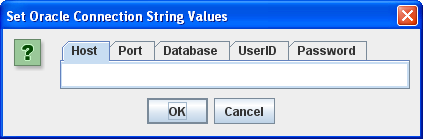
You need to enter the following values before clicking the OK button:
- Host: The
hostnameof your machine. - Port: The
portthat the Oracle Listener is running on (the default value is1521). - Database: The Oracle TNS Alias, which is
orclfor the full database sample database orxefor the Oracle Database 10g Express Edition. - UserID: The
user(schema) name where you’ve created anITEMtable. - Password: The
passwordfor the user’s account.
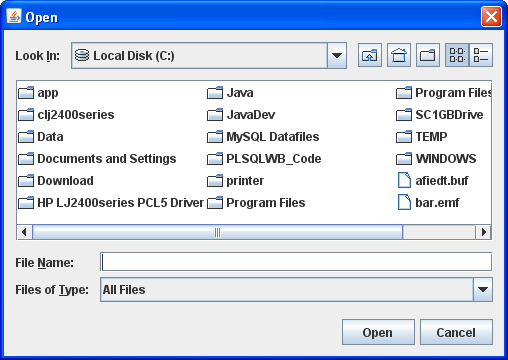
In the JFileChooser, select a file to upload to the database.
You should see what you uploaded displayed in a JFrame.
Java Source Code Program ↓
The drop down unfolds the WriteReadCLOB.java source code.
The following program has dependencies on the FileIO.jar file. You need to download it and put it in your $CLASSPATH for Linux or Mac OS X or %CLASSPATH% for Windows.
1 2 3 4 5 6 7 8 9 10 11 12 13 14 15 16 17 18 19 20 21 22 23 24 25 26 27 28 29 30 31 32 33 34 35 36 37 38 39 40 41 42 43 44 45 46 47 48 49 50 51 52 53 54 55 56 57 58 59 60 61 62 63 64 65 66 67 68 69 70 71 72 73 74 75 76 77 78 79 80 81 82 83 84 85 86 87 88 89 90 91 92 93 94 95 96 97 98 99 100 101 102 103 104 105 106 107 108 109 110 111 112 113 114 115 116 117 118 119 120 121 122 123 124 125 126 127 128 129 130 131 132 133 134 135 136 137 138 139 140 141 142 143 144 145 146 147 148 149 150 151 152 153 154 155 156 157 158 159 160 161 162 163 164 165 166 167 168 169 170 171 172 173 174 175 176 177 178 179 180 181 182 183 184 185 186 187 188 189 190 191 192 193 194 195 196 197 198 199 200 201 202 203 204 205 206 207 208 209 210 211 212 213 214 215 216 217 218 219 220 221 222 223 224 225 226 227 228 229 230 231 232 233 234 235 236 237 238 239 240 241 242 243 244 245 246 247 248 249 250 251 252 253 254 255 256 257 258 259 260 261 262 263 264 265 266 267 268 269 270 271 272 273 274 275 276 277 278 279 280 281 282 283 284 285 286 287 | // -------------------------------------------------------------------- // WriteReadCLOB.java // by Michael McLaughlin // // This code demonstrates reading a large text file and displaying // the text stream in a JLabel in a JFrame. // // The UPDATE and SELECT statements have dependencies on the // create_store.sql script. // -------------------------------------------------------------------- // Java Application class imports. import java.awt.Dimension; import java.awt.Font; import java.awt.GridLayout; import java.io.Reader; import javax.swing.JFrame; import javax.swing.JLabel; import javax.swing.JOptionPane; import javax.swing.JPanel; import javax.swing.JScrollPane; import javax.swing.JTextArea; // Generic JDBC imports. import java.sql.CallableStatement; import java.sql.Clob; import java.sql.Connection; import java.sql.DatabaseMetaData; import java.sql.ResultSet; import java.sql.ResultSetMetaData; import java.sql.SQLException; import java.sql.Statement; // Oracle JDBC import. import oracle.jdbc.driver.OracleDriver; import oracle.jdbc.pool.OracleDataSource; // Include book libraries (available at publisher website). import plsql.jdbc.DataConnectionPane; import plsql.fileio.FileIO; // -------------------------------------------------------------------/ public class WriteReadCLOB extends JFrame { // Define database connections. private String host; private String port; private String dbname; private String userid; private String passwd; // Define data connection pane. private DataConnectionPane message = new DataConnectionPane(); // Construct the class. public WriteReadCLOB (String s) { super(s); // Get database connection values or exit. if (JOptionPane.showConfirmDialog(this,message ,"Set Oracle Connection String Values" ,JOptionPane.OK_CANCEL_OPTION) == 0) { // Set class connection variables. host = message.getHost(); port = message.getPort(); dbname = message.getDatabase(); userid = message.getUserID(); passwd = message.getPassword(); // Print connection to console (debugging tool). message.getConnection(); // Create a JPanel for data display. ManageCLOB panel = new ManageCLOB(); // Configure the JPanel. panel.setOpaque(true); setContentPane(panel); // Configure the JFrame. setDefaultCloseOperation(JFrame.EXIT_ON_CLOSE); setLocation(100,100); pack(); setVisible(true); } else System.exit(1); } // -------------------------------------------------------------------/ private class ManageCLOB extends JPanel { // Define display variables. private String clobText; private JScrollPane scrollPane; private JTextArea textArea; // -----------------------------------------------------------------/ public ManageCLOB () { // Set layout manager. super(new GridLayout(1,0)); // Assign file read to String. clobText = FileIO.openFile(FileIO.findFile(this)); // Insert record before querying it. if (clobText.length() > 0) { if (insertClob(host,port,dbname,userid,passwd,clobText)) clobText = getQuery(host,port,dbname,userid,passwd); else clobText = null; } else System.exit(2); // Construct text area and format it. textArea = new JTextArea(clobText); textArea.setEditable(false); textArea.setFont(new Font(Font.SANS_SERIF,Font.PLAIN,14)); textArea.setLineWrap(true); textArea.setRows(10); textArea.setSize(400,100); textArea.setWrapStyleWord(true); // Put the image in container, and add label to panel. scrollPane = new JScrollPane(textArea); add(scrollPane); } // ---------------------------------------------------------------/ private Boolean insertClob(String host,String port,String dbname ,String user,String pswd,String fileString) { try { // Set the Pooled Connection Source OracleDataSource ods = new OracleDataSource(); String url = "jdbc:oracle:thin:@//"+host+":"+port+"/"+dbname; ods.setURL(url); ods.setUser(userid); ods.setPassword(passwd); // Define connection. Connection conn = ods.getConnection(); // Create statement. CallableStatement stmt = conn.prepareCall("UPDATE item "+ "SET item_desc = ? "+ "WHERE item_title = "+ "'The Lord of the Rings - Fellowship of the Ring'"+ "AND item_subtitle = 'Widescreen Edition'"); // Set string into statement. stmt.setString(1,fileString); // Execute query. if (stmt.execute()) conn.commit(); // Close resources. stmt.close(); conn.close(); // Return CLOB as a String data type. return true; } // End of connection try-block. catch (SQLException e) { if (e.getSQLState() == null) { System.out.println( new SQLException("Oracle Thin Client Net8 Connection Error.", "ORA-" + e.getErrorCode() + ": Incorrect Net8 thin client arguments:\n\n" + " host name [" + host + "]\n" + " port number [" + port + "]\n" + " database name [" + dbname + "]\n" , e.getErrorCode()).getSQLState()); // Return an empty String on error. return false; } else { System.out.println(e.getMessage()); // Return an empty String on error. return false; }}} // -----------------------------------------------------------------/ private String getQuery(String host,String port,String dbname ,String user,String pswd) { // Define method variables. char[] buffer; int count = 0; int length = 0; String data = null; String[] type; StringBuffer sb; try { // Set the Pooled Connection Source OracleDataSource ods = new OracleDataSource(); String url = "jdbc:oracle:thin:@//"+host+":"+port+"/"+dbname; ods.setURL(url); ods.setUser(userid); ods.setPassword(passwd); // Define connection. Connection conn = ods.getConnection(); // Define metadata object. DatabaseMetaData dmd = conn.getMetaData(); // Create statement. Statement stmt = conn.createStatement(); // Execute query. ResultSet rset = stmt.executeQuery( "SELECT item_desc " + "FROM item " + "WHERE item_title = " + "'The Lord of the Rings - Fellowship of the Ring'"+ "AND item_subtitle = 'Widescreen Edition'"); // Get the query metadata, size array and assign column values. ResultSetMetaData rsmd = rset.getMetaData(); type = new String[rsmd.getColumnCount()]; for (int col = 0;col < rsmd.getColumnCount();col++) type[col] = rsmd.getColumnTypeName(col + 1); // Read rows and only CLOB data type columns. while (rset.next()) { for (int col = 0;col < rsmd.getColumnCount();col++) { if (type[col] == "CLOB") { // Assign result set to CLOB variable. Clob clob = rset.getClob(col + 1); // Check that it is not null and read the character stream. if (clob != null) { Reader is = clob.getCharacterStream(); // Initialize local variables. sb = new StringBuffer(); length = (int) clob.length(); // Check CLOB is not empty. if (length > 0) { // Initialize control structures to read stream. buffer = new char[length]; count = 0; // Read stream and append to StringBuffer. try { while ((count = is.read(buffer)) != -1) sb.append(buffer); // Assign StringBuffer to String. data = new String(sb); } catch (Exception e) {} } else data = (String) null; } else data = (String) null; } else { data = (String) rset.getObject(col + 1); }}} // Close resources. rset.close(); stmt.close(); conn.close(); // Return CLOB as a String data type. return data; } catch (SQLException e) { if (e.getSQLState() == null) { System.out.println( new SQLException("Oracle Thin Client Net8 Connection Error.", "ORA-" + e.getErrorCode() + ": Incorrect Net8 thin client arguments:\n\n" + " host name [" + host + "]\n" + " port number [" + port + "]\n" + " database name [" + dbname + "]\n" , e.getErrorCode()).getSQLState()); // Return an empty String on error. return data; } else { System.out.println(e.getMessage()); return data; }} finally { if (data == null) System.exit(1); }}} // -----------------------------------------------------------------/ public static void main(String[] args) { // Define window. WriteReadCLOB frame = new WriteReadCLOB("Write & Read CLOB Text"); }} |
Delay or synchronize it?
A couple students in one of my classes ran into a problem when competing Java threads tried to insert new rows in a table. They raised an error when they tried the DELAY keyword to avoid the race (collision) condition in an INSERT statement. It was simple to explain to them that the DELAY keyword doesn’t work with an InnoDB table. Any attempt throws the following error:
ERROR 1616 (HY000): DELAYED OPTION NOT supported FOR TABLE 'message' |
Important Update: INSERT DELAYED is gone in MySQL 5.6.6 (announcement) and the whole issue comes down to synchronizing threads (some dislike the solution) or using the ON DUPLICATE KEY clause.
They retested their Java application after redefining the target table using the MyISAM engine. They found it worked but that’s a bad fix in Java (a brief Java/MySQL tutorial post). They really needed to synchronize the Java thread (line #22), leave out the DELAY keyword, and manage the table with the InnoDB engine. Here’s the modified Java code (by the way, they named their project VulcanTech if you’re wondering about the packages in the import statement):
1 2 3 4 5 6 7 8 9 10 11 12 13 14 15 16 17 18 19 20 21 22 23 24 25 26 27 28 29 30 31 32 33 | package vulcantech.vth.server.commands; import java.io.IOException; import java.net.Socket; import vulcantech.vth.server.combeans.MessageBean; public class MessageHandler implements Handler { @Override public void handleIt(Object... args) { MessageBean message = (MessageBean) args[0]; Socket sock = (Socket) args[1]; DatabaseConnection dbconnection = new DatabaseConnection(); String update = new String("INSERT INTO message(message_timestamp, sender, recipient, message, checked) VALUES(\'" + message.getTimeStamp() + "\', \'" + message.getSender() + "\', \'" + message.getRecipient() + "\', \'" + message.getMessage() + "\', b\'0\')"); synchronized (this) { dbconnection.executeUpdate(update); } try { sock.getOutputStream().write(1); } catch (IOException e) { e.printStackTrace(); } dbconnection.close(); } } |
Hope this helps those who encounter race conditions against MySQL when you’re writing Enterprise Java Beans (EJBs).
PHP for MySQL Striped View
Back in May I explained how to create MySQL striped views with session variables. A couple folks wanted to know how to implement them through PHP programs. The trick is sharing the same connection between a call to the function before a query against the striped view.
I’ve updated the MySQL example beyond the Hobbit analogy from the prior post. It now uses the following database components:
- An
APPLICATION_USERtable - A striped
AUTHORIZED_USERview - A
FUNCTION_QUERYview to optimize function calls - A
SET_LOGINfunction - A
GET_LOGIN_ID function - A
GET_USER_IDfunction
The definition of the APPLICATION_USER table is:
CREATE TABLE application_user ( user_id int(10) unsigned PRIMARY KEY AUTO_INCREMENT , user_name varchar(20) NOT NULL , user_role varchar(20) NOT NULL , user_group_id int(10) unsigned NOT NULL , user_type int(10) unsigned NOT NULL , first_name varchar(20) , middle_name varchar(20) , last_name varchar(20) , created_by int(10) unsigned NOT NULL , creation_date datetime NOT NULL , last_updated_by int(10) unsigned NOT NULL , last_update_date datetime NOT NULL , CONSTRAINT natural_key UNIQUE (user_name) ) ENGINE=InnoDB AUTO_INCREMENT=1 DEFAULT CHARSET=latin1; |
You should note that the natural key is a user-defined user name (mind you in reality it is often set by the application administrator). This guarantees that the authorize_cursor in the set_login function below always returns only one row.
The following seeds five rows in the APPLICATION_USER table:
INSERT INTO application_user VALUES ( null, 'potterhj', 'System Admin', 2, 1, 'Harry', 'James', 'Potter', 1, NOW(), 1, NOW()) ,( null, 'weasilyr', 'Guest', 1, 1, 'Ronald', null, 'Weasily', 1, NOW(), 1, NOW()) ,( null, 'longbottomn', 'Guest', 1, 1, 'Neville', null, 'Longbottom', 1, NOW(), 1, NOW()) ,( null, 'holmess', 'DBA', 3, 1, 'Sherlock', null, 'Holmes', 1, NOW(), 1, NOW()) ,( null, 'watsonj', 'DBA', 3, 1, 'John', 'H', 'Watson', 1, NOW(), 1, NOW()); |
Before creating the striped view, you should create the functions that set the session variables and query them. The set_login function sets two session variables when successful, which requires a user name that matches a valid value in the user_name column of the application_user table. The function returns an integer of 1 on success and 0 on failure. The set_login function code follows.
1 2 3 4 5 6 7 8 9 10 11 12 13 14 15 16 17 18 19 20 21 22 23 24 25 26 27 28 29 30 31 32 33 34 35 36 37 38 39 40 41 42 43 44 45 46 47 48 49 50 51 52 53 54 55 | CREATE FUNCTION set_login(pv_login_name VARCHAR(20)) RETURNS INT UNSIGNED BEGIN /* Declare a local variable to verify completion of the task: || ========================================================== || a. Default value is zero, which means false. || b. Non-default value is one, which means true. || ========================================================== */ DECLARE lv_success_flag INT UNSIGNED DEFAULT 0; /* Declare local variables to hold the return values from the cursor. */ DECLARE lv_login_id INT UNSIGNED; DECLARE lv_group_id INT UNSIGNED; /* Declare a condition variable for zero rows fetched, selected, or processed. */ DECLARE no_rows_fetched CONDITION FOR 1329; /* Declare a cursor to return an authorized user id. */ DECLARE authorize_cursor CURSOR FOR SELECT a.user_id , a.user_group_id FROM application_user a WHERE a.user_name = pv_login_name; /* Declare a handler for the cursor when it fails to return a row. */ DECLARE EXIT HANDLER FOR no_rows_fetched BEGIN /* The return statement when the function is aborted through an error. */ RETURN lv_success_flag; END; /* Check whether the input value is something other than a null value. */ IF pv_login_name IS NOT NULL THEN OPEN authorize_cursor; FETCH authorize_cursor INTO lv_login_id, lv_group_id; CLOSE authorize_cursor; /* Set the success flag. */ SET @sv_login_id := lv_login_id; SET @sv_group_id := lv_group_id; /* Check whether the session variables are set. */ IF NOT ISNULL(@sv_login_id) AND @sv_login_id > 0 AND NOT ISNULL(@sv_group_id) AND @sv_group_id > 0 THEN SET lv_success_flag := 1; END IF; END IF; /* Return the success flag. */ RETURN lv_success_flag; END; $$ |
The following GET_LOGIN_ID function returns the value from the @sv_login_id variable.
1 2 3 4 5 6 | CREATE FUNCTION get_login_id() RETURNS INT UNSIGNED BEGIN /* Return the success flag. */ RETURN @sv_login_id; END; $$ |
The following GET_GROUP_ID function returns the value from the @sv_group_id variable.
1 2 3 4 5 6 | CREATE FUNCTION get_group_id() RETURNS INT UNSIGNED BEGIN /* Return the success flag. */ RETURN @sv_group_id; END; $$ |
Lastly, you create the MySQL striped AUTHORIZED_USER like this one. It looks ineffective because it includes four function calls to the get_group_id() and one to the get_login_id().
CREATE VIEW authorized_user AS SELECT au.user_id , au.user_name , au.user_role , CONCAT(au.last_name,", ",au.first_name," ",IFNULL(au.middle_name,"")) AS full_name FROM application_user au WHERE (au.user_group_id = 1 AND au.user_group_id = get_group_id() AND au.user_id = get_login_id()) OR get_group_id() = 2 OR (get_group_id() > 2 AND au.user_group_id = get_group_id()); |
The prior view’s query lets you see the logic for the three types of access. You can eliminate the multiple function calls by using an inline view, like the following in a SQL statement:
CREATE VIEW authorized_user AS SELECT au.user_id , au.user_name , au.user_role , CONCAT(au.last_name,", ",au.first_name," ",IFNULL(au.middle_name,"")) AS full_name FROM application_user au CROSS JOIN (SELECT get_login_id() AS login_id , get_group_id() AS group_id) fq WHERE (au.user_group_id = 1 AND au.user_group_id = fq.group_id AND au.user_id = fq.login_id) OR fq.group_id = 2 OR (fq.group_id > 2 AND au.user_group_id = fq.group_id); |
Unfortunately, the preceding query raises the following exception if you attempt to put it in a view:
ERROR 1349 (HY000): View's SELECT contains a subquery in the FROM clause |
MySQL raises the error because a SELECT statement can’t contain a subquery in the FROM clause, according to the Create View MySQL Reference material.
The solution to the limitation of the CREATE VIEW syntax requires that you breakup the SQL statement into queries, and put them into separate views. The following example shows the function_query view holding the function calls and the authorized_user view cross joining the function_query view.
CREATE VIEW function_query AS SELECT get_login_id() AS login_id , get_group_id() AS group_id; CREATE VIEW authorized_user AS SELECT au.user_id , au.user_name , au.user_role , CONCAT(au.last_name,", ",au.first_name," ",IFNULL(au.middle_name,"")) AS full_name FROM application_user au CROSS JOIN function_query fq WHERE (au.user_group_id = 1 AND au.user_group_id = fq.group_id AND au.user_id = fq.login_id) OR fq.group_id = 2 OR (fq.group_id > 2 AND au.user_group_id = fq.group_id); |
The following PHP program calls the SET_LOGIN function before querying the AUTHORIZED_USER view. It uses a $_GET global parameter to simplify testing the concept but you should always run parameters through the $_POST global parameter. The $_GET and $_REQUEST global parameters are security risks.
1 2 3 4 5 6 7 8 9 10 11 12 13 14 15 16 17 18 19 20 21 22 23 24 25 26 27 28 29 30 31 32 33 34 35 36 37 38 39 40 41 42 43 44 45 46 47 48 49 50 51 52 53 54 55 56 57 58 59 60 61 62 63 64 65 66 67 68 69 70 71 72 73 74 75 76 77 78 79 80 81 82 83 84 85 86 87 88 89 90 91 92 93 94 95 | <html>
<header>
<title>Static Query Object Sample</title>
<style type="text/css">
/* HTML element styles. */
table {background:white;border-style:solid;border-width:3px;border-color:black;border-collapse:collapse;}
th {text-align:center;font-style:bold;background:lightgray;border:solid 1px gray;}
td {border:solid 1px gray;}
/* Class tag element styles. */
.ID {min-width:50px;text-align:right;}
.Label {min-width:200px;text-align:left;}
</style>
</header>
<body>
<?php
// Process the input parameter, which should be through a $_POST argument.
(isset($_GET['user_name'])) ? $input = $_GET['user_name'] : $input = '';
// Assign credentials to connection.
$mysqli = new mysqli("localhost", "student", "student", "studentdb");
// Check for connection error and print message.
if ($mysqli->connect_errno) {
print $mysqli->connect_error."<br />";
print "Connection not established ...<br />";
}
else {
// Declare a dynamic function call.
$query = "SELECT set_login(?)";
// Attempt preparing statement.
if (!$stmt = $mysqli->prepare($query)) {
// Print failure to resolve query message.
print $mysqli->error."<br />";
print "Failed to resolve query ...<br />";
}
else {
// Bind variable to SQL statement and execute it.
$stmt->bind_param("s", $input);
$stmt->execute();
$stmt->close();
}
// Declare a static query.
$query = "SELECT au.user_id, au.user_name, au.user_role, au.full_name FROM authorized_user au" ;
// Loop through a result set until completed.
do {
// Attempt query and exit with failure before processing.
if (!$stmt = $mysqli->query($query)) {
// Print failure to resolve query message.
print $mysqli->error."<br />";
print "Failed to resolve query ...<br />";
}
else {
// Print the opening HTML table tag.
print '<table><tr><th class="ID">ID</th><th class="Label">User Name</th><th class="Label">User Role</th><th class="Label">Full Name</th></tr>';
// Fetch a row for processing.
while( $row = $stmt->fetch_row() ) {
// Print the opening HTML row tag.
print "<tr>";
// Loop through the row's columns.
for ($i = 0;$i < $mysqli->field_count;$i++) {
// Handle column one differently.
if ($i == 0)
print '<td class="ID">'.$row[$i]."</td>";
else
print '<td class="Label">'.$row[$i]."</td>";
}
// Print the closing HTML row tag.
print "</tr>";
}
}
} while( $mysqli->next_result());
// Print the closing HTML table tag.
print "</table>";
// Release connection resource.
$mysqli->close(); }
?>
</script>
</body>
</html> |
You can call this through a browser with the following type of URL. You have two possible striped values, and they are any user’s unique user name.
http://localhost/stripedquery1.php?user_name=potterhj |
It returns one row when the user isn’t in a privileged group, all rows when the user is the root privileged group and all rows for a privilege group when not in the root privileged group. Naturally, you can extend this level of individual and group membership.
You can test this in the web page or directly in MySQL. The MySQL test doesn’t require image files and thereby loads faster, which is why I’ve opted to show it to you that way.
- Test for the root privilege group:
SELECT set_login('potterhj'); |
You get the full five rows:
+---------+-------------+--------------+----------------------+ | user_id | user_name | user_role | full_name | +---------+-------------+--------------+----------------------+ | 1 | potterhj | System Admin | Potter, Harry James | | 2 | weasilyr | Guest | Weasily, Ronald | | 3 | longbottomn | Guest | Longbottom, Neville | | 4 | holmess | DBA | Sherlock, Holmes | | 5 | watsonj | DBA | John, Watson H | +---------+-------------+--------------+----------------------+ |
- Test for an individual in a non-privileged group:
SELECT set_login('weasilyr'); |
You get the single user’s row:
+---------+-----------+-----------+------------------+ | user_id | user_name | user_role | full_name | +---------+-----------+-----------+------------------+ | 2 | weasilyr | Guest | Weasily, Ronald | +---------+-----------+-----------+------------------+ |
- Test for a non-root privileged group:
SELECT set_login('holmess'); |
You get the two rows that belong to the non-root privileged group:
+---------+-----------+-----------+-------------------+ | user_id | user_name | user_role | full_name | +---------+-----------+-----------+-------------------+ | 4 | holmess | DBA | Holmes, Sherlock | | 5 | watsonj | DBA | Watson, John H | +---------+-----------+-----------+-------------------+ |
Naturally, it’s more effective to put these components into a function library. The trick to making this work in a session is to share the connection. The object approach to the MySQL Improved (mysqli) object holds the connection, and that’s whats passed in the following example files.
This is an optimistic setter function. It forks (starts) the MySQL SQL/PSM set_login function but it doesn’t wait see if it ran successfully. That’s the nature of optimistic programming solutions, and the principal problem with them.
1 2 3 4 5 6 7 8 9 10 11 12 13 14 15 16 17 18 19 20 21 22 23 24 25 26 27 | function set_login($mysqli, $user_name) { // Define return string. $return = false; // Declare a dynamic function call. $query = "SELECT set_login(?)"; // Attempt preparing statement. if (!$stmt = $mysqli->prepare($query)) { // Print failure to resolve query message. print $mysqli->error."<br />"; print "Failed to resolve query ...<br />"; } else { // Bind variable to SQL statement and execute it. $stmt->bind_param("s", $user_name); $stmt->execute(); $stmt->close(); $return = true; } // Return the string. return $return; } |
An optimistic setter function fails to synchronize behaviors between the PHP and MySQL coding levels. It should be rewritten to fork the MySQL SQL/PSM set_login function and evaluate it’s successful or unsuccessful completion, which makes it a pessimistic function.
There are two ways to solve this problem. One can write a wrapper that accesses the get_login_id stored function to confirm the session variable is set, and the other handles the return value from the native set_login_id stored function. The former requires knowledge of the internal workings of the database model, while the latter does not. That means the first is more tightly coupled than the latter.
The following set_login PHP function is rewritten to be pessimistic but dependent on a supplemental call to another get_login PHP function, which calls the get_login_id stored function in the MySQL Server:
1 2 3 4 5 6 7 8 9 10 11 12 13 14 15 16 17 18 19 20 21 22 23 24 25 26 27 28 29 30 | function set_login($mysqli, $user_name) { // Define return string. $return = false; // Declare a dynamic function call. $query = "SELECT set_login(?)"; // Attempt preparing statement. if (!$stmt = $mysqli->prepare($query)) { // Print failure to resolve query message. print $mysqli->error."<br />"; print "Failed to resolve query ...<br />"; } else { // Bind variable to SQL statement and execute it. $stmt->bind_param("s", $user_name); $stmt->execute(); $stmt->close(); // True only when query returns a row. if (get_login($mysqli)) { $return = true; } } // Return the string. return $return; } |
A more effective solution reads the return value from the set_login function, like this:
1 2 3 4 5 6 7 8 9 10 11 12 13 14 15 16 17 18 19 20 21 22 23 24 25 26 27 28 29 30 31 32 33 34 35 36 37 38 39 40 41 42 43 44 45 | function set_login($mysqli, $user_name) { // Define return string. $return = false; // Declare a dynamic function call. $query = "SELECT set_login(?)"; // Attempt preparing statement. if (!$stmt = $mysqli->prepare($query)) { // Print failure to resolve query message. print $mysqli->error."<br />"; print "Failed to resolve query ...<br />"; } else { // Bind variable to SQL statement and execute it. $stmt->bind_param("s", $user_name); // Attempt query and exit with failure before processing. if (!$stmt->execute()) { // Print failure to resolve query message. print $mysqli->error."<br />"; print "Failed to resolve query ...<br />"; } else { // Fetch a row for processing. $result = $stmt->get_result(); $row = $result->fetch_array(MYSQLI_NUM); } // Close the statement cursor. $stmt->close(); // True only when query returns a row. if (!is_null($row[0]) && ($row[0] > 0)) { $return = true; } } // Return the string. return $return; } |
This is the getter function:
1 2 3 4 5 6 7 8 9 10 11 12 13 14 15 16 17 18 19 20 21 22 23 24 25 26 27 28 29 30 31 | function get_login($mysqli) { // Define return string. $return = false; // Declare a dynamic function call. $query = "SELECT get_login_id()"; // Attempt preparing statement. if (!$stmt = $mysqli->query($query)) { // Print failure to resolve query message. print $mysqli->error."<br />"; print "Failed to resolve query ...<br />"; } else { // Fetch a SQL statement. $row = $stmt->fetch_row(); // Close the statement. $stmt->close(); // True only when query returns a row. if (!is_null($row[0]) && ($row[0] > 0)) { $return = true; } } // Return the string. return $return; } |
The get_authorized_user PHP function gets and displays the table result from the authorized_user striped view:
1 2 3 4 5 6 7 8 9 10 11 12 13 14 15 16 17 18 19 20 21 22 23 24 25 26 27 28 29 30 31 32 33 34 35 36 37 38 39 40 41 42 43 44 45 46 47 48 49 50 51 52 | function get_authorized_user($mysqli) { // Define return string. $out = ''; // Declare a static query. $query = "SELECT au.user_id, au.user_name, au.user_role, au.full_name FROM authorized_user au" ; // Loop through a result set until completed. do { // Attempt query and exit with failure before processing. if (!$stmt = $mysqli->query($query)) { // Print failure to resolve query message. print $mysqli->error."<br />"; print "Failed to resolve query ...<br />"; } else { // Print the opening HTML table tag. $out .= '<table><tr><th class="ID">ID</th><th class="Label">User Name</th>' . '<th class="Label">User Role</th><th class="Label">Full Name</th></tr>'; // Fetch a row for processing. while( $row = $stmt->fetch_row() ) { // Print the opening HTML row tag. $out .= "<tr>"; // Loop through the row's columns. for ($i = 0;$i < $mysqli->field_count;$i++) { // Handle column one differently. if ($i == 0) $out .= '<td class="ID">'.$row[$i]."</td>"; else $out .= '<td class="Label">'.$row[$i]."</td>"; } // Print the closing HTML row tag. $out .= "</tr>"; } } } while( $mysqli->next_result()); // Print the closing HTML table tag. $out .= "</table>"; // Return an HTML table of the results. return $out; } |
This is the modified program using the functions:
1 2 3 4 5 6 7 8 9 10 11 12 13 14 15 16 17 18 19 20 21 22 23 24 25 26 27 28 29 30 31 32 33 34 35 36 37 38 39 40 41 42 43 44 45 | <style type="text/css">
/* HTML element styles. */
table {background:white;border-style:solid;border-width:3px;border-color:black;border-collapse:collapse;}
th {text-align:center;font-style:bold;background:lightgray;border:solid 1px gray;}
td {border:solid 1px gray;}
/* Class tag element styles. */
.ID {min-width:50px;text-align:right;}
.Label {min-width:200px;text-align:left;}
</style>
</header>
<body>
<?php
// Include the credentials file if omitted.
include_once("striping.inc");
// Process the input parameter, which should be through a $_POST argument.
(isset($_GET['user_name'])) ? $input = $_GET['user_name'] : $input = '';
// Assign credentials to connection.
$mysqli = new mysqli("localhost", "student", "student", "studentdb");
// Check for connection error and print message.
if ($mysqli->connect_errno) {
print $mysqli->connect_error."<br />";
print "Connection not established ...<br />";
}
else {
// After setting the session variable, get the striped view result.
if (set_login($mysqli,$input)) {
// Print the authorized list.
print get_authorized_user($mysqli);
}
// Release connection resource.
$mysqli->close();
}
?>
</script>
</body>
</html> |
Hope this helps those implementing MySQL Striped tables.
Free Oracle PHP Book
 Six years ago, I wrote Oracle Database 10g Express Edition PHP Web Programming for the release of the express edition. It was a lot of fun to write because I enjoy the PHP programming language, but unfortunately sales didn’t measure up too well. That’s probably because the population of PHP developers working with Oracle was small.
Today it seems there are more PHP developers working with Oracle 11g. While the population of PHP community for Oracle 11g is still smaller than for MySQL, it continues to grow year-over-year.
The FREE Underground PHP and Oracle Manual can help those converting PHP to run in the Oracle Call Interface, which is the replacement for MySQLi Interface. Chris Jones (an Oracle Open Source Product Manager) and Alison Holloway (an Oracle Senior Product Manager) write and maintain this book. It’s a great place to start if you’re migrating to Oracle Database 11g from MySQL.
PHP/MySQL Query
Somebody wanted an example of how to handle column values using PHP to query a MySQL database. While I thought there were enough examples out there, they couldn’t find one that was code complete.
Well, here’s one that works using a static query. If you want to use a prepared statement, check this earlier post.
<html>
<header>
<title>Static Query Object Sample</title>
<style type="text/css">
  /* HTML element styles. */
  table {background:white;border-style:solid;border-width:3px;border-color:black;border-collapse:collapse;}
  th {text-align:center;font-style:bold;background:lightgray;border:solid 1px gray;}
  td {border:solid 1px gray;}

  /* Class tag element styles. */
  .ID {min-width:50px;text-align:right;}
  .Label {min-width:200px;text-align:left;}
</style>
</header>
<body>
<?php
  // Assign credentials to connection.
  $mysqli = new mysqli("localhost", "student", "student", "studentdb");

  // Check for connection error and print message.
  if ($mysqli->connect_errno) {
    print $mysqli->connect_error."<br />";
    print "Connection not established ...<br />";
  }
  else {

    // Declare a static query.
    $query = "SELECT au.system_user_id, au.system_user_name FROM system_user au" ;

    // Loop through a result set until completed.
    do {

      // Attempt query and exit with failure before processing.
      if (!$stmt = $mysqli->query($query)) {

        // Print failure to resolve query message.
        print $mysqli->error."<br />";
        print "Failed to resolve query ...<br />";
      }
      else {

        // Print the opening HTML table tag.
        print '<table><tr><th class="ID">ID</th><th class="Label">User Role Name</th></tr>';

        // Fetch a row for processing.
        while( $row = $stmt->fetch_row() ) {

          // Print the opening HTML row tag.
          print "<tr>";

          // Loop through the row's columns.
          for ($i = 0;$i < $mysqli->field_count;$i++) {
            // Handle column one differently.
            if ($i == 0)
              print '<td class="ID">'.$row[$i]."</td>";
            else
              print '<td class="Label">'.$row[$i]."</td>";
          }
          // Print the closing HTML row tag.
          print "</tr>";
        }
      }
    } while( $mysqli->next_result());

  // Print the closing HTML table tag.
  print "</table>";

  // Release connection resource.
  $mysqli->close(); }
?>
</script>
</body>
</html> |
It prints the following image:

While you shouldn’t embed CSS, I’ve done it to keep this as simple as possible. You can also use the procedural approach to the MySQLi library, like this:
<html>
<header>
<title>Static Query Procedural Sample</title>
<style type="text/css">
  /* HTML element styles. */
  table {background:white;border-style:solid;border-width:3px;border-color:black;border-collapse:collapse;}
  th {text-align:center;font-style:bold;background:lightgray;border:solid 1px gray;}
  td {border:solid 1px gray;}

  /* Class tag element styles. */
  .ID {min-width:50px;text-align:right;}
  .Label {min-width:200px;text-align:left;}
</style>
</header>
<body>
<?php
  // Assign credentials to connection.
  $mysqli = mysqli_connect("localhost", "student", "student", "studentdb");

  // Check for connection error and print message.
  if (mysqli_connect_errno()) {
    print mysqli_connect_error()."<br />";
    print "Connection not established ...<br />";
  }
  else {

    // Initialize a statement in the scope of the connection.
    $stmt = mysqli_stmt_init($mysqli);

    // Declare a static query.
    $query = "SELECT au.system_user_id, au.system_user_name FROM system_user au" ;

    // Loop through a result set until completed.
    do {

      // Attempt query and exit with failure before processing.
      if (!$stmt = mysqli_query($mysqli,$query)) {

        // Print failure to resolve query message.
        print mysqli_error($stmt)."<br />";
        print "Failed to resolve query ...<br />";
      }
      else {

        // Print the opening HTML table tag.
        print '<table><tr><th class="ID">ID</th><th class="Label">User Role Name</th></tr>';

        // Fetch a row for processing.
        while( $row = mysqli_fetch_row($stmt) ) {

          // Print the opening HTML row tag.
          print "<tr>";

          // Loop through the row's columns.
          for ($i = 0;$i < mysqli_field_count($mysqli);$i++) {
            // Handle column one differently.
            if ($i == 0)
              print '<td class="ID">'.$row[$i]."</td>";
            else
              print '<td class="Label">'.$row[$i]."</td>";
          }
          // Print the closing HTML row tag.
          print "</tr>";
        }
      }
    } while( mysqli_next_result($mysqli));

    // Print the closing HTML table tag.
    print "</table>";

    // Free system resources.
    mysqli_stmt_free_result($stmt);

    // Release connection resource.
    mysqli_close($mysqli);
  }
?>
</script>
</body>
</html> |
It produces the same output as the object oriented approach with one exception the title of the web page.
Hope this helps some folks.
Placement over substance
I was stunned when a SQL query raised an ERROR 1630 (42000) telling me the SUM function didn’t exist in MySQL 5.5.23. The fix was simple. The opening parenthesis of the SUM function must be on the same line as the SUM keyword without an intervening white space. Alternatively phrased, you can’t have a line return or white space between the SUM function name and the opening parenthesis of the call parameter list. The same rule doesn’t apply to the opening parenthesis of the FORMAT function and it seems to me that this parsing inconsistency is problematic.
Therefore, my surprise, observation, and complaint is that all functions don’t parse the same way, using the same rules. That is, unless you use specialized SQL_MODE settings. This assumption was borne out by Kolbe Kegel’s comment on this post, and there are 30 remaining built in functions that have specialized parsing and resolution markers.
A simplified version of the code that raises the error follows. As you’ll notice the opening parenthesis for the FORMAT and SUM function have intervening white space and a line return.
1 2 3 4 5 6 7 8 9 10 11 12 13 14 15 16 17 18 | SELECT t.transaction_account AS "Transaction" , LPAD(FORMAT (SUM (CASE WHEN EXTRACT(MONTH FROM transaction_date) = 1 AND EXTRACT(YEAR FROM transaction_date) = 2011 THEN CASE WHEN t.transaction_type = cl.common_lookup_type THEN t.transaction_amount ELSE t.transaction_amount * -1 END END),2),10,' ') AS "JAN" FROM TRANSACTION t CROSS JOIN common_lookup cl WHERE cl.common_lookup_table = 'TRANSACTION' AND cl.common_lookup_column = 'TRANSACTION_TYPE' AND cl.common_lookup_type = 'DEBIT' GROUP BY t.transaction_account; |
Based on the comments, the SQL_MODE is:
mysql> SELECT @@version, @@sql_mode; +-----------+----------------------------------------------------------------+ | @@version | @@sql_mode | +-----------+----------------------------------------------------------------+ | 5.5.23 | STRICT_TRANS_TABLES,NO_AUTO_CREATE_USER,NO_ENGINE_SUBSTITUTION | +-----------+----------------------------------------------------------------+ 1 ROW IN SET (0.00 sec) |
It raises the following error:
ERROR 1630 (42000): FUNCTION studentdb.SUM does NOT exist. CHECK the 'Function Name Parsing and Resolution' SECTION IN the Reference Manual |
Moving ONLY the opening parenthesis to the end of the SUM keyword (or removing the line return and white space from between the SUM keyword and opening parenthesis) prevents the error but it would be more convenient if it supported both approaches. It seems odd that an intervening line return and white space for the SUM function raises an exception while the same intervening line return and white space doesn’t raise an exception for the FORMAT function. It strikes me the parser should support both or reject both. Here’s the fixed code that works without enabling the IGNORE_SPACE SQL Mode option.
1 2 3 4 5 6 7 8 9 10 11 12 13 14 15 16 17 18 | SELECT t.transaction_account AS "Transaction" , LPAD(FORMAT (SUM( CASE WHEN EXTRACT(MONTH FROM transaction_date) = 1 AND EXTRACT(YEAR FROM transaction_date) = 2011 THEN CASE WHEN t.transaction_type = cl.common_lookup_type THEN t.transaction_amount ELSE t.transaction_amount * -1 END END),2),10,' ') AS "JAN" FROM TRANSACTION t CROSS JOIN common_lookup cl WHERE cl.common_lookup_table = 'TRANSACTION' AND cl.common_lookup_column = 'TRANSACTION_TYPE' AND cl.common_lookup_type = 'DEBIT' GROUP BY t.transaction_account; |
As noted by the comments, adding the IGNORE_SPACE to the SQL_MODE lets both queries work without moving the open parenthesis. You can do that in a session with the following syntax (which is covered in an older post):
SET SQL_MODE=(SELECT CONCAT(@@sql_mode,',IGNORE_SPACE')); |
Hope this helps folks…
 Subscribe via RSS