Archive for the ‘Oracle Developer’ tag
SQL Logic Overkill, again …
It’s interesting to watch people try to solve problems. For example, the student is required to use a scalar subquery in a SQL lab exercise that I wrote. It should be a simple fix. The problem is structured with an incorrect foreign key value in an external CSV file and the restriction that you can not replace the value in the external CSV file. I hoped that students would see the easiest option was to write a scalar subquery in the SELECT clause to replace the value found in the external file. There’s even a hint about how to use a scalar subquery.
Students who are new to SQL can take very interesting approaches to solve problems. The flexibility of SQL can lead them to solve problems in interesting ways. While the following solution worked to solve the problem, it’s wrong on two levels:
1 2 3 4 5 6 7 8 9 10 11 12 13 14 15 16 17 18 19 20 21 22 23 24 25 | INSERT INTO TRANSACTION (SELECT transaction_s1.NEXTVAL , tr.transaction_account , CASE WHEN NOT tr.transaction_type = (SELECT common_lookup_id FROM common_lookup WHERE common_lookup_table = 'TRANSACTION' AND common_lookup_column = 'TRANSACTION_TYPE' AND common_lookup_type = 'CREDIT') THEN cl.common_lookup_id END AS transaction_type , tr.transaction_date , (tr.transaction_amount / 1.06) AS transaction_amount , tr.rental_id , tr.payment_method_type , tr.payment_account_number , tr.created_by , tr.creation_date , tr.last_updated_by , tr.last_update_date FROM transaction_reversal tr CROSS JOIN common_lookup cl WHERE cl.common_lookup_table = 'TRANSACTION' AND cl.common_lookup_column = 'TRANSACTION_TYPE' AND cl.common_lookup_type = 'CREDIT'); |
The CASE statement on lines 4 through 12 substitutes a value only when the source value is not a match. That means if the source file is ever correct a null value would become the transaction_type column value, which would make the statement fail because the transaction_type column is NOT NULL constrained in the target transaction table. Therefore, the logic of the student’s approach requires adding an ELSE clause to the CASE statement for the event that the source file is ever corrected. The modified CASE statement would be =the following:
4 5 6 7 8 9 10 11 12 13 14 | , CASE WHEN NOT tr.transaction_type = (SELECT common_lookup_id FROM common_lookup WHERE common_lookup_table = 'TRANSACTION' AND common_lookup_column = 'TRANSACTION_TYPE' AND common_lookup_type = 'CREDIT') THEN cl.common_lookup_id ELSE tr.transaction_type END AS transaction_type |
The second element of student thought at issue is the CROSS JOIN to the in-line view. It does one thing right and another wrong. It uses the unique key to identify a single row, which effectively adds all the columns for that one row to all rows returned from the external transaction_reversal table. The CROSS JOIN is a correct approach to adding values for computations to a query when you need those columns for computations. The problem with this CROSS JOIN logic may not be immediately obvious when you write it in ANSI SQL 1992 syntax, but it should become obvious when you replace the inline view with a Common Table Expression (CTE) in ANSI SQL 1999 syntax, like:
1 2 3 4 5 6 7 8 9 10 11 12 13 14 15 16 17 18 19 20 | INSERT INTO TRANSACTION (WITH cte AS (SELECT * FROM common_lookup WHERE common_lookup_table = 'TRANSACTION' AND common_lookup_column = 'TRANSACTION_TYPE' AND common_lookup_type = 'CREDIT') SELECT transaction_s1.NEXTVAL , tr.transaction_account , cte.common_lookup_id AS transaction_type , tr.transaction_date , (tr.transaction_amount / 1.06) AS transaction_amount , tr.rental_id , tr.payment_method_type , tr.payment_account_number , tr.created_by , tr.creation_date , tr.last_updated_by , tr.last_update_date FROM transaction_reversal tr CROSS JOIN cte); |
Unfortunately, you would discover that Oracle Database 11g does not support the use of an ANSI SQL 1999 WITH clause inside as the source for an INSERT statement. Oracle Database 12c does support the use of the ANSI SQL 1999 WITH clause inside a subquery of an INSERT statement. That’s an “Oops!” for Oracle 11g because that means the Oracle database fails to meet the ANSI SQL 1999 compliance test. 😉 Great that they fixed it in Oracle 12c. While the nested query would work in Oracle as an ordinary query (outside of an INSERT statement). It raises the following error when you embed it in an INSERT statement:
ERROR AT line 20: ORA-32034: unsupported USE OF WITH clause |
The WITH clause does highlight a key problem with the idea of a CROSS JOIN in this situation. You don’t need all the columns from the common_lookup table. You only need the common_lookup_id column. That make the CROSS JOIN approach suboptimal if it worked.
The complex logic in the original approach is wasted. That’s true because the common_lookup_id value can be supplied to each row as the value from a scalar subquery. The scalar query runs once and the result is placed in the return set for each row. You implement the scalar subquery in the SELECT clause, like:
1 2 3 4 5 6 7 8 9 10 11 12 13 14 15 16 17 18 | INSERT INTO TRANSACTION (SELECT transaction_s1.NEXTVAL , tr.transaction_account , (SELECT common_lookup_id FROM common_lookup WHERE common_lookup_table = 'TRANSACTION' AND common_lookup_column = 'TRANSACTION_TYPE' AND common_lookup_type = 'CREDIT') AS transaction_type , tr.transaction_date , (tr.transaction_amount / 1.06) AS transaction_amount , tr.rental_id , tr.payment_method_type , tr.payment_account_number , tr.created_by , tr.creation_date , tr.last_updated_by , tr.last_update_date FROM transaction_reversal tr); |
There really was no intent or logical outcome where the value from the original CASE statement would be different than the subquery’s common_lookup_id value. That fact makes adding an ELSE clause useless, and the solution viable though inefficient. Also, there was no need for the additional columns from the common_lookup table because they are unused. The subquery on lines 4 through 8 provides the optimal solution and improved efficiency.
Developers should ask themselves two questions when they write SQL:
- If my logic is so elegant why do I need it to be so elegant?
- Is there a simpler solution to provide the desired result set?
If there aren’t good answers to both questions, they should re-write it. I hope the examples answer questions and help folks solve problems.
Oracle SQL Strip Quotes
Somebody wanted to know how to strip double quotes from strings. Obviously, they’re playing with the DBMS_METADATA package. It’s quite simple, the TRIM function does it, like this:
SELECT TRIM(BOTH '"' FROM '"Hello World!"') AS "Message" FROM dual; |
It will print:
Hello World! |
As always, I hope this helps those looking for a solution.
Reset Oracle Password
This blog entry shows you how to reset the system password for an Oracle Database. It uses a Linux image running Oracle Database 11g Express Edition. It assumes the student user is the sudoer user.
After you sign on to the student user account, you open a Terminal session and you should see the following:
[student@localhost python]$ |
The oracle user account should be configured to prevent a login. So, you should use the su command or sudo command to open a terminal shell as the root user.
[student@localhost python]$ sudo sh [sudo] password for student: |
As the root user, you can login as the oracle user with the following command:
su - oracle |
and, you should see the following prompt. You can see the present working directory (pwd) with the pwd command:
-bash-4.2$ pwd /u01/app/oracle |
You need to source the oracle_env.sh shell file created by the installation of the Oracle Database during the installation. You have two approaches to source the environment file, the first approach is with a dot (.), like
. /u01/app/oracle/product/11.2.0/xe/bin/oracle_env.sh |
or, this
source /u01/app/oracle/product/11.2.0/xe/bin/oracle_env.sh |
The oracle_env.sh file contains the following:
export ORACLE_HOME=/u01/app/oracle/product/11.2.0/xe export ORACLE_SID=XE export NLS_LANG=`$ORACLE_HOME/bin/nls_lang.sh` export PATH=$ORACLE_HOME/bin:$PATH |
Now, you can connect to the Oracle Database as the internal user with the following command:
sqlplus / as sysdba |
Once connected as the internal user, you can reset the system user’s password to “cangetin” with this command:
ALTER USER system IDENTIFIED BY cangetin; |
At this point, you can also stop and start the database. You stop the database with this command:
shutdown immediate |
You can then start the database with this command:
startup |
After setting the system user password, sign out of SQL*Plus. Then, you can type two exits to return to the student user account, like this:
-bash-4.2$ exit logout sh-4.2# exit exit [student@localhost python]$ |
As always, I hope this helps those who need to reset the system password when they don’t know what it was to begin with.
Oracle Diagnostic Queries
It’s always a challenge when you want to build your own Oracle SQL Tools. I was asked how you could synchronize multiple cursors into a single source. The answer is quite simple, you write an Oracle object type to represent a record structure, an Oracle list of the record structure, and a stored function to return the list of the record structure.
For this example, you create the following table_struct object type and a table_list collection type:
/* Drop the types from most to least dependent. */ DROP TYPE table_list; DROP TYPE table_struct; /* Create the record type structure. */ CREATE OR REPLACE TYPE table_struct IS OBJECT ( table_name VARCHAR2(30) , column_cnt NUMBER , row_cnt NUMBER ); / /* Create the collection of a record type structure. */ CREATE OR REPLACE TYPE table_list IS TABLE OF table_struct; / |
The following listing function now reads all table names from the user_tables view. A subordinate cursor reads the user_tab_columns view for the number of columns in a table. A Native Dynamic SQL (NDS) cursor counts the number of rows in each tables found in the .
/* Create the listing function. */
CREATE OR REPLACE
FUNCTION listing RETURN table_list IS

  /* Variable list. */
  lv_column_cnt  NUMBER;
  lv_row_cnt     NUMBER;

  /* Declare a statement variable. */
  stmt  VARCHAR2(200);

  /* Declare a system reference cursor variable. */
  lv_refcursor  SYS_REFCURSOR;
  lv_table_cnt  NUMBER;

  /* Declare an output variable.  */
  lv_list  TABLE_LIST := table_list();

  /* Declare a table list cursor that excludes APEX tables. */
  CURSOR c IS
    SELECT table_name
    FROM   user_tables
    WHERE  table_name NOT IN
            ('DEPT','EMP','APEX$_ACL','APEX$_WS_WEBPG_SECTIONS','APEX$_WS_ROWS'
            ,'APEX$_WS_HISTORY','APEX$_WS_NOTES','APEX$_WS_LINKS'
            ,'APEX$_WS_TAGS','APEX$_WS_FILES','APEX$_WS_WEBPG_SECTION_HISTORY'
            ,'DEMO_USERS','DEMO_CUSTOMERS','DEMO_ORDERS','DEMO_PRODUCT_INFO'
            ,'DEMO_ORDER_ITEMS','DEMO_STATES');

  /* Declare a column count. */
  CURSOR cnt
  ( cv_table_name  VARCHAR2 ) IS
    SELECT   table_name
    ,        COUNT(column_id) AS cnt_columns
    FROM     user_tab_columns
    WHERE    table_name = cv_table_name
    GROUP BY table_name;

BEGIN
  /* Read through the data set of non-environment variables. */
  FOR i IN c LOOP

    /* Count the columns of a table. */
    FOR j IN cnt(i.table_name) LOOP
      lv_column_cnt := j.cnt_columns;
    END LOOP;

    /* Declare a statement. */
    stmt := 'SELECT COUNT(*) AS column_cnt FROM '||i.table_name;

    /* Open the cursor and write set to collection. */
    OPEN lv_refcursor FOR stmt;
    LOOP
      FETCH lv_refcursor INTO lv_table_cnt;
      EXIT WHEN lv_refcursor%NOTFOUND;
      lv_list.EXTEND;
      lv_list(lv_list.COUNT) := table_struct(
                                    table_name => i.table_name
                                  , column_cnt => lv_column_cnt
                                  , row_cnt    => lv_table_cnt );
    END LOOP;
  END LOOP;

  RETURN lv_list;
END;
/ |
The following query pulls the processed data set as the function’s result:
COL table_name FORMAT A20 HEADING "Table Name" COL column_cnt FORMAT 9,999 HEADING "Column #" COL row_cnt FORMAT 9,999 HEADING "Row #" SELECT table_name , column_cnt , row_cnt FROM TABLE(listing); |
It returns the following result set:
Table Name Column # Row # -------------------- -------- ------ SYSTEM_USER 11 5 COMMON_LOOKUP 10 49 MEMBER 9 10 CONTACT 10 18 ADDRESS 10 18 STREET_ADDRESS 8 28 TELEPHONE 11 18 RENTAL 8 4,694 ITEM 14 93 RENTAL_ITEM 9 4,703 PRICE 11 558 TRANSACTION 12 4,694 CALENDAR 9 300 AIRPORT 9 6 ACCOUNT_LIST 8 200 15 rows selected. |
As always, I hope this helps those trying to work with the Oracle database.
Install cx_Oracle for Python
This shows you how to install the cx_Oracle library for Python 2.7 on Fedora Linux. If Fedora has it on the server you can download it with the following yum command:
yum install -y cx_Oracle-5.2.1-11g-py27-1.x86_64.rpm |
Currently, you’ll get the following failure because it’s not available in the Fedora repository:
Loaded plugins: langpacks, refresh-packagekit mysql-connectors-community | 2.5 kB 00:00:00 mysql-tools-community | 2.5 kB 00:00:00 mysql56-community | 2.5 kB 00:00:00 pgdg93 | 3.6 kB 00:00:00 updates/20/x86_64/metalink | 2.3 kB 00:00:00 No package cx_Oracle-5.2.1-11g-py27-1.x86_64.rpm available. Error: Nothing to do |
You can download the cx_Oracle library from the Python web site. The cx_Oracle documentation qualifies module interfaces, objects, and connections. Assuming your Linux user’s name is student, you download the cx_Oracle library into the /home/student/Downloads directory. Then, you use the su or sudo command to become the root user.
As the root user, run the following yum command:
yum install -y ~student/Downloads/cx_Oracle-5.2.1-11g-py27-1.x86_64.rpm |
You should see the following output:
Loaded plugins: langpacks, refresh-packagekit Examining /home/student/Downloads/cx_Oracle-5.2.1-11g-py27-1.x86_64.rpm: cx_Oracle-5.2.1-1.x86_64 Marking /home/student/Downloads/cx_Oracle-5.2.1-11g-py27-1.x86_64.rpm to be installed Resolving Dependencies --> Running transaction check ---> Package cx_Oracle.x86_64 0:5.2.1-1 will be installed --> Finished Dependency Resolution Dependencies Resolved ======================================================================================= Package Arch Version Repository Size ======================================================================================= Installing: cx_Oracle x86_64 5.2.1-1 /cx_Oracle-5.2.1-11g-py27-1.x86_64 717 k Transaction Summary ======================================================================================= Install 1 Package Total size: 717 k Installed size: 717 k Downloading packages: Running transaction check Running transaction test Transaction test succeeded Running transaction (shutdown inhibited) Installing : cx_Oracle-5.2.1-1.x86_64 1/1 Verifying : cx_Oracle-5.2.1-1.x86_64 1/1 Installed: cx_Oracle.x86_64 0:5.2.1-1 Complete! |
After you install the cx_Oracle-5.2.1-1.x86_64 package, you can find the installed files with this rpm command:
rpm -ql cx_Oracle-5.2.1-1.x86_64 |
It lists:
/usr/lib64/python2.7/site-packages/cx_Oracle-5.2.1-py2.7.egg-info /usr/lib64/python2.7/site-packages/cx_Oracle-5.2.1-py2.7.egg-info/PKG-INFO /usr/lib64/python2.7/site-packages/cx_Oracle-5.2.1-py2.7.egg-info/SOURCES.txt /usr/lib64/python2.7/site-packages/cx_Oracle-5.2.1-py2.7.egg-info/dependency_links.txt /usr/lib64/python2.7/site-packages/cx_Oracle-5.2.1-py2.7.egg-info/top_level.txt /usr/lib64/python2.7/site-packages/cx_Oracle.so /usr/share/doc/cx_Oracle-5.2.1 /usr/share/doc/cx_Oracle-5.2.1/BUILD.txt /usr/share/doc/cx_Oracle-5.2.1/README.txt /usr/share/doc/cx_Oracle-5.2.1/samples /usr/share/doc/cx_Oracle-5.2.1/samples/DatabaseChangeNotification.py /usr/share/doc/cx_Oracle-5.2.1/samples/DatabaseShutdown.py /usr/share/doc/cx_Oracle-5.2.1/samples/DatabaseStartup.py /usr/share/doc/cx_Oracle-5.2.1/samples/ReturnLongs.py /usr/share/doc/cx_Oracle-5.2.1/samples/ReturnUnicode.py /usr/share/doc/cx_Oracle-5.2.1/samples/RowsAsInstance.py /usr/share/doc/cx_Oracle-5.2.1/test /usr/share/doc/cx_Oracle-5.2.1/test/3kArrayDMLBatchError.py /usr/share/doc/cx_Oracle-5.2.1/test/3kNumberVar.py /usr/share/doc/cx_Oracle-5.2.1/test/3kStringVar.py /usr/share/doc/cx_Oracle-5.2.1/test/ArrayDMLBatchError.py /usr/share/doc/cx_Oracle-5.2.1/test/BooleanVar.py /usr/share/doc/cx_Oracle-5.2.1/test/Connection.py /usr/share/doc/cx_Oracle-5.2.1/test/Cursor.py /usr/share/doc/cx_Oracle-5.2.1/test/CursorVar.py /usr/share/doc/cx_Oracle-5.2.1/test/DateTimeVar.py /usr/share/doc/cx_Oracle-5.2.1/test/IntervalVar.py /usr/share/doc/cx_Oracle-5.2.1/test/LobVar.py /usr/share/doc/cx_Oracle-5.2.1/test/LongVar.py /usr/share/doc/cx_Oracle-5.2.1/test/NCharVar.py /usr/share/doc/cx_Oracle-5.2.1/test/NumberVar.py /usr/share/doc/cx_Oracle-5.2.1/test/ObjectVar.py /usr/share/doc/cx_Oracle-5.2.1/test/SessionPool.py /usr/share/doc/cx_Oracle-5.2.1/test/SetupTest.sql /usr/share/doc/cx_Oracle-5.2.1/test/StringVar.py /usr/share/doc/cx_Oracle-5.2.1/test/TestEnv.py /usr/share/doc/cx_Oracle-5.2.1/test/TimestampVar.py /usr/share/doc/cx_Oracle-5.2.1/test/test.py /usr/share/doc/cx_Oracle-5.2.1/test/test3k.py /usr/share/doc/cx_Oracle-5.2.1/test/test_dbapi20.py /usr/share/doc/cx_Oracle-5.2.1/test/uArrayDMLBatchError.py /usr/share/doc/cx_Oracle-5.2.1/test/uConnection.py /usr/share/doc/cx_Oracle-5.2.1/test/uCursor.py /usr/share/doc/cx_Oracle-5.2.1/test/uCursorVar.py /usr/share/doc/cx_Oracle-5.2.1/test/uDateTimeVar.py /usr/share/doc/cx_Oracle-5.2.1/test/uIntervalVar.py /usr/share/doc/cx_Oracle-5.2.1/test/uLobVar.py /usr/share/doc/cx_Oracle-5.2.1/test/uLongVar.py /usr/share/doc/cx_Oracle-5.2.1/test/uNumberVar.py /usr/share/doc/cx_Oracle-5.2.1/test/uObjectVar.py /usr/share/doc/cx_Oracle-5.2.1/test/uSessionPool.py /usr/share/doc/cx_Oracle-5.2.1/test/uStringVar.py /usr/share/doc/cx_Oracle-5.2.1/test/uTimestampVar.py |
After you installed the software, you can test whether inside Python’s IDLE environment with the import command, like this:
Python 2.7.5 (default, Apr 10 2015, 08:09:05) [GCC 4.8.3 20140911 (Red Hat 4.8.3-7)] on linux2 Type "help", "copyright", "credits" or "license" for more information. >>> import cx_Oracle Traceback (most recent call last): File "<stdin>", line 1, in <module> ImportError: libclntsh.so.11.1: cannot open shared object file: No such file or directory |
This error indicates that Oracle Client software isn’t installed, which is true in this case. I only installed the Oracle Database 11g Express Edition. You need to download the Oracle Client software and install it as the root user.
You download the Oracle Client software from the Oracle web site. Assuming your Linux user’s name is student, you download the cx_Oracle library into the /home/student/Downloads directory. Then, you use the su or sudo command to become the root user.
As the root user, run the following yum command:
yum install -y ~student/Downloads/oracle-instantclient11.2-basic-11.2.0.4.0-1.x86_64.rpm |
You should see the following output:
Loaded plugins: langpacks, refresh-packagekit
Examining /home/student/Downloads/oracle-instantclient11.2-basic-11.2.0.4.0-1.x86_64.rpm: oracle-instantclient11.2-basic-11.2.0.4.0-1.x86_64
Marking /home/student/Downloads/oracle-instantclient11.2-basic-11.2.0.4.0-1.x86_64.rpm to be installed
Resolving Dependencies
--> Running transaction check
---> Package oracle-instantclient11.2-basic.x86_64 0:11.2.0.4.0-1 will be installed
--> Finished Dependency Resolution

Dependencies Resolved

================================================================================
 Package
        Arch   Version
                      Repository                                           Size
================================================================================
Installing:
 oracle-instantclient11.2-basic
        x86_64 11.2.0.4.0-1
                      /oracle-instantclient11.2-basic-11.2.0.4.0-1.x86_64 179 M

Transaction Summary
================================================================================
Install  1 Package

Total size: 179 M
Installed size: 179 M
Downloading packages:
Running transaction check
Running transaction test
Transaction test succeeded
Running transaction (shutdown inhibited)
  Installing : oracle-instantclient11.2-basic-11.2.0.4.0-1.x86_64           1/1
  Verifying  : oracle-instantclient11.2-basic-11.2.0.4.0-1.x86_64           1/1

Installed:
  oracle-instantclient11.2-basic.x86_64 0:11.2.0.4.0-1

Complete! |
You can create a Python program that checks your ability to connect to the Oracle database, like the following oracleConnection.py file:
# Import the Oracle library. import cx_Oracle try: # Create a connection. db = cx_Oracle.connect("student/student@xe") # Print a message. print "Connected to the Oracle " + db.version + " database." except cx_Oracle.DatabaseError, e: error, = e.args print >> sys.stderr, "Oracle-Error-Code:", error.code print >> sys.stderr, "Oracle-Error-Message:", error.message finally: # Close cursor. db.close() |
You can run this from the Linux command line with the following syntax:
python oracleConnection.py |
It should return the following string:
Connected to the Oracle 11.2.0.2.0 database. |
Now, you can create a Python program that reads data from the Oracle database. The following oracleString.py file reads a string literal from the pseudo table dual:
# Import the Oracle library. import cx_Oracle try: # Create a connection. db = cx_Oracle.connect("student/student@xe") # Create a cursor. cursor = db.cursor() # Execute a query. cursor.execute("SELECT 'Hello world!' FROM dual") # Read the contents of the cursor. for row in cursor: print (row[0]) except cx_Oracle.DatabaseError, e: error, = e.args print >> sys.stderr, "Oracle-Error-Code:", error.code print >> sys.stderr, "Oracle-Error-Message:", error.message finally: # Close cursor and connection. cursor.close() db.close() |
You can run this from the Linux command line with the following syntax:
python oracleString.py |
It should return the following string:
Hello world! |
Now, you can create a Python program that reads actual table data from the Oracle database (assuming you have a copy of my video store database). The following oracleTable.py file reads a string literal from the pseudo table dual:
# Import the Oracle library. import cx_Oracle try: # Create a connection. db = cx_Oracle.connect("student/student@xe") # Create a cursor. cursor = db.cursor() # Execute a query. cursor.execute("SELECT item_title, item_subtitle FROM item") # Read the contents of the cursor. for row in cursor: print (row[0], row[1]) except cx_Oracle.DatabaseError, e: error, = e.args print >> sys.stderr, "Oracle-Error-Code:", error.code print >> sys.stderr, "Oracle-Error-Message:", error.message finally: # Close cursor and connection. cursor.close() db.close() |
You can run this from the Linux command line with the following syntax:
python oracleTable.py |
It should return the following strings (only a subset of the returned values):
("Harry Potter and the Sorcer's Stone", 'Two-Disc Special Edition')
('Harry Potter and the Chamber of Secrets', 'Two-Disc Special Edition')
('Harry Potter and the Prisoner of Azkaban', 'Two-Disc Special Edition')
('Harry Potter and the Chamber of Secrets', None)
('Harry Potter and the Goblet of Fire', 'Widescreen Edition')
('Harry Potter and the Goblet of Fire', 'Two-Disc Special Edition')
('Harry Potter and the Order of the Phoenix', 'Widescreen Edition')
('The Lord of the Rings - Fellowship of the Ring', 'Widescreen Edition')
('The Lord of the Rings - Fellowship of the Ring', 'Platinum Series Special Extended Edition')
('The Lord of the Rings - Two Towers', 'Widescreen Edition')
('The Lord of the Rings - Two Towers', 'Platinum Series Special Extended Edition')
('The Lord of the Rings - The Return of the King', 'Widescreen Edition')
('The Lord of the Rings - The Return of the King', 'Platinum Series Special Extended Edition')
('Star Wars - Episode I', 'The Phantom Menace')
('Star Wars - Episode II', 'Attack of the Clones')
('Star Wars - Episode III', 'Revenge of the Sith')
('Star Wars - Episode IV', 'A New Hope')
('Star Wars - Episode V', 'The Empire Strikes Back')
('Star Wars - Episode VI', 'Return of the Jedi') |
As always, I hope this helps others who want to work with Python and the Oracle database.
Oracle Segment Fails
The instance that I’ve built for my students in a Fedora VM is quite stable except for one feature. The feature is the hibernation process of the base operating system. Sometimes when the base operating system hibernates, it causes the Oracle shared memory segment to fail. When that happens you get the following error:
ERROR: ORA-01034: ORACLE NOT available ORA-27101: shared memory realm does NOT exist Linux-x86_64 Error: 2: No such FILE OR DIRECTORY Process ID: 0 SESSION ID: 0 Serial NUMBER: 0 |
I created the master sudoer account as the student user. The oracle user is configured so that you can’t log in to the Linux OS with it. To restart the instance you can do the following in a default Oracle 11g XE installation:
su - root |
or, you can do this:
sudo sh |
Then as the root user, you can sign on to the oracle user’s account by using the su command without a password, like:
su - oracle |
As the user who installed the Oracle instance, you can connect to the database without a password after you source the environment file. The standard Oracle 11g XE environment file can be sources like this:
. /u01/app/oracle/product/11.2.0/xe/bin/oracle_env.sh |
Alternatively, for my students there is a .bashrc file that they can manually source. It contains the following:
# Source global definitions if [ -f /etc/bashrc ]; then . /etc/bashrc fi # Uncomment the following line if you don't like systemctl's auto-paging feature: # export SYSTEMD_PAGER= # User specific aliases and functions . /u01/app/oracle/product/11.2.0/xe/bin/oracle_env.sh # Wrap sqlplus with rlwrap to edit prior lines with the # up, down, left and right keys. sqlplus () { # Discover the fully qualified program name. path=`which rlwrap 2>/dev/null` file='' # Parse the program name from the path. if [ -n ${path} ]; then file=${path##/*/} fi; # Wrap when there is a file and it is rewrap. if [ -n ${file} ] && [[ ${file} = "rlwrap" ]]; then rlwrap sqlplus "${@}" else echo "Command-line history unavailable: Install the rlwrap package." $ORACLE_HOME/bin/sqlplus "${@}" fi } # Set vi as a command line editor. set -o vi |
You can source the oracle user’s .bashrc account, like this:
. .bashrc |
After you’ve sourced the environment, you can connect as the internal user with the following syntax:
sqlplus / AS sysdba |
Connected as the internal user, run these two commands in sequence:
shutdown IMMEDIATE
startup |
Then, you should be able to connect as the student user or another ordinary user with the following syntax:
CONNECT student/student |
Hope this helps my students and those who want to know how to restart the Oracle instance.
Oracle EBS 12.2 & Languages
As does seem to occur from time-to-time, I’m out there in the weeds again and sorting out a solution that fits a customer’s need. They wanted to know if they could write Oracle EBS 12.2 Concurrent Manager Programs in Ruby. They don’t want to write Java, which is fully supported.
I checked the documentation, which as is too common, didn’t answer the question. I’m sure if I downloaded the PDF and searched it for one of the languages I knew Oracle supported, I would have found the list of supported languages.
It was simply quicker to query the Oracle EBS 12.2 FND_LOOKUPS table like so:
SELECT lookup_type , lookup_code , SUBSTR(meaning,1,30) AS meaning FROM fnd_lookups WHERE lookup_type = 'CP_EXECUTION_METHOD_CODE' ORDER BY meaning; |
It returns the list of possible types of Oracle EBS 12.2 Concurrent Manager Programs:
LOOKUP_TYPE LOOKUP_CODE MEANING -------------------------- ------------ ------------------------------ CP_EXECUTION_METHOD_CODE X FlexRpt CP_EXECUTION_METHOD_CODE F FlexSql CP_EXECUTION_METHOD_CODE H Host CP_EXECUTION_METHOD_CODE S Immediate CP_EXECUTION_METHOD_CODE K Java Concurrent Program CP_EXECUTION_METHOD_CODE J Java Stored Procedure CP_EXECUTION_METHOD_CODE M Multi Language Function CP_EXECUTION_METHOD_CODE P Oracle Reports CP_EXECUTION_METHOD_CODE I PL/SQL Stored Procedure CP_EXECUTION_METHOD_CODE E Perl Concurrent Program CP_EXECUTION_METHOD_CODE B Request Set Stage Function CP_EXECUTION_METHOD_CODE L SQL*Loader CP_EXECUTION_METHOD_CODE Q SQL*Plus CP_EXECUTION_METHOD_CODE R SQL*Report CP_EXECUTION_METHOD_CODE Z Shutdown Callback CP_EXECUTION_METHOD_CODE A Spawned |
That gave me some of the answer. You can’t call Ruby programs directly. However, Perl lets you use Inline::Ruby. You can use Inline:Ruby to call your Ruby programs. So, if you use Perl to wrap Ruby you don’t have to use Java.
DB_LINK w/o tnsnames.ora
A question popped up, which I thought was interesting. How can you create a DB_LINK in Oracle without the DBA changing the tnsnames.ora file? It’s actually quite easy, especially if the DBA sets the TNS address name the same as the instance’s service name or in older databases SID value.
- Do the following with the
tnspingutility:tnsping mohawk
It should return this when the server’s
hostnameismohawkand domain name istechtinker.com:TNS Ping Utility for Linux: Version 11.2.0.2.0 - Production on 26-JUL-2016 16:55:58 Copyright (c) 1997, 2011, Oracle. All rights reserved. Used parameter files: Used TNSNAMES adapter to resolve the alias Attempting to contact (DESCRIPTION = (ADDRESS = (PROTOCOL = TCP)(HOST = mohawk.techtinker.com)(PORT = 1521)) (CONNECT_DATA = (SERVER = DEDICATED) (SERVICE_NAME = ORCL))) OK (10 msec)
- You can now create a
DB_LINKin another Oracle instance without atnsnames.oraentry by referencing the type of server connection and service name with the following syntax (please note that you should remove extraneous white space):CREATE DATABASE LINK test CONNECT TO student IDENTIFIED BY student USING '(DESCRIPTION=(ADDRESS=(PROTOCOL=tcp)(HOST=mohawk.techtinker.com)(PORT=1521))(CONNECT_DATA=(SERVER=DEDICATED)(SERVICE_NAME=ORCL)))'
In an older database version, you may need to refer to the
SID, like this:CREATE DATABASE LINK test CONNECT TO student IDENTIFIED BY student USING '(DESCRIPTION=(ADDRESS=(PROTOCOL=tcp)(HOST=mohawk.techtinker.com)(PORT=1521))(CONNECT_DATA=(SERVER=DEDICATED)(SID=ORCL)))'
Then, you can query a contact table in the remote instance like this:
SELECT COUNT(*)
FROM   contact@test;
As always, I hope this helps somebody trying to solve a problem.
Debug PL/SQL Web Pages
What happens when you can’t get a PL/SQL Web Toolkit to work because it only prints to a web page? That’s more tedious because any dbms_output.put_line command you embed only prints to a SQL*Plus session. The answer is quite simple, you create a test case and test it inside a SQL*Plus environment.
Here’s a sample web page that fails to run successfully …
1 2 3 4 5 6 7 8 9 10 11 12 13 14 15 16 17 18 19 20 21 22 23 24 | CREATE OR REPLACE PROCEDURE html_table_values ( name_array OWA_UTIL.VC_ARR , value_array OWA_UTIL.VC_ARR ) IS BEGIN /* Print debug to SQL*Plus session. */ FOR i IN 1..name_array.COUNT LOOP DBMS_OUTPUT.put_line('Value ['||name_array(i)||'='||value_array(i)||']'); END LOOP; /* Open HTML page with the PL/SQL toolkit. */ htp.print('<!DOCTYPE html>'); htp.htmlopen; htp.headopen; htp.htitle('Test'); htp.headclose; htp.bodyopen; htp.line; htp.print('Test'); htp.line; htp.bodyclose; htp.htmlclose; END; / |
You can test the program with the following anonymous block as the SYSTEM user, which is equivalent to the following URL:
http://localhost:8080/db/html_table_values?begin=1004&end=1012 |
The following test program lets you work:
1 2 3 4 5 6 7 8 9 10 11 12 13 14 15 16 | DECLARE x OWA_UTIL.VC_ARR; y OWA_UTIL.VC_ARR; BEGIN /* Insert first row element. */ x(1) := 'begin'; y(1) := '1004'; /* Insert second row element. */ x(2) := 'end'; y(2) := '1012'; /* Call the anonymous schema's web page. */ anonymous.html_table_values(x,y); END; / |
It should print:
Value [begin=1004] Value [end=1012] |
I hope this helps those looking for a solution.
SQL Developer & PL/SQL
While SQL Developer installs with a dbms_output view, some organizations close it before they distribute images or virtual machine (VM) instances. This post shows you how to re-enable the Dbms Output view for SQL Developer.
SQL Developer DBMS_OUTPUT Configuration
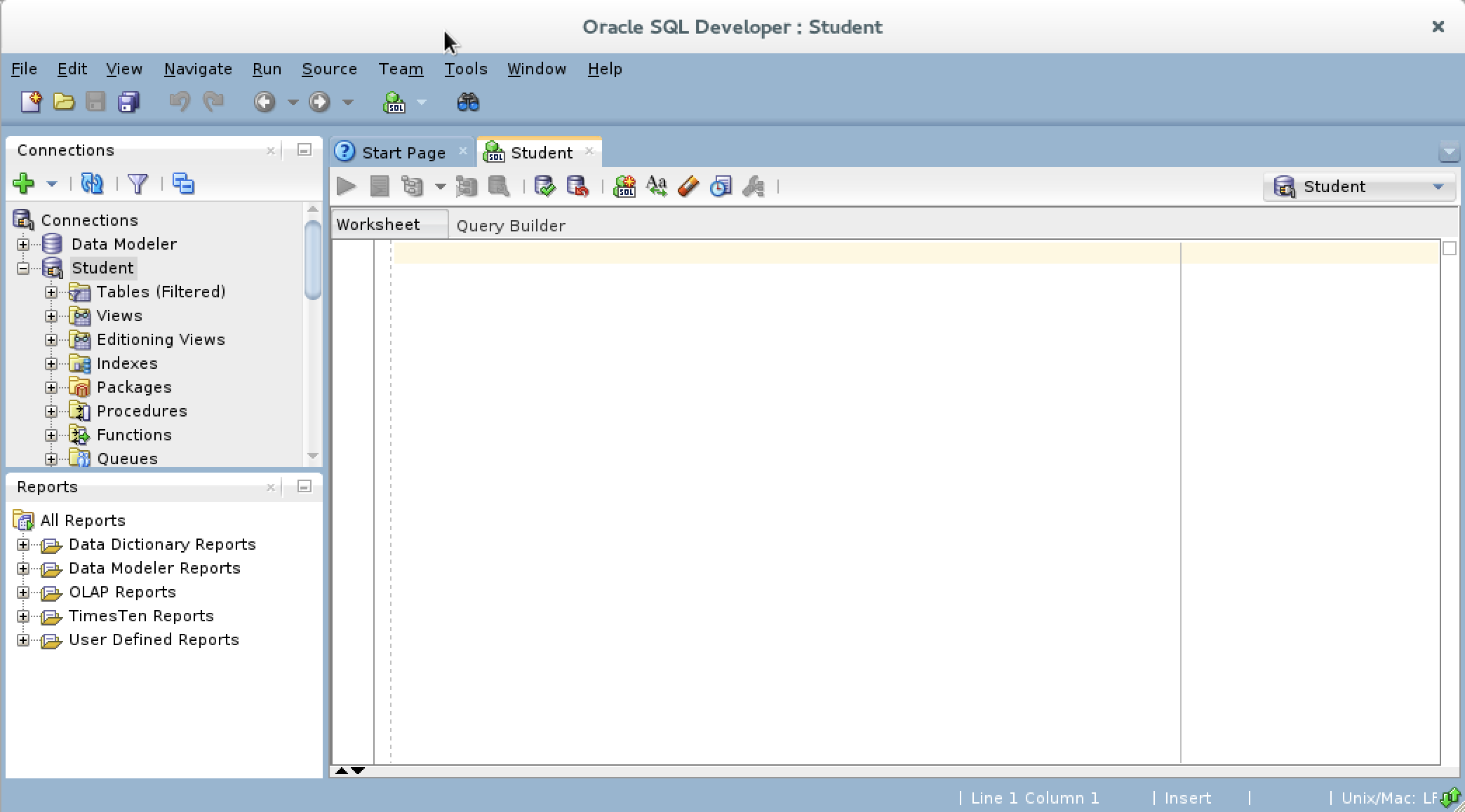
- You need to open SQL Developer, which may look like this when the
DBMS_OUTPUTview isn’t visible.
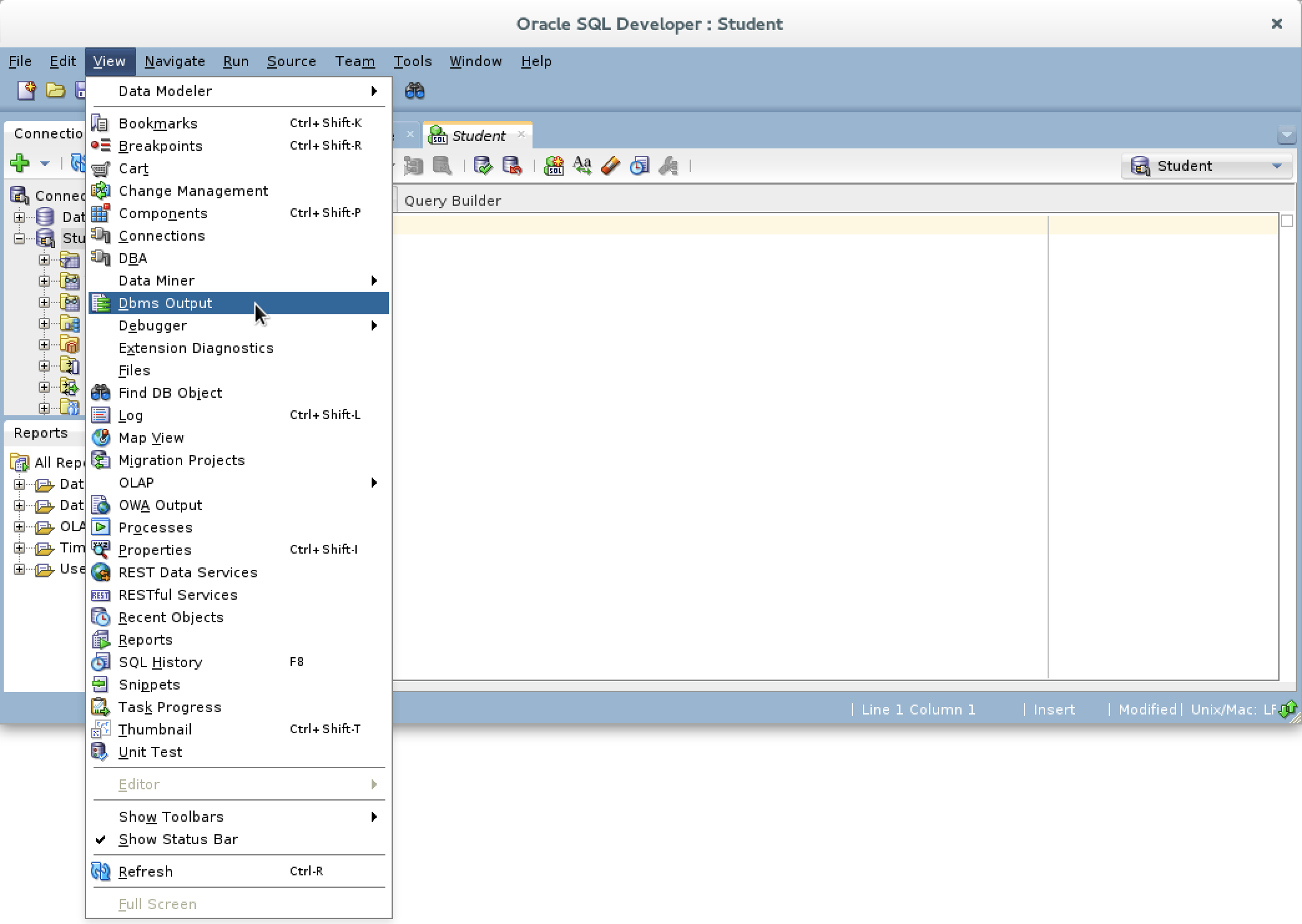
- You need to click on the View menu option in SQL Developer and choose the Dbms Output dropdown menu element.
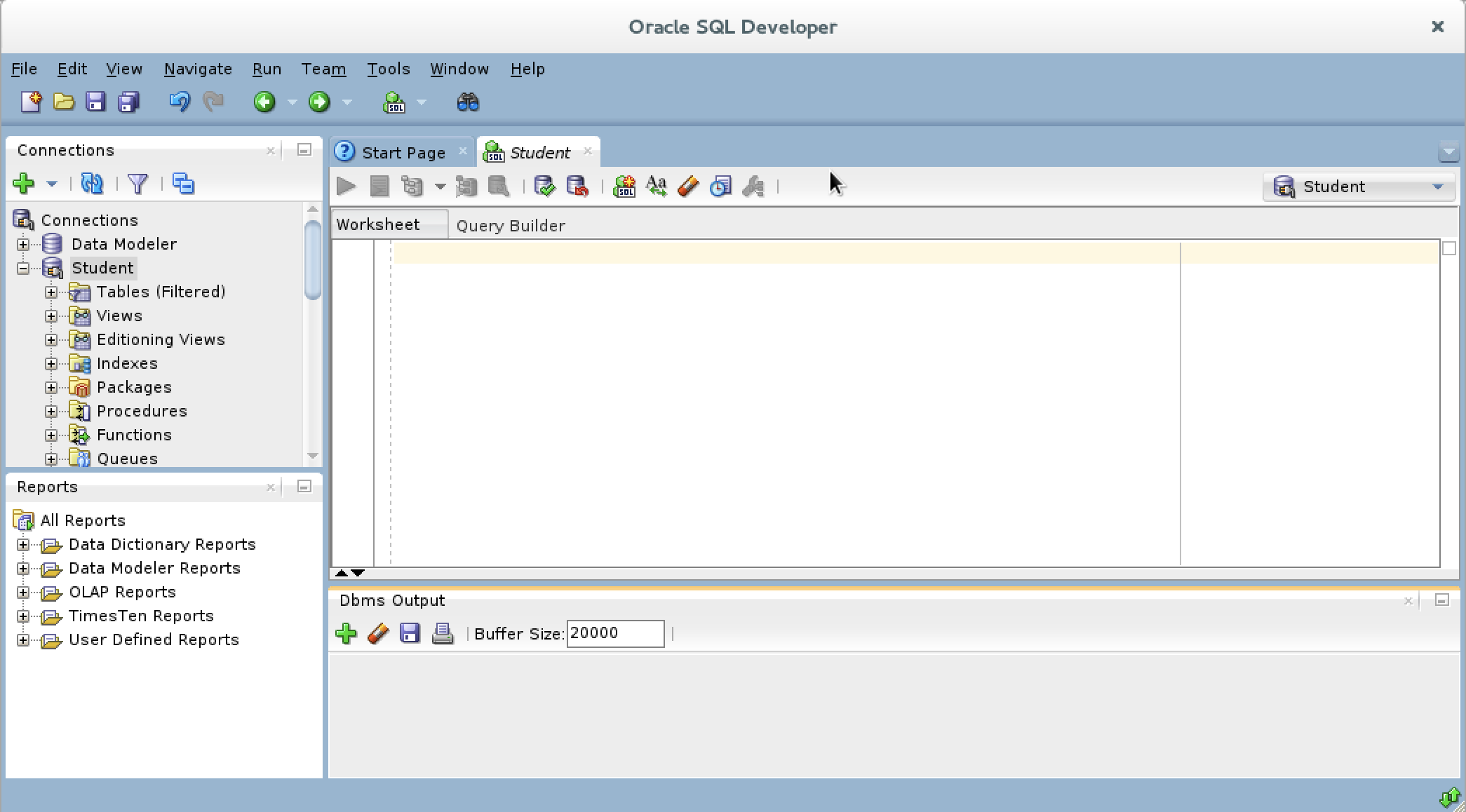
- You should see a grayed-out Dbms Output view.
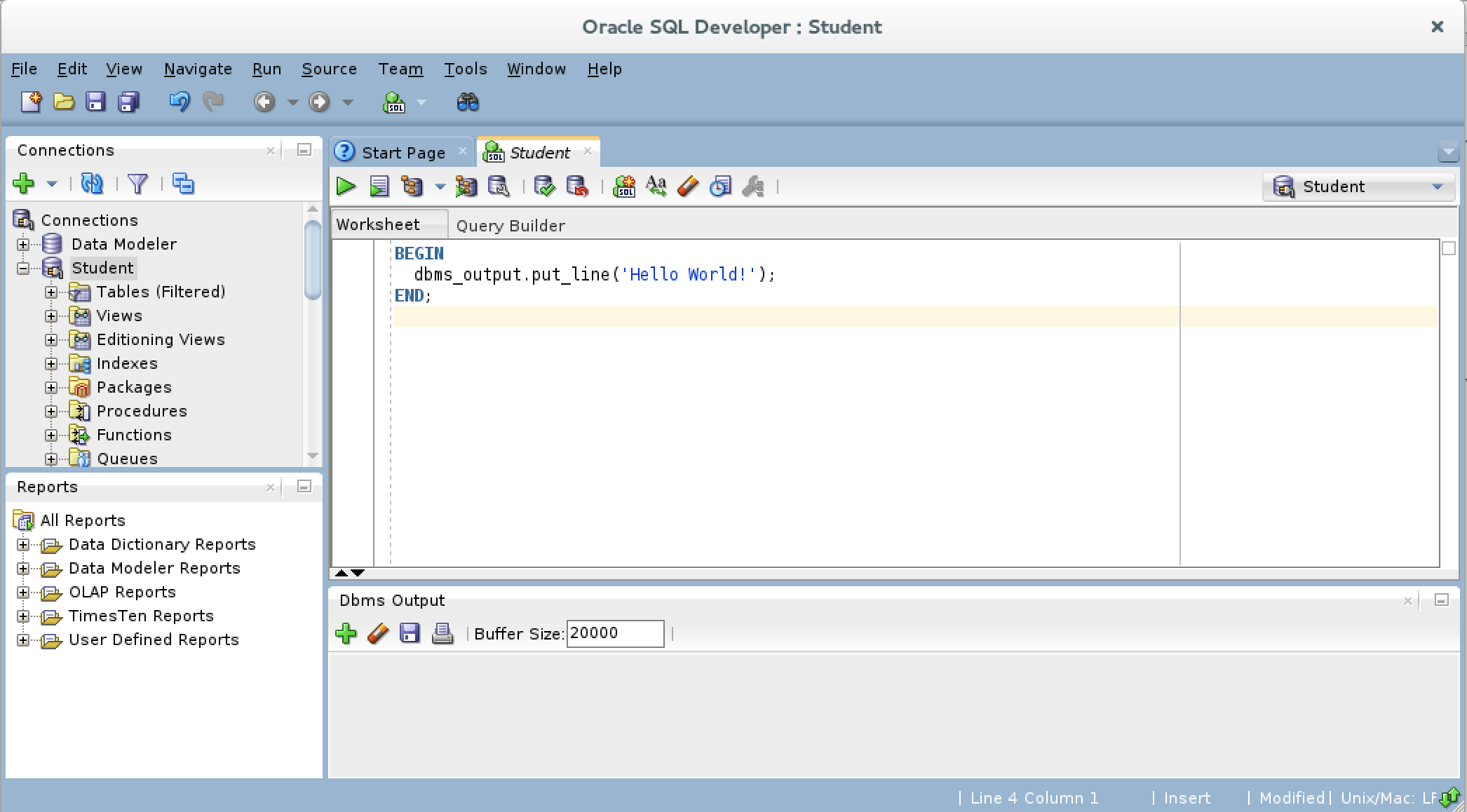
- You should type a simply “Hello World!” anonymous block program in PL/SQL, like the one shown in the drawing.
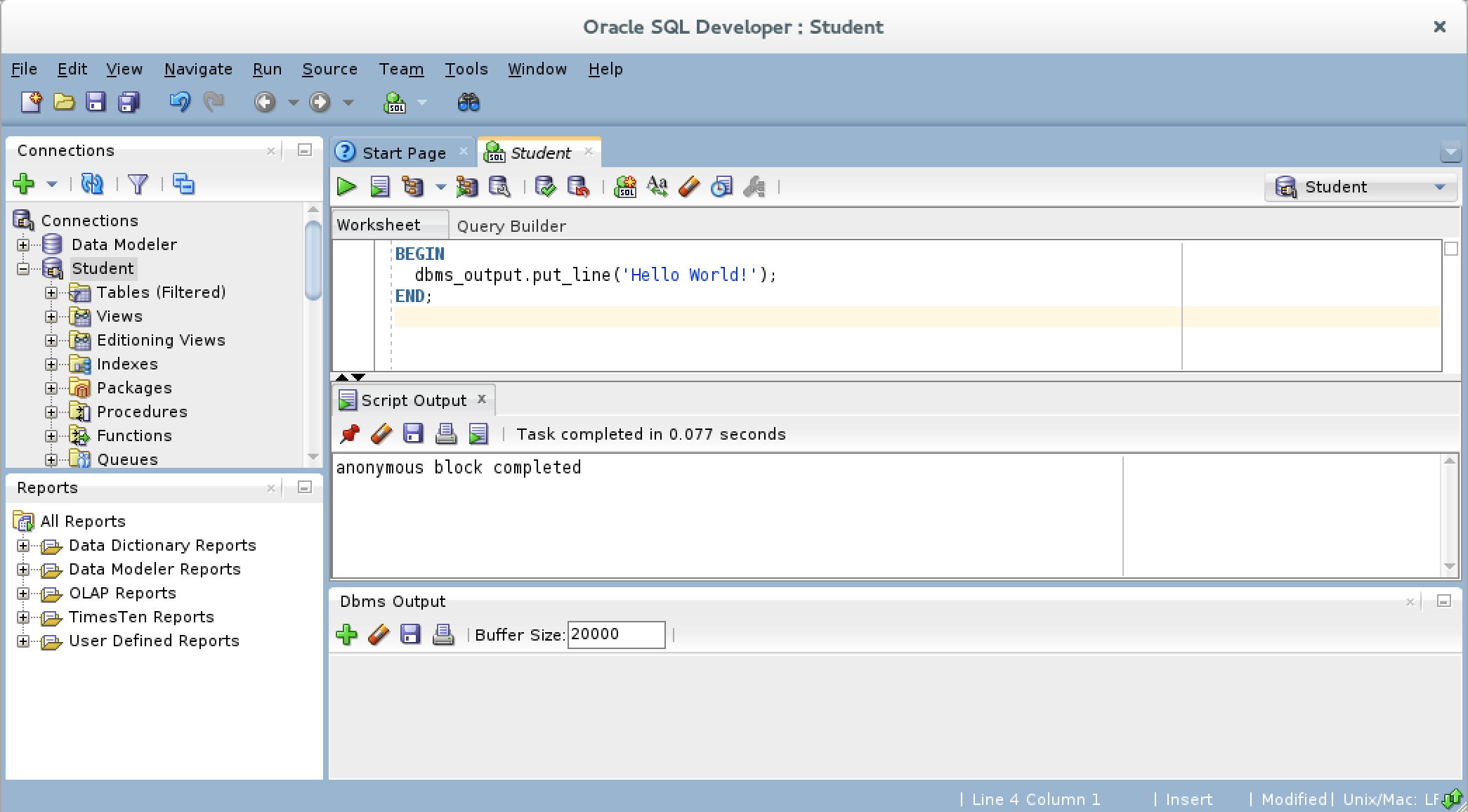
- After writing the “Hello World!” anonymous block program in PL/SQL, click the green arrow to start the statement and you will see two things. There is now a Script Output view between your console and Dbms Output views, and it should say “anonymous block completed.” Unfortunately, none of your output is displayed in the Dbms Output view because you need to enable it.
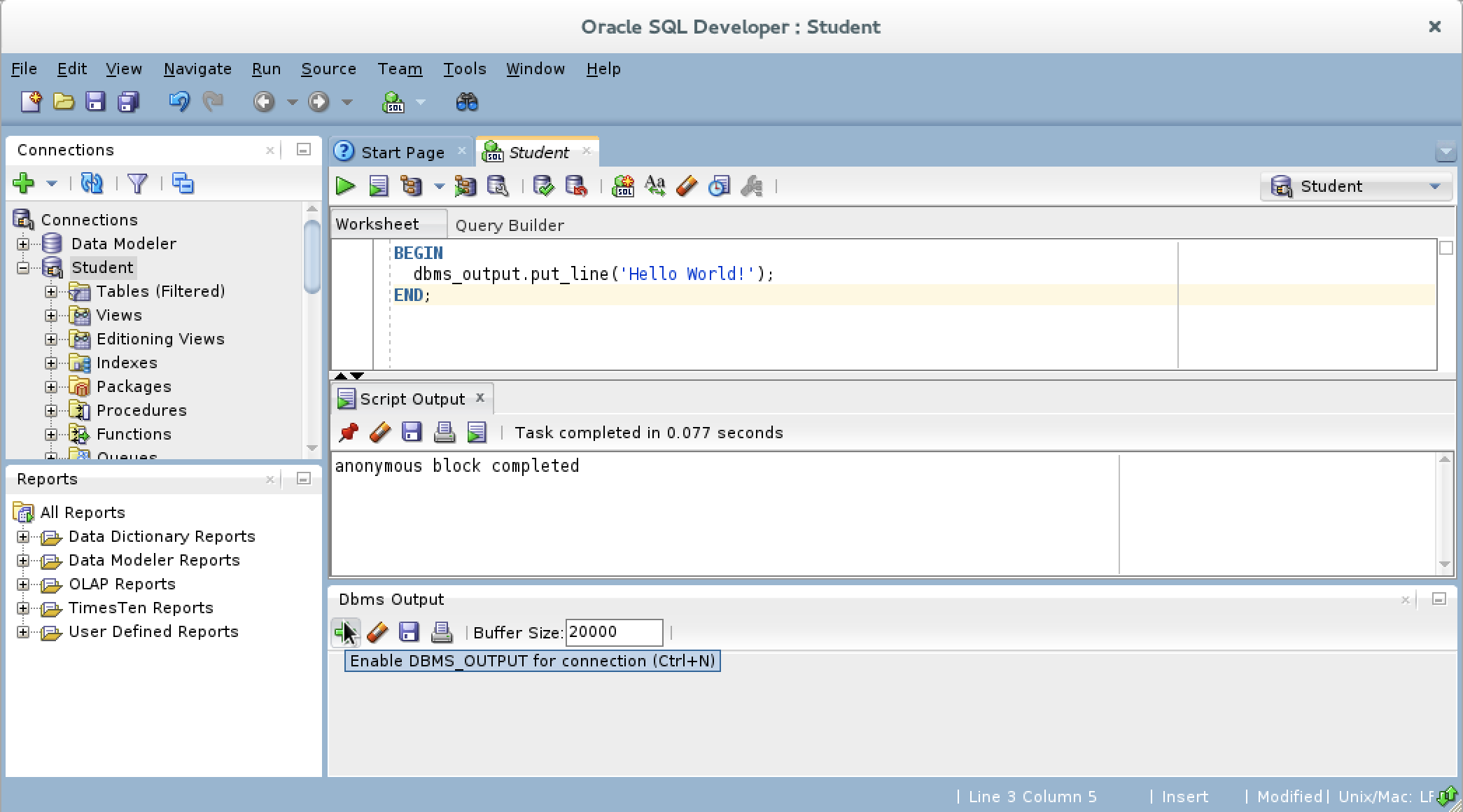
- If you hover over the Dbms Output view’s green arrow, you see the help message that describes the behavior of the green arrow. The Dbms Output green arrow lets you enable the Dbms Output view for output.
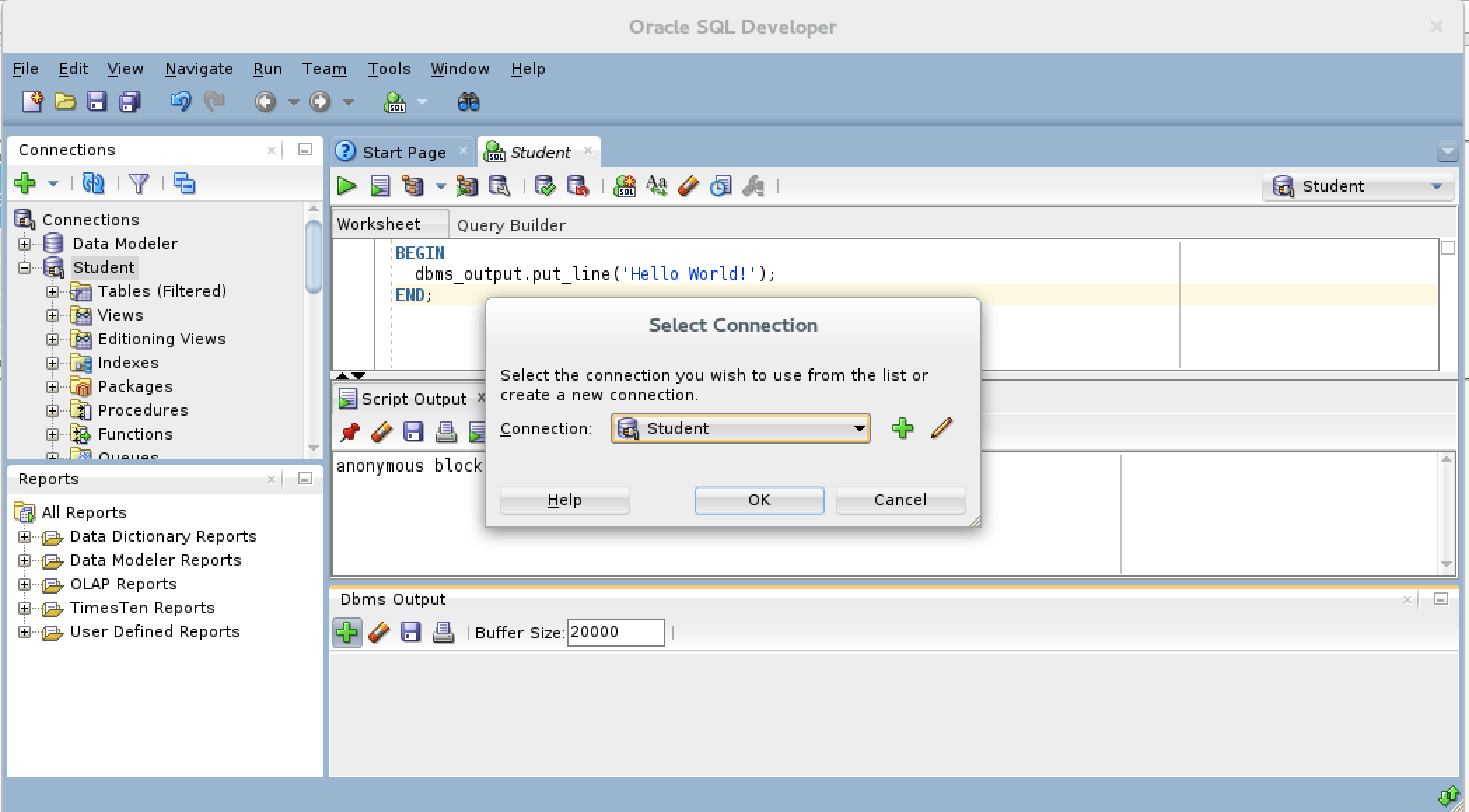
- After you click the Dbms Output view’s green arrow, you receive a Select Connection prompt for the view. Make sure you have the right user, and click the OK button to continue.
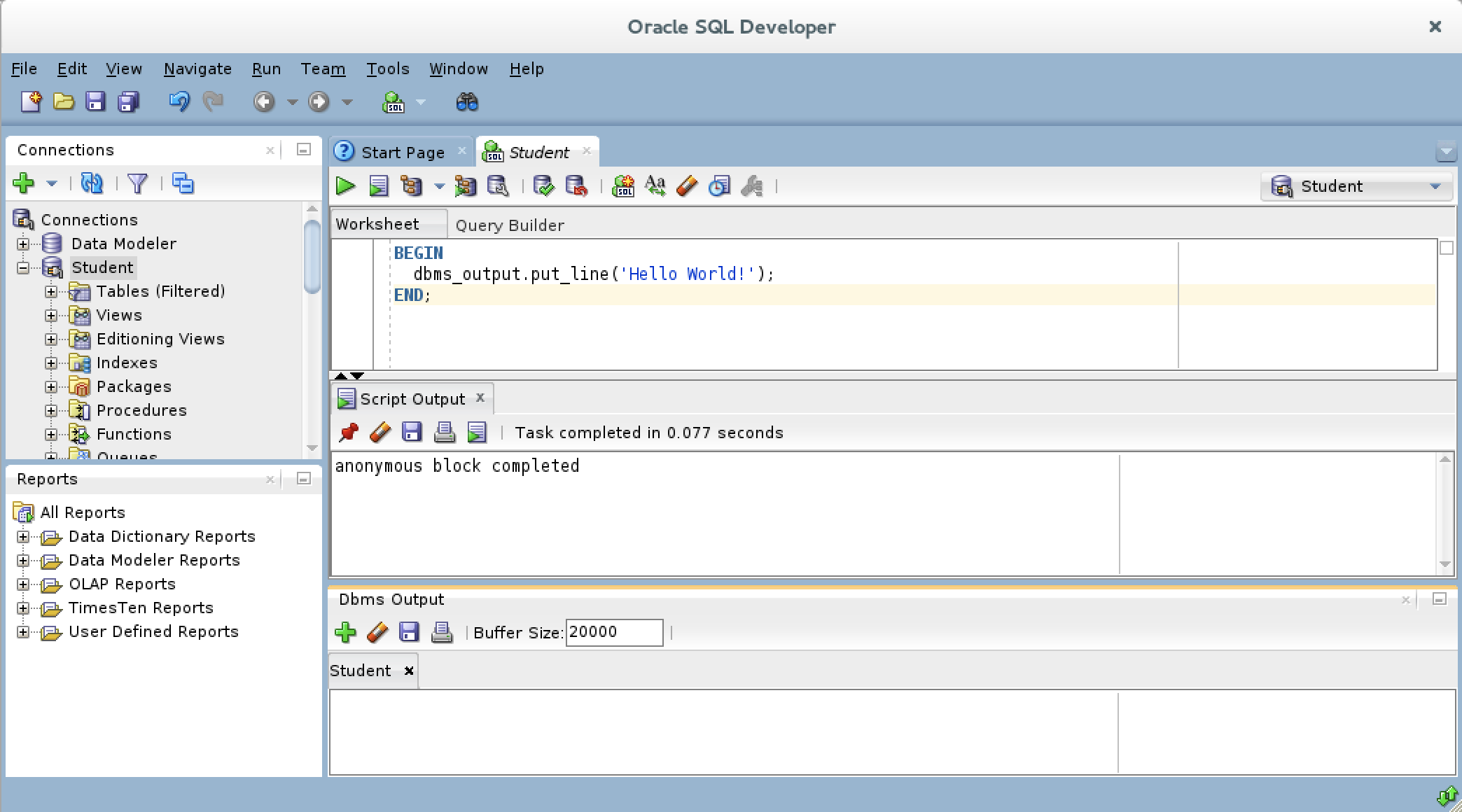
- After you create the connection for the Dbms Output stream, the view area becomes white rather than gray.
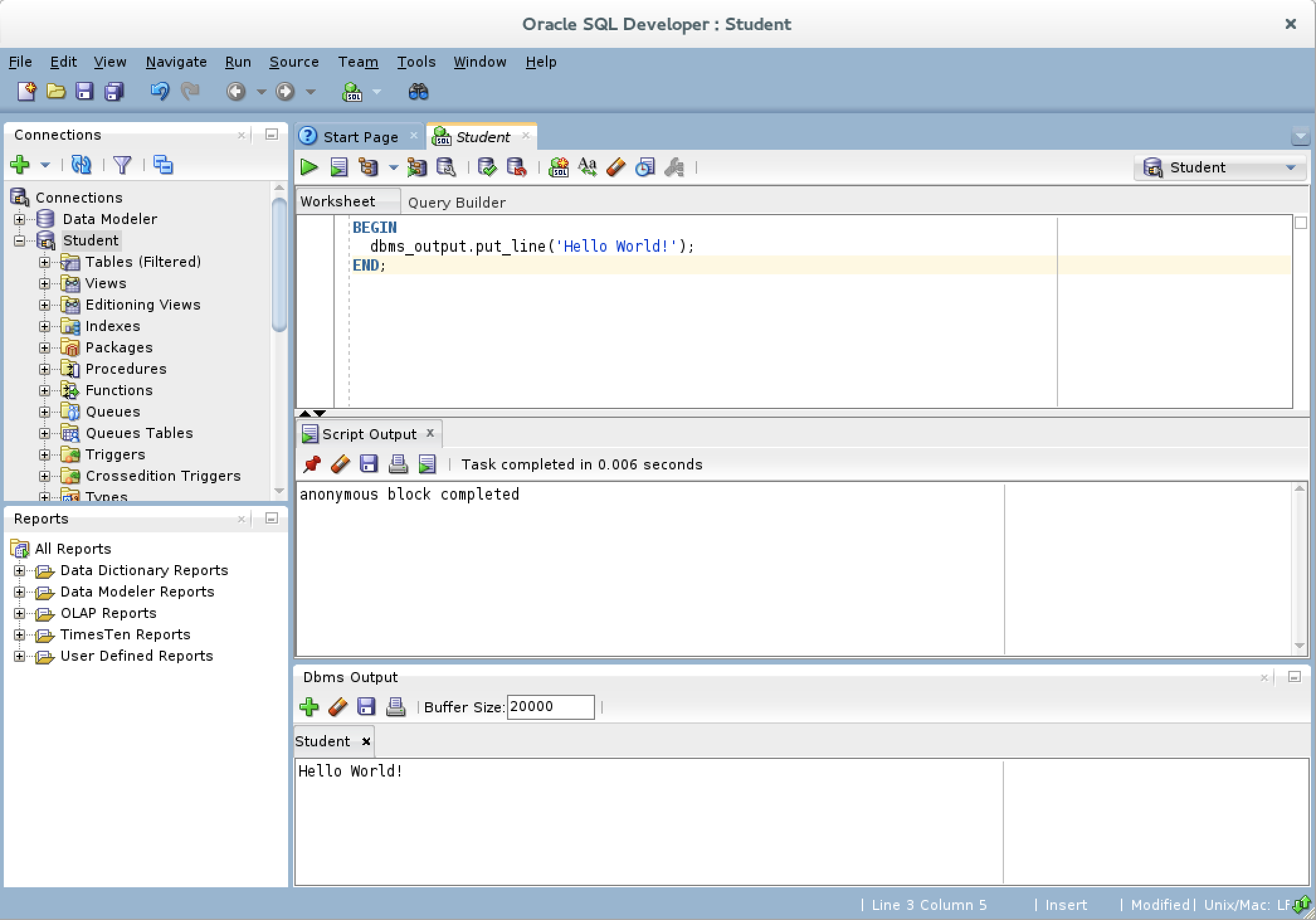
- Click the green arrow to start the statement and you will see the “Hello World!” string in the Dbms Output view.”
As always, I hope this helps those looking for a solution.
 Subscribe via RSS