Convert to SQL Server?
I’m always amazed at the questions that pop up for me. For example, how do you convert an Oracle script that creates my Video Store model to a Microsoft SQL Server script. It’s not very hard but there’s one big caveat, and that’s the fact that system_user is a reserved word. That means you can’t create the Access Control List (ACL) table with a system_user name. The alternative, would be to convert the system_user table name to database_user. That’s what I’ve done in this example.
It’s also important to note that this example uses Microsoft SQL Server’s sqlcmd in batch mode. Naturally, it presumes that you’ve created a student user with a trivial password of student, and a studentdb schema. Also, that you’ve granted privileges so everything works (if you need help on that check my earlier post on how to setup a studentdb schema).
The following is an example of conditionally dropping and then creating a system_user table in an Oracle schema. It uses a CASCADE CONSTRAINTS clause to eliminate dependencies with foreign key values.
1 2 3 4 5 6 7 8 9 10 11 12 13 14 | -- Conditionally drop the table and sequence. BEGIN FOR i IN (SELECT NULL FROM user_tables WHERE table_name = 'SYSTEM_USER') LOOP EXECUTE IMMEDIATE 'DROP TABLE system_user CASCADE CONSTRAINTS'; END LOOP; FOR i IN (SELECT NULL FROM user_sequences WHERE sequence_name = 'SYSTEM_USER_S1') LOOP EXECUTE IMMEDIATE 'DROP SEQUENCE system_user_s1'; END LOOP; END; / |
1 2 3 4 5 6 7 8 9 10 11 12 13 14 15 16 17 18 19 20 | -- Create SYSTEM_USER table. CREATE TABLE system_user ( system_user_id NUMBER CONSTRAINT system_user_pk PRIMARY KEY , system_user_name VARCHAR2(20) CONSTRAINT system_user_nn1 NOT NULL , system_user_group_id NUMBER CONSTRAINT system_user_nn2 NOT NULL , system_user_type NUMBER CONSTRAINT system_user_nn3 NOT NULL , first_name VARCHAR2(20) , middle_name VARCHAR2(20) , last_name VARCHAR2(20) , created_by NUMBER CONSTRAINT system_user_nn4 NOT NULL , creation_date DATE CONSTRAINT system_user_nn5 NOT NULL , last_updated_by NUMBER CONSTRAINT system_user_nn6 NOT NULL , last_update_date DATE CONSTRAINT system_user_nn7 NOT NULL , CONSTRAINT system_user_fk1 FOREIGN KEY (created_by) REFERENCES system_user (system_user_id) , CONSTRAINT system_user_fk2 FOREIGN KEY (last_updated_by) REFERENCES system_user (system_user_id)); -- Create SYSTEM_USER_S1 sequence with a start value of 1001. CREATE SEQUENCE system_user_s1 START WITH 1001; |
1 2 3 4 5 6 7 8 9 10 11 12 13 14 | -- Conditionally drop the table and sequence. BEGIN FOR i IN (SELECT NULL FROM user_tables WHERE table_name = 'COMMON_LOOKUP') LOOP EXECUTE IMMEDIATE 'DROP TABLE common_lookup CASCADE CONSTRAINTS'; END LOOP; FOR i IN (SELECT NULL FROM user_sequences WHERE sequence_name = 'COMMON_LOOKUP_S1') LOOP EXECUTE IMMEDIATE 'DROP SEQUENCE common_lookup_s1'; END LOOP; END; / |
1 2 3 4 5 6 7 8 9 10 11 12 13 14 15 16 17 18 19 20 21 22 23 24 | -- Create COMMON_LOOKUP table. CREATE TABLE common_lookup ( common_lookup_id NUMBER , common_lookup_context VARCHAR2(30) CONSTRAINT nn_clookup_1 NOT NULL , common_lookup_type VARCHAR2(30) CONSTRAINT nn_clookup_2 NOT NULL , common_lookup_meaning VARCHAR2(30) CONSTRAINT nn_clookup_3 NOT NULL , created_by NUMBER CONSTRAINT nn_clookup_4 NOT NULL , creation_date DATE CONSTRAINT nn_clookup_5 NOT NULL , last_updated_by NUMBER CONSTRAINT nn_clookup_6 NOT NULL , last_update_date DATE CONSTRAINT nn_clookup_7 NOT NULL , CONSTRAINT pk_c_lookup_1 PRIMARY KEY(common_lookup_id) , CONSTRAINT fk_c_lookup_1 FOREIGN KEY(created_by) REFERENCES system_user(system_user_id) , CONSTRAINT fk_c_lookup_2 FOREIGN KEY(last_updated_by) REFERENCES system_user(system_user_id)); -- Create a non-unique index on a single column. CREATE INDEX common_lookup_n1 ON common_lookup(common_lookup_context); -- Create a unique index based on two columns. CREATE UNIQUE INDEX common_lookup_u2 ON common_lookup(common_lookup_context,common_lookup_type); -- Create COMMON_LOOKUP_S1 sequence with a start value of 1001. CREATE SEQUENCE common_lookup_s1 START WITH 1001; |
You can do the same thing for a database_user table in Microsoft SQL Server with the following syntax. Unfortunately, there isn’t a CASCADE CONSTRAINTS clause that we can append in Microsoft SQL Server. The script uses a dynamic SQL statement with a Common Table Expression (CTE) to generate a list of ALTER statements that drop foreign key constraints in the schema.
1 2 3 4 5 6 7 8 9 10 11 12 13 14 15 16 17 18 19 20 21 22 23 24 25 26 27 28 29 30 31 32 33 34 35 36 37 38 39 40 41 42 43 44 45 46 47 48 49 50 51 52 53 54 55 56 57 58 59 60 61 62 63 64 65 | /* Drop all foreign keys. */ USE studentdb; /* Create a session variable to hold a command list. */ SELECT 'Create a session variable.' AS "Statement"; DECLARE @sql NVARCHAR(MAX) = N''; /* Generate the command list to drop foreign key constraints. */ SELECT 'Generate dynamic SQL statements.' AS "Statement"; ;WITH x AS (SELECT N'ALTER TABLE ' + OBJECT_SCHEMA_NAME(parent_object_id) + N'.' + OBJECT_NAME(parent_object_id) + N' ' + N'DROP CONSTRAINT ' + name + N';' AS sqlstmt FROM sys.foreign_keys) SELECT @sql += sqlstmt FROM x; /* Call the dynamically generated statements. */ SELECT 'Execute dynamic SQL statements.' AS "Statement"; EXEC sp_executesql @sql; /* Conditionally drop tables. */ SELECT 'Conditionally drop studentdb.common_lookup table.' AS "Statement"; IF OBJECT_ID('studentdb.database_user','U') IS NOT NULL DROP TABLE studentdb.database_user; /* Create a table with self-referencing foreign key constraints. */ SELECT 'Create studentdb.common_lookup table.' AS "Statement"; CREATE TABLE studentdb.database_user ( database_user_id INT NOT NULL IDENTITY(1,1) CONSTRAINT database_user_pk PRIMARY KEY , database_user_name VARCHAR(20) NOT NULL , database_user_group_id INT NOT NULL , database_user_type INT NOT NULL , first_name VARCHAR(20) , middle_name VARCHAR(20) , last_name VARCHAR(20) , created_by INT NOT NULL , creation_date DATE NOT NULL , last_updated_by INT NOT NULL , last_update_date DATE NOT NULL , CONSTRAINT database_user_fk1 FOREIGN KEY (created_by) REFERENCES studentdb.database_user (database_user_id) , CONSTRAINT database_user_fk2 FOREIGN KEY (created_by) REFERENCES studentdb.database_user (database_user_id)); /* Conditionally drop common_lookup table. */ SELECT 'Conditionally drop studentdb.common_lookup table.' AS "Statement"; IF OBJECT_ID('studentdb.common_lookup','U') IS NOT NULL DROP TABLE studentdb.common_lookup; /* Create a table with external referencing foreign key constraints. */ SELECT 'Create studentdb.common_lookup table.' AS "Statement"; CREATE TABLE studentdb.common_lookup ( common_lookup_id INT NOT NULL IDENTITY(1,1) CONSTRAINT common_lookup_pk PRIMARY KEY , common_lookup_context VARCHAR(30) CONSTRAINT nn_clookup_1 NOT NULL , common_lookup_type VARCHAR(30) CONSTRAINT nn_clookup_2 NOT NULL , common_lookup_meaning VARCHAR(30) CONSTRAINT nn_clookup_3 NOT NULL , created_by INT CONSTRAINT nn_clookup_4 NOT NULL , creation_date DATE CONSTRAINT nn_clookup_5 NOT NULL , last_updated_by INT CONSTRAINT nn_clookup_6 NOT NULL , last_update_date DATE CONSTRAINT nn_clookup_7 NOT NULL , CONSTRAINT common_lookup_fk1 FOREIGN KEY(created_by) REFERENCES studentdb.database_user (database_user_id) , CONSTRAINT common_lookup_fk2 FOREIGN KEY(last_updated_by) REFERENCES studentdb.database_user (database_user_id)); |
You can run it from a file by calling the sqlcmd utility. You’ll need to know several things to run it. First, you need to know your database instance. You can capture that from a query against the data dictionary or catalog. Just run the following from inside the Microsoft SQL Server Management Studio (SSMS):
SELECT @@SERVERNAME; |
In my case, it shows the following, which is the machine’s hostname a backslash and SQLEXPRESS:
MCLAUGHLINSQL\SQLEXPRESS |
The script uses sqltest.sql as a file name, and you can call it from the Windows shell environment like this:
sqlcmd -S MCLAUGHLINSQL\SQLEXPRESS -U student -P student -i C:\Data\MicrosoftSQL\sqltest.sql -o C:\Data\Microsoft\sqltest.out |
As always, I hope this helps.
Popular Programming Languages
First of all, Happy New Year!
IEEE Spectrum published a ranking of the most popular programming languages. Computational journalist Nick Diakopoulos wrote the article. While it may surprise some, I wasn’t surprised to find SQL in the top ten.
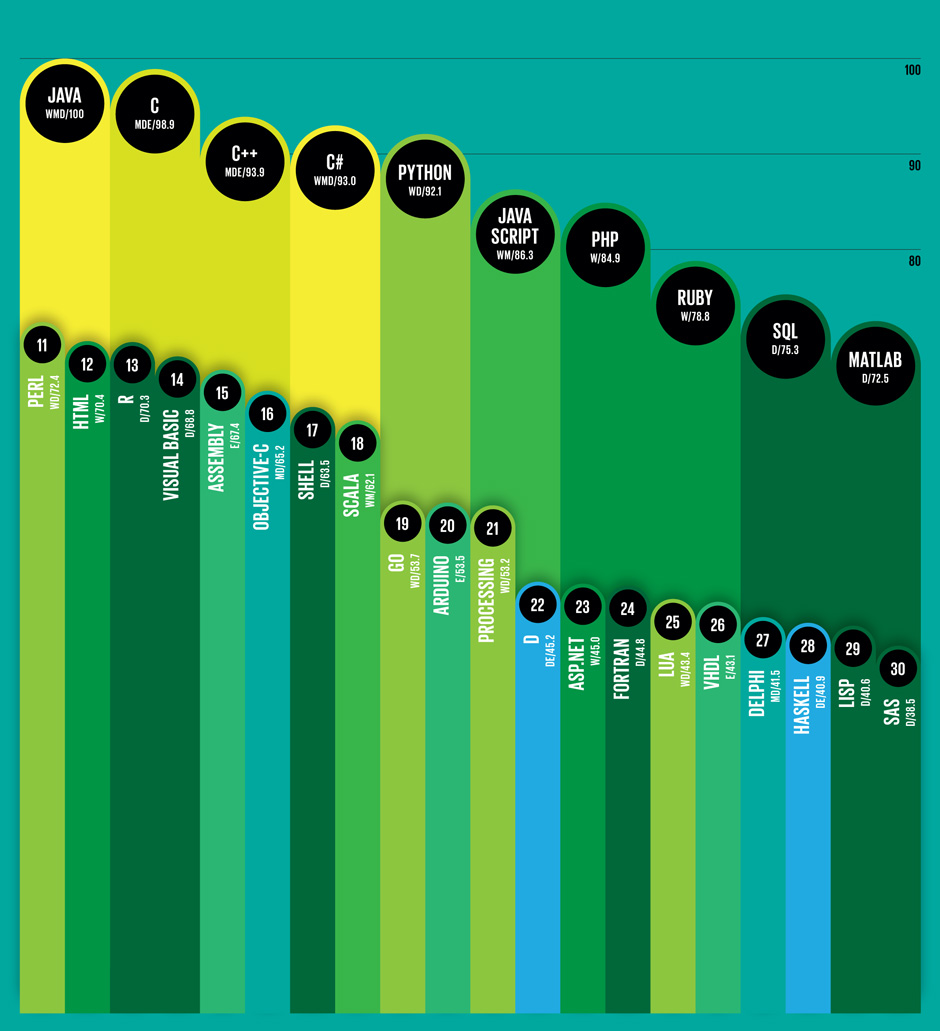 Nick weighted and combined 12 metrics from 10 sources (including IEEE Xplore, Google, and GitHub) to rank the most popular programming languages.
- Compiled programming languages (Java [#1], C [#2], C++ [#3], C# [#4], Objective-C [#16])
- Interpreted programming languages (Python [#5], JavaScript [#6], PHP [#7], Ruby [#8], Perl [#11], HTML [#12])
- Data languages (SQL [#9], MATLAB [#10], R [#13])
I couldn’t resist including Objective-C because it shows how the iPhone, iPad, and Mac OS impact our daily lives. At the same time, Assembly [#15] is actually more popular than Objective-C. Shell [#17] follows Objective-C. While the Visual Basic [#14] programming language still remains very popular.
There are many “why” questions raised by this list of popular programming languages. The “why” from my perspective deals with what are the market drivers for their popularity. The money drivers I see are as follows:
- Business software: Java, C++, C#, and AIDE – Android IDE (works with Java and C++ source code)
- OS X and iOS Development: Objective-C
- Development Tools: Java, C, C++, and Python
- System Admin/Utilities Tools: C, Perl, and Shell
- Web Development: Python, PHP, Ruby, and Perl
- Data Analysis: SQL, MATLAB, and R
Business Intelligence (BI) software manages most high-level data analysis tools and they’ll continue to get better over time. However, if SQL has shown us anything over 30 years it’s that ultimately we revert to it to solve problems. The conclusion from the reality of BI probably means the programming languages that develop those tools will continue to rise and so will the underlying data languages.
It’s also interesting to note that nine out of ten of the popular programming languages work with databases, like Oracle, MySQL, PostgreSQL, or SQL Server. While JavaScript doesn’t access the database typically, it’s JSON (JavaScript Object Notation) is supported in all the databases.
Querying InnoDB Tables
Somebody ran into the following error message trying to query the innodb_sys_foreign and innodb_sys_foreign_cols tables from the information_schema database:
ERROR 1227 (42000): Access denied; you need (at least one of) the PROCESS privilege(s) for this operation |
It’s easy to fix the error, except you must grant the PROCESS privilege. It’s a global privilege and it should only be granted to super users. You grant the privilege global PROCESS privilege to the student user with the following command:
GRANT PROCESS ON *.* TO student; |
Then, you can run this query to resolve foreign keys to their referenced primary key column values:
SELECT SUBSTRING_INDEX(f.id,'/',-1) AS constraint_name , CONCAT(SUBSTRING_INDEX(for_name,'/',-1),'.',SUBSTRING_INDEX(for_col_name,'/',-1)) AS foreign_key_column , CONCAT(SUBSTRING_INDEX(ref_name,'/',-1),'.',SUBSTRING_INDEX(ref_col_name,'/',-1)) AS primary_key_column FROM innodb_sys_foreign f INNER JOIN innodb_sys_foreign_cols fc ON f.id = fc.id WHERE SUBSTRING_INDEX(f.for_name,'/',-1) = 'system_user_lab' ORDER BY CONCAT(SUBSTRING_INDEX(for_name,'/',-1),'.',SUBSTRING_INDEX(for_col_name,'/',-1)) , CONCAT(SUBSTRING_INDEX(ref_name,'/',-1),'.',SUBSTRING_INDEX(ref_col_name,'/',-1)); |
It returns the following:
+---------------------+--------------------------------------+------------------------------------+ | constraint_name | foreign_key_column | primary_key_column | +---------------------+--------------------------------------+------------------------------------+ | system_user_lab_fk1 | system_user_lab.created_by | system_user_lab.system_user_id | | system_user_lab_fk2 | system_user_lab.last_updated_by | system_user_lab.system_user_id | | system_user_lab_fk3 | system_user_lab.system_user_group_id | common_lookup_lab.common_lookup_id | | system_user_lab_fk4 | system_user_lab.system_user_type | common_lookup_lab.common_lookup_id | +---------------------+--------------------------------------+------------------------------------+ 4 rows in set (0.00 sec) |
However, you can get the same information without granting the global PROCESS privilege. You simply use the table_constraints and key_column_usage tables, like this:
SELECT tc.constraint_name , CONCAT(kcu.table_name,'.',kcu.column_name) AS foreign_key_column , CONCAT(kcu.referenced_table_name,'.',kcu.referenced_column_name) AS primary_key_column FROM information_schema.table_constraints tc JOIN information_schema.key_column_usage kcu ON tc.constraint_name = kcu.constraint_name AND tc.constraint_schema = kcu.constraint_schema WHERE tc.constraint_type = 'foreign key' AND tc.table_name = 'system_user_lab' ORDER BY tc.table_name , kcu.column_name; |
It prints the same output:
+---------------------+--------------------------------------+------------------------------------+ | constraint_name | foreign_key_column | primary_key_column | +---------------------+--------------------------------------+------------------------------------+ | system_user_lab_fk1 | system_user_lab.created_by | system_user_lab.system_user_id | | system_user_lab_fk2 | system_user_lab.last_updated_by | system_user_lab.system_user_id | | system_user_lab_fk3 | system_user_lab.system_user_group_id | common_lookup_lab.common_lookup_id | | system_user_lab_fk4 | system_user_lab.system_user_type | common_lookup_lab.common_lookup_id | +---------------------+--------------------------------------+------------------------------------+ 4 rows in set (0.00 sec) |
Hope this helps.
MySQL Non-unique Indexes
Somebody wanted to know how to find any non-unique indexes in information_schema of the MySQL. The query takes a session variable with the table name and returns the non-unique indexes by column names. It uses a correlated subquery to exclude the table constraints. A similar query lets you find unique indexes in MySQL. Both queries are in this post.
You set the session variable like this:
SET @sv_table_name := 'member_lab'; |
You can query the indexes result with the following query:
SELECT s.table_name , s.index_name , s.seq_in_index , s.column_name FROM information_schema.statistics s WHERE s.table_name = @sv_table_name AND s.non_unique = TRUE AND NOT EXISTS (SELECT null FROM information_schema.table_constraints tc WHERE s.table_name = tc.table_name AND s.index_name = tc.constraint_name) ORDER BY s.table_name , s.seq_in_index; |
You can also reverse the logic and exclude implicit unique indexes on auto incrementing columns, like
SELECT s.table_name , s.index_name , s.seq_in_index , s.column_name FROM information_schema.statistics s WHERE s.table_name = @sv_table_name AND s.non_unique = FALSE AND NOT s.index_name = 'primary' AND EXISTS (SELECT null FROM information_schema.table_constraints tc WHERE s.table_name = tc.table_name AND s.index_name = tc.constraint_name) ORDER BY s.index_name , s.seq_in_index; |
Hope this helps those trying to find non-unique indexes for a table in MySQL.
Popular PHP Frameworks
My students often ask me about popular PHP frameworks and MySQL approaches. I wish a PHP framework choice was as clear as a JavaScript framework, like AngularJS. Unfortunately, PHP frameworks aren’t that clear cut.
It seems that the most popular PHP frameworks are: Laravel (1st), Phalcon (2nd), and Symphony2 (3rd). I found the following graphic (from December 2013) that highlights popularity by percentage of the market (though I can’t guarantee its accuracy). As far as jobs go, on Dice.com only Laravel had more than 3 positions referring to the framework by name. There were actually 42 PHP developer positions that mention Laravel out of 2,115 PHP developer positions. So, it seems learning a specific framework for PHP doesn’t yet have much market appeal.

While learning the basics of PHP are generic, frameworks expedite process and control pattern implementation. My suggestion to students is to target three to five employers that use a specific framework and start learning how to use the framework. I’d like to get opinions from those in the field whether this is the best advice.
As to MySQL, I suggest they learn native Mysqli and MySQL PDO. Any other suggestions on that from readers? Thanks as always.
VMware 7 Upgrade
 I finally upgraded from VMware Fusion 6 to VMware Fusion 7 to take advantage of the new features. It was interesting to upgrade the Windows 7 virtual machine because of the unique failure message it raised.
The message said it was incompatible, and that I should navigate to:
Virtual Machine -> Settings -> Compatibility -> Upgrade
The Upgrade button checks the Allow upgrading the virtual hardware for this virtual machine checkbox. You will get prompted with the Would you like to upgrade this virtual machine? dialog for the next virtual machine.
Querying an Object Type
I demonstrated a number of SQL approaches to reading object types in Appendix B of the Oracle Database 12c PL/SQL Programming book. For example, the easiest one to construct and return the results from a TO_STRING member function uses the TREAT function:
SELECT TREAT(base_t() AS base_t).to_string() AS "Text" FROM dual; |
However, it seems that I could have provided one more. Here’s an example of how you can test the construction of an object type and how you can return its attributes with a query. It’s important to note that there’s a natural problem with this syntax when you increment a sequence inside the object type. The problem is that it double increments the counter for the sequence.
SELECT * FROM TABLE(SELECT CAST(COLLECT(base_t()) AS base_t_tab) FROM dual); |
The syntax for the COLLECT function requires that you put it inside a SELECT-list. Then, the CAST function converts a single instance of the BASE_T object type to a one element BASE_T_TAB collection. Finally, the TABLE function returns a single row from the BASE_T_TAB collection.
You can find a more complete article covering column substitutability and object types and subtypes on the ToadWorld site. I think it helps clear up how you can effectively write PL/SQL types and subtypes for persistent object type columns.
Finding Direct Indexes
If you’re not using Toad DBA Suite, it’s sometimes hard to find solutions. Somebody wanted to know how to find indexes that aren’t indirect. Indirect indexes are those created for a primary key because a primary key column or set of columns are both not null and uniquely constrained. Likewise, you create a unique index when you can create a unique constraint. You can’t drop a unique index for a primary key without dropping the primary key or unique constraint that indirectly created it.
The following query returns indexes with one or more columns that are created by a CREATE INDEX statement on a target table. It excludes unique indexes created by a primary key constraint, and it returns the relative position of columns in an index:
COLUMN sequence_name FORMAT A22 HEADING "Sequence Name" COLUMN column_position FORMAT 999 HEADING "Column|Position" COLUMN column_name FORMAT A22 HEADING "Column|Name" SELECT uin.index_name , uic.column_position , uic.column_name FROM user_indexes uin INNER JOIN user_ind_columns uic ON uin.index_name = uic.index_name AND uin.table_name = uic.table_name WHERE uin.table_name = UPPER('&&table_name') AND NOT uin.index_name IN (SELECT constraint_name FROM user_constraints WHERE table_name = UPPER('&&table_name')) ORDER BY uin.index_name , uic.column_position; |
It can be rewritten into a function, which can then drop indexes based on a table name:
CREATE OR REPLACE FUNCTION drop_indexes_on ( pv_table_name VARCHAR2 ) RETURN NUMBER IS /* A return value. */ lv_return NUMBER := 0; /* A query to return only directly created indexes. */ CURSOR find_indexes_on ( cv_table_name VARCHAR2 ) IS SELECT DISTINCT ui.index_name FROM user_indexes ui INNER JOIN user_ind_columns uic ON ui.index_name = uic.index_name AND ui.table_name = uic.table_name WHERE ui.table_name = UPPER(cv_table_name) AND NOT ui.index_name IN (SELECT constraint_name FROM user_constraints WHERE table_name = UPPER(cv_table_name)); /* Declare function autonomous. */ PRAGMA AUTONOMOUS_TRANSACTION; BEGIN /* Drop the indexes on a table. */ FOR i IN find_indexes_on(pv_table_name) LOOP EXECUTE IMMEDIATE 'DROP INDEX '||i.index_name; lv_return := 1; END LOOP; RETURN lv_return; END drop_indexes_on; / |
You can call the drop_on_indexes_on function like this:
SELECT drop_indexes_on(UPPER('address_lab')) FROM dual; |
Hope this helps those who need to work with dropping indexes.
Check Constraints
Oracle Database 12c introduces a SEARCH_CONDITION_VC column to the CDB_, DBA_, ALL_, and USER_CONSTRAINTS views. The SEARCH_CONDITION_VC column is a VARCHAR2 data type equivalent to the search condition in the LONG data type SEARCH_CONDITION column. Unfortunately, Oracle Database 11g and earlier versions requires you to convert the LONG data type to a VARCHAR2 for the equivalent behavior. This post provides you with a function to help you do that in Oracle Database 11g.
While Oracle Database 12c let’s you check the search condition of a CHECK constraint, with this query:
SELECT uc.constraint_name AS constraint_name , uc.search_condition_vc AS search_condition FROM user_constraints uc WHERE uc.table_name = UPPER('table_name') AND REGEXP_LIKE(uc.search_condition_vc,'search_key','i'); |
You need the following GET_SEARCH_CONDITION function to convert the SEARCH_CONDITION column from a LONG data type to a VARCHAR2 data type. It uses the DBMS_SQL package to convert the LONG data type.
CREATE OR REPLACE FUNCTION get_search_condition ( pv_table_name VARCHAR2 , pv_column_name VARCHAR2 ) RETURN VARCHAR2 AS /* Declare local variables. */ lv_cursor INTEGER := DBMS_SQL.open_cursor; lv_feedback INTEGER; -- Acknowledgement of dynamic execution lv_length INTEGER; -- Length of the input string lv_value_length INTEGER; -- Length of the output string lv_constraint_name VARCHAR2(30); -- Constraint name lv_return VARCHAR2(32767); -- Function output lv_stmt VARCHAR2(2000); -- Dynamic SQL statement lv_long LONG; -- Dynamic LONG data type. lv_string VARCHAR2(32760); -- Maximum length of LONG data type FUNCTION return_length ( pv_table_name VARCHAR2 , pv_column_name VARCHAR2 ) RETURN VARCHAR2 IS /* Declare a target variable, because of the limit of SELECT-INTO. */ lv_long_view LONG; /* Declare a dynamic cursor. */ CURSOR c ( cv_table_name VARCHAR2 , cv_column_name VARCHAR2 ) IS SELECT uc.search_condition FROM user_constraints uc INNER JOIN user_cons_columns ucc ON uc.table_name = ucc.table_name AND uc.constraint_name = ucc.constraint_name WHERE uc.table_name = UPPER(cv_table_name) AND ucc.column_name = UPPER(cv_column_name) AND uc.constraint_type = 'C'; BEGIN /* Open, fetch, and close cursor to capture view text. */ OPEN c (pv_table_name, pv_column_name); FETCH c INTO lv_long_view; CLOSE c; /* Return the output CLOB length value. */ RETURN LENGTH(lv_long_view); END return_length; BEGIN /* Get the length of the CLOB column value. */ lv_length := return_length(pv_table_name, pv_column_name); /* Create dynamic statement. */ lv_stmt := 'SELECT uc.search_condition'||CHR(10) || 'FROM user_constraints uc INNER JOIN user_cons_columns ucc'||CHR(10) || 'ON uc.table_name = ucc.table_name'||CHR(10) || 'AND uc.constraint_name = ucc.constraint_name'||CHR(10) || 'WHERE uc.table_name = UPPER('''||pv_table_name||''')'||CHR(10) || 'AND ucc.column_name = UPPER('''||pv_column_name||''')'||CHR(10) || 'AND uc.constraint_type = ''C'''; /* Parse and define VARCHAR2 and LONG columns. */ DBMS_SQL.parse(lv_cursor, lv_stmt, DBMS_SQL.native); DBMS_SQL.define_column_long(lv_cursor,1); /* Only attempt to process the return value when fetched. */ IF DBMS_SQL.execute_and_fetch(lv_cursor) = 1 THEN DBMS_SQL.column_value_long( lv_cursor , 1 , lv_length , 0 , lv_string , lv_value_length); END IF; /* Check for an open cursor. */ IF DBMS_SQL.is_open(lv_cursor) THEN DBMS_SQL.close_cursor(lv_cursor); END IF; /* Convert the long length string to a maximum size length. */ lv_return := lv_string; RETURN lv_return; END get_search_condition; / |
Then, you can use the following query to view the full search criteria of a CHECK constraint that matches part of a search string:
COLUMN constraint_name FORMAT A16 COLUMN search_condition FORMAT A30 SELECT uc.constraint_name AS constraint_name , get_search_condition('table_name','column_name') AS search_condition FROM user_constraints uc WHERE REGEXP_LIKE(get_search_condition('table_name','column_name'),'check_constraint_search_string','i') AND uc.constraint_type = 'C'; |
Hope this helps those looking at discovering the full search criteria of a CHECK constraint.
iPhoto movie export
What happens when iPhoto doesn’t export movies? One of two things, you re-install iPhoto and risk losing the movies and photos; or you drop down to the Terminal level and move the files manually before re-installing iPhoto.
Option one is easy, you open iPhoto, choose File from menu, and Export… from the File menu list. When you get to the dialog, change it Kind value to original. If everything is working, you should be able to double click the exported file in a Finder window and launch the program with QuickTime Player.

It’s important to know how to use option two when you’ve copied the movies from your iPhone, iPad, or iPod, and then deleted them. At this point, all you have is a recovery option from your local MacBook, MacBook Pro, or iMac to a safe folder (or command-line directory) before updating iPhoto.
This is how you perform option two:
- Open Finder and navigate to your user’s home directory, left click on Pictures, and then right click on iPhoto Library and choose Open With option from the first floating menu then Terminal on the context (or second) floating menu.
- In the Terminal window, a
pwdcommand will show you the following directory for a user with the namesomeuser:
/Users/someuser/Pictures/iPhoto Library |
- Again in the Terminal window, type a
lscommand will show you the following directory structure:
AlbumData.xml Info.plist Projects.db Attachments Library.data ThemeCache Auto Import Library.iPhoto Thumbnails Backup Library6.iPhoto iLifeShared Caches Masters iPhotoAux.db Contents Modified iPhotoLock.data Data Originals iPhotoMain.db Data.noindex Previews Database ProjectDBVersion.plist |
- In the Terminal window, change directory to the
Originalsdirectory with this syntax from the previous directory:
cd Originals |
- The directory structure can differ because of changes over time. The following is a snapshot example from 2012:
Jun 15, 2012 Jun 21, 2012 Jun 24, 2012 Jul 21, 2012 Sep 3, 2012 Jun 18, 2012 Jun 22, 2012 Jul 4, 2012 Aug 14, 2012 Oct 20, 2012 Jun 19, 2012 Jun 23, 2012 Jul 7, 2012 Aug 24, 2012 Nov 21, 2012 |
- Change to any of the preceding directories, and copy the
*.MOVfiles to new directory. I’ve elected to copy the files to the following directory or thesomeuserhome directory (you can make the directory using the GUI Finder interface):
/Users/someuser/MovieBackup |
While the directory structure can differ because of changes in iPhone versions over time. Once you change into one of subdirectories of the Originals directory, you can move all of the movie files from one of the subdirectories with this command to the MovieBackup directory:
cp *.MOV ~someuser/MovieBackup |
It’s possible to move all your files by scripting a more elegant Bash file. As always, I hope this helps those who encounter the problem.
 Subscribe via RSS